
Xobni, a groundbreaking plugin for Microsoft Outlook, aimed to transform the user experience from frustration to delight. For years, Outlook’s notoriously poor search functionality plagued users, making the retrieval of old emails a tedious and time-consuming task. Xobni emerged as a solution, seamlessly integrating with Outlook to offer a vastly superior search experience alongside a suite of insightful features. This review delves into the capabilities of Xobni, exploring its strengths and limitations based on its features, performance, and overall impact on email management.
Enhanced Search Capabilities: The Core of Xobni’s Appeal
The most significant contribution of Xobni was its dramatically improved search functionality. Unlike Outlook’s native search, which often yielded irrelevant or incomplete results, Xobni provided fast, accurate, and comprehensive search results. Searching for a specific individual instantly returned all relevant emails, presented as a cohesive conversation thread, offering immediate context and improving information retrieval efficiency. This conversational view significantly enhanced the user experience, allowing users to quickly scan through the history of their communication with a particular contact.
Furthermore, the innovative design of Xobni’s search results displayed the first few lines of each email upon hovering over the result. This preview feature served as a powerful memory jog, enabling users to swiftly identify the email they sought without opening each message individually. This small but significant detail dramatically sped up the search process, eliminating the need to open and close multiple emails to find the relevant information. The improved search capability alone represented a massive leap forward in email management for Outlook users.
Beyond Search: Unveiling Xobni’s Comprehensive Feature Set
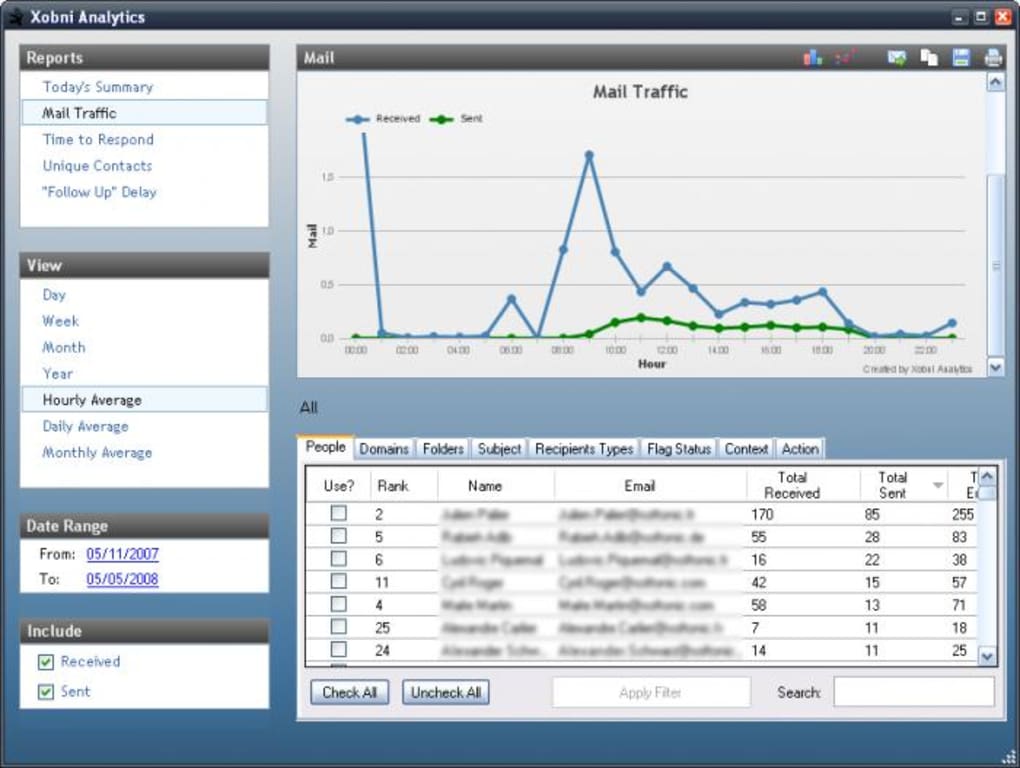
Xobni’s capabilities extended far beyond its superior search functionality. The application incorporated several valuable features designed to optimize email management and provide insightful data analysis. One such feature was “Email Analytics,” which offered a detailed ranking of contacts based on interaction frequency and communication patterns. This data provided valuable insights into the relationships built through email, highlighting key contacts and identifying areas where communication could be improved. A companion graph visually depicted the history of email exchanges, allowing for quick analysis of communication trends over time.
For users focused on time management, Xobni’s analytics proved an invaluable tool. The ability to visualize email interaction frequency and intensity offered a clear picture of time allocation across different contacts and projects. This granular data provided a basis for prioritizing communication efforts and streamlining workflows for improved efficiency. The comprehensive analytics feature was a standout component, pushing Xobni beyond a simple search enhancement tool and into the realm of a powerful productivity application.
Streamlined Contact Management and Information Integration
Xobni further enhanced email management with its intelligent contact management features. The application automatically extracted contact details from emails and compiled them into easily accessible personal profile panels. This intelligent data extraction reduced the manual effort required to organize contact information, streamlining the process of accessing critical details for each individual.
Moreover, Xobni integrated with popular social networks like LinkedIn and Facebook, allowing users to easily access additional information about their contacts directly within the Outlook interface. This integration expanded the scope of information available to the user, providing a richer context for each interaction. By consolidating social media information alongside email history and contact details, Xobni created a unified platform for maintaining and utilizing contact information effectively.
Attachment Management and Cross-Platform Integration (with Limitations)
Finding attachments within overflowing inboxes was another challenge Xobni addressed. The application made it effortless to locate attached documents within email conversations, improving productivity by reducing time spent searching for specific files. This seemingly small feature had a significant impact on workflow efficiency.
While Xobni offered seamless Yahoo Mail integration, support for other email providers was less comprehensive. Integration with Gmail and Hotmail accounts required manual configuration, detracting from the overall ease of use, particularly for users accustomed to seamless cross-platform compatibility. This limitation highlighted an area where future development could significantly enhance the application’s appeal and practicality.
User Interface and User Experience: A Seamless Integration
Xobni’s user interface was designed for intuitive navigation and ease of use. The collapsible sidebar, housing all of the application’s features, minimized screen clutter while maintaining easy accessibility to the core functionalities. This well-considered design contributed to a seamless integration with the Outlook environment, ensuring that the plugin did not disrupt the user’s existing workflow.
The overall user experience was characterized by its efficiency and simplicity. The combination of a streamlined interface, powerful search capabilities, and valuable analytical features created a workflow that was both productive and enjoyable. This user-centric approach was instrumental in the success of Xobni, distinguishing it from other email management tools.
Xobni’s Strengths and Weaknesses: A Balanced Perspective
Xobni offered significant advantages over Outlook’s native email management capabilities. The revolutionary search functionality, coupled with insightful analytics and convenient contact management tools, created a compelling case for its adoption. The intuitive user interface and seamless integration further solidified its position as a valuable asset for any Outlook user. However, limited cross-platform integration and the somewhat intrusive prompts to share Xobni presented drawbacks that could be improved upon.
Conclusion: Xobni’s Legacy in Email Management
Xobni represented a significant advancement in email management technology for Outlook users. Its groundbreaking search capabilities alone addressed a major pain point for countless users, while its integrated analytics and contact management features elevated the application beyond a simple add-on. Despite limitations in cross-platform support, Xobni’s positive impact on productivity and email organization cemented its place as a remarkable contribution to the world of email management software. Its legacy lies in demonstrating the power of intuitive design and intelligent integration in transforming an often-frustrating task into a streamlined and productive experience. The lessons learned from its development and adoption continue to shape the design and functionality of modern email management tools. Xobni’s impact on how users interact with their emails is undeniable, serving as a testament to its innovative approach to improving user experience.
File Information
- License: “Free”
- Latest update: “January 6, 2022”
- Platform: “Windows”
- OS: “Windows 8”
- Language: “English”
- Downloads: “30.9K”
- Size: “7.02 MB”


