
XRecode is a free, user-friendly audio converter for Windows, lauded for its simplicity and support for a wide range of popular audio formats. This review delves into its features, strengths, weaknesses, and overall usability, providing a comprehensive assessment for potential users.
Ease of Use and Interface
One of XRecode’s most significant advantages is its intuitive interface. The program boasts a straightforward design, making it exceptionally easy to navigate, even for users with limited technical expertise. The drag-and-drop functionality allows for quick and effortless import of audio files or entire folders, streamlining the conversion process. This simplicity contributes to a highly efficient workflow, saving users valuable time and minimizing frustration. The clear visual layout ensures that users can easily select their desired output format and adjust settings without difficulty. The absence of complex menus or confusing options contributes to its appeal for both novice and experienced users. The program’s clean aesthetics further enhance the user experience, creating a pleasant and efficient environment for audio conversion tasks.
Supported Formats and Conversion Capabilities
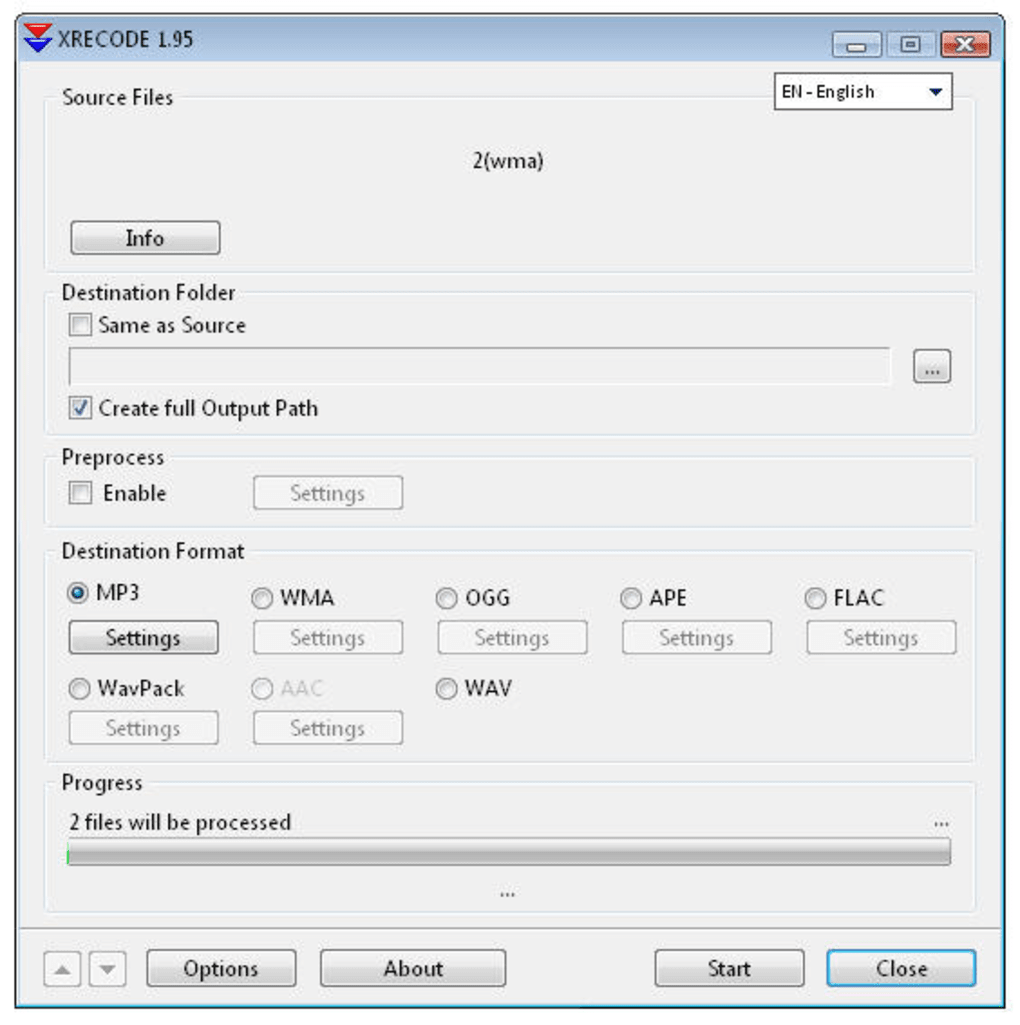
XRecode supports a comprehensive list of popular audio formats, including MP3, WAV, FLAC, Ogg Vorbis, WMA, APE, and AAC. This broad compatibility makes it a versatile tool for handling various audio files, ensuring that users can convert between a wide range of formats without compatibility issues. The inclusion of AAC, the standard audio format for many mobile devices, adds considerable value for users who need to optimize their audio files for portable playback. Beyond the standard format support, XRecode also offers a “Settings” button for each format, allowing users to fine-tune the conversion parameters to achieve optimal audio quality and file size. This level of customization empowers users to tailor the conversion process to their specific needs and preferences. While the lack of pre-defined conversion profiles is a minor drawback, the ability to adjust settings on a per-conversion basis provides a degree of flexibility.
Advanced Features: CUE Splitting and Parallel Processing
Beyond its basic conversion capabilities, XRecode incorporates several advanced features that enhance its functionality and efficiency. One notable feature is the integrated CUE splitting tool. This allows users to easily split large audio files into smaller, more manageable segments based on CUE sheet information. This is particularly useful for working with audio files that have been organized into separate tracks or chapters, ensuring that individual tracks are correctly separated and saved as individual files. The support for parallel processing is another significant enhancement. This feature allows XRecode to convert multiple files simultaneously, dramatically reducing the overall conversion time. This speed improvement is especially beneficial when dealing with large numbers of files or large file sizes. The combination of CUE splitting and parallel processing enhances XRecode’s overall performance and makes it a powerful tool for managing large audio libraries or complex audio projects.
Missing Features and Areas for Improvement
Despite its strengths, XRecode has some limitations. The most noticeable omission is the lack of conversion profiles. The inability to save and reuse custom conversion settings necessitates reconfiguring the settings each time a conversion is performed, which can be cumbersome, especially for users who frequently perform conversions with the same settings. Implementing a profile system would significantly improve the program’s efficiency and workflow. Another potential area for improvement is the addition of support for more advanced audio editing capabilities, such as normalization, tagging, or metadata management. While the program excels at basic conversion, incorporating these additional functionalities would enhance its versatility and usefulness for a wider range of users.
Comparison with Alternative Audio Converters
XRecode occupies a unique position in the audio converter landscape. While many commercial and open-source alternatives exist, XRecode distinguishes itself with its exceptional ease of use and intuitive interface. Several commercial competitors offer more advanced features like batch processing, extensive format support, and metadata editing, but often come with a price tag. Open-source alternatives may provide more advanced features, but can sometimes lack the user-friendly interface and streamlined workflow that XRecode offers. Therefore, XRecode stands out as a strong contender for users who prioritize simplicity and ease of use without sacrificing essential functionality. Its focus on core conversion capabilities, coupled with its user-friendly approach, makes it a compelling choice for users who need a straightforward and efficient audio conversion tool.
User Reviews and Community Feedback
User reviews consistently praise XRecode’s simple and effective interface. Many users appreciate the program’s ease of use and straightforward approach to audio conversion. The program’s support for a wide range of audio formats is also frequently cited as a significant advantage. However, the lack of conversion profiles is a recurring criticism, highlighting the need for this feature to enhance the user experience and workflow efficiency. While some users express a desire for more advanced features, such as DRM removal or more extensive audio editing capabilities, the overall feedback points to XRecode’s success in fulfilling its core functionality: providing a simple, reliable, and easy-to-use audio converter. The positive feedback reinforces the program’s position as a valuable tool for users who require a straightforward and efficient solution for their audio conversion needs.
Conclusion
XRecode is a robust and efficient free audio converter for Windows, particularly suited for users who prioritize simplicity and ease of use. Its intuitive interface, drag-and-drop functionality, and broad format support make it an excellent choice for a wide range of users. While the absence of conversion profiles and some advanced features may be considered limitations by some users, its strengths outweigh its weaknesses for many users. The program’s fast processing speed and parallel processing capabilities significantly improve workflow efficiency, making it a valuable tool for both casual and more intensive audio conversion tasks. For users seeking a simple, reliable, and effective audio conversion tool, XRecode is a strong contender that provides an excellent balance of functionality and user-friendliness. The program’s streamlined design and user-friendly interface cater to a broad spectrum of technical abilities, making it accessible to both novice and experienced users alike. Overall, XRecode remains a practical and efficient choice for audio conversion needs, offering a valuable balance between ease of use and functionality.
File Information
- License: “Free”
- Latest update: “May 15, 2009”
- Platform: “Windows”
- OS: “Windows 2000”
- Language: “English”
- Downloads: “33.7K”
- Size: “3.70 MB”


