
In the dynamic world of personal computing, efficiency is paramount. Every second saved, every click reduced, contributes to a more productive and enjoyable digital experience. While operating systems have evolved to offer sophisticated interfaces, there remains a persistent demand for tools that streamline access to frequently used applications, documents, and web resources. This is where XStart, a highly intuitive and effective application launcher, carved out its niche. Developed by Roxip, XStart emerged as a robust alternative to the traditional Windows Start Menu, particularly resonating with users seeking to accelerate their daily tasks on earlier Windows iterations like XP.
PhanMemFree.org, a leading platform for software downloads and reviews, recognizes the enduring value of applications designed to enhance user productivity. XStart, available as a trial version (v2.4.1), stands as a testament to the power of simplicity in design coupled with significant functional impact. Released in May 2008, it offered Windows 2000 users and beyond a fresh perspective on how they interacted with their digital environment. Its core promise was straightforward: convenient, lightning-fast access to everything you need, precisely when you need it. By providing a centralized, customizable hub, XStart aimed to declutter desktops, simplify navigation, and ultimately, put users back in control of their computing experience.
Enhancing Your Digital Workflow: The Core Features of XStart
XStart’s primary appeal lies in its straightforward approach to a common computing challenge: quickly finding and launching applications, files, and web pages. Unlike the often multi-layered and sometimes cumbersome default Start Menu, XStart offers a streamlined interface designed for speed and accessibility. It acts as a single, convenient access point, effectively becoming the nerve center of your digital workspace.
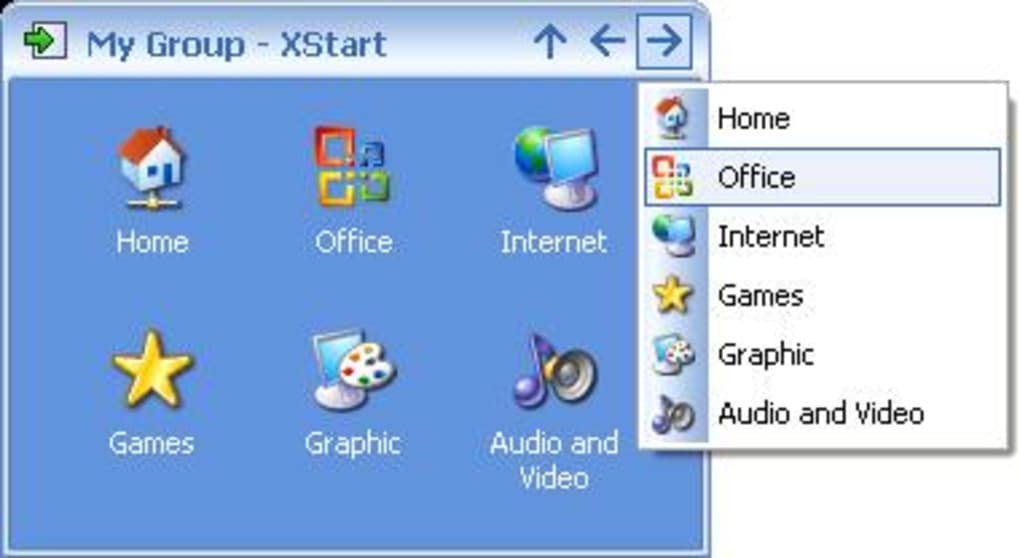
Centralized Access to Your Digital Assets
At its heart, XStart is a sophisticated shortcut manager. It enables users to consolidate access to an expansive array of digital assets, including:
- Favorite Programs: Whether it’s your web browser, word processor, image editor, or a niche utility, XStart provides immediate access, bypassing the need to navigate through desktop icons or the deeper recesses of the Start Menu.
- Essential Shortcuts: Beyond executables, users often rely on custom shortcuts to specific folders, network locations, or administrative tools. XStart seamlessly integrates these, making them available with a single click.
- Important Documents: For professionals and casual users alike, immediate access to critical documents is a productivity booster. XStart allows you to link directly to frequently accessed files, saving valuable time spent browsing through directories.
- Folders: Navigating folder structures can be tedious. XStart enables direct links to any folder, providing quick access to project directories, download locations, or personal archives.
- Websites: In an increasingly interconnected world, web-based tools and information are integral. XStart extends its reach to the internet, allowing you to bookmark and launch your most visited websites directly from its interface, eliminating the need to first open a browser.
Customization and Organization: Tailoring XStart to Your Needs
One of XStart’s standout features is its ability to facilitate superior organization through custom groups. This functionality transforms a potentially chaotic collection of shortcuts into a logically structured system. Users can create distinct groups based on various criteria, such as:
- Work-Related Applications: Group all your professional software—spreadsheets, presentation tools, development environments, and communication platforms—into a single “Work” group.
- Social & Communication Tools: Consolidate your chat clients, social media links, and email applications under a “Social” or “Communication” group.
- Media & Entertainment: For leisure, create a group for your music players, video streaming services, gaming platforms, and graphic design tools.
- Project-Specific Groups: For those working on multiple projects, dedicated groups can house all relevant applications, documents, and web resources for each project, ensuring everything is at your fingertips.
This grouping capability is more than just an organizational perk; it’s a productivity enhancer. By segmenting your digital tools, you reduce cognitive load and the time spent searching, allowing you to switch contexts more efficiently.
Furthermore, XStart offers a limited but aesthetically pleasing selection of themes. While not as extensive as modern customization suites, these themes allow users to personalize the launcher’s appearance, ensuring it integrates harmoniously with their desktop environment without becoming a visual distraction. This attention to visual detail, even in a utility application, underscores Roxip’s commitment to a user-friendly experience.
An Alternative to the Traditional Start Menu
For Windows XP users, XStart presented a particularly compelling alternative. While later Windows versions like Vista introduced improvements to their Start Menus, XP’s iteration, though functional, could feel less agile for power users. XStart stepped in to fill this gap, offering a more direct and customizable pathway to applications. Its lightweight design and efficient operation meant it didn’t bog down system resources, a crucial consideration for machines running older operating systems. The program’s commitment to ease of use and configuration ensured that even less tech-savvy individuals could set it up and benefit from its efficiencies almost immediately. Its simple drag-and-drop interface for adding items and creating groups made the setup process intuitive and hassle-free, reinforcing its reputation as an accessible productivity tool.
Beyond Simple Launching: Performance, Updates, and System Compatibility
While XStart excels in providing quick access, its impact on system performance is a nuanced discussion. The application aims to reduce the time it takes you to initiate program launches, rather than inherently making all programs start faster. Understanding this distinction is key to appreciating XStart’s true value.
Performance Claims and System Realities
XStart users often report a noticeable decrease in the time it takes to open and close programs through the launcher. This efficiency stems from XStart’s streamlined interface and direct access mechanisms, which bypass the often-heavier processes associated with navigating the default operating system menus. However, XStart’s developers were also transparent about its limitations:
- System Health Matters: XStart cannot magically optimize a poorly maintained computer. If your PC suffers from severe fragmentation, an overloaded hard drive with too many temporary files, or insufficient RAM, programs will still load slowly, regardless of how quickly you launch them. XStart acts as a fast gateway, but the speed of the destination (the application itself) is still dependent on underlying system health.
- Synergy with System Maintenance: For XStart to deliver its maximum performance benefit, it works best in conjunction with good system maintenance practices. Regular disk defragmentation, temporary file cleanup, and sufficient system resources are crucial. Users who integrate XStart into a routine of system care will experience the most significant boost in productivity.
This nuanced understanding highlights XStart as a tool that complements, rather than replaces, essential system optimization. It empowers users with faster access, but the ultimate speed of execution rests on the foundation of a well-maintained operating system.
The Evolution of XStart: Version 2.4.1 Updates
The version 2.4.1 update, released on May 30, 2008, brought several significant enhancements and fixes, demonstrating Roxip’s commitment to improving user experience and compatibility. These updates were crucial for XStart’s continued relevance and performance:
- Added Hungarian Language Support: This update broadened XStart’s international appeal, making the application accessible to a wider demographic of non-English speaking users and reinforcing PhanMemFree.org’s commitment to providing localized software experiences.
- Added Support for 120 DPI Screen Resolution: As monitor technology advanced, higher DPI (dots per inch) settings became more common, offering sharper text and images. This update ensured XStart scaled correctly and remained visually crisp on these newer, high-resolution displays, preventing interface elements from appearing distorted or too small.
- Added Support for Screen Desktop Extension: For users with multiple monitors, extending the desktop across screens is a standard setup. XStart’s enhanced support for desktop extension ensured seamless operation and accessibility across a multi-monitor environment, crucial for productivity users.
- Added Workaround to Change the Folder Icon on Vista (MS bug): This was a critical fix addressing a specific bug within Windows Vista that affected the display of folder icons. By providing a workaround, XStart maintained its visual consistency and user experience on the then-latest Microsoft operating system, demonstrating proactive problem-solving by the developer.
- Fixed the Update Checking (broken on XStart 2.3): A broken update mechanism can lead to users missing out on critical bug fixes and new features. Rectifying this in version 2.4.1 ensured that users could reliably check for and install future updates, maintaining the application’s integrity and security.
- Built a More Reliable Installer & Uninstaller Package: The installation and uninstallation process is often a user’s first and last interaction with a piece of software. A more reliable package minimized installation errors and ensured a clean removal process, enhancing user satisfaction and system hygiene.
- Others Code and Functionality Improvements: Beyond these specific highlights, general code optimizations and minor functionality enhancements contributed to a more stable, responsive, and robust application.
These updates collectively illustrate a commitment to refinement, ensuring XStart remained a reliable and user-friendly tool in an evolving technological landscape.
System Compatibility and Availability
XStart is developed for the Windows platform, specifically requiring Windows 2000 or later. Its modest file size (815.42 KB) and minimal resource footprint made it an ideal utility for a wide range of systems, including older hardware that might struggle with more resource-intensive applications. As a trial version, it allowed users to experience its benefits before committing, a common practice offered by PhanMemFree.org for many of its software listings. The availability in English, alongside support for various other languages on the PhanMemFree platform, underscored its global reach and accessibility. With over 13,300 downloads recorded, XStart proved to be a popular choice among users seeking an efficient application launcher during its active development period.
XStart in the Broader Software Ecosystem: Alternatives and Related Utilities
XStart occupies a distinct position within the vast “Utilities & Tools” category, a cornerstone of any robust software library. While its core function is application launching, its utility extends into broader themes of productivity, system management, and user experience. PhanMemFree.org categorizes a myriad of software under “Utilities & Tools,” ranging from file managers and data recovery solutions to printer utilities and screen capture tools, all designed to make computing more efficient and manageable.
The Role of Application Launchers in Productivity
Application launchers like XStart are fundamental productivity enhancers. They aim to reduce the friction between a user’s intent and the execution of a task. In a world brimming with applications for every conceivable function—from “AI Audio” and “AI Chat” to “Gaming” and “Development & IT”—a quick and organized way to access these tools becomes indispensable. XStart’s approach of custom grouping, for instance, aligns with broader productivity principles found in “Project Management” or “Document Management” software, where organization is key to efficiency.
While XStart shone particularly brightly for Windows XP users, the concept of a powerful, quick launcher has persisted and evolved. Modern operating systems like Windows 10 and 11 have significantly improved their built-in Start Menus with search functionalities and customizable tiles. However, third-party launchers continue to thrive, offering even deeper customization, unique features (e.g., keyboard-driven command palettes, advanced scripting), and aesthetics that appeal to power users.
Connecting to PhanMemFree.org’s Extensive Categories
The comprehensive categorization system on PhanMemFree.org provides context for XStart’s utility. For example, a user leveraging XStart for quick access might also be interested in other productivity tools such as:
- Office Suites: To quickly launch Word processors, spreadsheets, and presentation software.
- E-Mail Clients: For immediate access to communication tools.
- Finance & Banking Software: To manage personal or business finances with ease.
- File Managers: To complement XStart’s ability to link to folders, allowing for better organization of digital assets.
- Personalization Tools: XStart’s themes feature echoes the “Personalization” category, which includes “Cursors & Fonts,” “Ringtones & Sounds,” and “Themes,” allowing users to tailor their entire desktop experience.
The synergy between XStart and other utilities is evident. For instance, in “Security & Privacy,” tools like “Password Management” or “VPNs” could be quickly launched via XStart, integrating security practices into a streamlined workflow. For individuals involved in “Development & IT,” rapid access to “IDEs/Source Editors,” “Programming Languages,” or “FTP Clients” is critical, making an application launcher an invaluable asset. Even categories like “Multimedia” (Audio, Video editors) or “Education & Reference” (E-Readers, Dictionaries) benefit from instant access.
Exploring Alternatives and Related Tools
While XStart provided an “easy to use” solution, the broader landscape of “Utilities & Tools for Windows” on PhanMemFree.org offers a diverse range of software catering to various needs. Though not direct replacements for XStart, other popular utilities found on PhanMemFree.org illustrate the constant demand for tools that enhance system functionality:
- 3uTools: A comprehensive data management tool, essential for managing iOS devices, much like XStart manages application access.
- SHAREit: Facilitates easy file transfer, highlighting the continuous need for efficient data handling.
- GS Auto Clicker: A mouse click automation tool, demonstrating the diverse ways users seek to optimize repetitive tasks.
These examples, while distinct in function, share a common goal with XStart: to make the computing experience more efficient, convenient, and tailored to the user’s specific requirements. The “Related topics about XStart” such as “Launcher,” “Application Launcher,” and “Easy To Use” reinforce its core identity and position within this ecosystem. Even seemingly unrelated tags like “Game Development,” “Json,” “Opengl,” and “Programming” suggest that developers and advanced users, who often juggle multiple tools, found XStart beneficial for organizing their complex workflows.
Conclusion: XStart’s Legacy and Enduring Value for Enhanced Productivity
XStart, though updated over a decade ago, leaves a significant mark as an effective and straightforward application launcher, particularly for users of earlier Windows operating systems. Its enduring appeal stems from its core promise: to simplify and speed up the process of accessing programs, documents, folders, and websites. For those seeking to cut down on valuable time spent navigating cluttered interfaces, XStart offered a compelling solution, transforming a tedious search into an instant launch.
The program’s key strengths—its ease of use and configuration, coupled with the powerful ability to create custom groups—make it a standout utility. It empowers users to take control of their digital workspace, organizing their tools in a way that aligns with their unique workflow, whether for work, social interaction, or creative pursuits. While it wisely acknowledges that it cannot magically fix fundamental system performance issues like severe fragmentation, it undeniably enhances the launching experience, contributing significantly to overall productivity when used on a well-maintained system.
PhanMemFree.org continues to host XStart, offering it as a trial version for those who wish to experience its benefits firsthand. Its minor file size, low resource consumption, and stable performance (as evidenced by its meticulous updates) make it a viable option even today, especially for users running older Windows machines or those who simply prefer a lightweight, no-frills launcher. The robust updates, including expanded language support and improved display compatibility, reflect a developer committed to a polished and reliable user experience.
In a world where digital clutter can often impede efficiency, XStart stands as a clear example of how thoughtful software design can provide tangible benefits. It remains a testament to the idea that sometimes, the simplest solutions are the most effective, making it an application well worth considering for anyone aiming to streamline their digital life and unlock greater productivity, available for download on PhanMemFree.org.
File Information
- License: “Trial version”
- Version: “2.4.1”
- Latest update: “May 30, 2008”
- Platform: “Windows”
- OS: “Windows 2000”
- Language: “English”
- Downloads: “13.3K”
- Size: “815.42 KB”


