
Yahoo! SiteBuilder was a free website building application designed to empower users, particularly small businesses and individuals with limited technical expertise, to create and manage websites with ease. While no longer actively developed or supported by Yahoo, its legacy provides valuable insight into the evolution of website building tools. This review explores its features, advantages, and limitations based on available information.
Ease of Use and Target Audience
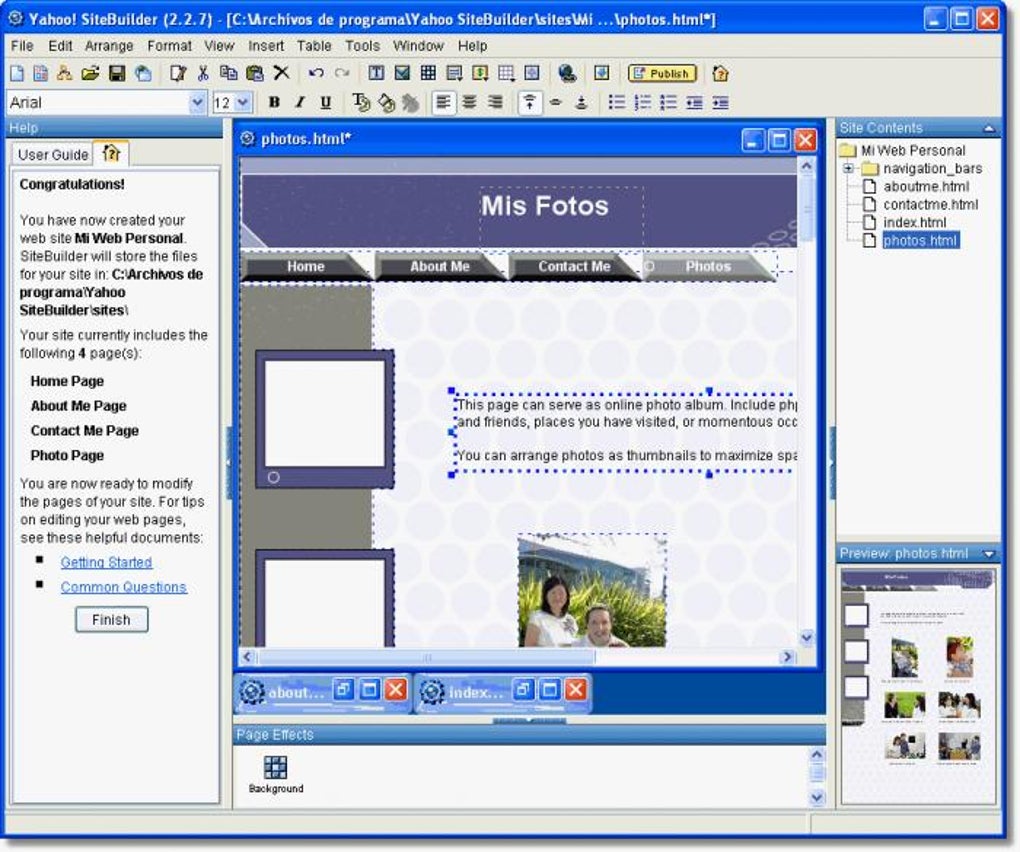
Yahoo! SiteBuilder prioritized user-friendliness. Its drag-and-drop interface and WYSIWYG (What You See Is What You Get) page editor eliminated the need for coding knowledge. This made website creation accessible to a broad audience, including those with no prior web design or technical background. The intuitive design allowed users to build websites in minutes, focusing on content creation rather than complex technical configurations. The application targeted small businesses, offering features like e-commerce integration, facilitating the creation of online stores without the complexities of setting up dedicated e-commerce platforms.
The availability of numerous customizable designs and mobile-friendly themes broadened its appeal beyond novice users. While designed for simplicity, the tool’s functionality also resonated with tech-savvy individuals who appreciated its efficiency and streamlined workflow. The all-in-one approach, combining website building tools with hosting, simplified the entire process, eliminating the need for separate hosting providers and reducing the potential for compatibility issues. This integrated approach likely saved users both time and money.
Feature Set and Functionality
Yahoo! SiteBuilder boasted a rich feature set designed to support the creation of fully functional websites. Beyond its simple interface, several key features contributed to its effectiveness:
-
WYSIWYG Page Editor: This core feature allowed users to visually create and modify website pages, providing immediate feedback and reducing the reliance on HTML or other coding languages.
-
Application Gallery: Integration with various applications enhanced website functionality. While specific applications aren’t detailed, this feature likely extended the site’s capabilities beyond basic web page creation, potentially incorporating tools for things like contact forms, analytics, or social media integration.
-
Built-in Hosting: The inclusion of hosting within the Yahoo ecosystem was a significant advantage. Users didn’t need to manage external hosting accounts, simplifying the website management process. This also potentially avoided the technical hurdles associated with connecting website builders to separate hosting platforms.
-
Corporate Email IDs: This feature, specifically beneficial for small businesses, provided a professional image and enhanced credibility. Having a branded email address associated with the business website strengthened brand identity and presented a more trustworthy image to potential customers.
-
Blogging Platform: The integration of a blogging platform facilitated content creation and regular updates, essential for SEO and engaging website visitors. This feature fostered communication with customers or potential clients, strengthening relationships and increasing brand reach.
-
E-commerce Tools: While the extent of these tools isn’t specified, their inclusion allowed small businesses to create online stores directly through SiteBuilder, enabling seamless sales and order processing without the need for additional software or third-party integration. This facilitated transactions and simplified business operations.
Advantages and Disadvantages
Yahoo! SiteBuilder offered a compelling set of advantages:
- Simplicity and Ease of Use: The intuitive interface made website creation accessible to everyone, regardless of technical skills.
-
All-in-One Solution: The combination of website building, hosting, and potentially email services simplified the process and minimized the need for external tools or services.
-
Cost-Effectiveness: As a free application, it presented a low barrier to entry for users wanting to establish an online presence without incurring upfront costs.
-
Mobile-Friendliness: The availability of mobile-friendly themes ensured websites were accessible across different devices, crucial in the mobile-first world.
-
Enlisting Option with Local Directories: The ability to easily list the business in local online directories enhanced local SEO and visibility, crucial for attracting customers.
However, the platform had certain limitations:
-
Limited Theme Collection: The availability of only a limited number of themes restricted design flexibility, potentially limiting the potential for unique branding and visual appeal.
-
Lack of Advanced Features: Compared to more advanced website builders, Yahoo! SiteBuilder likely lacked features like advanced SEO tools, extensive customization options, or complex analytics dashboards. This would have made it less suitable for larger businesses or those with advanced marketing strategies.
-
Platform Limitations: User reviews highlight compatibility issues, primarily the lack of Mac support. This significantly limited its accessibility, hindering widespread adoption.
- Past Issues and Lack of Support: User reviews reveal problems with saving, publishing, and receiving error messages. The lack of active development and support likely meant these issues were never fully addressed, rendering the tool unreliable in the long run.
User Reviews and Feedback
User reviews paint a mixed picture of Yahoo! SiteBuilder’s performance. While some praised its ease of use and simplicity, others highlighted significant issues, especially regarding reliability and the lack of Mac compatibility. These criticisms reflect the challenges faced by users due to the lack of ongoing development and technical support. The issues reported, such as error messages during publishing and saving, were likely significant impediments to productivity and user satisfaction. The lack of a responsive support system further exacerbated these issues, leaving users frustrated and with limited options for resolution. The Mac compatibility problem significantly reduced the user base and demonstrates a failure to adapt to evolving technological landscapes. These problems collectively contributed to user dissatisfaction and ultimately led to the obsolescence of the tool.
Conclusion
Yahoo! SiteBuilder represented a notable attempt to provide a user-friendly website builder for a broad audience. Its strengths lay in its simplicity, accessibility, and all-in-one approach. However, its limitations, particularly the lack of ongoing development, limited theme selection, and platform restrictions, ultimately hampered its success. The negative feedback regarding reliability and support reflects the crucial role of continuous updates and robust customer support in maintaining the viability of any software application. While its legacy serves as a case study in the design and implementation of user-friendly website building tools, its eventual discontinuation underlines the need for continuous development, adaptation to evolving market demands, and responsive support to ensure long-term sustainability.
File Information
- License: “Free”
- Latest update: “December 1, 2023”
- Platform: “Windows”
- OS: “Windows 2000”
- Language: “English”
- Downloads: “69.3K”
- Size: “16.26 MB”


