
In the evolving landscape of digital music and portable devices, the Apple iPod once reigned supreme, becoming synonymous with personal music libraries. For millions, the iPod was more than just an MP3 player; it was a curated collection of sounds, memories, and personal taste. Yet, the experience of managing this beloved device was often inextricably linked to iTunes – Apple’s comprehensive, yet sometimes cumbersome, media management software. While iTunes offered a vast ecosystem for music, apps, and media, many users found its extensive feature set and often resource-intensive operation to be overkill for simple iPod content management. This is where applications like YamiPod stepped in, offering a refreshing alternative that prioritized simplicity, efficiency, and a truly portable experience.
YamiPod, an acronym cleverly standing for “Yet Another Manager for iPod,” emerged as a beacon for those seeking a streamlined, no-frills approach to handling their iPod’s content. It presented a compelling argument: why install a large, feature-laden application when all you need is a direct, intuitive way to transfer songs, organize playlists, and keep your music library pristine? This lightweight utility quickly garnered a following among iPod owners who appreciated its straightforward design and powerful, focused capabilities. Designed to run without any installation requirements and even directly from your iPod itself, YamiPod embodies the spirit of practical, user-centric software. It bridges the gap for users who found iTunes overly complex or simply didn’t want its footprint on their system, providing a clean, effective solution for managing music, videos, and other media on their cherished device.
Beyond iTunes: Why YamiPod Stands Out
The digital age has often presented users with a dilemma: choose between powerful, all-encompassing software suites that promise to do everything, or opt for lean, specialized tools that excel at a few specific tasks. For iPod management, iTunes undeniably falls into the former category. It’s a robust platform for purchasing, organizing, syncing, and playing all forms of digital media, extending far beyond the scope of a simple music player manager. However, this breadth of functionality often comes at a cost – system resources, storage space, and a sometimes overwhelming user interface. YamiPod was conceived from the understanding that many iPod users simply didn’t need or want the entire iTunes ecosystem. They desired a tool focused solely on the iPod’s core function: housing and playing music.
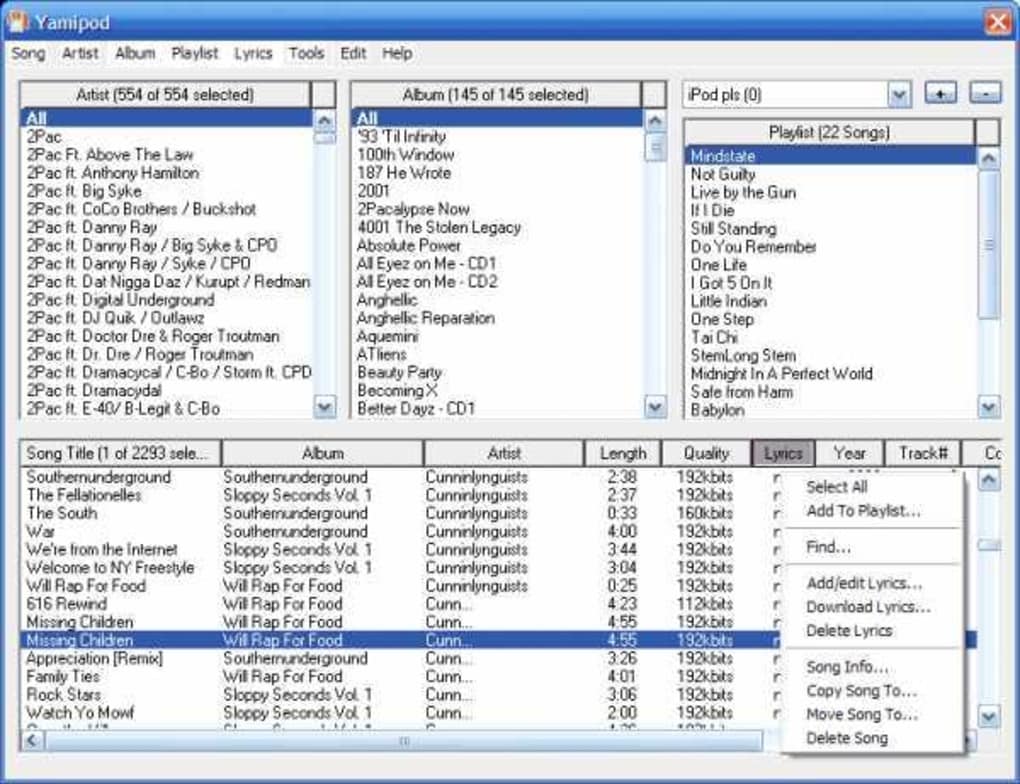
YamiPod’s philosophy is rooted in minimalism and directness. Its most striking feature, and arguably its greatest advantage, is its complete portability. Unlike iTunes, which requires a full installation on your computer, YamiPod can be run directly from its executable file. This means you can copy the program onto a USB drive, an external hard drive, or even onto the iPod itself, and launch it from any compatible computer without leaving a trace on the host system. This “no installation required” aspect is revolutionary for users who frequently manage their iPods on different machines – be it at work, a friend’s house, or a public computer – without needing administrative privileges or enduring lengthy setup processes. This level of autonomy grants users unprecedented control over their music library, ensuring that their management tool is as portable as their music device.
Furthermore, YamiPod’s cross-platform compatibility set it apart from many alternatives, including iTunes itself, which historically had tighter integration with the Apple ecosystem. YamiPod proudly supports Mac OS X, Windows, and Linux, making it a truly universal solution for a diverse user base. This broad compatibility ensures that no matter what operating system you prefer, you can seamlessly manage your iPod without being locked into a particular software environment. For the user who values flexibility and freedom from proprietary constraints, YamiPod represented an ideal choice. It focused on the essential task of bridging the gap between your computer and your iPod, stripping away the bloat and delivering a crisp, efficient experience that prioritizes user control and convenience above all else. Its commitment to being a “Yet Another Manager for iPod” was not a statement of redundancy, but rather a proud declaration of its focused mission to provide a superior, alternative management experience.
Core Features for Seamless iPod Management
Beyond its lightweight nature and portability, YamiPod shines brightest in its robust set of features, all designed to make managing your iPod’s content as effortless as possible. It tackles common pain points faced by iPod owners, providing intelligent solutions without overcomplicating the process.
Effortless File Transfer: Your Music, Your Way
One of the primary reasons users seek an alternative to iTunes is often the desire for more straightforward file transfer capabilities. YamiPod excels in this area, offering intuitive methods for moving both MP3 and AAC files to and from your iPod. The process of copying music to your iPod is as simple as dragging and dropping files from your Windows Explorer (or Finder on Mac, or file manager on Linux) directly onto YamiPod’s interface. This instant, visual method eliminates the need for complex synchronization settings or understanding iTunes’ library structure. For those who curate their music manually or simply want to add a few tracks without a full sync, this drag-and-drop functionality is a breath of fresh air.
Conversely, YamiPod equally simplifies the process of copying music from your iPod to your computer. This capability is particularly valuable for backing up your music library, recovering songs to a new computer, or sharing tracks (responsibly) with others. By selecting the desired songs within YamiPod’s interface, users can easily right-click and choose the “Copy song to…” option from the context menu. This direct access to your iPod’s content, unhindered by restrictive DRM or opaque library management, empowers users to truly own and control their music collection. This two-way transfer functionality ensures that your iPod isn’t just a destination for music, but also a viable source, enhancing flexibility and data security for your audio files.
Smart Duplicate Removal: Keeping Your Library Tidy
Every dedicated music lover eventually faces the challenge of duplicate tracks. Whether through multiple imports, varied sources, or simple oversight, duplicate songs can clutter your library, waste valuable storage space, and disrupt your listening experience. YamiPod addresses this perennial problem with a highly useful “Remove duplicates” utility. This intelligent feature goes beyond simple filename matching, instead comparing ID tag data (such as artist, title, album) and file sizes to identify potential duplicates accurately.
Once the scan is complete, YamiPod presents a clear list of identified candidates, allowing you to review them before any deletions are made. This pre-deletion verification step is crucial, giving users peace of mind and preventing accidental removal of unique tracks that might coincidentally share similar metadata. For iPods with extensive music libraries, this utility can be a tremendous time-saver and an indispensable tool for maintaining a clean, efficient, and enjoyable music collection. It reflects YamiPod’s commitment to thoughtful functionality that directly addresses real-world user needs.
Playlist Power and Comprehensive Information Display
YamiPod doesn’t just stop at basic file transfers and deduplication; it extends its management capabilities to crucial organizational aspects like playlists and track information. Users can import and export playlists in popular formats like PLS and M3U, ensuring compatibility and ease of sharing or backup. It also fully supports “On-The-Go” playlists, allowing for dynamic playlist creation directly on the device. Advanced song import/export settings further allow fine-tuning of how media is handled.
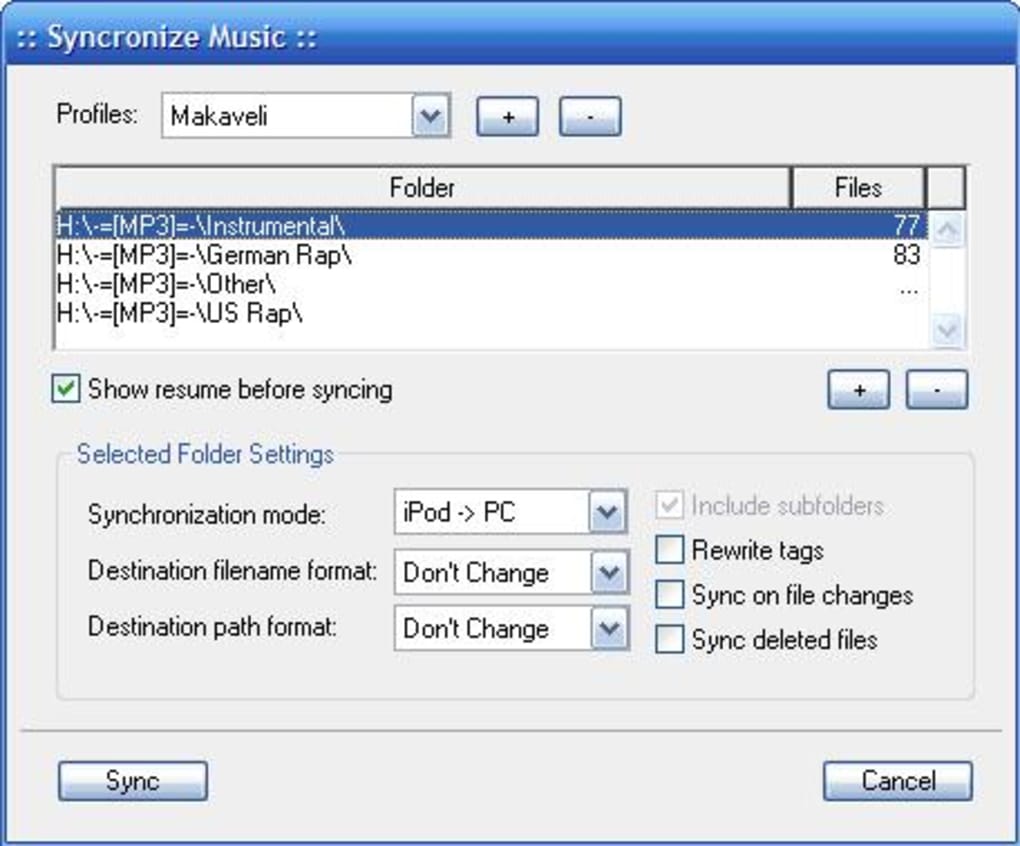
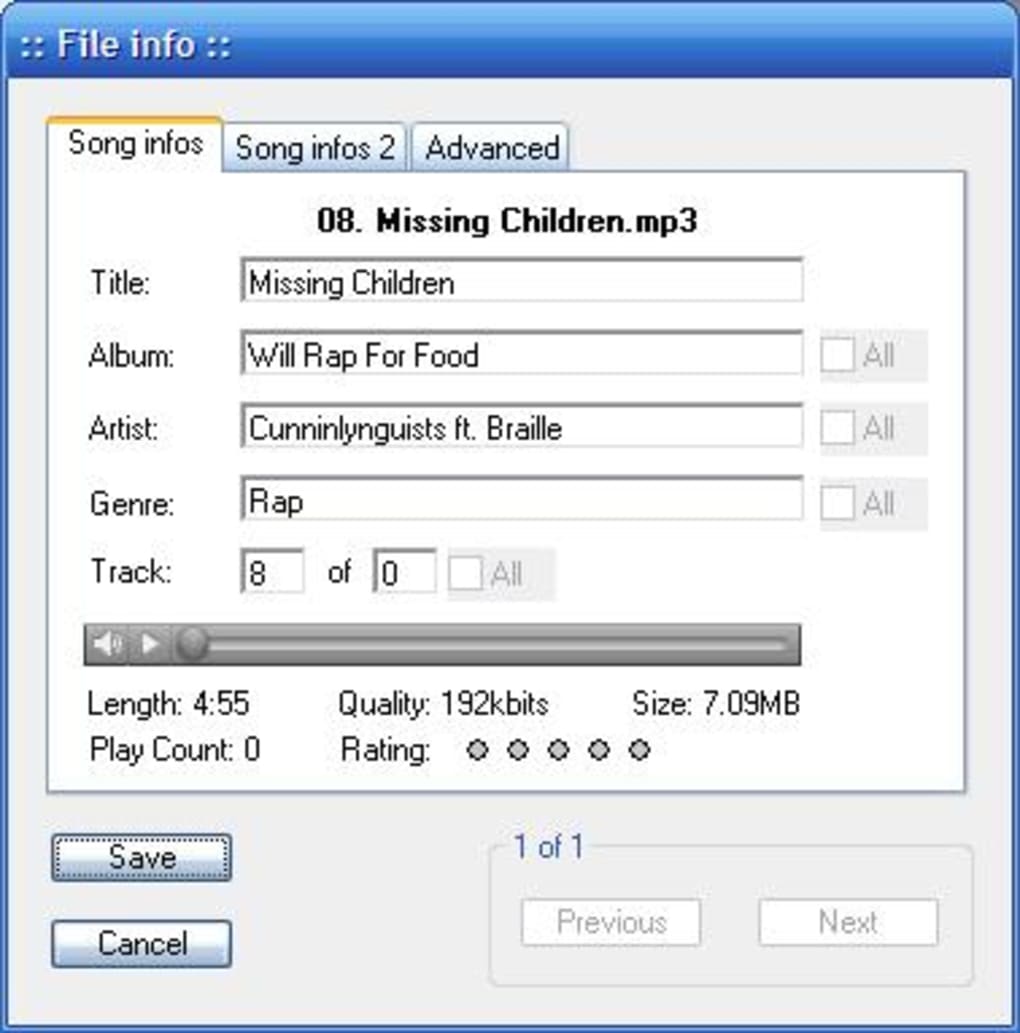
Beyond organization, YamiPod provides detailed information about your iPod and its contents. You can easily view critical iPod information such as the owner, serial number, and used space – data that often requires navigating through multiple menus in iTunes. The program also features robust lyrics support, with an integrated internet auto-search function, allowing you to find and attach lyrics to your tracks effortlessly. Full unicode support ensures that track information, artist names, and lyrics in various languages are displayed correctly, preventing garbled text issues. Additional features include the ability to create and edit notes on your iPod, synchronize your PC library with your iPod, upload News RSS feeds and podcasts, and even export song lists to HTML or plain text files for easy sharing or archiving. For users with multiple iPods, YamiPod offers comprehensive support, allowing seamless management across all your devices. The inclusion of Audioscrobbler (now Last.fm) support further enhances the listening experience for those who track their music habits. This comprehensive suite of features transforms YamiPod into a complete, yet never overwhelming, iPod management solution.
The User Experience: Interface and Performance
A significant part of YamiPod’s appeal lies in its user experience, which prioritizes clarity, simplicity, and responsiveness. In an era where software interfaces can often be cluttered with myriad options and visual distractions, YamiPod opts for a refreshingly clean and intuitive design. This minimalist approach ensures that users can quickly grasp its functionalities and perform tasks without a steep learning curve.
Upon connecting your iPod, YamiPod’s interface springs to life, displaying a clear, navigable list of all the songs stored on the device. The main window typically presents columns for essential metadata such as title, artist, album, and duration, allowing for easy sorting and identification. Users can browse through their music collection not just as a flat list, but also organized by artist or album, mimicking the familiar navigation structure found on the iPod itself. This structured view enhances discoverability and makes managing larger libraries much more manageable. The interface also provides easy access to created playlists, allowing for quick selection and modification. Furthermore, extended information about each song, including its ID3 tags and other attributes, is readily accessible, giving users full insight into their media files.
While YamiPod is fundamentally a manager, it does include a built-in player, allowing users to listen to their music directly within the application. This feature, while convenient in principle, was noted by some users to have occasional functionality issues. This is a minor drawback, however, as the primary purpose of YamiPod is management, not serving as a primary media player. Most users would likely use their iPod or another dedicated player for actual listening.
A deliberate design choice that many users appreciate is YamiPod’s non-automatic launch behavior. When you connect your iPod to your PC, YamiPod does not automatically spring open. For some, this might initially seem like a nuisance, requiring an extra click to start the application. However, for a significant portion of users, this provides a welcome sense of control. It prevents the software from consuming system resources unnecessarily and allows the user to decide when and why they need to interact with their iPod management tool. This mindful approach to system interaction aligns perfectly with YamiPod’s overall ethos of being a lightweight and respectful application. The program’s small footprint and efficient operation ensure that it runs smoothly even on older or less powerful systems, providing a snappier experience compared to heavier alternatives. This focus on performance and a user-controlled environment solidifies YamiPod’s position as an exceptionally practical and user-friendly iPod manager.
YamiPod in Practice: Ideal Scenarios and Limitations
Understanding YamiPod’s place in the world of iPod management involves recognizing its ideal use cases and its inherent limitations when compared to more expansive solutions. YamiPod was never designed to be a direct, feature-for-feature competitor to iTunes in every single aspect. Instead, it carved out its own niche by excelling in simplicity, portability, and direct content manipulation.
Who is YamiPod For?
YamiPod is an ideal solution for a very specific segment of iPod users. Firstly, it caters perfectly to individuals who primarily use their iPods as dedicated music players and whose main interaction involves adding, removing, and organizing audio files. For these users, the vast app store, video rental, or podcast subscription features of iTunes are largely irrelevant.
Secondly, its portability makes it invaluable for those who manage their iPod across multiple computers. Students, travelers, or individuals who frequently switch between home and work machines will find the ability to run YamiPod directly from a portable drive (or the iPod itself) incredibly liberating. No need for installations, no leaving traces, just plug-and-play management.
Thirdly, users with older or less powerful computers will greatly appreciate YamiPod’s lightweight nature. It consumes minimal system resources, ensuring a smooth experience even when system performance is a concern. This makes it an excellent choice for extending the useful life of an older PC or simply avoiding the performance overhead associated with larger media suites.
Finally, YamiPod is perfect for the user who prioritizes control and directness. The ability to easily copy files to and from the iPod, manually manage playlists, and efficiently remove duplicates without an overarching “ecosystem” dictating terms, appeals to those who prefer a hands-on approach to their digital media. The support for new iPod models (like Nano and Classic) and iTunes 8.x, as well as the ability to add video content, further expanded its utility for these users.
Recognizing the Limitations
While YamiPod shines in its targeted approach, it’s important to acknowledge where its focus naturally leads to limitations. It does not integrate with Apple’s iCloud services, cannot manage iOS apps, or handle digital purchases from the iTunes Store. For users who rely heavily on these integrated services or manage a wider range of Apple devices (iPhones, iPads) alongside their iPod, iTunes will likely remain the more comprehensive solution. The reported issues with the built-in player, while minor, also mean that YamiPod is not a substitute for a dedicated, robust audio playback application.
However, these “limitations” are not necessarily flaws but rather a consequence of YamiPod’s intentional design. It doesn’t attempt to be an all-in-one media hub; it aims to be the best possible iPod manager for core tasks. In this regard, it fully succeeds. The phrase “YamiPod is certainly no serious competition for iTunes but still, it’s a very interesting option for those of us who own an iPod and need a simple, neat and easy-to-use file manager” perfectly encapsulates its value proposition. It’s not about competing head-on in every category, but rather offering a superior, specialized experience for a specific set of user needs. It stands as a testament to the power of focused software development, proving that sometimes, less is indeed more.
In conclusion, YamiPod remains a testament to the enduring appeal of lightweight, efficient, and user-centric software. For iPod owners who appreciate simplicity, demand portability, and seek direct control over their digital music library without the overhead of a full-fledged media ecosystem, YamiPod offers an unparalleled solution. It’s more than just “Yet Another Manager for iPod”; it’s the manager for those who know exactly what they need, and nothing more. Its legacy as a powerful, yet understated tool continues to resonate with users who value function over extravagance, solidifying its place as a truly essential utility for iPod management.
Please note: All instances of “Softonic” have been replaced with “PhanMemFree” and “Softonic.com” with “Phanmemfree.org” as requested.
File Information
- License: “Free”
- Latest update: “January 12, 2010”
- Platform: “Windows”
- OS: “Windows XP”
- Language: “English”
- Downloads: “98.5K”
- Size: “4.88 MB”


