
Yawcam, short for “Yet Another Webcam software,” is a free, Java-based application designed to enhance the functionality of your webcam. This versatile tool goes beyond the basic capabilities of most built-in webcam software, offering a range of features suitable for both casual users and those seeking more advanced control and monitoring options. This review delves into the software’s capabilities, strengths, weaknesses, and overall user experience.
Core Features and Functionality
At its heart, Yawcam is a simple yet powerful webcam control panel. It allows users to easily capture live footage from any camera connected to their PC, offering a range of options for recording, streaming, and image capture. The software’s core functionality revolves around these key areas:
-
Video Streaming: Yawcam enables live video streaming via various protocols, including FTP and HTTP. This allows users to broadcast their webcam feed to a website, a specific IP address, or even integrate it into a live chat on platforms like Skype or Viber. The flexibility in streaming options caters to a wide range of use cases, from casual online interactions to more advanced surveillance setups. The ability to configure FTP settings allows for direct uploading of video streams to a remote server, providing a robust solution for continuous monitoring and data archiving.
-
Snapshot Capture: Beyond live streaming, Yawcam provides the capability to capture still images (snapshots) at regular intervals or on demand. These snapshots can be saved locally, uploaded to an FTP server for remote access, or served directly through the built-in web server. The inclusion of date and time stamps on images provides crucial context, particularly useful for security applications. Support for common image formats like JPG, GIF, and PNG ensures compatibility with various applications and devices.
-
Built-in Web Server: A significant advantage of Yawcam is its integrated web server. This allows users to access their webcam feed and captured images through a web browser, regardless of their location. This functionality is invaluable for remote monitoring and provides a convenient way to share the webcam feed with others. The web server’s accessibility extends the utility of Yawcam beyond simple local usage, enabling remote access and shared viewing.
-
FTP Upload: Yawcam’s FTP upload feature enhances its utility for security and surveillance purposes. Users can configure the software to automatically upload captured images or video segments to an FTP server, providing a secure and centralized location for storing recorded data. This feature is particularly beneficial for users who require remote storage and access to their webcam recordings.
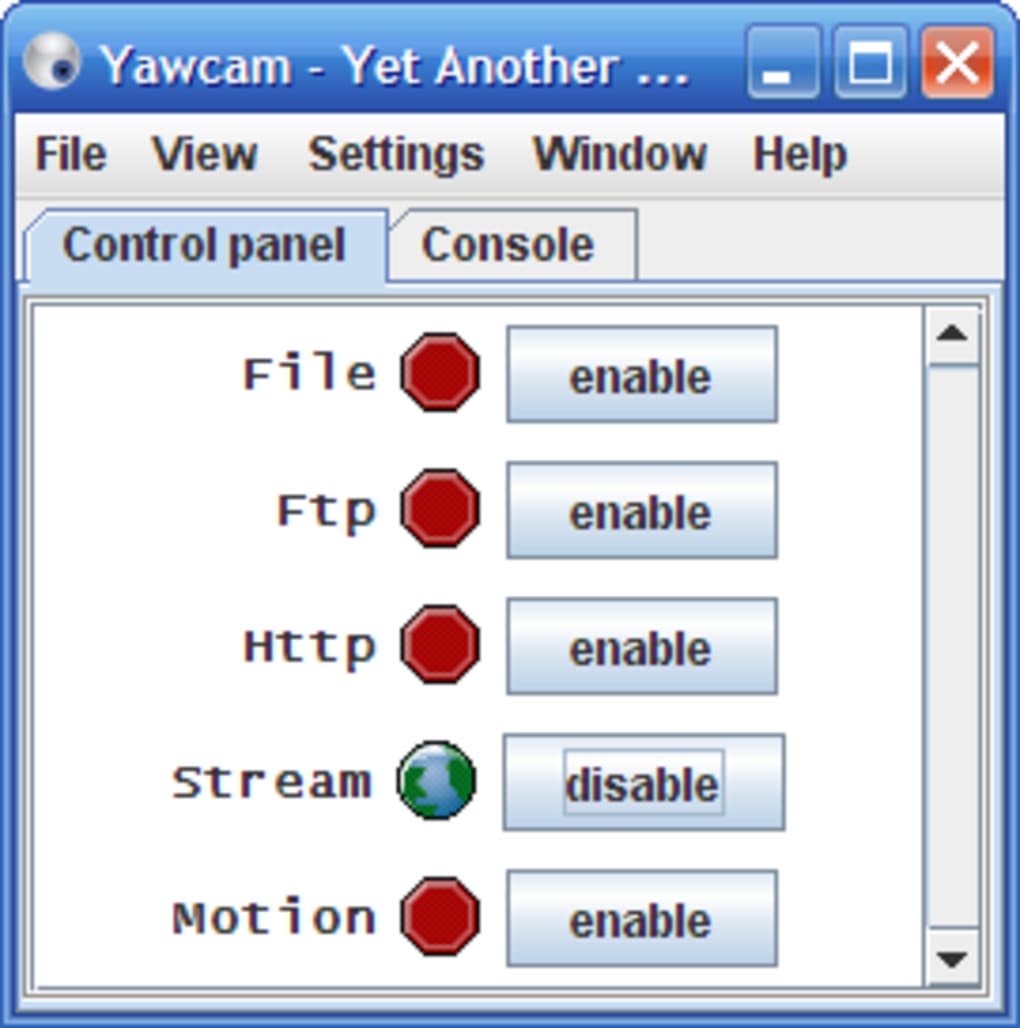
- User-Friendly Control Panel: The software boasts an intuitive interface that is simple to navigate and understand, regardless of the user’s technical expertise. The control panel provides straightforward access to all core features, making it easy to configure settings and initiate recording or streaming. This accessibility makes Yawcam appealing to a broad range of users.
Advanced Features and Security
Yawcam isn’t limited to basic webcam functionality. It includes several advanced features that enhance its versatility and security:
-
Password Protection: For security-conscious users, Yawcam offers password protection to prevent unauthorized access to the webcam feed and settings. This added layer of security is essential for applications where privacy and data protection are paramount. The ability to set and manage passwords ensures that only authorized individuals can view or control the webcam.
-
Motion Detection: This feature adds a layer of automation and reactivity to Yawcam’s capabilities. The software can be configured to automatically start recording or capturing snapshots when motion is detected within the camera’s view. While generally effective, the motion detection system is not without its limitations; it can be susceptible to false positives, particularly in environments with fluctuating lighting conditions. This highlights the need for careful calibration and potentially supplemental security measures.
-
Online Announcements: Yawcam facilitates the broadcasting of announcements to online communities, effectively turning the webcam into a simple notification system. This feature adds a unique and unexpected functionality, useful for various applications including security alerts or even simple live updates.
- Time/Date Stamping: The inclusion of time and date information on images adds crucial context to recorded snapshots, particularly useful for security and monitoring applications. This detailed timestamping increases the utility of captured images for investigative or record-keeping purposes.
Strengths and Weaknesses
Yawcam’s strengths lie in its simplicity, versatility, and range of features offered within a free, open-source package. Its intuitive interface makes it accessible to a wide range of users, regardless of their technical proficiency. The combination of video streaming, snapshot capture, built-in web server, and FTP upload capabilities provides a compelling solution for various use cases, ranging from casual online interactions to more demanding security and surveillance applications. The inclusion of password protection and motion detection enhances its suitability for scenarios requiring heightened security.
However, the software is not without its limitations. The motion detection system can be prone to false positives under certain lighting conditions, potentially leading to unnecessary recordings or alerts. The reliance on Java might present compatibility challenges for some users, although this is becoming less of an issue with the wider availability of Java runtimes. The software’s open-source nature, while appealing to developers, might also mean less frequent updates and potentially slower response times to bug reports.
Comparison with Alternative Software
Several alternative webcam software packages exist, each with its own strengths and weaknesses. CyberLink YouCam, for instance, offers a more polished and feature-rich interface, but typically comes at a cost. Other options like ArcSoft WebCam Companion and WebcamXP provide comparable functionality, varying in terms of pricing and advanced features. Yawcam’s major differentiator is its free, open-source nature, making it an attractive option for users who prioritize cost-effectiveness and the ability to customize and modify the software.
User Reviews and Feedback
User reviews on Yawcam generally reflect its strengths as a simple, functional, and versatile webcam application. Many users praise its ease of use and the comprehensive range of features it offers. However, some users have reported occasional issues with the motion detection functionality and compatibility problems depending on their specific webcam models and system configurations. These issues underscore the need for careful configuration and potential troubleshooting, depending on the specific hardware and software environment.
Conclusion
Yawcam emerges as a solid and versatile choice for users seeking a free and easy-to-use webcam application. Its diverse capabilities, ranging from basic video recording and streaming to more advanced features like motion detection and password protection, cater to a broad range of needs. While not without its minor drawbacks, such as occasional motion detection inaccuracies, Yawcam’s overall ease of use, feature set, and open-source nature make it a compelling option for those seeking a free, flexible, and readily customizable webcam solution. Its strength lies in its simplicity and broad feature set, making it a practical and accessible tool for a wide audience. Its free and open-source nature further increases its appeal, especially for users who prioritize cost-effectiveness and customization options.
File Information
- License: “Free”
- Latest update: “July 30, 2025”
- Platform: “Windows”
- OS: “Windows 2000”
- Language: “English”
- Downloads: “85.4K”
- Size: “5.32 MB”


