
YoWindow is a unique weather application that departs significantly from the traditional approach of simple text-based or static image-based weather updates. Instead, it presents a dynamic, visually engaging experience, transforming your desktop into a living, breathing representation of the current weather conditions. This innovative approach sets YoWindow apart from its competitors, offering a compelling alternative for users seeking more than just a numerical forecast.
A Visually Stunning Weather Experience
The core appeal of YoWindow lies in its captivating animated interface. Forget dry data presentations; YoWindow immerses you in a vibrant, constantly shifting landscape that reflects the real-time weather in your chosen location. Whether it’s a sunny day depicted with bright, clear skies and gentle breezes, a rainy day with softly falling animated rain, or a stormy day with dramatic clouds and flashes of lightning, the visual representation is consistently engaging and remarkably accurate. The level of detail is impressive, with subtle changes in lighting, cloud formations, and atmospheric effects accurately mirroring the actual weather patterns.
This visually rich interface is far more than just eye candy. It effectively communicates the weather information intuitively, making it effortless for users to grasp the current conditions at a glance. The animated scenes aren’t merely decorative; they’re an integral part of the user experience, providing an immediate and impactful understanding of the weather. The level of immersion is surprisingly high, transforming a simple weather check into a pleasant and engaging experience.
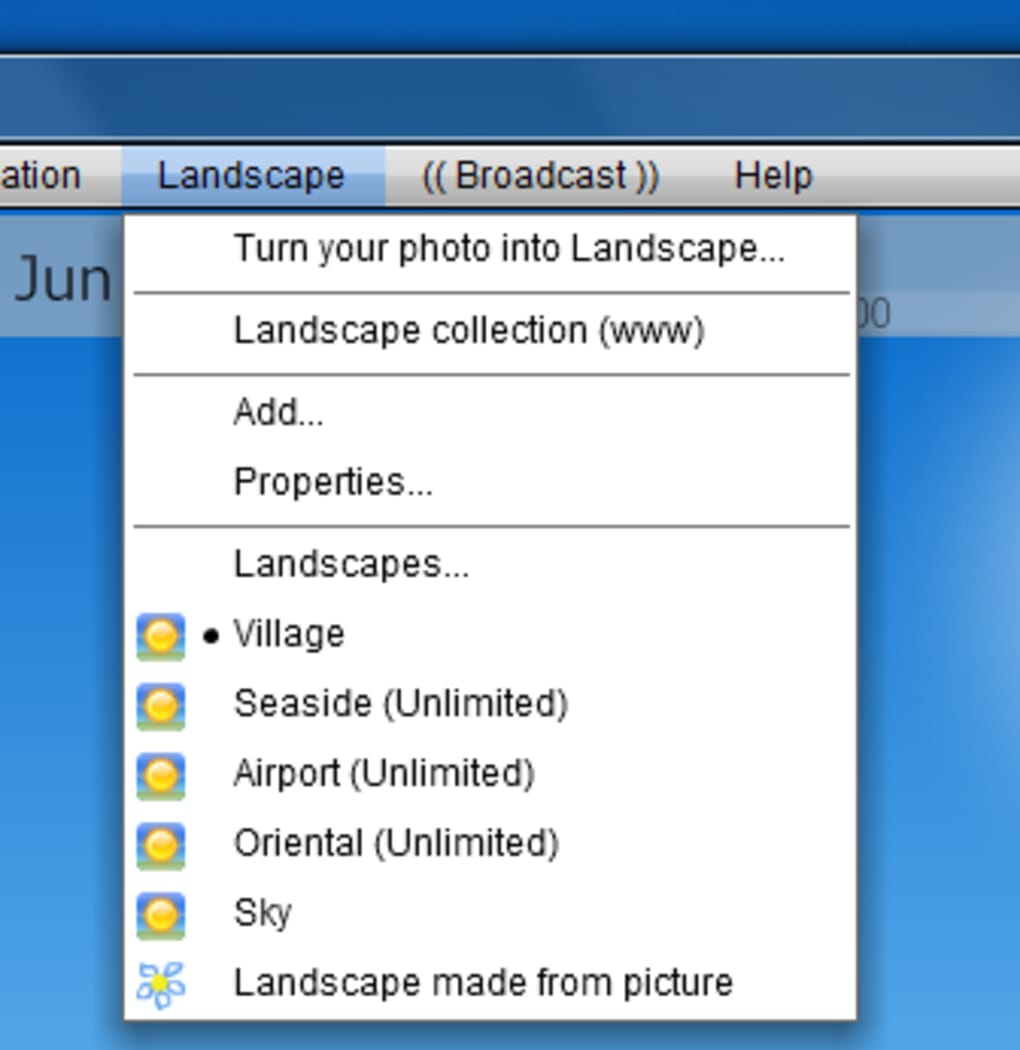
Beyond the dynamic weather animations, users also have the flexibility to personalize the background. While the default landscapes are beautifully rendered and offer a wide range of weather scenarios, YoWindow allows users to replace the background with their own personal photos. This customization feature adds a further layer of personal touch, allowing users to tailor the app to their own aesthetic preferences. Whether it’s a cherished vacation memory or a calming landscape image, integrating a personalized photo seamlessly blends YoWindow’s dynamic weather visuals with a user’s individual style.
Comprehensive Weather Information Beyond the Visuals
While its visual appeal is undeniably a major selling point, YoWindow isn’t just a pretty face. It provides a robust set of weather information that goes beyond the basic temperature reading. Users receive detailed information including:
- Current Temperature: Displayed prominently, showing both the actual temperature and the “feels like” temperature, factoring in wind chill or heat index. This provides a more accurate reflection of the experienced temperature.
- Wind Speed and Direction: YoWindow indicates wind speed and direction, offering valuable context to the overall weather conditions.
- Atmospheric Pressure and Humidity: These key atmospheric parameters provide additional detail for a more comprehensive weather picture. This detailed data is beneficial for users who are sensitive to weather changes or engage in activities significantly impacted by atmospheric conditions.
- Three-Day Forecast: Beyond the real-time depiction, YoWindow offers a three-day forecast, providing users with a glimpse into the coming weather patterns. This forecast isn’t simply a list of numbers; it’s visually represented through transitions in the animated landscape, offering an intuitive and visually appealing forecast.
- Hourly Breakdown: Users can navigate through an interactive timeline to see how the weather conditions are predicted to change throughout the day, offering a granular view of the weather patterns. This is particularly helpful in planning daily activities, considering the changing weather conditions throughout the day.
- Sunrise and Sunset: The program elegantly depicts sunrise and sunset times, visually showcasing these daily transitions within the animated landscape. This aesthetic touch elevates the experience beyond a mere functional weather app.
This combination of visual representation and detailed numerical data offers a well-rounded weather experience that caters to both visual learners and those who prefer more concrete data points. The user-friendly interface seamlessly blends these aspects, providing a balanced and informative experience.
User-Friendly Interface and Functionality
YoWindow’s interface is designed for ease of use and intuitive navigation. Finding the information you need is straightforward, whether it’s the current temperature, the three-day forecast, or adjusting the settings. The controls are unobtrusive, allowing the beautiful animations to remain the focal point, while providing easy access to all the necessary information and settings.
Beyond the ease of accessing weather data, YoWindow also offers convenient features such as:
- Screensaver Functionality: The application can be seamlessly integrated as a screensaver, transforming your idle screen time into a captivating weather display. This provides a continuous display of the current weather conditions, even when your computer is inactive.
- Location Selection: Users can easily select their location, ensuring that the app accurately reflects the weather in their area.
Limitations and Areas for Improvement
While YoWindow offers a highly innovative and visually appealing approach to weather presentation, it’s not without its minor drawbacks:
-
Limited Landscape Choices: A frequent user complaint revolves around the limited number of default landscape backgrounds. While users can add their own photos, having a broader range of pre-installed landscapes would enhance customization options. The developers could explore offering additional landscape packs or themed backgrounds for purchase or as a premium feature.
-
Mouse Wheel Scrolling Issue: In earlier versions, navigating the location selection menu using the mouse wheel was reportedly problematic. While this may have been addressed in later updates, ensuring smooth navigation across all functionalities remains crucial for a seamless user experience. The developers should prioritize addressing any navigation issues to provide a user-friendly experience, regardless of input methods.
- Update Frequency: Some users have expressed a desire for more frequent updates. While the current update frequency is acceptable for many, offering more granular updates, perhaps configurable by the user, could provide even greater accuracy in reflecting real-time weather changes.
Conclusion: A Unique and Engaging Weather Experience
YoWindow presents a refreshing take on the weather application, prioritizing a visually captivating experience while providing comprehensive weather data. Its innovative animated interface transforms the mundane act of checking the weather into an engaging and enjoyable experience. While minor limitations exist, the overall strengths of YoWindow—its stunning visuals, detailed information, and user-friendly interface—make it a compelling choice for anyone seeking a more dynamic and visually appealing weather application. Its ability to transform a utilitarian task into a pleasing aesthetic experience is what sets it apart and makes it a truly unique contender in the weather app market. The ongoing development and attention to user feedback suggest a commitment to addressing past limitations and further enhancing the user experience. YoWindow’s blend of form and function offers a uniquely pleasing way to stay informed about the weather.
File Information
- License: “Trial version”
- Version: “4.0.108”
- Latest update: “July 11, 2023”
- Platform: “Windows”
- OS: “Windows Vista”
- Language: “English”
- Downloads: “28.8K”
- Size: “17.01 MB”


