
YTD for Mac has firmly established itself as a leading application for users seeking to download and convert videos from a multitude of online platforms directly onto their macOS devices. In an increasingly digital world, the ability to access cherished videos, educational content, or entertainment without relying on a constant internet connection has become a necessity. YTD for Mac excels in this regard, offering a powerful yet user-friendly solution that simplifies capturing and managing online video content. It addresses common pain points of buffering, geo-restrictions, and format incompatibilities, transforming the way Mac users interact with their favorite online videos. This guide explores YTD for Mac’s multifaceted capabilities, from its intuitive downloading mechanisms to its versatile conversion tools, illustrating why it remains a top choice for a diverse user base.
Core Functionality: Seamless Downloading
At its heart, YTD for Mac is engineered for efficient and reliable video acquisition. Its design prioritizes a straightforward experience, ensuring users can quickly grasp and utilize its features without extensive technical know-how. This ease of use is a cornerstone of its widespread appeal, making advanced video management accessible to everyone.
Multi-Platform Support and Easy URL Capture
One of YTD for Mac’s most compelling attributes is its extensive compatibility with various video streaming websites. While “YTD” (YouTube Downloader) suggests a primary focus, the application effortlessly handles content from a broad spectrum of platforms, including YouTube, Facebook, and Vevo. This wide-ranging support means users are not restricted to a single source, consolidating their downloading needs within one powerful application.
The process of initiating a download is remarkably intuitive. YTD for Mac intelligently monitors the system’s clipboard. The moment a user copies a video link (URL) from their web browser, YTD automatically detects it and populates the URL field within its interface. This seamless integration eliminates manual pasting, streamlining the first step of the download process.
Furthermore, YTD for Mac offers crucial flexibility in download quality. Users can choose to download videos in stunning 1080p HD or opt for lower resolutions if conserving storage space is a priority. This choice empowers users to tailor downloads to their needs. Once the URL is detected and quality selected, a single click on the “Download” button initiates the process. Download speed is impressive; a three-minute video typically completes in roughly one minute, showcasing the application’s optimized performance for expanding an offline video library.
User-Friendly Interface and Activity Management
A significant contributor to YTD for Mac’s high user satisfaction is its exceptionally clean and intuitive interface. The application’s layout is designed for immediate understanding, presenting core functions through easily navigable tabs: “Download,” “Activity,” and “Play.”
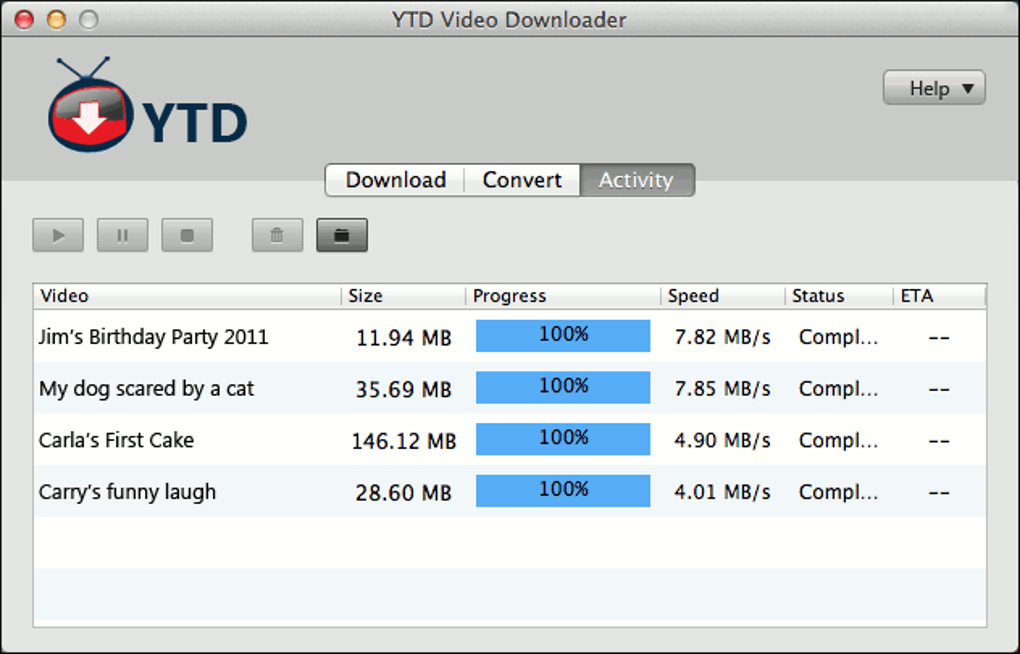
The “Download” tab serves as the starting point, where users configure download settings. The “Activity” window acts as the central control panel for all ongoing and completed tasks. Here, users monitor real-time download status, track progress, observe speeds, and view a history of previously saved videos. This transparency and immediate feedback are invaluable for managing multiple downloads effectively.
Beyond monitoring, the “Activity” tab also facilitates convenient post-download actions. Users can directly play back downloaded videos using YTD’s integrated media player or open them with their system’s default player. A practical right-click context menu offers quick access to essential file management options such as deleting files, stopping/pausing active downloads, and renaming videos. This comprehensive control within a unified interface significantly enhances productivity, transforming YTD for Mac into a complete solution for both acquiring and managing video content.
Enhancing Versatility: Powerful Conversion Tools
YTD for Mac’s utility extends beyond mere downloading, incorporating robust video conversion capabilities that make it an incredibly versatile multimedia tool. In today’s diverse device ecosystem, where compatibility issues can hinder seamless media enjoyment, this feature proves invaluable for adapting downloaded content for any platform.
Broad Format Compatibility for All Devices
The application features an extensive suite of conversion presets, meticulously designed to meet the demands of various modern devices. Once a video is downloaded, it can be effortlessly transformed into formats optimized for popular Apple devices like iPods, iPads, and iPhones, guaranteeing flawless playback. Its compatibility also extends to PSP, various cell phones, and common PC formats such as Windows Media and XVid. For audio enthusiasts, the ability to extract audio tracks by converting video files directly into MP3 format is a highly appreciated feature, enabling users to create portable audio libraries from music videos or lectures.
The conversion process mirrors the simplicity of downloading. Within the YTD interface, users easily select their desired output format or device profile from a clear, predefined list. This intuitive selection removes the complexity often associated with video codecs and resolution settings, empowering even non-technical users to produce perfectly compatible files. Conversion speed is optimized, typically completing in roughly the same timeframe as the initial download, ensuring users can rapidly prepare their media for offline consumption on preferred gadgets.
Understanding Free vs. Pro Features
While YTD for Mac offers substantial functionality in its free version, certain advanced capabilities, particularly batch processing and simultaneous operations, are exclusive to the premium “Pro” version. The free iteration allows users to download videos and then convert individual files sequentially. You can queue multiple videos for download, and similarly, queue them up for conversion one after another. For most casual users, this sequential processing is perfectly sufficient.
However, for power users, the Pro version introduces significant workflow enhancements. A key advantage is the ability to download and convert videos simultaneously. This parallel processing drastically accelerates the entire workflow. Instead of waiting for a download to complete, both tasks can run concurrently, saving considerable time and boosting productivity. Furthermore, the Pro version unlocks true batch conversion capabilities, enabling users to convert multiple downloaded files at once. This feature is a tremendous time-saver for anyone needing to reformat a large collection of videos. While the free version supports queuing, genuine simultaneous batch conversion defines the Pro upgrade. Recognizing these distinctions helps users determine if the added efficiency and advanced features align with their specific usage patterns.
The YTD for Mac Advantage: Performance and User Satisfaction
The enduring success and popularity of YTD for Mac are testament to its consistent delivery of a positive user experience, coupled with reliable and efficient performance. Its development philosophy centers on providing powerful features that remain accessible and intuitive for all users, irrespective of their technical background.
Installation Simplicity and User Acclaim
The user journey with YTD for Mac typically begins with a straightforward installation. A common practice for freeware, however, is the inclusion of offers for bundled third-party software during setup. When installing YTD for Mac, users might encounter prompts to accept additional programs. To ensure a clean installation, it is advisable to meticulously review each step and proactively “decline” any unwanted software. Beyond this brief initial consideration, installation is quick, and the application usually launches automatically, ready for immediate use.
The application’s reputation is further bolstered by overwhelmingly positive feedback from its user community. Reviews consistently highlight YTD for Mac’s exceptional ease of use, impressive speed, and overall efficiency. Users frequently laud its “easy and fast” operation, appreciating its direct approach that eliminates the need for “intermediate web site[s].” Many long-time users vouch for its stability and reliability, often stating they have utilized the app “for years and have never had a problem,” underscoring its consistent performance.
Key Benefits and Practical Applications
The practical advantages of integrating YTD for Mac into one’s digital toolkit are manifold:
- Effortless Operation: Intuitive design ensures new users can quickly navigate and master its functions.
- Rapid Downloads: Optimized algorithms facilitate swift download speeds.
- Extensive Site Support: Downloads from YouTube, Facebook, Vevo, and many others.
- Versatile Format Conversion: Integrated converter supports a broad spectrum of output formats (e.g., iPod, iPhone, PSP, MP4, MP3).
- Optional Batch Processing (Pro): Pro version offers simultaneous downloading and converting for efficiency.
- Ad-Free Experience (Free version): Generally devoid of intrusive advertisements.
While some users occasionally wish for niche functionalities, such as a built-in subtitle downloader, the core competencies of YTD for Mac—downloading and converting videos—are executed with exemplary polish and efficiency. It serves its primary purpose with robust features that few competitors truly match.
YTD in the Competitive Landscape
The market for Mac video downloaders is vibrant, featuring several notable alternatives. Prominent competitors include ClipGrab, Total Video Downloader for Mac, and 4k Video Downloader. ClipGrab, a well-regarded free option, is known for its straightforward approach. However, YTD for Mac often provides a slightly more refined interface and seamless automatic URL detection. Total Video Downloader for Mac emphasizes professional features and broad format support but typically functions as a trial version requiring purchase. 4k Video Downloader excels in ultra-high-definition downloads (4K and beyond). However, YTD for Mac’s broader focus on general ease of use, integrated conversion for standard HD content, and intuitive clipboard monitoring make it a more holistic and immediately accessible solution for the average user. YTD for Mac distinguishes itself through an optimal balance of robust features, exceptional ease of use, and a generous free offering, positioning it as a leading choice for everyday video downloading and conversion needs.
Final Verdict: Why YTD for Mac Stands Out
In summation, YTD for Mac unequivocally asserts itself as an outstanding and indispensable application for anyone on macOS aiming to download and convert online videos. Its well-earned reputation as a “superb downloader” is built on a foundation of efficient performance, intuitive design, and a comprehensive feature set. From streamlined installation to its self-explanatory interface, YTD for Mac prioritizes user-friendliness. Automatic detection of copied video URLs, straightforward download options, and a clear “Activity” window ensure a smooth workflow. The flexibility to download videos in various resolutions, including full 1080p HD, allows users to tailor content acquisition to their preferences.
Beyond its core downloading prowess, YTD for Mac excels with its integrated video conversion tools. Offering an extensive array of presets for popular devices like iPod, iPad, iPhone, PSP, mobile phones, and universal formats such as MP4, Windows Media, XVid, and MP3, it guarantees seamless compatibility across an entire digital ecosystem. This versatility liberates content from platform-specific restrictions, enabling users to enjoy their media anywhere, at any time.
While advanced functionalities like simultaneous downloading/converting or true batch conversion are reserved for the Pro version, the free iteration of YTD for Mac remains exceptionally potent and fully capable for most users. Its ability to queue downloads and conversions sequentially ensures effective video content management without an immediate upgrade.
Ultimately, YTD for Mac is more than a utility; it is a catalyst for a more flexible and enriched multimedia experience. It frees users from streaming limitations, empowering them to curate personal video libraries, enjoy content offline, and maintain optimal format compatibility. Its efficiency, reliability, and user-centric design solidify its status as an indispensable tool for everyone. For Mac users in search of a dependable, swift, and highly efficient solution for managing their online video content, YTD for Mac stands as a premier choice that consistently delivers on its promises, representing a valuable asset for maximizing digital media consumption.
File Information
- License: “Free”
- Latest update: “July 10, 2023”
- Platform: “Mac”
- OS: “Mac OS X”
- Language: “English”
- Downloads: “293.4K”


