
YTD Video Downloader is a widely popular application designed to simplify the process of downloading videos from various online platforms. This review delves into its features, functionality, ease of use, and compares it with alternative solutions available in the market. We will explore its strengths and weaknesses to help you determine if YTD Video Downloader is the right choice for your video downloading needs.
Ease of Use and Interface Design
YTD Video Downloader boasts a user-friendly interface, making it accessible even to users with limited technical expertise. The program’s layout is clean and intuitive, featuring four clearly labeled tabs: Download, Activity, Convert, and Player. This organization simplifies navigation and allows users to quickly access the desired functionality. The large icons associated with each tab further enhance the user experience, providing visual cues for easy identification.
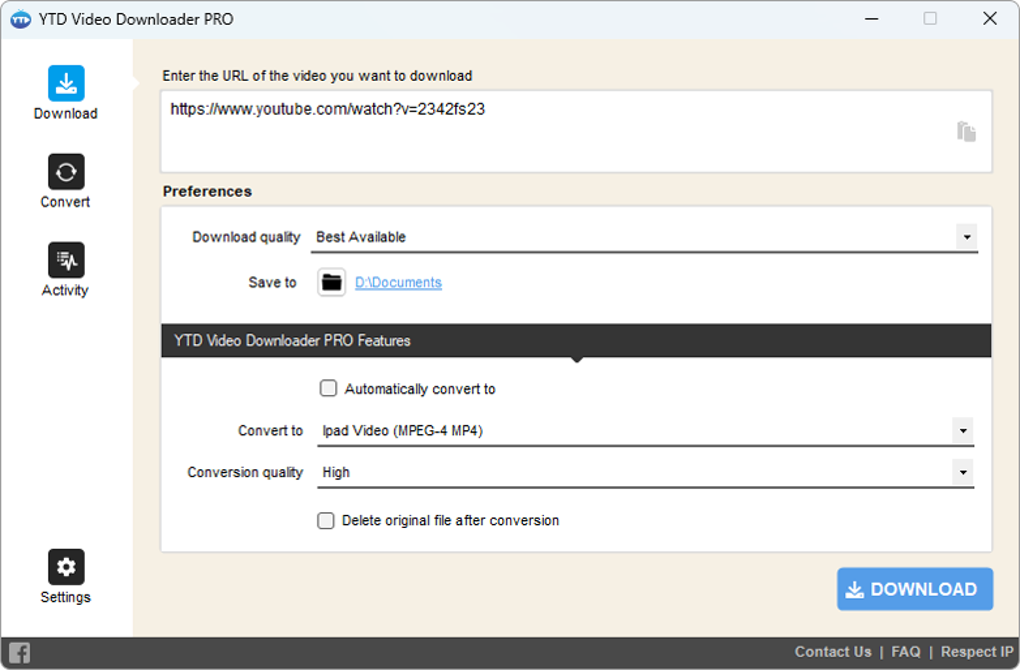
The primary function, video downloading, is centralized within the “Download” tab. Users simply need to copy and paste the video URL from their web browser into the designated area. The program intelligently identifies the video and presents options for selecting the desired quality, ranging from standard definition to high definition (HD 1080p). Users can also choose a lower resolution for smaller file sizes and faster download speeds. Once the quality is selected, specifying the download location on the user’s Windows PC completes the setup. The download process then commences automatically.
The “Activity” tab provides real-time monitoring of the download progress, displaying crucial information such as file size, video name, download speed, remaining time, and overall progress. This transparency keeps users informed and allows them to track multiple downloads efficiently. While the free version doesn’t support simultaneous downloads of multiple videos, users can queue videos for sequential downloading. This feature enhances workflow, especially when multiple videos need to be downloaded one after another.
Core Features and Functionality
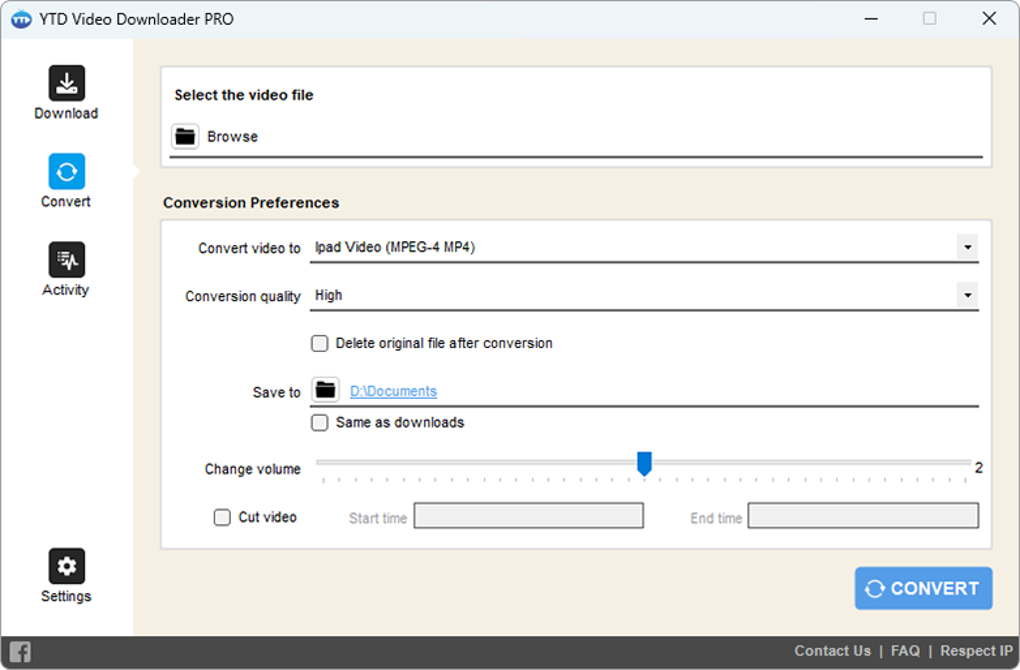
YTD Video Downloader goes beyond basic downloading capabilities. Its functionality extends to video conversion and basic editing. The “Convert” tab enables users to transform downloaded videos into various formats, including MP4, MOV, MP3, and WMV. This flexibility allows users to optimize videos for different devices and playback scenarios. The conversion process is straightforward, allowing users to choose the output format, quality, and destination folder. The option to delete the original file after conversion further enhances file management.
The “Convert” tab also includes basic video editing tools. Although limited, these tools permit simple adjustments such as volume control and cropping. This built-in editing capability eliminates the need for external editing software for minor video modifications. The “Player” tab serves as an integrated media player for seamless playback of downloaded and converted videos. This all-in-one approach minimizes the need for switching between different applications, streamlining the overall video management experience.
Compatibility and Supported Platforms
YTD Video Downloader is primarily designed for Windows PCs, offering robust compatibility across various versions of the Windows operating system. While the software’s help section provides information about compatibility with Android and iPhone devices, the extent of this compatibility needs further clarification. Mac users might find limited direct support, possibly requiring alternative methods for utilizing downloaded files on their macOS systems. This aspect highlights the software’s primary focus on the Windows environment.
Comparison with Alternative Downloaders and Performance Considerations
Although YTD Video Downloader offers a comprehensive set of features, several alternative video downloaders exist in the market. Direct comparisons with competitors highlight its strengths and weaknesses.
-
4K Video Downloader: This specialized YouTube downloader stands out due to its simplicity and speed. It offers a straightforward approach to downloading YouTube videos, including options for downloading audio in MP3 format. Its speed and ease of use make it a strong contender for users solely focused on YouTube downloads.
-
Ummy Video Downloader: Another popular choice, Ummy Video Downloader offers a balance of simplicity and functionality. It features a clean interface, supports video conversion, and allows users to queue downloads. However, like YTD Video Downloader, it does not support batch downloads, a limitation for users needing to download a large number of videos simultaneously.
-
Fast Video Downloader: This option prioritizes speed, making it attractive for users who need to quickly download videos. It supports multiple streaming websites and provides a streamlined download process. The focus on speed, however, may compromise some of the advanced features found in YTD Video Downloader and others.
While YTD Video Downloader holds its ground against these alternatives, a noteworthy point of contention is its download speed. User reviews often mention that the download speed is comparatively slow, especially for higher-resolution videos. This drawback can be a significant issue for users dealing with large video files or who prioritize faster download times. The Pro version of YTD Video Downloader claims to address this issue by providing quicker download speeds.
Pricing and Licensing
YTD Video Downloader is available as both a free and a pro version. The free version offers core downloading functionality, including basic conversion and editing, but it may be limited in terms of speed and simultaneous downloads. The pro version, available through a paid subscription, offers enhancements such as faster download speeds, support for batch downloads, and the removal of certain limitations present in the free version. The cost-benefit analysis between the free and pro versions should consider individual needs and usage patterns. Whether the additional features justify the upgrade cost depends on the user’s specific requirements.
Conclusion: Is YTD Video Downloader Right for You?
YTD Video Downloader offers a compelling combination of ease of use, multiple functionalities, and a relatively straightforward interface. Its ability to handle video downloads, conversions, and basic editing within a single application is a significant advantage. However, the limitations related to download speed in the free version and the lack of batch downloading capabilities should be taken into consideration.
If your needs are simple, such as downloading and converting the occasional video, the free version of YTD Video Downloader might suffice. However, for users needing high download speeds, batch downloads, or more advanced features, the pro version or exploring alternatives like 4K Video Downloader or Ummy Video Downloader may provide a more suitable solution. Ultimately, the best choice depends on individual requirements, priorities, and budget considerations. Thoroughly weighing the pros and cons outlined in this review will help in making an informed decision.
File Information
- License: “Free”
- Latest update: “November 11, 2024”
- Platform: “Windows”
- OS: “Windows 7”
- Language: “English”
- Downloads: “19.6M”


