
YTD, short for YouTube Downloader, was a popular software application designed to simplify the process of downloading and converting videos from YouTube and other online platforms. While the original YTD application is no longer available for download due to reasons that may include discontinuation, security concerns, or other factors, its legacy and functionality provide valuable insights into the evolution of video downloaders. This review will explore the features, pros, cons, and alternatives to the YTD application, examining its impact on the digital landscape and the needs it fulfilled for users.
Ease of Use and Download Speed
One of YTD’s key selling points was its user-friendly interface and remarkably fast download speeds. The application boasted a drag-and-drop functionality, allowing users to seamlessly transfer video links from their web browser directly into the YTD interface. This intuitive approach eliminated the complexities often associated with other downloaders, making the process accessible to users of all technical skill levels. Furthermore, YTD employed advanced download engines, claiming download speeds up to 500% faster than competitors. This speed advantage was a significant draw for users eager to quickly access their desired videos without prolonged waiting times. The ability to preview downloaded videos before completing the download added another layer of convenience, enabling users to verify that they had selected the correct file before committing to the download process. This minimized the risk of downloading the wrong video, a common frustration with some video downloaders.
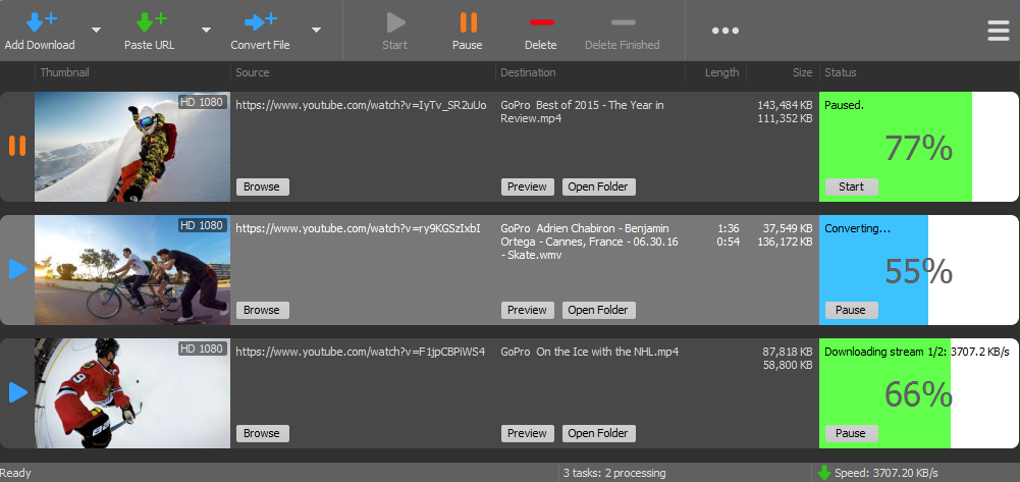
The ability to handle multiple simultaneous downloads was another notable feature. This functionality allowed users to queue up several videos for download, significantly increasing efficiency. The program’s capacity to manage multiple downloads concurrently without compromising individual download speeds was a testament to its robust engineering.
Video Quality and Format Conversion
YTD distinguished itself by supporting downloads of high-quality videos, including 2K, 4K, and even 8K resolutions, provided the source video offered such options. This wide range of resolutions catered to users with varying bandwidth and display capabilities, allowing them to choose the best quality suitable for their needs. Furthermore, the application extended its functionality beyond mere downloading. It included a built-in video conversion tool, enabling users to transform downloaded videos into a variety of formats, such as MP4, WAV, and others. This versatility was critical for ensuring compatibility across diverse media players and devices. Beyond video conversion, the software also offered audio conversion options, enabling users to extract the audio track from videos and save it as MP3, OGG, or other audio file formats. This ability to customize the output format catered to users’ diverse preferences and needs, enriching the overall user experience. The absence of compatibility issues resulting from various media player or device limitations was a major benefit, making YTD a comprehensive solution for users who wanted flexibility in how they consumed their downloaded content.
Advantages and Disadvantages of YTD
YTD offered a compelling combination of features that made it a popular choice among video downloaders. Its streamlined user experience, facilitated by the intuitive drag-and-drop functionality, simplified the download process. The impressive download speeds were another major selling point, saving users valuable time. The built-in video and audio conversion tools enhanced the application’s versatility and made it a comprehensive solution for managing downloaded media. The ability to download high-quality videos, ranging from 2K to 8K resolution, catered to a wide range of user preferences and device capabilities. Finally, supporting multiple downloads simultaneously significantly enhanced workflow efficiency.
However, YTD was not without its drawbacks. The absence of a built-in editing tool was a notable limitation. Features such as trimming or cutting specific portions of downloaded videos were unavailable, requiring users to rely on external editing software. This deficiency hampered its overall functionality, especially for users who needed basic editing capabilities.
Another criticism was the lack of an integrated help manual or tutorial. While the application’s ease of use was often praised, the lack of supporting documentation could pose challenges for users requiring additional assistance or troubleshooting. For less tech-savvy individuals, this absence could hinder the user experience. Finally, user reviews suggested that after a trial period, the application often prompted users to register and purchase a Pro version to continue using its features. This practice, while common in many software applications, could be a source of frustration for users who expected the trial version to offer unrestricted access for a longer duration.
Alternatives to YTD
Given that YTD is no longer available, users seeking similar functionality now have various alternatives to choose from. These alternatives, often updated frequently, provide features comparable to, and sometimes exceeding, YTD’s capabilities. Many modern downloaders offer not only faster speeds but also more advanced features such as batch downloads, built-in editors, support for a wider range of websites, and enhanced security measures. Some popular alternatives include 4K Video Downloader, JDownloader, and Freemake Video Downloader. Each of these options offers a unique set of features and capabilities, allowing users to select the tool that best fits their individual needs and preferences. Before selecting an alternative, it is crucial to research its features, user reviews, and security aspects.
Conclusion
YTD represented a significant step in the evolution of video downloaders. Its simplicity, speed, and versatile conversion capabilities resonated with a large user base. However, its limitations, including the absence of editing capabilities and integrated support, prevented it from achieving perfection. While the original YTD application is no longer accessible, its impact on the digital landscape remains evident. The demand for efficient and user-friendly video downloaders continues to drive innovation in the field, resulting in a plethora of alternative options available today. Users seeking a similar experience should thoroughly research available alternatives to find the best fit for their specific requirements, considering factors such as download speed, supported formats, ease of use, and security features. The legacy of YTD serves as a reminder of the constant evolution in software development and the ongoing quest for better, faster, and more feature-rich applications to meet the evolving demands of users.
File Information
- License: “Trial version”
- Version: “6.7.29”
- Latest update: “January 27, 2025”
- Platform: “Windows”
- OS: “Windows 2003”
- Language: “English”
- Downloads: “106.4K”
- Size: “14.67 MB”


