
In an increasingly digital world, data is the lifeblood of our personal and professional lives. From cherished family photographs and critical business documents to intricate project files and invaluable research, our digital assets represent countless hours of effort, irreplaceable memories, and the very foundation of modern existence. However, this digital landscape is fraught with perils. The sudden, unexpected loss of data is a nightmare scenario that far too many individuals and organizations have unfortunately encountered. Whether it’s the heart-stopping moment of accidentally deleting a crucial folder, the frustration of a corrupted hard drive, or the despair of a system-wide meltdown, data loss events can be devastating. This is where specialized tools become indispensable, offering a lifeline in moments of digital crisis. Among the pantheon of data recovery solutions, Zero Assumption Recovery (ZAR) emerges as a noteworthy contender, promising a robust, persistent, and “zero-assumption” approach to salvaging what seemed irrevocably lost.
For many years, Zero Assumption Recovery has been a quiet but powerful force in the realm of data retrieval. Initially introduced to the public via platforms like PhanMemFree in 2004, it quickly garnered attention for its unconventional yet highly effective methodology. While many data recovery programs rely on intact file system structures to locate and restore files, ZAR takes a more fundamental, “zero-assumption” stance. This implies that even when the traditional signposts of a file system (like the master boot record or partition tables) are severely damaged or completely wiped out, ZAR endeavors to crawl through the raw data sectors of a drive, identifying file patterns and reconstructing lost information. It’s this deep-seated persistence, its unwavering commitment to sifting through digital debris, that sets ZAR apart and often leads to success where other, less tenacious tools might falter. This article delves into the nuances of Zero Assumption Recovery, exploring its core philosophy, key features, real-world applications, and why it remains a go-to solution for many facing the daunting challenge of data loss.
Navigating the Digital Minefield: Understanding Data Loss Scenarios
Data loss is not a singular event but a broad spectrum of unfortunate occurrences, each presenting its own set of challenges for recovery. Understanding the common causes is the first step toward appreciating the intricate work performed by tools like Zero Assumption Recovery.
Accidental Deletion and Formatting: The Common Culprits
One of the most frequent scenarios leading to data loss is human error. A momentary lapse in judgment, a misclick, or a simple misunderstanding of system prompts can lead to the accidental deletion of files or, even worse, the complete reformatting of a drive. When you “delete” a file from your operating system, it often doesn’t immediately erase the data from the physical storage medium. Instead, the operating system simply marks the space occupied by that file as “available” for new data. The file’s entry is removed from the file system’s index, making it invisible to the user. As long as new data hasn’t overwritten that marked space, the original data still resides there, waiting to be recovered.
Similarly, accidental reformatting, whether quick or full, wipes the file system structure clean, effectively creating a blank slate. While a quick format primarily rebuilds the file system and doesn’t erase all data sectors, a full format typically writes zeroes or random data across the drive, making recovery significantly harder but not always impossible, especially if specialized tools are used immediately. ZAR excels in these situations because its “zero-assumption” approach allows it to bypass the damaged or absent file system and directly scan for file signatures. It doesn’t assume the file system is intact; it looks for the data itself.
System Corruption and Hardware Malfunctions: When Disaster Strikes Harder
Beyond simple user error, data loss can stem from more complex and insidious issues. Power spikes can suddenly cut off a drive’s power during a write operation, leading to corrupted sectors or an unreadable file system. Virus attacks, malware, and ransomware can encrypt, delete, or scramble files, making them inaccessible. Operating system crashes, faulty software installations, or improper shutdowns can also lead to file system corruption, where the logical structure that organizes your data becomes damaged, rendering entire partitions or drives unreadable.
Hardware malfunctions represent another significant threat. A failing hard drive might develop bad sectors, leading to read/write errors and data inaccessibility. A damaged partition table might make an entire drive appear unallocated. In these more severe cases, the file system itself is often compromised, making traditional recovery methods ineffective. This is precisely where ZAR’s strength lies. Its ability to work “below” the file system layer, performing a deep scan of the physical disk, allows it to often recover data even when the operating system can no longer recognize the drive or its partitions. It treats the drive as a raw block of data, painstakingly piecing together fragments based on file headers and footers, demonstrating its commitment to recovery even in the face of widespread digital devastation.
Why a “Zero-Assumption” Approach is Crucial: Deeper Scans, Better Results
The “zero-assumption” philosophy is at the heart of Zero Assumption Recovery’s effectiveness. Many data recovery tools are designed to work efficiently when the file system is largely intact, relying on directory structures, file allocation tables, or master file tables to reconstruct lost data. While this approach is quicker and often sufficient for minor deletions, it falls short when the file system itself is heavily damaged or completely missing.
ZAR, on the other hand, makes minimal assumptions about the underlying file system. Instead of solely relying on the operating system’s metadata, it conducts a low-level, sector-by-sector scan of the storage device. During this process, it looks for specific “signatures” – unique patterns of bytes that identify the beginning and end of common file types (e.g., JPEG headers, PDF headers, DOCX headers). By recognizing these patterns, ZAR can reconstruct files even if their original names, sizes, or locations within the file system have been lost.
This meticulous, persistent crawling through every byte of data allows ZAR to achieve results in scenarios deemed “beyond salvation” by other tools. Whether it’s a completely reformatted drive, a drive with a corrupted partition table, or a device that has suffered extensive logical damage, ZAR’s “zero-assumption” method increases the probability of recovering fragmented or seemingly lost files. It’s akin to sifting through rubble by hand to find precious artifacts, rather than just relying on a blueprint that might no longer exist. This persistence is a testament to its design and why it has earned a reputation for being a powerful, last-resort solution for complex data loss situations.
Zero Assumption Recovery: A Deep Dive into its Capabilities
Zero Assumption Recovery is not just another data recovery tool; it’s a comprehensive suite designed to tackle a wide array of data loss scenarios with remarkable tenacity. Its “zero-assumption” philosophy translates into a set of powerful features that enable users to perform sophisticated data recovery right from their desktops.
Beyond Standard File Recovery: Persistent Scanning Technology
At its core, ZAR’s strength lies in its persistent scanning technology. Unlike simpler tools that might give up once file system metadata is compromised, ZAR is engineered to go deeper. It employs advanced algorithms to analyze raw disk sectors, seeking out file headers and footers to identify recoverable data regardless of the directory structure. This means it can effectively recover files from partitions that have been formatted, deleted, or even corrupted to the point where they are no longer recognized by the operating system.
For instance, if a hard drive’s Master Boot Record (MBR) or partition table is damaged, rendering the entire drive inaccessible, ZAR can often bypass these logical barriers. It will scan the entire physical drive, identify potential partitions, and then delve into those identified areas to find files. This “bottom-up” approach significantly enhances the chances of recovery in severe data loss situations that would typically require professional data recovery services. Its ability to “carry on crawling” even when other solutions falter is a recurring theme in user feedback and a cornerstone of its design.
Diverse Recovery Scenarios: From Photos to Critical Documents
The scope of data that Zero Assumption Recovery can salvage is extensive, making it a versatile tool for both personal and professional use. Users frequently praise its effectiveness in recovering:
- Digital Photos: One of the most common and emotionally impactful forms of data loss involves photographs. ZAR excels in digital image recovery, a specialized module within the software or a standalone product (“Zero Assumption Digital Image Recovery”). It can recover a wide variety of image formats (JPEG, TIFF, RAW files from various camera manufacturers, etc.) from memory cards (SD, CompactFlash, Memory Stick) and digital cameras, even after accidental deletion or card reformatting. This capability has saved countless memories for users, as evidenced by numerous testimonials.
- Documents and Office Files: Critical work documents, spreadsheets, presentations, and other office files (e.g., DOCX, XLSX, PDF, PPTX) are frequently recovered. Whether deleted, corrupted, or lost due to drive issues, ZAR’s signature-based scanning can often piece them back together.
- Multimedia Files: While some older user reviews noted potential issues with video playback after recovery, ZAR is generally equipped to recover various audio and video formats. The success often depends on the fragmentation of the files, but for contiguous data blocks, it offers a strong chance of retrieval.
- Other File Types: Beyond these common categories, ZAR can also recover archives, executable files, database files, and a plethora of other proprietary and standard file types, making it a truly general-purpose recovery solution.
Supported Storage Media and File Systems
Zero Assumption Recovery is primarily designed for Microsoft Windows operating systems, supporting versions from Windows 95 upwards, indicating a long history and broad compatibility across different Windows iterations. This focus means it’s optimized for the file systems prevalent in Windows environments, primarily NTFS (New Technology File System) and FAT (File Allocation Table, including FAT12, FAT16, and FAT32). While the provided information focuses on Windows, robust data recovery tools generally aim to support common file systems.
The software is adept at recovering data from a wide range of storage media, including:
- Internal Hard Disk Drives (HDDs): The most common target for data recovery, ZAR can work on desktop and laptop internal drives.
- Solid State Drives (SSDs): While SSD recovery can be more complex due to TRIM commands, ZAR still offers capabilities for these modern storage devices.
- External Hard Drives: USB-connected external drives are also fully supported.
- USB Flash Drives (Thumb Drives): Highly susceptible to accidental deletion or corruption, these are a frequent target.
- Memory Cards: As highlighted by its digital image recovery capabilities, ZAR is excellent for SD cards, CompactFlash, and other memory card types used in cameras and mobile devices.
The software’s minimal storage footprint (less than the average program in the Software utilities section) also means it can be installed on a healthy drive without risking overwriting data on the problematic drive, a crucial best practice in data recovery.
The “Do-It-Yourself” Advantage: Empowerment in Data Crisis
One of the most significant benefits of Zero Assumption Recovery is its “do-it-yourself” (DIY) nature. In the past, data loss often meant expensive visits to professional data recovery labs, a process that could be time-consuming, prohibitively costly, and involve sending sensitive data off-site. ZAR empowers users to take control of their data recovery process.
This DIY approach offers several distinct advantages:
- Cost-Effectiveness: While ZAR is a trial version, its ability to recover data, especially in specific scenarios as noted by users (like image recovery from SD cards), can prevent the need for expensive professional services. Even if a full license is required, it often represents a fraction of the cost of lab recovery.
- Speed and Immediacy: When data is lost, time is of the essence. The longer you wait, the higher the chance of data being overwritten. ZAR allows users to initiate a recovery scan immediately, potentially saving critical data that might otherwise be lost.
- Privacy and Security: For individuals and businesses dealing with sensitive information, keeping data in-house during recovery is paramount. The DIY aspect ensures that confidential data never leaves your control, mitigating security risks associated with third-party intervention.
- Accessibility: With a user-friendly interface (though some users might need a moment to “figure it out” as one review suggests), ZAR makes powerful data recovery accessible to a broader audience, including those who are not “too computer savvy.”
The combination of persistent scanning technology, broad data type and media support, and a strong DIY ethos positions Zero Assumption Recovery as a highly effective and accessible tool for navigating the complexities of modern data loss.
User Experiences and the Promise of Revival
The true measure of any software lies in the experiences of its users. For Zero Assumption Recovery, the testimonials paint a compelling picture of a tool that frequently delivers on its promises, often turning moments of despair into stories of successful digital resurrection. Since its introduction, ZAR has accumulated significant downloads, reflecting its popularity and perceived effectiveness among users worldwide, particularly in countries like India, Thailand, and Italy where it’s noted as “very heavily used.”
Testimonials: Stories of Successful Digital Resurrections
User reviews on platforms like PhanMemFree highlight several recurring themes that underscore ZAR’s value proposition:
- “Fabulous. Worked perfectly after I figured it out! Thank you so much!!!” This review from May 2015 encapsulates the sentiment of many users. While perhaps not always immediately intuitive, the effort to understand its interface is often richly rewarded with successful recovery. It speaks to the power beneath the surface that, once harnessed, yields impressive results.
- “Did what it promised and at no cost to us! This was super easy and especially good for people like us who are not too computer savvy. My husband had a corrupt SD card with about 80 photos from our recent trip to Costa Rica. We thought the pictures were lost for sure, so when I learned about ZAR online, I thought it was too good to be true. However, it worked exactly as promised and all 80 pictures were recovered. Not only that, but the program was free!! What could be better?” This detailed testimonial from March 2015 is particularly insightful. It showcases ZAR’s prowess in recovering photos from a corrupt SD card, a common data loss scenario for travelers and photographers. The mention of it being “super easy” and “free” for this specific use case is a powerful endorsement, especially for non-technical users. It reinforces ZAR’s strength in digital image recovery and its accessibility.
- “excellent sofware. i am in so much awe , this software is soooooooo helpful, it is the best eveer after wasting hours using other softwares expecting me to pat this on simply came to my rescue Pros: quick and free recovery Cons: videos were problematic to play” This review from March 2013 further emphasizes the “quick and free” recovery aspect for some users, suggesting that certain recovery modules or specific types of data might be recoverable without a full purchase in the trial version. The “videos were problematic to play” note is a valuable piece of feedback, indicating that while image and document recovery might be robust, complex multimedia files (which are often heavily fragmented) can pose greater challenges even for ZAR.
- “Photo Retrieval. I mistakenly deleted 917 photographs from my sd card today and I have to say, fair play to ZAR for retrieving them for me. Thank you. JM” Another glowing review, this one from January 2012, reinforces ZAR’s consistent success with photo retrieval from SD cards, a frequent need for many users. The sheer volume of recovered photos (917) speaks to its thoroughness.
These user accounts collectively paint a picture of Zero Assumption Recovery as a powerful, reliable, and often life-saving tool for critical data loss, particularly in scenarios involving accidental deletion and corrupt memory cards. Its “no cost” or “free” aspect for certain recoveries in the trial version clearly resonates with users and adds significant value.
Ease of Use vs. Power: Bridging the Gap for All Users
One might assume that a tool capable of such deep, persistent scanning would be overly complex or strictly for advanced users. While the initial learning curve might require a moment to “figure it out,” as one user noted, ZAR generally aims to strike a balance between powerful functionality and user accessibility. For basic scenarios like recovering deleted photos from an SD card, the process can be surprisingly straightforward, as attested by the user who found it “super easy” despite not being “too computer savvy.”
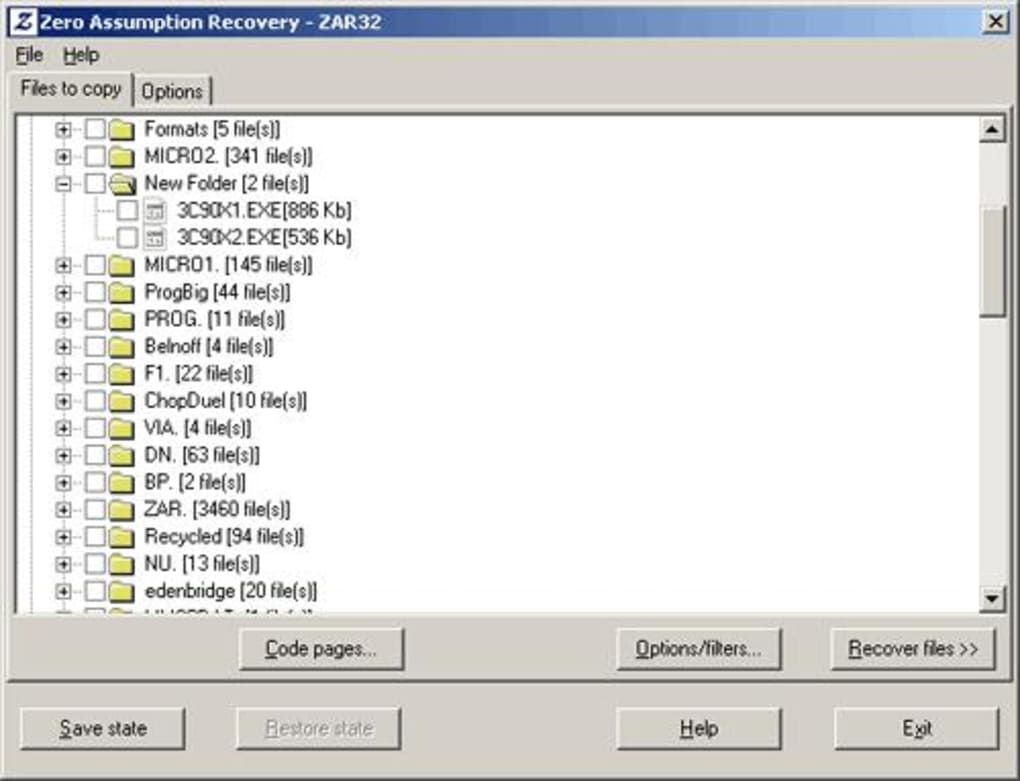
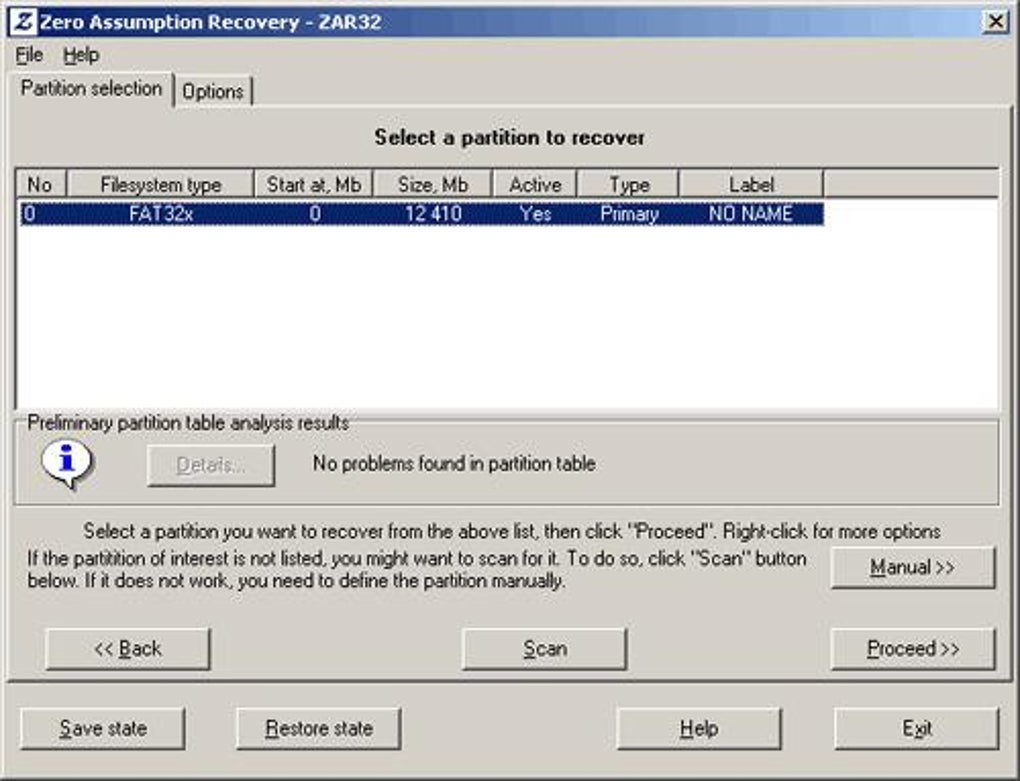
The software’s interface, though perhaps not the most modern by today’s standards (considering its last significant update was in 2007), is designed to guide users through the recovery process. It typically involves selecting the drive to scan, initiating the scan, and then reviewing and selecting the files to recover to a different, healthy drive. This step-by-step approach simplifies what could otherwise be a daunting technical procedure. The “do it yourself” aspect is crucial here, transforming a specialist task into a manageable process for the average computer user, empowering them to resolve their own data crises without external help.
The Trial Version: A Glimpse into its Potential
Zero Assumption Recovery is explicitly described as a “trial version program.” In the world of software, trial versions typically offer limited functionality, either in terms of the number of files, the size of files that can be recovered, or the duration of use. However, the user reviews on PhanMemFree strongly suggest that for specific, common scenarios – particularly the recovery of digital photographs from memory cards – ZAR’s trial version has often performed a full, successful recovery at “no cost” to the user.
This approach likely serves as an excellent demonstration of ZAR’s capabilities, allowing potential paying customers to experience its full power for a critical, high-impact use case. By enabling free recovery of valuable photos, the software builds trust and showcases its “zero-assumption” effectiveness, encouraging users to consider a full license for more complex or extensive recovery needs involving other file types or larger volumes of data. This strategic trial model allows users to truly assess if the tool “does what it promised” before making a financial commitment, cementing its reputation as a reliable and user-centric solution.
Implementing Your Own Recovery: Best Practices and Pro Tips
While Zero Assumption Recovery makes data recovery accessible, success rates can be significantly influenced by following some crucial best practices. These tips are universally applicable to any data recovery attempt but are particularly relevant when using powerful DIY tools like ZAR.
Acting Swiftly: The Golden Rule of Data Recovery
The single most important factor in successful data recovery is speed. The moment you realize data has been lost—whether due to accidental deletion, formatting, or a system crash—you must stop using the affected storage device immediately. Every minute you continue to use the drive, write new data to it, or even browse the internet from it, you increase the risk of overwriting the lost files.
Overwriting happens when the operating system reallocates the space previously occupied by your “deleted” files to new data. Once overwritten, the original data is permanently gone and cannot be recovered by any software tool. Therefore, the moment of data loss should trigger an immediate shutdown of the computer or disconnection of the external drive/memory card. This “golden rule” maximizes the chances of ZAR’s deep scanning being able to find and reconstruct the original data blocks.
Avoiding Overwriting: Why Installation Location Matters
When preparing to use Zero Assumption Recovery, or any data recovery software, it’s critical to install it on a drive different from the one you intend to recover data from. Installing the recovery software directly onto the problematic drive (e.g., C: drive if C: drive has lost data) runs the immediate risk of overwriting the very data you’re trying to save.
Ideally, ZAR should be downloaded and installed on a completely separate, healthy drive (e.g., a secondary internal drive, an external USB drive, or even a different computer if the problematic drive can be connected as a secondary drive). Similarly, when recovering files, always save the recovered data to a different storage device than the source drive. Never recover files back to the same drive they were lost from, as this will inevitably overwrite other potentially recoverable data. This two-pronged approach—installing on a separate drive and recovering to a separate drive—is fundamental to maximizing recovery success and minimizing further data loss.
Understanding Recovery Outcomes and Limitations
While Zero Assumption Recovery is remarkably persistent, it’s essential to approach data recovery with realistic expectations. No software tool can guarantee 100% recovery in every scenario, and understanding the potential outcomes and limitations can help manage expectations.
- Fragmentation: Highly fragmented files (where different parts of the file are scattered across non-contiguous sectors on the drive) are more challenging to recover perfectly. While ZAR can often piece together fragments using its advanced algorithms, severely fragmented files, especially large ones like videos, might be recovered but become unplayable or corrupted. This aligns with user feedback about “problematic” video playback.
- Physical Damage: ZAR, like all software-based recovery tools, cannot fix physical damage to a drive (e.g., head crashes, motor failures, severe platter damage). In such cases, the drive needs to be handled by professional data recovery labs that have specialized equipment and cleanroom environments. ZAR is designed for logical data loss.
- Overwriting: As discussed, once data is overwritten, it’s virtually impossible to recover. The duration between data loss and recovery attempt, and the extent of subsequent drive usage, are critical determinants of success.
- Trial Version Limitations: While some users have reported full recoveries for specific file types (like images) using the trial, the full capabilities and unlimited recovery of all file types and sizes typically require a licensed version. Users should be aware of these potential limitations when relying on the trial.
By adhering to these best practices and understanding the inherent limitations, users can significantly improve their chances of successful data recovery with Zero Assumption Recovery, transforming a daunting task into a manageable and often successful endeavor.
Conclusion: Safeguarding Your Digital Legacy with Zero Assumption Recovery
In a world where our lives are increasingly intertwined with our digital footprint, the specter of data loss looms large. Accidental deletions, insidious malware, system failures, and hardware malfunctions are constant threats that can, in an instant, erase years of work, cherished memories, or vital information. In these critical moments, having a reliable and robust data recovery solution is not just a convenience; it’s a necessity. Zero Assumption Recovery stands out as a powerful guardian of our digital assets, offering a lifeline when all hope seems lost.
ZAR’s distinctive “zero-assumption” philosophy—its unwavering commitment to scanning raw disk sectors regardless of file system damage—is its core strength. This persistence allows it to delve deeper than many conventional tools, unearthing files from even severely compromised drives and partitions. Its demonstrated success in recovering invaluable digital photographs, critical documents, and a wide array of other file types from various storage media, including hard drives, SSDs, and memory cards, speaks volumes about its efficacy. User testimonials, frequently highlighting successful recoveries from corrupt SD cards and accidental deletions, underscore its practical value and user-centric design, even for those not deeply versed in computer intricacies.
While it is offered as a trial version, its ability to provide seemingly full recovery for specific high-impact scenarios, such as image retrieval, has fostered a loyal user base and established its credibility. This approach not only showcases ZAR’s power but also empowers individuals to attempt recovery themselves, saving time, cost, and ensuring the privacy of their sensitive data.
However, the success of any data recovery effort, even with a tool as tenacious as ZAR, hinges on adherence to best practices. Swift action, preventing further data overwriting by installing and recovering to separate drives, and understanding the inherent limitations of software-based recovery are paramount.
Ultimately, Zero Assumption Recovery serves as a critical component in a comprehensive digital safeguard strategy. It’s a reminder that while prevention (through regular backups) is always the best defense against data loss, a potent recovery tool like ZAR offers a crucial second line of defense when disaster strikes. By empowering users to retrieve their lost data, ZAR not only restores files but also restores peace of mind, reaffirming its place as an essential utility for anyone navigating the complexities of the digital age. As our digital legacies grow, so too does the importance of tools that can persistently, and without assumption, help us reclaim what is rightfully ours.
File Information
- License: “Trial version”
- Version: “8.1”
- Latest update: “April 26, 2007”
- Platform: “Windows”
- OS: “Windows 2000”
- Language: “English”
- Downloads: “40.6K”
- Size: “2.48 MB”


