
Zotero stands as a cornerstone in the digital toolkit of researchers, academics, and anyone grappling with the complexities of managing information in the 21st century. As a free, open-source bibliographic reference manager, Zotero simplifies and automates the often tedious process of collecting, organizing, citing, and sharing research materials. Born out of the Center for History and New Media at George Mason University in 2006, Zotero was the brainchild of researchers Dan Cohen, Josh Greenberg, and Dan Stillman, who sought to create a more intuitive and powerful way to handle scholarly resources. Initially conceived as an extension exclusively for the Mozilla Firefox browser, its utility quickly became undeniable, leading to its expansion to support major browsers like Google Chrome, Safari, and Opera, alongside its standalone desktop application.
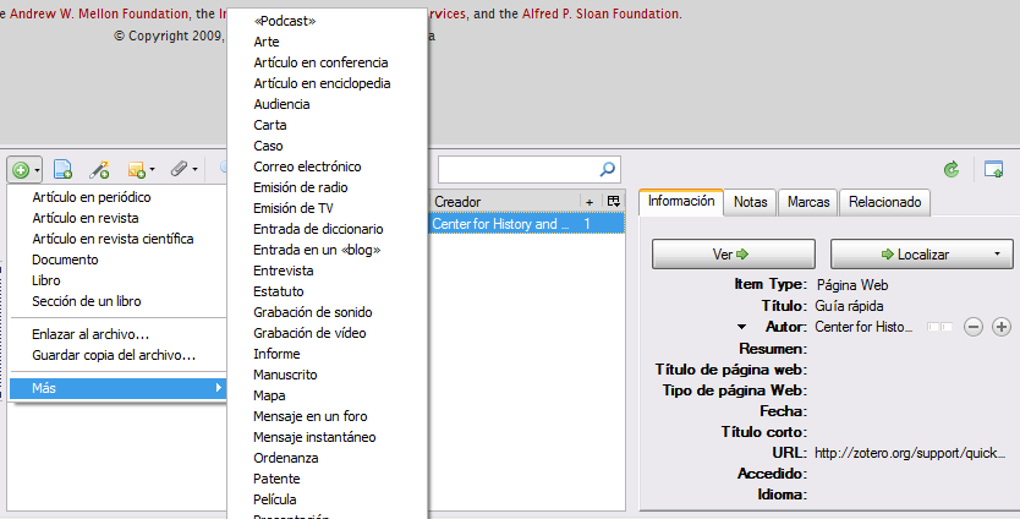
The primary function of Zotero is to act as your personal research assistant, a digital librarian capable of capturing comprehensive reference information from the web with a single click. Whether you’re browsing an academic journal, a news article, a book on an online store, or even a YouTube video, Zotero intelligently detects the resource and can save its full bibliographic details directly to your local library. This capability extends to capturing complete copies of sources, such as PDFs of articles, web page snapshots, or images, ensuring that your research materials are always accessible, even if the original online source changes or disappears. This intelligent capture system, combined with robust organizational tools, positions Zotero as an essential application, frequently compared to other leading reference managers like Mendeley, Refworks, or JabRef, but often lauded for its user-friendliness and open-source nature.
What truly sets Zotero apart is its seamless integration across various platforms and its commitment to collaborative research. It facilitates collecting, organizing, citing, synchronizing, and collaborating on research projects effortlessly, irrespective of the browser or operating system in use. Zotero automatically integrates and synchronizes across Windows, macOS, and GNU/Linux distributions, ensuring your research library is always up-to-date and accessible from any device. This cross-platform compatibility and synchronization are powered by a unified architecture, which evolved from earlier separate browser extensions and a desktop version (Zotero Standalone) into the comprehensive Zotero 5.0. This consolidated version, complemented by the various Zotero Connector extensions for browsers, empowers users to manage their bibliographic references both locally and in the cloud, offering unparalleled flexibility and reach.
Zotero: An Indispensable Tool for Education and Reference
In the realms of education, academic research, and professional documentation, the ability to accurately manage and cite sources is paramount. Zotero excels in this domain, providing a powerful suite of features designed to support students, professors, librarians, and researchers in their daily tasks. It transforms the often arduous process of compiling bibliographies and managing research materials into an intuitive and streamlined experience.
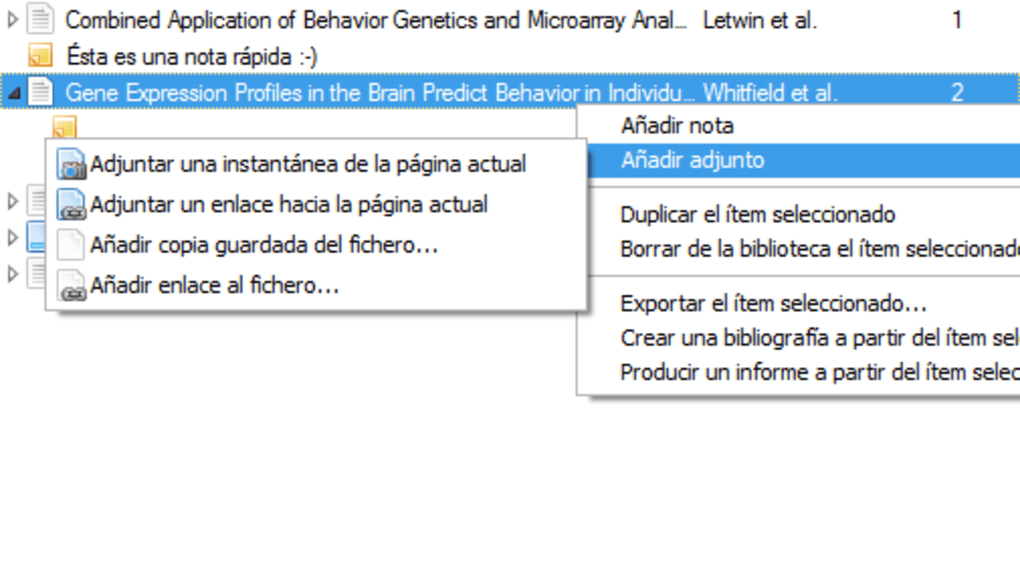
One of Zotero’s most significant contributions to the educational and research landscape is its ability to facilitate the extraction of metadata from PDF documents automatically. Imagine downloading dozens of research papers; Zotero can process these PDFs, extracting authors, titles, journal names, publication dates, and other crucial bibliographic information, thereby eliminating the need for manual data entry. This feature alone saves countless hours, allowing researchers to focus more on content analysis rather than administrative tasks. Beyond mere extraction, Zotero offers comprehensive full-text search capabilities across your entire document library. This means you can find specific keywords or phrases not just in the titles or abstracts, but within the body of all your saved PDFs and notes, making literature reviews and thematic analysis considerably more efficient.
The utility of Zotero extends to sophisticated document management. Users can rename PDF files according to customizable rules, ensuring a consistent and logical file organization. Intelligent filtering and personalized tagging capabilities allow for highly granular classification of research materials. Whether you want to group articles by topic, project, or methodological approach, Zotero provides the flexibility to create a system that works best for your individual workflow. This level of organization is crucial for large-scale research projects where managing hundreds or thousands of sources can become overwhelming without a robust system in place.
Perhaps Zotero’s most celebrated feature in academic circles is its robust support for CSL (Citation Style Language). This open XML-based language allows Zotero to generate bibliographic citations and bibliographies in a vast array of academic styles. With over 8,500 citation styles available out-of-the-box, including APA, MLA, Chicago, Harvard, IEEE, and many more, Zotero ensures that your citations meet the precise requirements of virtually any journal, university, or publisher. Furthermore, Zotero offers the possibility to customize these styles or even create new ones, providing an unmatched level of control over your documentation. This seamless integration with word processors like Microsoft Word and LibreOffice through dedicated plugins means that as you write, you can insert citations and generate bibliographies effortlessly, updating them dynamically as your reference list evolves. This functionality is invaluable for crafting academic papers, theses, dissertations, and research reports, significantly reducing the risk of citation errors and saving critical time during the final editing stages.
Zotero also fosters a collaborative research environment. It enables users to work online and share bibliographic references in groups. This is particularly beneficial for team projects, research groups, or institutional collaborations, where multiple individuals need access to a shared pool of resources. Group libraries allow team members to add, organize, and annotate references collectively, ensuring everyone is working with the most current and complete set of research materials. This shared workspace capability elevates Zotero from a personal productivity tool to a collaborative platform, enhancing the efficiency and coherence of group research endeavors. The ease with which researchers can share their findings and sources underscores Zotero’s role as a vital component in modern scholarly communication.
The platform’s versatility is further demonstrated by its support for bibliographic integration systems such as bookmarklet and CoinS, enabling flexible data capture from diverse web sources. It also boasts extensive import and export capabilities, allowing users to move documents in various formats, including PDF, JPG, PNG, HTML, DOC, TXT, RTF, and many more. This ensures compatibility with a wide range of academic tools and publishing workflows. Moreover, Zotero can effortlessly import records from a multitude of scientific databases and academic search engines like PubMed, Google Scholar, and Arxiv. Its intelligent connectors can even pull data from popular non-academic websites such as YouTube, IMDb, and Slideshare, recognizing the value of diverse media in contemporary research. This broad compatibility ensures that no valuable information source is left behind, allowing researchers to integrate a truly comprehensive range of materials into their Zotero library.
Boosting Productivity with Zotero’s Feature Set
Beyond its foundational role in academic referencing, Zotero significantly enhances overall productivity for any knowledge worker. Its design philosophy centers on automating routine tasks and providing intuitive tools that streamline the entire research workflow, from initial discovery to final publication.
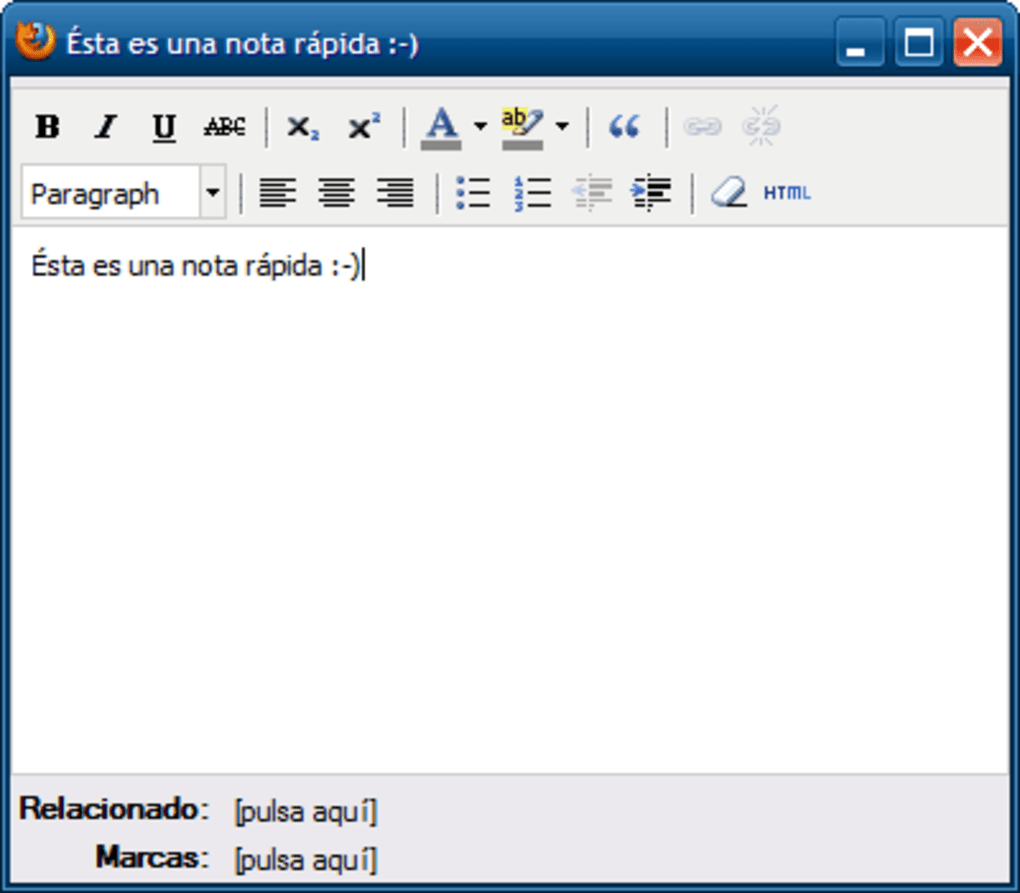
At its core, Zotero is an exceptional reference management system. It allows for the easy storage and management of references, along with associated tags, notes, and file attachments, all with a single click. This centralized repository ensures that all components of your research—the primary sources, your thoughts on them, and any related documents—are linked and readily retrievable. This is crucial for maintaining a coherent research trail and quickly revisiting information when needed. Furthermore, all this data is securely synchronized across all devices you use, provided you have a Zotero user account. This ensures that whether you’re working on your desktop, laptop, or even a mobile device (via compatible applications or web access), your research library is consistently available and up-to-date. This multi-device synchronization is a game-changer for modern flexible work environments, eliminating the hassle of manual file transfers or worrying about version control.
The open-source nature of Zotero is a major enabler of its extended functionality. While it comes packed with powerful native features, its design allows for significant enhancement through third-party plugins. This vibrant ecosystem of add-ons means that users can tailor Zotero to their specific needs, integrating it with other specialized tools or adding new capabilities not present in the core application. For example, as mentioned earlier, Zotero’s integration with word processors like Microsoft Word and LibreOffice is facilitated by robust plugins that streamline the citation process directly within your writing environment. These plugins are often available in multiple languages, catering to a global user base and making Zotero an even more versatile tool for academic documentation worldwide. The ability to extend Zotero’s capabilities through community-developed plugins not only makes it more powerful but also highly adaptable to evolving research methodologies and technological landscapes.
From a practical perspective, Zotero automates processes that, if done manually, could consume countless hours. Imagine the time saved by automatically extracting metadata from PDFs, rather than typing out each detail for every source. Consider the efficiency gained from dynamically generating bibliographies in the correct style, instead of meticulously formatting each entry by hand. The ability to search across all your documents instantly, filter by custom tags, and collaborate seamlessly with peers, all contribute to a dramatic increase in research productivity. It transforms research from a fragmented, labor-intensive process into a fluid, integrated, and efficient workflow.
Technical Specifications and Accessibility
Zotero’s commitment to accessibility and its robust technical foundation are key reasons for its widespread adoption. As a free and open-source software, published under the GNU Affero General Public License (GPL), Zotero champions the principles of transparency, collaboration, and unrestricted access to powerful tools.
Cost and Licensing: One of Zotero’s most attractive attributes is its complete freeness. Both the desktop software and its various browser extensions can be downloaded, distributed, and utilized without any financial cost or restrictive licenses. This open-source model ensures that Zotero is accessible to individuals and institutions worldwide, regardless of their budget. While the software itself is free, Zotero offers cloud synchronization with a generous free storage limit of 300 MB for user accounts. For users with more extensive libraries or who need to store a large volume of PDFs and other attachments, paid storage plans are available, which helps sustain the project while keeping the core functionality free for everyone. This tiered approach ensures that casual users or those with smaller research needs can enjoy Zotero’s full capabilities without cost, while heavy users have the option to scale their storage as required.
Key Technical Details:
- License: Free
- Version: 7.0.15
- Update Date: March 24, 2025 (note: this implies a future date and is likely a placeholder or error in the source material)
- Platform: Windows (also available for macOS, Linux, and mobile via Zotero Connector)
- OS Compatibility: Windows XP (and newer versions, implying broad compatibility)
- Interface Language: Spanish (Español)
- Available Languages: A wide array of languages, including German, English, Spanish, French, Japanese, Korean, Dutch, Polish, Portuguese, Russian, Chinese, Thai, Turkish, Vietnamese, and Arabic, indicating a strong international focus and user base.
- Downloads: Over 322.4K total downloads, with 3.6K in the last month (as per the source data), reflecting its ongoing popularity and active user engagement.
- Size: 89.48 MB (for the Windows installer), a relatively compact size for such a feature-rich application.
- Developer: Zotero (the project itself)
Pros and Cons: Like any software, Zotero has its strengths and areas for improvement.
-
Pros:
- Completely Free Bibliographic Reference Manager: This is arguably its biggest advantage, democratizing access to professional-grade research tools.
- Multi-Device and Cross-Platform Synchronization: Ensures seamless workflow across Windows, macOS, Linux, and via web access, making research truly mobile and flexible.
- Extensive Toolset: Offers a rich array of features for collecting, organizing, annotating, and citing.
- Third-Party Plugin Support: Allows for significant customization and extension of functionality, integrating with other applications and workflows.
- CSL Compatibility: Supports a massive library of citation styles, critical for academic rigor and diverse publishing requirements.
-
Cons:
- No Integrated PDF Reader: While it extracts metadata from PDFs and stores them, Zotero itself doesn’t offer a built-in PDF reader with annotation tools comparable to dedicated PDF applications. Users typically rely on external PDF readers to interact with their documents.
- Citation Manager Could Be Improved: Some users find the interface or specific features of its citation management (e.g., editing complex citation styles on the fly, advanced bibliography formatting) less intuitive or powerful than highly specialized, often paid, alternatives. However, for most academic needs, it is more than sufficient.
- Limited Free Storage (300 MB): While the software is free, the cloud storage for synchronizing attachments (like PDFs) is capped at 300 MB for free accounts. This limit can be quickly reached by researchers working with many PDF articles, necessitating a paid upgrade for more substantial cloud storage. This is a common model for sustaining open-source projects offering cloud services.
User Feedback and Community: User reviews consistently highlight Zotero’s effectiveness, especially for academic work. For instance, an anonymous user in 2012 praised it as an “excellent complement for Firefox” that “helps a lot, especially if you are looking to create bibliographies in works like theses, professional and extensive documents,” noting its faithful detailing of website bibliographies. The ease of use, exemplified by the “just click the book icon” process, is a recurring positive point. Another user in 2016 described it as “Spectacular,” emphasizing its value for scientific research.
While predominantly positive, some feedback points to areas where user experience could be enhanced, such as clearer instructions for new users, as suggested by Aurora Flores in 2017. This indicates that while the tool is powerful, the initial onboarding experience could sometimes be challenging for those less tech-savvy. Nevertheless, the consensus, as summarized by José Luis Nogales Astete in 2019, is that Zotero is “a very useful tool as a reference manager in the theme of research and literature reviews.” The active community behind Zotero, often responsive to feedback and continually developing new features and plugins, ensures that the software remains a relevant and evolving solution for information management.
Conclusion
Zotero unequivocally stands as a pivotal tool in the landscape of digital research and information management. Its status as a free, open-source, and cross-platform bibliographic reference manager makes it accessible to a global audience, democratizing the often complex process of scholarly documentation. From its origins as a simple browser extension to its current comprehensive, unified desktop application with robust cloud synchronization, Zotero has continually evolved to meet the demands of modern researchers.
Its capacity to automatically capture metadata, facilitate full-text search across documents, and manage files with intelligent tagging and renaming functions significantly streamlines the initial stages of research. The unparalleled support for thousands of Citation Style Language (CSL) formats, coupled with seamless integration with popular word processors, ensures academic rigor and efficiency in the writing and publication phases. Furthermore, its group collaboration features foster teamwork and shared knowledge, essential in contemporary research environments.
While Zotero offers a remarkably rich feature set, its open-source nature means it is also highly extensible through third-party plugins, allowing users to tailor its capabilities to their specific needs. Although it has minor drawbacks, such as the lack of an integrated PDF reader and a limited free cloud storage tier, these are often minor inconveniences easily mitigated or overcome by its overwhelming advantages.
In summary, Zotero is more than just a reference manager; it is a comprehensive research assistant that automates time-consuming tasks, organizes vast amounts of information, and ensures accurate academic attribution. For anyone engaged in academic study, professional research, or extensive documentation, Zotero represents an indispensable asset that significantly boosts productivity, maintains organizational clarity, and supports scholarly integrity. The continuous development by its dedicated community and its widespread adoption attest to its enduring value as a cornerstone tool for knowledge workers across the globe, ensuring that managing research remains as simple, fast, and automatic as possible.


