
Relive the nostalgic thrill of Nintendo 64 classics on your PC with 1964, a free emulator that brings the beloved console’s library to your desktop. While the original Nintendo 64 may feel like a relic of the past—a time perhaps best remembered for the Spice Girls or Germany’s penalty shootout victories over England—1964 provides a captivating portal back to that era. Rediscover the timeless charm of games like Super Mario Kart, The Legend of Zelda: Ocarina of Time, and GoldenEye 007, and experience them anew in the comfort of your PC.
Emulating the Past: A Retro Gaming Experience
1964 offers a compelling blend of nostalgia and modern convenience. Although the graphics might not match today’s high-definition standards, this retro aesthetic is precisely part of its appeal. It’s a chance to appreciate the groundbreaking visuals of a bygone era, recalling the unique charm and gameplay that defined the Nintendo 64 experience.
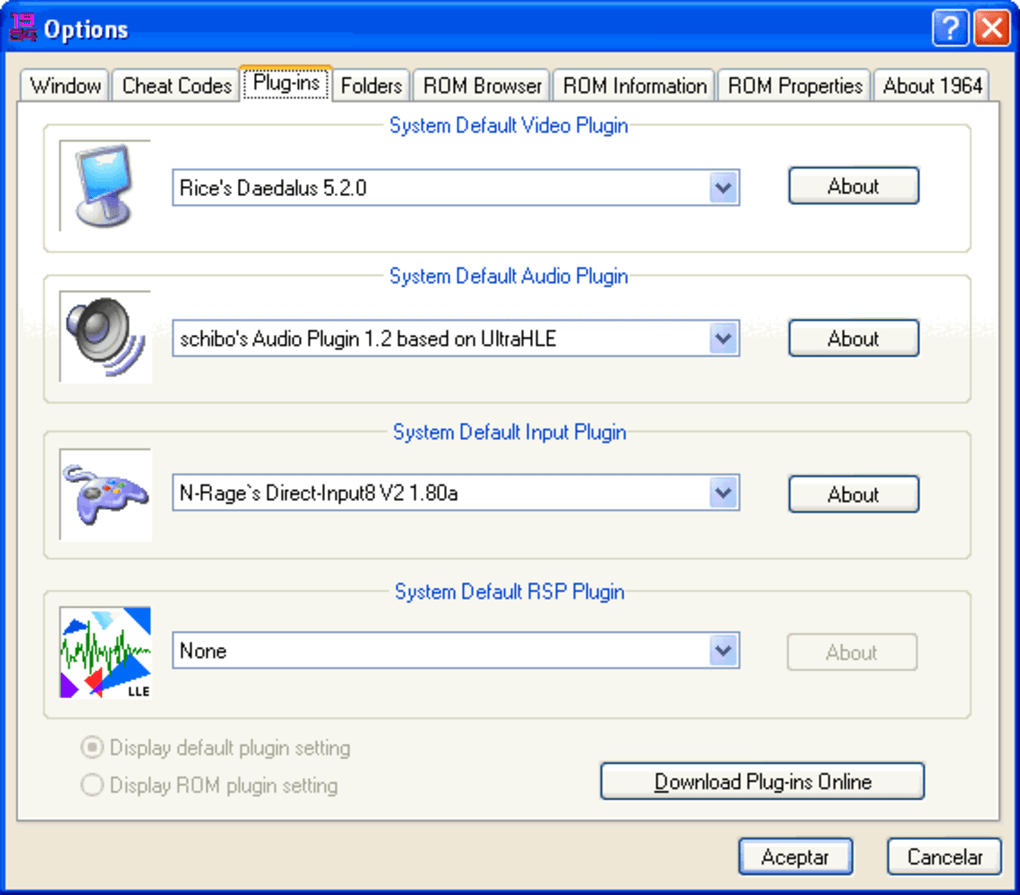
The emulator boasts an array of enhancements that go beyond simple emulation. It includes significant bug fixes, support for a wide selection of games, high-speed emulation to minimize lag, and an integrated cheat plugin for those seeking an easier gameplay experience. The inclusion of a save state facility allows players to pause their progress and resume later, ensuring uninterrupted gaming sessions. Furthermore, 1964 offers netplay features, enabling online multiplayer experiences with friends, allowing for cooperative and competitive gameplay across geographical boundaries. This brings a new dimension to classic titles, allowing you to share the experience with others, just as you might have done with friends gathered around a single Nintendo 64 console.
However, the emulator isn’t without its shortcomings. One significant drawback is the lack of comprehensive instructions or a user-friendly interface. Navigating the program and setting up controls can be challenging for newcomers. The emulator strongly recommends the use of a physical game controller connected to your PC for optimal gameplay. While keyboard controls are technically possible, they are not intuitive and significantly detract from the overall user experience. The lack of clear guidance on configuring keybindings adds to the frustration for players accustomed to the intuitive feel of a game controller. This makes the initial experience slightly steeper than it might be with more user-friendly emulators.
Technical Specifications and Availability
1964 is available as a free download for Windows operating systems, catering to a broad range of PC users. It supports a multitude of languages including English, Danish, German, Greek, Spanish, French, Italian, Japanese, Dutch, Norwegian, Portuguese, Russian, Swedish, and Chinese. This international reach ensures broader accessibility for gamers worldwide.
The emulator’s compact size of 8.23 MB makes downloading and installation straightforward, minimizing the burden on users’ storage space and internet bandwidth. Its relatively light footprint on system resources allows for smoother operation on a wider range of computer configurations. The latest version, 1.1.0.0, was last updated on July 15, 2022, demonstrating ongoing developer support and the potential for future updates and improvements.
The number of downloads further speaks to its popularity. With 157.9K downloads and 57 downloads in the previous month, 1964 establishes itself as a prevalent choice for Nintendo 64 emulation on PC. This significant user base underscores its reliability and effectiveness as an emulator for classic Nintendo 64 titles.
Advantages and Disadvantages of 1964
Pros:
- Extensive Game Compatibility: 1964 supports a large library of Nintendo 64 games, allowing access to a wide range of titles.
- High-Speed Emulation: The emulator provides high-speed performance, reducing lag and ensuring smooth gameplay.
- Netplay Capabilities: Online multiplayer capabilities enhance the gaming experience by allowing players to connect with others online.
- Integrated Cheat Plugin: This feature allows players to modify the game settings for easier or alternative gameplay.
- Save State Functionality: The ability to save and load game states offers convenience and flexibility to players.
Cons:
- Poor User Interface and Documentation: The lack of clear instructions and a user-friendly interface creates a learning curve for new users.
- Controller Requirement: The emulator strongly recommends the use of a physical game controller, making it less accessible to those without one. Keyboard controls are available but are poorly implemented.
- Limited Technical Support: The emulator may not offer readily available technical support for users experiencing difficulties.
Community and Future Development
Despite some drawbacks, 1964’s considerable download numbers and the availability of numerous online resources created by users illustrate a vibrant community of users working to improve the overall experience. This community-driven support extends beyond official channels, bridging the gaps in official documentation and providing solutions to common problems encountered by users. This active community represents a valuable resource for navigating the emulator’s nuances and enhancing the overall gaming experience.
The future of 1964 will likely depend on the continued engagement of its community and any future development efforts from Emulation64, the emulator’s developer. As the technology evolves, future updates could address some of the criticisms, enhancing user experience through improved documentation, more intuitive interface design, and perhaps, improved support for keyboard controls. The active user community could contribute significantly to future development by providing feedback, identifying bugs, and even contributing to the development of new features or improvements. Ultimately, the longevity and continued improvement of 1964 rest on this ongoing collaboration between developers and users.
File Information
- License: “Free”
- Version: “1.1.0.0”
- Latest update: “July 15, 2022”
- Platform: “Windows”
- OS: “Windows 98”
- Language: “English”
- Downloads: “158K”
- Size: “8.23 MB”


