
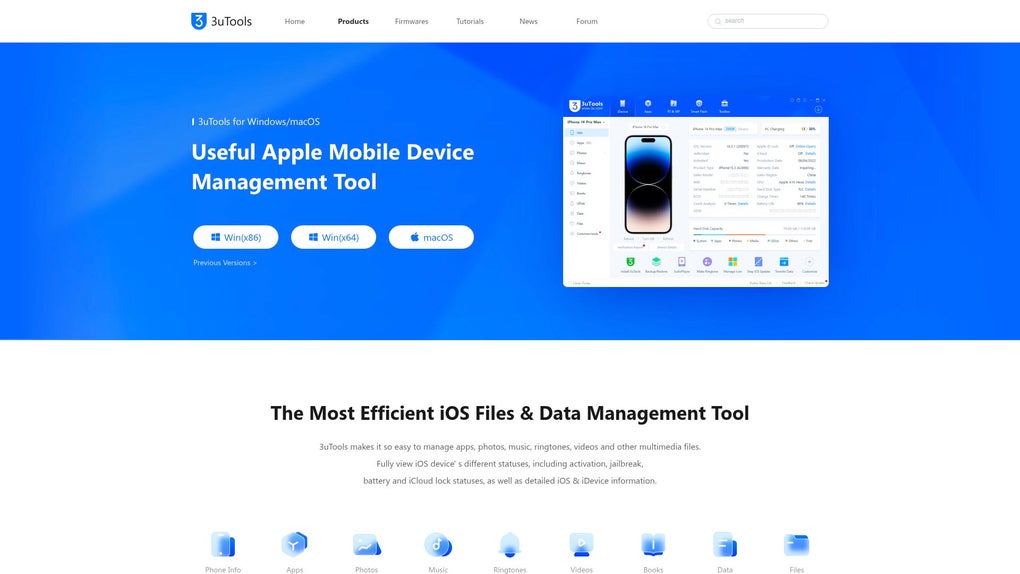
3uTools is a versatile utility for Mac computers designed to simplify the management of iOS devices, including iPhones, iPads, and iPod Touches. This all-in-one tool provides a wide range of functionalities, encompassing data transfer, backups, and advanced settings adjustments such as jailbreaking and firmware customization. Its intuitive interface ensures ease of navigation, catering to both novice and experienced users alike.
Streamlined iOS Device Management
3uTools excels at streamlining various aspects of iOS device management. Its core strength lies in its ability to handle multiple tasks efficiently, eliminating the need for multiple applications. This integrated approach saves time and simplifies the overall process of managing an iOS device from a Mac computer.
Effortless Data Transfer and Organization
One of the key features of 3uTools is its bidirectional file transfer capabilities. Users can seamlessly transfer photos, music, documents, and other files between their iOS devices and their Mac computers. This process is significantly faster and more efficient than using alternative methods, such as iTunes or manual syncing. Furthermore, 3uTools helps organize this transferred content effectively, making it easy to locate specific files or folders. The ability to manage large media libraries efficiently is a significant advantage for users with substantial amounts of data stored on their iOS devices.
Robust Backup and Restore Functionality
Data loss is a major concern for any device user. 3uTools addresses this concern with its robust backup and restore capabilities. Users can create selective backups of their iOS devices, ensuring that only the essential data is backed up, saving storage space and time. This selective backup feature allows users to choose which data to back up, offering flexibility and control. The restore function is equally efficient, enabling users to quickly recover data after system updates, device issues, or accidental data deletion. The reliable backup and restore capabilities provided by 3uTools offer peace of mind, knowing that critical data is protected and readily retrievable.
Advanced Features: Jailbreaking and Firmware Customization
For users interested in exploring advanced iOS functionalities, 3uTools offers jailbreaking options. Jailbreaking unlocks access to advanced features and customization opportunities that are typically unavailable in standard iOS environments. However, it’s crucial to understand the implications and potential risks associated with jailbreaking, including voiding warranties and potentially compromising device security. Users should carefully weigh the benefits against the potential drawbacks before undertaking this process. Furthermore, 3uTools provides tools for firmware customization, allowing users to fine-tune their devices’ operating systems according to their preferences. This advanced customization capability caters to users who desire greater control over their device’s functionalities and performance. Advanced users can leverage these features to personalize their iOS experience significantly.
Device Optimization and Cleanup Utilities
Beyond its core functionalities, 3uTools incorporates several cleanup utilities designed to optimize the performance of iOS devices. These tools help remove unnecessary files, caches, and temporary data, freeing up storage space and improving overall device responsiveness. By removing redundant files, 3uTools can help address performance bottlenecks commonly encountered with iOS devices over time. This feature is particularly beneficial for users with older devices or those who have accumulated large amounts of data. Regular use of these cleanup utilities helps maintain optimal device performance and prolongs its lifespan.
User-Friendly Interface and Ease of Use
Despite its extensive feature set, 3uTools maintains a user-friendly interface that is intuitive and easy to navigate. The program’s design prioritizes simplicity, allowing users to quickly access and utilize its various functionalities without needing extensive technical knowledge. The clear layout and straightforward instructions make it accessible to both beginners and experienced users. This focus on user experience ensures that even users unfamiliar with complex software can effectively manage their iOS devices.
3uTools: A Comprehensive Solution
In conclusion, 3uTools presents a comprehensive solution for managing iOS devices from a Mac computer. Its combined functionalities of data transfer, backup and restore, advanced features such as jailbreaking and firmware customization, and device optimization utilities make it a powerful and versatile tool. The user-friendly interface ensures accessibility for users of all technical skill levels. While jailbreaking carries risks, the overall benefits of 3uTools, including efficient data management and device optimization, make it a valuable asset for any iOS user with a Mac. It streamlines a complex process, empowering users with greater control and ease of use compared to alternative methods. The emphasis on both advanced and basic features caters to a wide spectrum of user needs and technical expertise.
Comparing 3uTools to other iOS Management Software
While several other software applications offer similar iOS device management capabilities, 3uTools distinguishes itself through its integrated approach and comprehensive feature set. Unlike some applications which focus solely on data transfer or backups, 3uTools consolidates these functionalities within a single interface. This integrated approach enhances efficiency and simplifies the user experience, avoiding the need to switch between multiple programs. Furthermore, 3uTools incorporates advanced features such as jailbreaking and firmware customization, which are absent in many competing applications. This expanded functionality appeals to power users seeking advanced control over their iOS devices. The user-friendly interface and clear navigation further differentiate 3uTools, setting it apart from applications with more complex or less intuitive designs.
Frequently Asked Questions (FAQ) about 3uTools
Q: Is 3uTools safe to use?
A: 3uTools itself is generally considered safe, however, using features like jailbreaking inherently introduces security risks. Always download 3uTools from the official website to minimize the risk of malware or other malicious software. Be aware of the risks associated with jailbreaking before proceeding.
Q: What operating systems are compatible with 3uTools?
A: Currently, 3uTools is primarily available for macOS and Windows operating systems.
Q: Does 3uTools work with all iOS devices?
A: 3uTools supports a wide range of iPhones, iPads, and iPod Touches. However, compatibility may vary depending on the specific iOS version and device model. It’s recommended to check the official 3uTools website for the most up-to-date compatibility information.
Q: Is 3uTools free to use?
A: Yes, 3uTools is available as a free download. However, some advanced features or premium support might require a paid subscription or in-app purchase.
Q: What are the system requirements for running 3uTools?
A: The system requirements for 3uTools may vary depending on the version. Check the official website or the application’s description for the most accurate and up-to-date information. Generally, a relatively modern Mac operating system and sufficient free disk space are needed.
Q: How do I report a problem or provide feedback to the developers of 3uTools?
A: The official 3uTools website or the application itself should provide contact information or a feedback mechanism for users to report problems or provide suggestions for improvement. Consult their official support channels for the most reliable assistance.
This detailed overview of 3uTools provides a comprehensive understanding of its functionalities, benefits, and potential drawbacks. Remember always to download software from trusted sources and be aware of the implications of using advanced features like jailbreaking.
File Information
- License: “Free”
- Version: “3.15.002”
- Latest update: “May 8, 2025”
- Platform: “Mac”
- OS: “macOS 10.15”
- Language: “English”
- Downloads: “15.9K”
- Size: “186.08 MB”


