
Syncios is a free, user-friendly application designed for managing iOS devices. It provides a streamlined interface for backing up data, transferring files between iOS devices and computers (including those running Android), and performing various other essential tasks. This comprehensive guide explores Syncios’s functionalities, benefits, limitations, and alternatives.
Streamlined iOS Device Management
Syncios simplifies the often-complex process of managing data on iOS devices. Its intuitive interface, reminiscent of older versions of iTunes, makes it accessible even for users with limited technical expertise. The application features a two-pane layout: the left pane displays a tool menu and a hierarchical view of your device’s files and folders, while the right pane shows the contents of the currently selected folder. This clear organization allows for effortless navigation and efficient file management.
One of Syncios’s key advantages lies in its ability to seamlessly transfer various media files between your iOS device and a computer (or even another mobile device). This includes photos, videos, music, and other data. Importantly, Syncios automatically converts files into compatible formats, eliminating the need for manual conversions and ensuring compatibility with your iOS device. This automatic conversion feature significantly simplifies the transfer process, saving users time and effort.
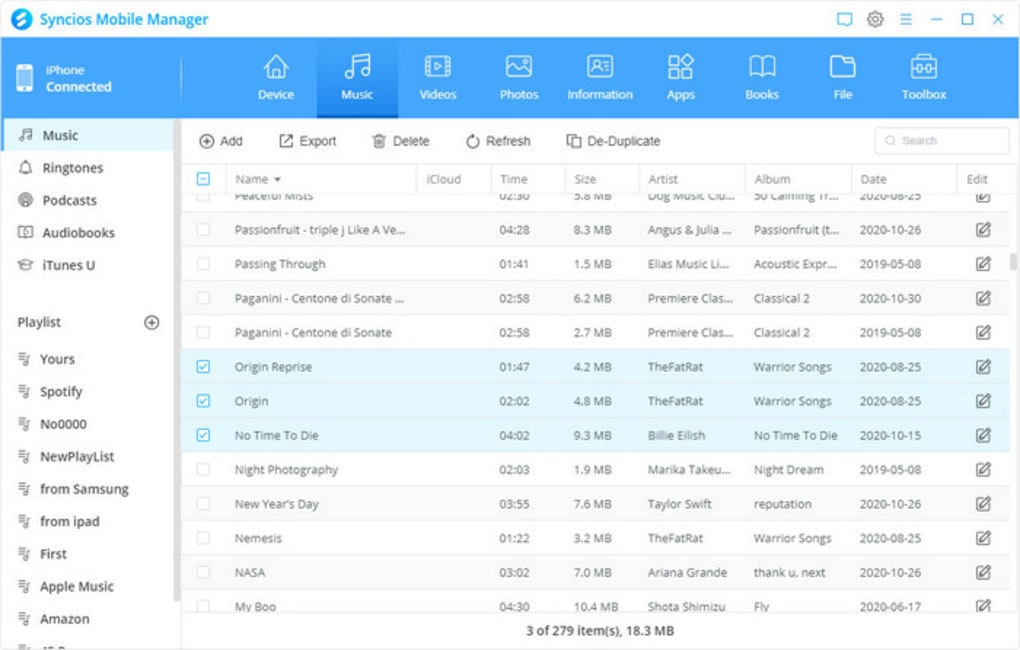
Beyond simple file transfers, Syncios also offers robust backup and restore capabilities. Users can create comprehensive backups of their device’s data, including applications, settings, and files, and seamlessly restore this data at a later time. This functionality is crucial for protecting valuable data and ensuring easy recovery in case of device loss, damage, or operating system issues.
Furthermore, Syncios allows users to access and manage text messages directly from their computer. This feature enables convenient searching and reviewing of message threads, eliminating the need to access your phone for this purpose. This simple, but highly beneficial feature provides a convenient alternative to accessing messages directly on the phone.
Beyond Basic File Transfer: Built-in Tools and Utilities
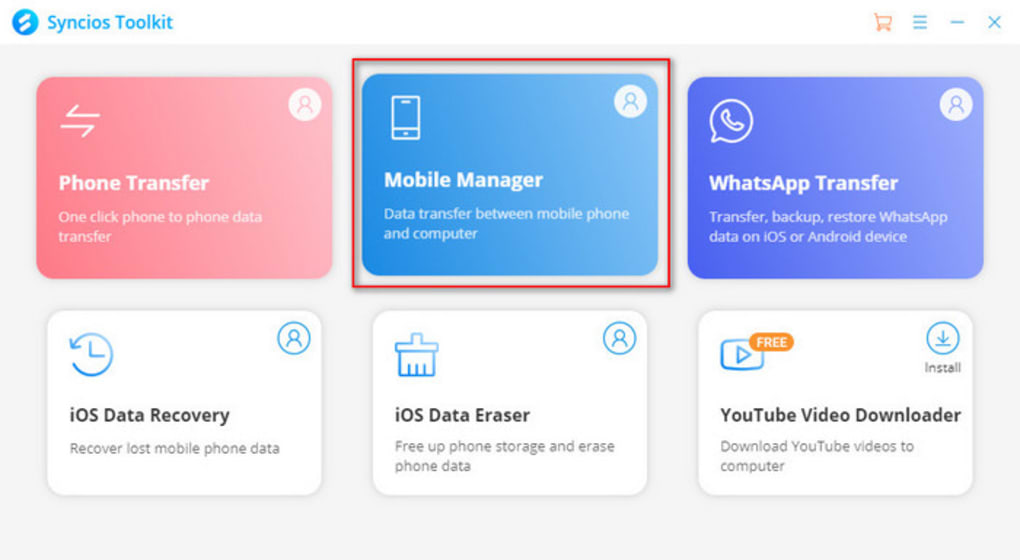
Syncios extends its functionality beyond basic file management with a suite of integrated tools designed to enhance user experience and efficiency. These built-in tools significantly improve usability and expand Syncios’ versatility.
One notable inclusion is a free video downloader, capable of retrieving videos from over 100 websites, including popular platforms such as YouTube, Vimeo, and Facebook. This functionality adds significant value for users who regularly consume online video content, enabling them to easily download and manage their favorite videos within the Syncios environment. This integration simplifies the video downloading process, avoiding the need to use separate downloaders.
The application also incorporates a free audio converter, allowing users to modify the formats of their audio files for optimal compatibility with various devices and applications. Similarly, Syncios includes a free video converter, enabling users to transform videos into desired formats for improved playback or compatibility. This conversion functionality ensures wider compatibility and efficient media management.
Further enhancing its utility, Syncios provides a free ringtone maker, enabling users to customize ringtones directly within the application. This allows for easy creation and personalization, adding a layer of customization that users appreciate.
Finally, Syncios offers free iTunes backup management, assisting users in organizing and managing their iTunes backups more efficiently. This feature enhances the overall organization of user data and provides better control over backups. The inclusion of these additional tools showcases Syncios’ commitment to providing a comprehensive solution for iOS device management.
Syncios: Pros and Cons
While Syncios offers a plethora of valuable features, it’s crucial to assess both its advantages and disadvantages.
Pros:
- User-Friendly Interface: Syncios boasts an intuitive and easy-to-navigate interface, making it accessible to users of all technical skill levels.
- Cross-Platform Compatibility: The software facilitates seamless data transfer between iOS devices, Android devices, and PCs.
- Automatic File Conversion: Syncios automatically converts files to ensure compatibility with iOS devices, simplifying the transfer process.
- Comprehensive Backup and Restore: The robust backup and restore functionality safeguards user data and ensures efficient recovery.
- Integrated Tools: The inclusion of a video downloader, audio converter, video converter, ringtone maker, and iTunes backup manager enhances overall utility.
- Free Availability: Syncios is offered free of charge, making it an attractive option for budget-conscious users.
- Windows 11 Compatibility: The application supports the latest version of the Windows operating system.
Cons:
- Limited Contact Management: Syncios’s contact management capabilities may be less comprehensive than those found in dedicated contact management software.
- iTunes Dependency (Potentially): While not explicitly stated as a requirement in all descriptions, some users have reported needing iTunes installed for certain functions to operate correctly. This might be a limitation for users who prefer not to install iTunes.
- Potential for Bugs and Occasional Issues: As with any software, Syncios may occasionally encounter bugs or performance issues.
Alternatives to Syncios
While Syncios offers a compelling solution for iOS device management, several alternative applications cater to similar needs. Some noteworthy alternatives include:
- iTools: A popular iOS management tool that provides features similar to Syncios, including file transfer, backup, and device management.
- Syncios Data Transfer: A paid version of Syncios that offers enhanced capabilities, including direct phone-to-phone data transfer.
- Appandora: A free tool offering file transfer between iOS devices and PCs, along with an app management feature.
- 3uTools: A comprehensive all-in-one data management tool for iOS devices, offering similar functionalities to Syncios with additional features.
- iFunBox: A free file manager specifically designed for iPhone and iPod Touch devices.
- PhoneBrowse: Another free option for browsing and managing iOS device files from a PC.
The choice between Syncios and its alternatives depends on individual needs and preferences. Factors to consider include the specific features required, the level of technical expertise, and budget constraints. Comparing the features and functionalities of each application can help users select the optimal solution for their specific needs.
User Reviews and Feedback
User reviews consistently highlight Syncios’s ease of use and effectiveness in transferring data between devices. Many users appreciate the intuitive interface and the automated file conversion capabilities. However, some reviews mention occasional glitches and limitations in contact management. Overall, user feedback indicates that Syncios provides a generally positive user experience, though users should be aware of potential limitations.
Conclusion
Syncios offers a convenient and efficient solution for managing iOS devices, particularly for users seeking a free and user-friendly option. Its intuitive interface, comprehensive backup and restore capabilities, and integrated tools significantly improve the management of data on iOS devices. While some limitations exist, particularly regarding contact management and potential dependence on iTunes, Syncios’s strengths in file transfer and automated format conversion make it a worthwhile tool for many users. Potential users should carefully evaluate their specific requirements and compare Syncios with available alternatives before making a decision. However, for a simple, free, and efficient way to manage your iOS device’s data, Syncios remains a strong contender.
File Information
- License: “Free”
- Latest update: “February 4, 2025”
- Platform: “Windows”
- OS: “Windows 8”
- Language: “English”
- Downloads: “246K”
- Size: “47.73 MB”


