8 SoundCloud is a free application designed for Windows 10 devices and Xbox One consoles, offering a dedicated platform to access and enjoy the vast music library available on the SoundCloud service. Unlike accessing SoundCloud through a web browser, 8 SoundCloud provides a streamlined, standalone experience, allowing users to immerse themselves in their favorite music without the distractions of other browser tabs or the need for multiple devices. This review will delve into the functionalities, strengths, and weaknesses of this application.
Features and Functionality of 8 SoundCloud
8 SoundCloud’s core functionality revolves around providing a convenient interface for browsing and playing music from the SoundCloud platform. This includes several key features:
-
Direct SoundCloud Integration: The app directly connects to SoundCloud’s servers, allowing users to access their existing playlists, discover new artists and tracks, and generally navigate the SoundCloud experience without the limitations of a web browser.
-
Background Playback: This is a significant advantage for users who want to listen to music while engaging in other activities on their computer or while gaming on their Xbox One. The music continues to play even when the application is minimized or another program is in focus.
-
Artist and Track Search: The app features a built-in search function, allowing users to quickly find specific artists or tracks within the extensive SoundCloud catalog. This facilitates efficient navigation through the platform’s vast library of music.
-
Trending Music Discovery: 8 SoundCloud keeps users up-to-date with trending music on the SoundCloud platform. This feature surfaces popular and newly released tracks, potentially introducing listeners to new artists and genres.
-
No SoundCloud Account Required (Potentially): While the original description suggests a lack of account requirement, the practical usability might vary. While you might be able to browse and play publicly available tracks without logging in, accessing personalized playlists or features might necessitate a SoundCloud account.
Advantages of Using 8 SoundCloud
The primary benefit of 8 SoundCloud is its convenience. It provides a dedicated space for accessing and enjoying SoundCloud music, avoiding the complexities of web browser navigation and multitasking. The background playback feature is another major advantage, particularly for gamers, allowing them to immerse themselves in their game without interrupting their listening experience.
The ability to search for specific artists and tracks ensures a smooth and efficient user experience. For users already familiar with SoundCloud, the intuitive nature of the app allows for a seamless transition from web browsing to dedicated application usage. The inclusion of a trending music section helps users discover new music and stay updated with the latest releases on the platform.
Disadvantages and Limitations of 8 SoundCloud
While 8 SoundCloud offers convenience, it also faces several limitations:
-
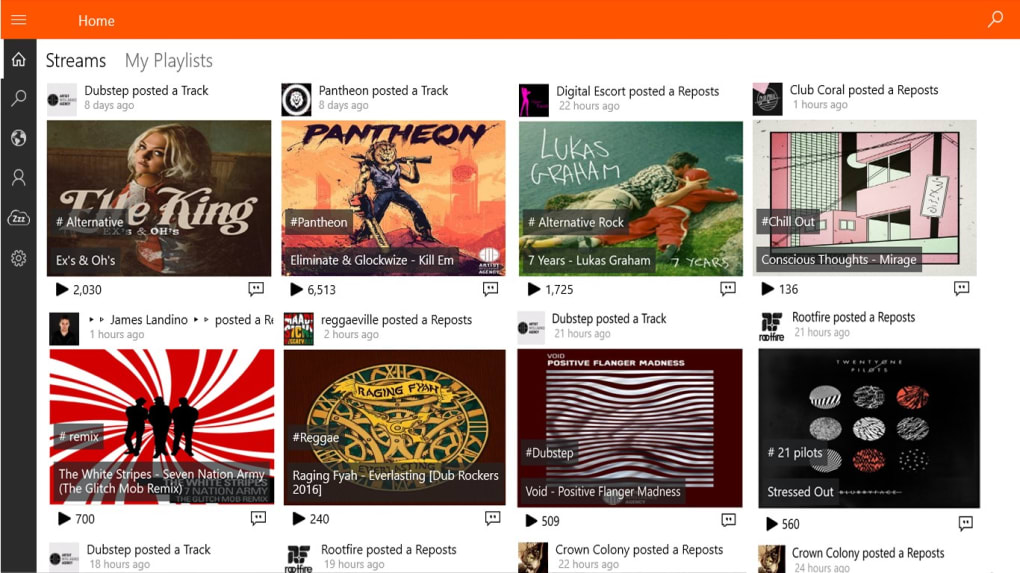
Interface Brightness: User reviews frequently mention the overly bright interface. This can be visually fatiguing during extended use, especially in low-light environments. The lack of customization options for interface brightness or theme is a noteworthy drawback.
-
Playlist Loading Issues: Reports of inconsistent playlist loading indicate potential instability within the application. This can severely disrupt the user experience, preventing users from accessing their carefully curated music collections.
-
Limited Music Selection: The app only offers access to music already available on the SoundCloud platform. This restricts the music library to what SoundCloud offers, meaning the user does not have access to music outside the platform’s library.
-
Absence of Offline Playback: This is a significant limitation. The inability to download music for offline listening means that users are always dependent on a stable internet connection to access their music. This is especially problematic in areas with unreliable internet connectivity or when traveling.
-
No Download Feature: The lack of a download function is another crucial drawback. This restricts user control over their listening experience, limiting flexibility and potentially affecting accessibility in areas with spotty internet access.
-
Potential for Bugs and Instability: The infrequent updates and mixed user reviews suggest potential instability and the presence of bugs within the application. The lack of regular maintenance and updates might hinder the overall functionality and user satisfaction.
-
Outdated Software: The last update noted is from October 10, 2018, suggesting that the application is no longer actively maintained. This increases the likelihood of compatibility issues with newer versions of Windows and the potential for security vulnerabilities.
Alternatives to 8 SoundCloud
Given the limitations and lack of active development of 8 SoundCloud, several alternative applications and methods exist for accessing SoundCloud on Windows devices:
- Web Browser: The most straightforward alternative is to use a web browser to access the SoundCloud website directly. While this lacks the standalone convenience of 8 SoundCloud, it offers the most comprehensive access to all of SoundCloud’s features.
-
Dedicated SoundCloud Desktop App (if available): SoundCloud may offer its own dedicated desktop application for Windows. Checking the official SoundCloud website is recommended to see if a more up-to-date and feature-rich application is available.
-
Third-Party Music Players: Several third-party music players might support SoundCloud integration, allowing users to access their music through those applications. These often offer a wider range of features than 8 SoundCloud.
-
SoundCloud Mobile App: Though designed for mobile devices, the official SoundCloud mobile app might offer a suitable alternative on Windows devices if running within an emulator or on certain devices with support for Android applications.
Conclusion: Is 8 SoundCloud Worth Using?
Given the age of the application and the numerous reported drawbacks, 8 SoundCloud might not be the optimal solution for accessing SoundCloud on Windows devices in 2024. The lack of active development, outdated features, and issues with stability significantly detract from the user experience. While the concept of a dedicated desktop application for SoundCloud is appealing, the current implementation of 8 SoundCloud falls short. Users are strongly advised to explore alternative methods, such as using the official SoundCloud website or other more modern and actively maintained music players, for a more reliable and feature-rich experience. The outdated nature of 8 SoundCloud, coupled with its limitations and the availability of superior alternatives, renders it largely obsolete in the current landscape of music streaming applications.
File Information
- License: “Free”
- Version: “varies-with-device”
- Latest update: “October 10, 2018”
- Platform: “Windows”
- OS: “Windows 10”
- Language: “English”
- Downloads: “39K”