
AMD Radeon Software Crimson Edition, a free utility tool from Advanced Micro Devices (AMD), significantly enhances the graphics performance of video games on your PC. This comprehensive review delves into its features, improvements over previous iterations, user experience, and overall value. From its revamped user interface to its powerful performance-enhancing features, we’ll explore why Crimson Edition remains a popular choice for gamers and PC enthusiasts alike.
A New Era for AMD Graphics Drivers
For years, AMD graphics card users relied on ATI Catalyst and later AMD Catalyst, driver suites known for their functionality but often criticized for their complex interface and cumbersome navigation. The Crimson Edition marked a significant departure, representing a complete overhaul designed with user feedback at its core. Built using the Qt toolkit, this driver suite primarily targets Microsoft Windows and Linux systems with 32-bit and 64-bit x86 processors. While annual updates were previously standard, the release of Crimson Edition in 2015 signaled a focus on significant, user-driven improvements rather than incremental changes.
This evolution moved beyond simple driver updates; it addressed the core usability issues that plagued earlier versions. The Catalyst Control Center, the control panel for previous iterations, was replaced with Radeon Settings, boasting a far more streamlined and intuitive interface. This intuitive design is crucial for both novice and experienced users, simplifying the process of adjusting graphical settings to optimize game performance and overall system visual experience.
Enhanced User Interface and Intuitive Navigation
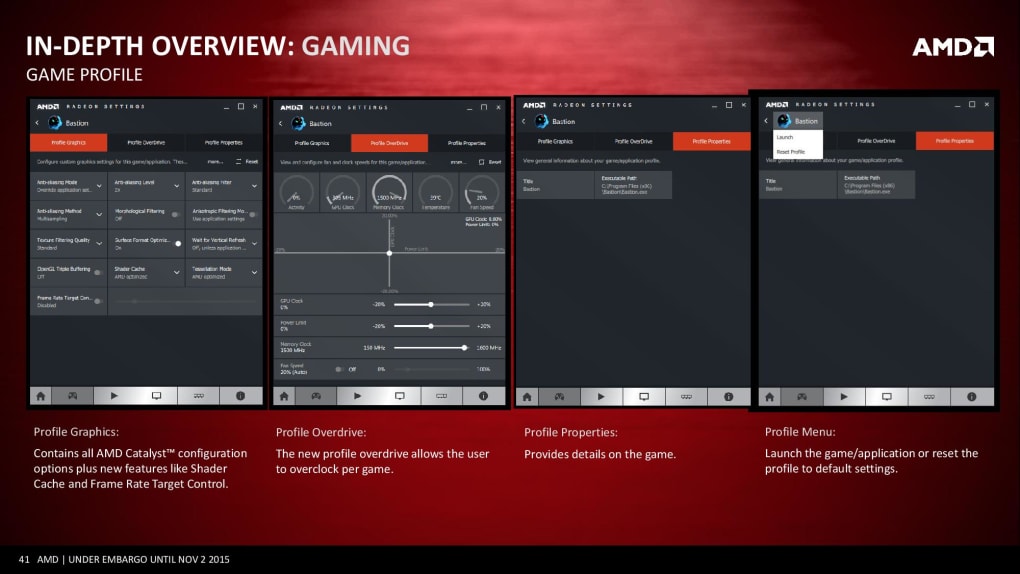
The redesigned interface in Radeon Settings represents a major improvement over its predecessors. The complexity of previous versions often overwhelmed users, particularly those unfamiliar with advanced graphics settings. Crimson Edition tackles this by grouping settings logically under clearly labeled tabs. Finding the specific setting you need is now straightforward and less time-consuming. A dedicated gaming tab centralizes all game-related settings, providing a convenient hub for performance adjustments.
This intuitive approach extends to game detection. The software automatically identifies games installed on your system, eliminating the need for manual configuration in most cases. For each game, users can create custom profiles, saving preferred settings for optimal performance and visual fidelity. This eliminates the need to reconfigure settings every time you switch games, significantly simplifying the user experience. The improved organization and clarity contribute significantly to an overall smoother and more enjoyable experience. For users previously frustrated by the complexities of older AMD driver suites, Crimson Edition delivers a welcome improvement in user-friendliness.
Performance Enhancements and Optimization Features
Beyond the improved user interface, Crimson Edition offers substantial performance enhancements. The integrated Shader Cache, a prominent feature, significantly accelerates game loading times by pre-loading and caching shaders, reducing the initial wait time and getting users into the game faster. Additionally, frame-pacing enhancements contribute to smoother gameplay, reducing stuttering and screen tearing, resulting in a more fluid and visually appealing experience.
The Frame Rate Target Control (FRTC) is another noteworthy feature. This allows for more precise control over frame rates, providing a significant benefit for power saving. By targeting a specific frame rate, users can reduce power consumption without sacrificing significant visual quality, which is particularly valuable for laptops or systems with power constraints. The intelligent balancing of performance and efficiency represents a powerful advantage for users seeking optimal performance without impacting their system’s power usage.

The software’s ability to automatically detect and profile games is another aspect that improves its overall effectiveness and usability. This automated feature saves users from manual setup, allowing them to easily adjust settings for a wide range of titles. The user-friendly design allows easy access to critical settings and performance enhancements, even for users without prior experience optimizing graphical settings.
Streamlined Installation and Launch
Installation and launching the software are now quick and straightforward processes, contrasting sharply with the potentially lengthy and complex installation routines associated with older driver versions. The streamlined process reduces waiting times and improves the overall user experience significantly, enabling quicker access to the program’s features and capabilities. The reduced wait times contribute to an improved overall user experience, emphasizing efficiency and ease of use.
Addressing Limitations and Potential Drawbacks
While Crimson Edition represents a notable improvement, some advanced settings remain less accessible than others. Although the main interface is user-friendly, accessing advanced options typically requires navigating to a separate menu or button, adding a few extra steps to the process. While this doesn’t detract significantly from the overall experience for most users, those seeking the deepest levels of customization may find the accessibility of certain settings somewhat less intuitive than desired.
Despite this minor limitation, the overall enhancements and improvements in the user interface, performance, and ease of use far outweigh this drawback. For the vast majority of users, the benefits offered by Crimson Edition clearly exceed the minor inconvenience of accessing advanced settings.
Comparison with Previous Versions: A Quantum Leap
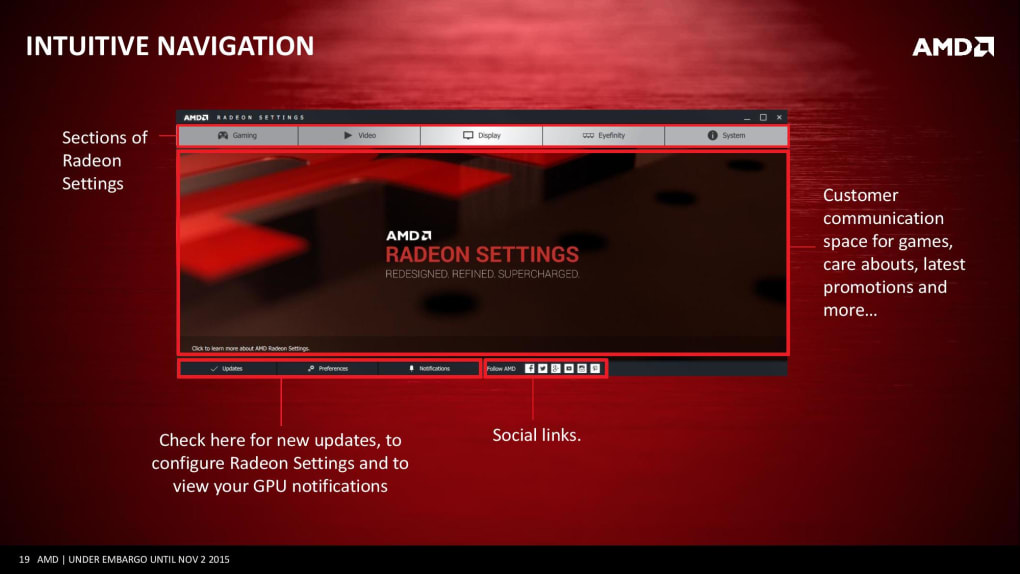
The shift from the earlier Catalyst versions to Crimson Edition represents a significant advancement in AMD’s graphics driver technology. The Catalyst Control Center, known for its complex layout and challenging navigation, is replaced with a far more user-friendly interface in Radeon Settings. The shift focuses on user experience, making game optimization and system-wide graphic adjustments accessible to a wider range of users.
The automatic game detection feature, absent in older versions, streamlines the process of configuring settings for individual games. Crimson Edition’s pre-emptive Shader Cache technology and frame-pacing enhancements are significant performance improvements not available in the Catalyst series. The inclusion of FRTC for power management offers added flexibility and efficiency, another feature absent from the previous iterations. Overall, the Crimson Edition delivers substantial improvements in both usability and performance over its predecessors.
Conclusion: A Highly Recommended Upgrade
AMD Radeon Software Crimson Edition is a significant upgrade over previous versions. Its streamlined interface, performance enhancements, and ease of use make it highly recommended for users of AMD graphics cards. While accessing some advanced settings might require a few extra clicks, the overall improvement in user-friendliness and performance makes it a compelling choice for both novice and experienced users alike. The focus on usability, combined with the noticeable performance benefits, solidifies Crimson Edition’s place as a valuable tool for anyone seeking to optimize their gaming experience on a PC. The intuitive design and performance enhancements make it a highly recommended upgrade for any AMD graphics card user.
File Information
- License: “Free”
- Version: “16.3.1”
- Latest update: “July 15, 2022”
- Platform: “Windows”
- OS: “Windows 7”
- Language: “English”
- Downloads: “1.7K”
- Size: “242.07 MB”


