
In today’s fast-paced digital world, audio files come in a myriad of formats, each designed for specific purposes and devices. Among these, AMR (Adaptive Multi-Rate) and MP3 (MPEG-1 Audio Layer III) stand out, serving distinct roles in the realm of sound. While MP3 has become the ubiquitous standard for digital music and general audio playback due to its widespread compatibility and impressive compression, AMR files are intrinsically linked to mobile telephony, particularly for recording and transmitting spoken voice. This inherent difference often creates a need for conversion, especially when users wish to transition audio recorded on their mobile devices into a more versatile and universally accepted format. This is precisely where a tool like the AMR to MP3 Converter proves invaluable, offering a straightforward solution to a common digital dilemma.
At PhanMemFree.org, we understand the complexities and nuances of digital media, and our mission is to provide users with reliable, easy-to-use software solutions. The AMR to MP3 Converter, available as a trial version for Windows, embodies this philosophy by focusing on simplicity and functionality. Developed specifically to tackle the challenge of converting mobile-centric AMR files into the more adaptable MP3 format, and vice-versa, it serves a crucial niche for users who interact with both worlds. This comprehensive guide will delve into the intricacies of these audio formats, explore the features and limitations of the AMR to MP3 Converter, provide insights into its practical applications, and highlight how PhanMemFree.org helps users navigate the vast landscape of digital tools.
Understanding AMR and MP3: Why Conversion Matters
Before diving into the specifics of the AMR to MP3 Converter, it’s essential to grasp the fundamental differences between AMR and MP3 formats. Their distinct characteristics are precisely what necessitate conversion and highlight the converter’s utility.
What is AMR (Adaptive Multi-Rate)?
AMR, or Adaptive Multi-Rate, is an audio data compression scheme optimized for speech coding. It was developed primarily for GSM and UMTS mobile phone systems, becoming the standard speech codec for cellular networks. Its core strength lies in its ability to encode speech efficiently, especially in environments with varying network conditions. This is achieved through adaptive bit-rate adjustment, meaning it can switch between different bit rates depending on channel conditions, ensuring call quality even in challenging situations.
However, this optimization comes with trade-offs. AMR files are typically small in size, making them ideal for transmitting voice over limited bandwidth. But this efficiency often results in a lower audio fidelity when compared to formats designed for music. They are specifically tuned for the human voice, making them less suitable for musical recordings or complex audio landscapes. Furthermore, AMR files have historically been less universally compatible outside of mobile phone ecosystems. While modern smartphones might handle them, older devices or dedicated audio players often struggle, necessitating conversion for broader playback.
What is MP3 (MPEG-1 Audio Layer III)?
In stark contrast, MP3 (MPEG-1 Audio Layer III) is an audio coding format that uses a form of lossy data compression. It is by far the most common audio format for consumer audio streaming and storage, renowned for its ability to significantly reduce the size of audio files while retaining a quality that is often indistinguishable from uncompressed audio to the average listener. MP3 achieves this by selectively discarding information that is considered inaudible to most human ears, a process known as perceptual coding.
The MP3 format is a cornerstone of the digital music revolution, enabling easy distribution and playback of music across a vast array of devices and platforms, including computers, dedicated MP3 players, smartphones, car stereos, and smart home devices. Its widespread adoption means almost any audio software or hardware product supports MP3 playback. While not optimized specifically for speech like AMR, its versatility, acceptable quality at various bit rates, and universal compatibility make it the go-to format for general audio.
The Need for Conversion: Compatibility and Versatility
The disparity between AMR and MP3 creates a clear need for conversion. Imagine recording an important voice memo or a casual conversation on your mobile phone, which saves the file in AMR format. You might then want to:
- Play it on your computer: While some media players can handle AMR, many will default to MP3.
- Share it with others: Ensuring recipients can open and listen to the file without needing special software.
- Edit the audio: Most audio editing software is optimized for MP3 and WAV, making AMR a less practical format for post-production.
- Create a ringtone: Many older phones, or even some current ones, might require MP3 for custom ringtones.
- Archive the audio: Storing it in a more robust and universally accessible format for future use.
Without a conversion tool, users might find themselves unable to fully utilize or share their AMR recordings. This is precisely the gap that the AMR to MP3 Converter aims to bridge, providing a simple, direct pathway between these two prevalent audio formats.
Introducing the AMR to MP3 Converter: A Deep Dive
The AMR to MP3 Converter is designed with a singular focus: to facilitate the conversion between AMR and MP3 files. Its development ethos leans heavily towards straightforward functionality, making it accessible to users who may not be technically proficient but still need to manage their audio files effectively.
Core Functionality: Simple and Direct Conversion
The primary function of this application, as its name suggests, is to convert AMR audio files into MP3 format, and vice versa. This dual capability is crucial for users who not only need to liberate their voice recordings from the confines of AMR but also wish to create specific AMR files for older mobile devices, perhaps for custom ringtones or voice messages. The application’s core strength lies in its directness; it promises to do one thing and do it efficiently. Users simply select their input file and choose the desired output format, initiating a swift conversion process. This simplicity makes it a utility rather than a comprehensive audio suite, catering to a specific, common requirement.
User Experience: Simplicity Over Features
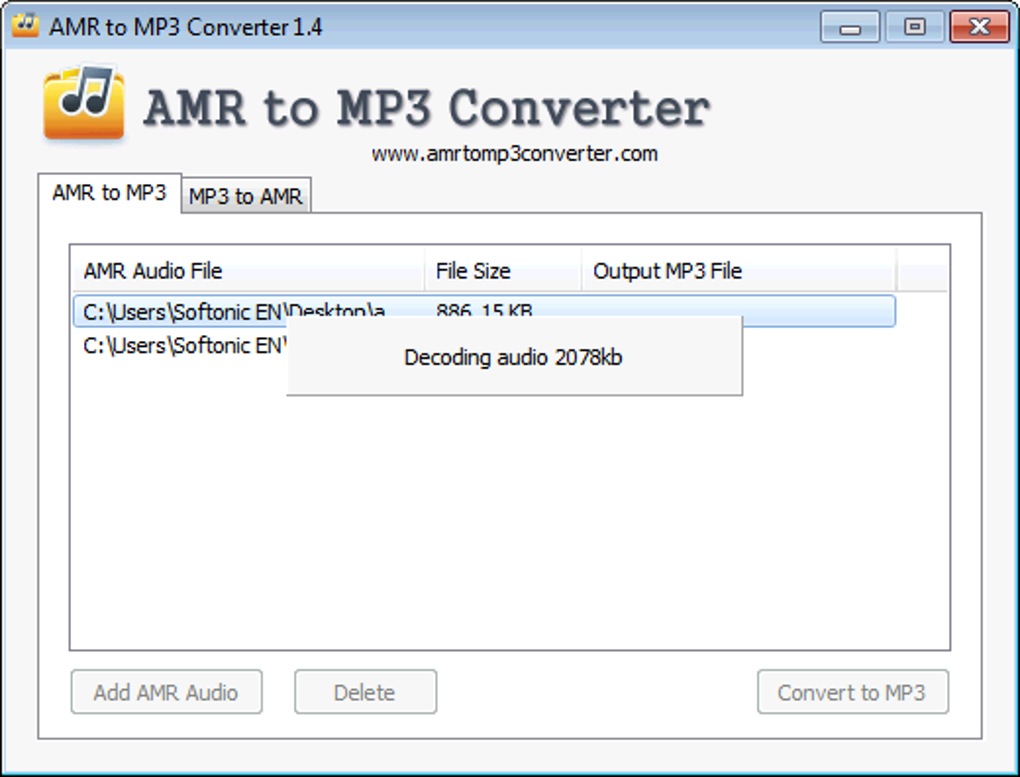
Upon launching the AMR to MP3 Converter, users are greeted with an incredibly simple interface. The design philosophy clearly prioritizes ease of use over a plethora of advanced options. As noted in its review, “There are no options for things like choosing bit rates or quality, simply two tabs, one for converting to AMR and the other to MP3.” This minimalist approach means there’s virtually no learning curve. Even a novice user can navigate the application without guidance, making it ideal for quick, no-fuss conversions.
While this simplicity is a boon for casual users, it also represents a significant limitation for those who require more control over their audio output. The absence of adjustable settings for parameters like bit rate, sample rate, or channel mode means that all conversions are performed using predefined, default settings. This trade-off between user-friendliness and customization is a defining characteristic of the AMR to MP3 Converter.
Performance and Quality: A Trade-off
The conversion speed is generally quick, a significant advantage for users dealing with multiple files or larger audio segments. This efficiency ensures that tasks are completed without undue delay, enhancing productivity for those who frequently need to convert mobile audio. However, speed and simplicity come at a cost, particularly in the realm of audio fidelity.
PhanMemFree.org’s assessment, based on extensive testing, reveals a “noticeable drop in quality whichever direction the conversion was done.” This observation is critical. When converting from AMR to MP3, the inherent limitations of the AMR format — specifically its optimization for speech and relatively lower fidelity compared to MP3 — mean that the resulting MP3 file, while more compatible, won’t magically gain studio-quality sound. In fact, the conversion process itself, even if well-executed, can sometimes introduce minor artifacts or further degrade an already compressed audio signal.
Conversely, converting from MP3 to AMR will also result in a quality reduction. This is primarily because the MP3 file, which might be rich in musical detail or complex sounds, is being re-encoded into a format specifically designed for low-bandwidth speech. The AMR codec will strip away much of the information deemed irrelevant for voice communication, leading to a flatter, less dynamic sound. Therefore, users should manage their expectations regarding the audio output; this tool prioritizes format compatibility and ease of use over preserving or enhancing high-fidelity sound.
Ideal Use Cases: Legacy Devices and Ringtones
Despite its limitations in audio fidelity, the AMR to MP3 Converter finds its niche in specific, practical scenarios. As noted, it is “useful for people with older phones, as it can be used to create compatible ring tones from any MP3.” This highlights one of its primary applications: enabling compatibility with legacy hardware. Older mobile phones often had strict requirements for audio formats, with MP3 being a common choice for custom ringtones due to its balance of file size and quality. For users who wish to personalize their older devices or those with specific format restrictions, this converter provides a direct path to preparing audio files.
Furthermore, for those who frequently record voice notes, lectures, or interviews on their mobile phones and then need to transfer these recordings to a computer for archival, transcription, or basic playback, the AMR to MP3 conversion function is highly beneficial. It ensures that these important spoken audio files can be easily accessed and managed on virtually any platform without compatibility hurdles.
Limitations and What’s Missing
While functional, the AMR to MP3 Converter is characterized by a stark absence of advanced features. “It’s a shame that there aren’t any editing features, which makes this as basic a converter as you will find anywhere.” This lack of editing capability means users cannot trim, cut, merge, apply effects, or perform any form of audio manipulation within the application itself. If editing is required, users must first convert the file and then import it into a separate audio editor.
Moreover, the inability to choose quality options or control bit rates is a significant drawback for users who demand more control over their audio output. For professional applications, high-fidelity music conversion, or situations where precise file size management is crucial, this converter simply falls short. It is best understood as a utility for quick, basic format changes rather than a comprehensive audio processing tool. The lack of drag-and-drop support, as pointed out by a user reviewer who wished to “support dropping files to the main window,” also suggests areas where user convenience could be improved, even within its simple framework.
Navigating the Converter: Installation, Usage, and Tips
The AMR to MP3 Converter prides itself on its simplicity, extending to its installation and usage. For users looking for a no-frills experience, this tool offers an accessible entry point into audio format conversion.
Getting Started: Download and Installation
Obtaining the AMR to MP3 Converter is a straightforward process, typically involving a quick download from trusted platforms like PhanMemFree.org. As a trial version, it allows users to test its functionality before committing.
- Visit PhanMemFree.org: Navigate to the dedicated page for “AMR to MP3 Converter.”
- Download the Installer: Locate the “Download for Windows” button and click it. The file size is relatively small (2.50 MB, for version 1.43.4 as of July 15, 2022), ensuring a rapid download even on slower connections.
- Run the Installer: Once downloaded, execute the installer file. Follow the on-screen prompts, which are usually minimal and easy to understand. The installation process is quick and doesn’t typically involve complex configurations.
- Launch the Application: After installation, the converter can be launched from your desktop shortcut or the Start menu.
PhanMemFree.org ensures that all files hosted on its platform, including the AMR to MP3 Converter, undergo rigorous security checks. Our team scans new uploads and periodically reviews existing files using over 50 leading antivirus services to assess and avoid any potential harm to your device, ensuring a “Clean” security status for this software.
Step-by-Step Conversion Guide
The user interface of the AMR to MP3 Converter is remarkably simple, featuring just two tabs. This makes the conversion process intuitive:
- Open the Application: Launch the AMR to MP3 Converter.
- Select Conversion Direction:
- To convert AMR to MP3, click on the tab labeled “To MP3” (or similar).
- To convert MP3 to AMR, click on the tab labeled “To AMR” (or similar).
- Choose Your Input File: Click the “Browse” or “Add File” button to navigate to the location of your AMR or MP3 file. Select the file you wish to convert.
- Specify Output Location (Optional): The application usually defaults to saving the converted file in the same directory as the original, or a specified output folder. If you wish to change this, look for an “Output Folder” option and set your preferred destination.
- Initiate Conversion: Click the “Convert” button. The conversion process will begin, and a progress indicator might appear.
- Retrieve Converted File: Once completed, the new file will be in your designated output folder.
The entire process is designed to be as straightforward as possible, minimizing user interaction and speeding up the conversion workflow.
Maximizing Utility with AMR to MP3 Converter
Given its basic nature, maximizing the utility of the AMR to MP3 Converter involves understanding its strengths and limitations:
- Batch Conversion (if available/implied): While the description highlights simplicity, many basic converters offer some form of batch processing. If the interface allows adding multiple files, this can save significant time when dealing with numerous recordings. If not, users will have to convert files one by one.
- Focus on Voice Recordings: This converter shines brightest when dealing with spoken audio. For voice memos, interviews, and dictations, the quality trade-off is less impactful, and the compatibility gain is significant.
- Ringtone Creation: As mentioned, it’s excellent for crafting custom ringtones for older mobile phones that specifically require MP3 or AMR formats.
- Pre-processing for Editing: If you need to edit an AMR file, use this converter to turn it into an MP3 first. Then, import the MP3 into a dedicated audio editor like Audacity (also available on PhanMemFree.org) for trimming, merging, or applying effects.
Addressing Common Concerns: Quality and Expectations
The most significant concern for users will undoubtedly be the “noticeable drop in quality.” It is crucial to set realistic expectations:
- No Quality Improvement: This converter will not enhance the audio quality of your original file. If your AMR recording is already low quality, the MP3 conversion will retain that base quality, albeit in a more compatible format.
- Lossy Conversion: Both AMR and MP3 are lossy formats. Converting between them involves re-encoding, which can lead to successive generations of quality degradation.
- Prioritize Compatibility: The primary benefit of this converter is format compatibility. If high-fidelity audio is your main concern, especially for music, you might need a more advanced converter with granular quality settings.
By understanding these points, users can effectively leverage the AMR to MP3 Converter for its intended purpose without disappointment.
Beyond AMR to MP3 Converter: Exploring Alternatives and Broader Audio Tools
While the AMR to MP3 Converter effectively serves its specific purpose, the world of audio processing is vast and diverse. For users with more complex needs, higher fidelity requirements, or a desire for additional features, exploring alternative converters and broader audio tools is a natural progression.
When to Look for More: Advanced Features and High Fidelity
The AMR to MP3 Converter, with its simplicity and lack of advanced options, is best suited for straightforward, utilitarian conversions. However, several scenarios call for a more robust solution:
- Professional Audio Projects: When working with music production, podcast editing, or broadcast-quality audio, precision, lossless conversion options, and extensive editing capabilities are paramount.
- High-Fidelity Audio Enthusiasts: Users who value pristine sound quality for their music collection will want converters that offer control over bit rates, sample rates, and even support for lossless formats like FLAC or WAV.
- Batch Processing of Diverse Formats: If you frequently deal with a wide array of audio formats (e.g., WAV, WMA, M4A, OGG, FLAC) and need to convert them to multiple output types, a more versatile, multi-format converter is essential.
- Integrated Editing Needs: For users who want to convert, trim, normalize, add effects, or merge audio files within a single application, the AMR to MP3 Converter’s basic nature will be a limitation.
In these instances, the simplicity of the AMR to MP3 Converter becomes its Achilles’ heel, prompting users to seek out more comprehensive solutions.
A Glimpse at Other Converters
PhanMemFree.org, being a comprehensive resource for software, lists several alternatives that cater to a broader spectrum of audio conversion needs. These alternatives often offer more features, broader format support, and greater control over output quality:
- Easy AMR MP3 M4A WAV WMA Audio Converter: As its name suggests, this tool offers conversion between a wider range of popular audio formats, providing more flexibility than a specialized AMR-only converter.
- MikSoft Mobile AMR Converter: Described as “Practical, quick audio converter for use with your mobile,” this might offer similar simplicity but perhaps with slightly different optimizations for mobile use.
- Audio Converter (General): Many generic audio converters exist that can handle a multitude of input and output formats, often including advanced settings for bit rate, sample rate, and channel selection. These are typically more suitable for converting music CDs to MP3 or WAV, for example.
- Xilisoft Audio Converter: Often a feature-rich solution, offering extensive format support, batch conversion, and quality customization options, appealing to users with more demanding requirements.
- Free MP3 Converter: While also simple, many free alternatives focus purely on MP3 output and might offer different conversion engines or slightly better quality preservation at the expense of other features.
These alternatives showcase the diverse landscape of audio conversion software, each designed to meet varying user needs and technical requirements.
The Ecosystem of Audio Tools: Editors, Players, and Advanced Converters
Beyond simple format conversion, the multimedia category encompasses a rich ecosystem of tools that complement each other:
- Audio Editors (e.g., Audacity, WaveLab Pro): For in-depth audio manipulation, such as cutting, pasting, mixing, applying effects, noise reduction, and mastering, dedicated audio editors are indispensable. Audacity, a powerful and free tool, is a popular choice for many users, and often available for download on PhanMemFree.org.
- Media Players (e.g., Winamp, Spotify, iTunes, Bomi Player): Once audio is in a compatible format, media players are essential for playback and organization. From lightweight local players like Winamp to comprehensive streaming services like Spotify, these tools provide the listening experience.
- Video to Audio Extractors (e.g., AoA Audio Extractor): For users who need to extract background music or dialogue from video files, specialized tools convert video formats (like MP4, AVI) into audio formats (MP3, WAV, AC3).
- Tag Editors (e.g., Music Tag Editor, MediaHuman Lyrics Finder): To organize large audio libraries, tools that allow editing of metadata (artist, album, title, year, genre) and even finding lyrics are highly useful.
Understanding this ecosystem helps users choose the right tool for each specific task, recognizing that a basic converter is just one piece of a larger puzzle.
Making the Right Choice: Matching Tools to Your Needs
The key takeaway is that the “best” audio tool is highly subjective and depends entirely on the user’s specific needs and technical proficiency.
- If your primary goal is quick, simple conversion between AMR and MP3 for mobile voice recordings or ringtones, and you prioritize ease of use over advanced features and pristine quality, the AMR to MP3 Converter is an excellent choice. Its directness and small footprint make it efficient for its intended purpose.
- If you require high-fidelity conversions, extensive format support, batch processing, or any form of audio editing, then you should explore the more advanced alternatives or combine the AMR to MP3 Converter with a dedicated audio editor.
PhanMemFree.org strives to offer a diverse catalog of software, ensuring that whether you’re a casual user or an audio professional, you can find the tools that perfectly match your requirements.
The PhanMemFree.org Perspective: Security, Reviews, and Support
At PhanMemFree.org, our commitment extends beyond simply listing software. We aim to be a trusted resource, providing not only access to applications but also vital information regarding their safety, functionality, and user experiences. Our approach ensures that users can make informed decisions when downloading and utilizing software from our platform.
Trust and Transparency: Security Status
One of the cornerstones of PhanMemFree.org’s service is our robust security protocol. We understand that software downloads can sometimes carry risks, and our priority is to mitigate these concerns for our users. For the AMR to MP3 Converter, as with all software hosted on our platform, we provide a clear “Security Status.”
Our team employs a comprehensive scanning process:
- Initial Upload Scan: Each new file uploaded to PhanMemFree.org is immediately scanned using more than 50 of the world’s leading antivirus services.
- Periodic Reviews: Files are regularly re-scanned and reviewed to confirm or update their status, ensuring ongoing safety.
This rigorous procedure allows us to confidently mark the AMR to MP3 Converter with a “Clean” status. This means: “It’s extremely likely that this software program is clean. We have scanned the file and URLs associated with this software program in more than 50 of the world’s leading antivirus services; no possible threat has been detected.” This transparency is crucial for building trust and ensuring a safe downloading experience for our community.
In rare cases, a program might be flagged as “Warning,” indicating it is “potentially malicious or may contain unwanted bundled software.” When this occurs, we investigate further, often finding that these are “false positives” – benign programs mistakenly flagged due to overly broad detection signatures. We believe in providing users with as much information as possible to make their own judgments.
User Feedback: Valuing Community Insights
Beyond our internal assessments, PhanMemFree.org places significant value on user feedback. Real-world experiences often reveal nuances that technical specifications might miss. The user reviews section for the AMR to MP3 Converter, for instance, offers valuable insights from individuals who have actually used the software.
One anonymous user, reviewing on December 11, 2013, highlighted a key positive: “good format support. Great software, this was the first to support my AMR file well!” This affirms the converter’s primary strength – its effectiveness in handling AMR files. The same reviewer also provided constructive criticism: “It would be nice to support dropping files to the main window however.” This feedback, though minor, points towards potential improvements in user interface and workflow, showcasing how community input can guide future development or inform other users.
PhanMemFree.org integrates a “Rate it!” and “Report Software” feature on every catalog page. This allows our users to easily submit their reviews, provide ratings, and flag any particular issues they may encounter. This feedback loop is vital; it directly contributes to our understanding of software performance, potential problems, and overall user satisfaction, ensuring that we can address concerns as soon as possible and maintain a high-quality, malware-free catalog of programs and apps.
Our Commitment to Safe Downloads
PhanMemFree.org’s commitment to user safety and satisfaction is unwavering. We strive to be more than just a download portal; we aim to be a reliable guide in the complex world of software. By combining automated scanning technologies with human oversight and valuing community input, we endeavor to provide a secure and informative environment for all our users.
When you choose to download the AMR to MP3 Converter, or any other software, from PhanMemFree.org, you do so with the assurance that:
- The software has been thoroughly scanned for potential threats.
- You have access to transparent security status information.
- You can benefit from the experiences of other users through reviews.
- You have a channel to report any issues directly to our team.
This holistic approach underpins PhanMemFree.org’s reputation as a trustworthy source for software, empowering users to confidently find, download, and utilize the tools they need to enhance their digital lives. Whether it’s a simple utility like the AMR to MP3 Converter or more complex multimedia suites, our goal remains consistent: to provide a safe, informed, and user-centric experience.
In conclusion, the AMR to MP3 Converter, available on PhanMemFree.org, serves as an essential, no-frills tool for bridging the compatibility gap between mobile-centric AMR files and the universally accepted MP3 format. While its simplicity means a trade-off in advanced features and audio fidelity, its ease of use and direct functionality make it ideal for quick conversions, especially for legacy mobile devices and spoken audio recordings. PhanMemFree.org is dedicated to ensuring that users can access such tools safely and with full awareness of their capabilities and limitations, fostering a trusted environment for all digital needs.
File Information
- License: “Trial version”
- Version: “1.4”
- Latest update: “July 15, 2022”
- Platform: “Windows”
- OS: “Windows XP”
- Language: “English”
- Downloads: “193K”
- Size: “2.50 MB”


