
TagScanner is a powerful and versatile application designed to streamline the management of large music collections. Its core functionality revolves around editing audio file tags, enabling users to efficiently organize and maintain their digital music libraries. Beyond basic tag editing, TagScanner boasts a range of advanced features, including batch processing capabilities, automated tag retrieval from online databases, and the ability to generate playlists in various formats. This comprehensive review delves into the capabilities, advantages, and limitations of TagScanner, providing a detailed assessment of its suitability for various user needs.
Streamlining Music Management: Core Features and Functionality
The primary function of TagScanner is, as its name suggests, the editing of metadata tags associated with audio files. These tags contain crucial information such as artist name, album title, track title, year of release, genre, and album art. Improperly tagged files can make navigating and organizing a large music library extremely difficult. TagScanner offers a solution by providing a user-friendly interface for manipulating these tags on a large scale. Users can modify individual tags or employ batch editing to simultaneously update tags across multiple files, significantly accelerating the organization process. This batch processing capability is particularly valuable when dealing with extensive collections.
The program supports a wide variety of audio file formats, ensuring compatibility with diverse music libraries. This extensive support includes, but is not limited to, MP3, OGG, Musepack, Monkey’s Audio, FLAC, AAC, OptimFROG, SPEEX, WavePack, TrueAudio, WMA, and MP4 files. This broad compatibility makes TagScanner a versatile tool for users with diverse music formats in their collections. It also supports a comprehensive range of tag formats, including ID3 1.0/1.1/2.2/2.3/2.4 tags, APE v1 and v2 tags, Vorbis Comments, WMA tags, and MP4 (iTunes) metadata. This extensive support ensures compatibility with various tagging conventions, making it suitable for collections built over time with different tagging practices.
Furthermore, TagScanner facilitates the renaming of files based on the tag information, ensuring consistency between file names and metadata. This is a crucial aspect of library organization, as it helps maintain a clean and logical file structure. This feature, in conjunction with the batch editing capabilities, allows for the systematic and accurate renaming of large numbers of files based on consistent and updated metadata.
Automated Tagging and Online Database Integration
One of TagScanner’s most powerful features is its ability to automatically retrieve tag information from online music databases. It leverages the freedb.org database, a widely used source for accurate music information. This automated retrieval significantly reduces the manual effort required to tag a large music collection. While the accuracy of automatically retrieved information isn’t always perfect (as discussed later), it provides a considerable time-saving advantage over manual tagging. The program also offers integration with other services, such as Discogs and MusicBrainz, enhancing its accuracy and providing users with access to a wider range of information. Improved relevance in lookups on these platforms ensures greater accuracy in retrieving metadata.
Advanced Features and Beyond Basic Tag Editing
Beyond its core tagging capabilities, TagScanner offers several advanced features that enhance its usefulness. For instance, it allows users to generate tag information directly from file and folder names. This feature is particularly helpful for organizing collections where file names already contain relevant metadata but haven’t been formally integrated into the file’s tags. This automated integration simplifies the process of standardizing the metadata across the entire collection. The program also features a basic integrated audio player, enabling users to preview tracks within the application. While not a full-fledged music player, this functionality is convenient for verifying tagged information and managing playlists within the TagScanner environment. Importantly, TagScanner can create and export playlists in various formats, including HTML and Excel worksheets, allowing users to share their curated selections with others or utilize them in different contexts.
User Interface and Ease of Use
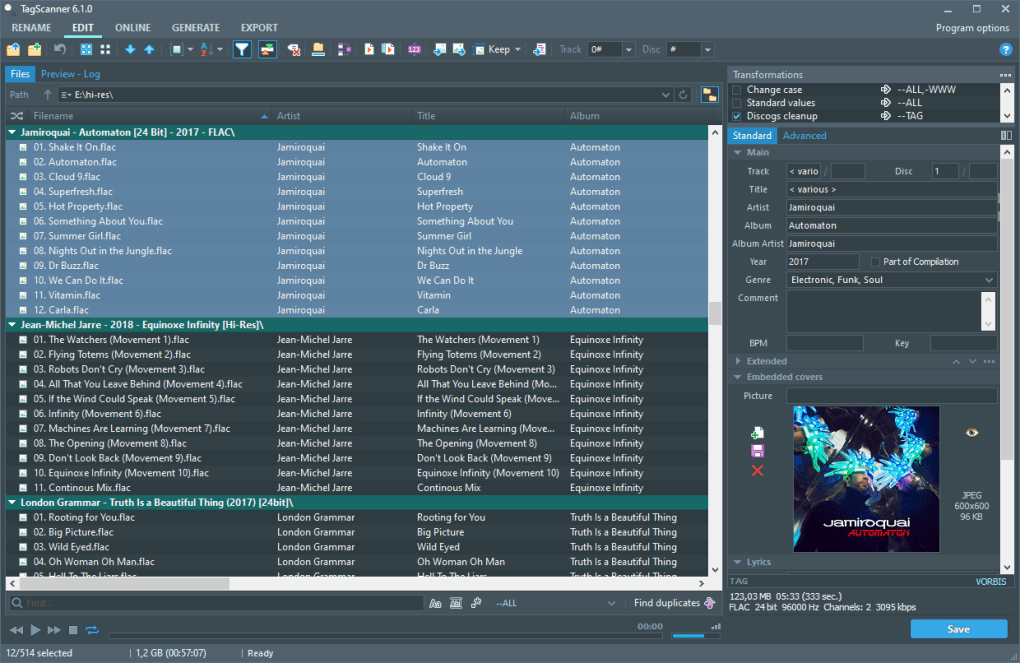
TagScanner boasts a clean and intuitive interface, making it accessible even to users with limited technical expertise. Its well-organized menus and straightforward controls simplify the process of navigating the program’s features. The batch editing functionality, while powerful, remains easy to use, allowing for the efficient manipulation of large sets of files with minimal complexity. However, like many powerful applications, a basic level of understanding of audio file metadata is beneficial to get the most out of TagScanner’s advanced features. The visual interface allows for clear visualization of the tagging data and simplifies the process of updating and correcting metadata.
Accuracy and Limitations
While TagScanner is a highly effective tool, it’s important to acknowledge its limitations. The accuracy of automatically retrieved tags is not always perfect. Sometimes, online databases may contain inaccurate or incomplete information, resulting in inaccuracies within the tagged files. This issue necessitates manual verification and correction of automatically tagged data to ensure complete accuracy. Users should approach the automated tagging process as a time-saving aid rather than a completely infallible solution. Manual review and correction are sometimes essential to ensure consistency and precision in the metadata.
System Requirements and Compatibility
TagScanner is primarily designed for Windows operating systems. Its system requirements are generally modest, making it compatible with a wide range of Windows machines. However, the specifics may vary depending on the version of TagScanner, and users should refer to the software’s documentation for the most up-to-date requirements. Its compatibility with various audio formats and tagging standards makes it a widely applicable tool across different music libraries and user setups.
User Reviews and Community Support
TagScanner has received generally positive reviews from users, praising its powerful features, ease of use, and effectiveness in managing large music collections. Users consistently highlight its time-saving capabilities and the efficiency of its batch processing functions. While some users report occasional inaccuracies in the automatically retrieved tags, many find the overall benefits of TagScanner outweigh these occasional shortcomings. The availability of user reviews and online forums offers opportunities for users to share experiences, troubleshoot issues, and benefit from the collective knowledge of the community.
Conclusion: A Powerful Tool for Music Librarians
TagScanner stands as a highly effective tool for managing and organizing extensive music libraries. Its capacity for batch editing, automated tag retrieval, and file renaming significantly simplifies the often-tedious task of metadata management. While the accuracy of automatic tagging isn’t always perfect, the program’s overall efficiency and ease of use make it a valuable asset for anyone seeking to streamline their music organization process. Its broad compatibility with various audio formats and metadata standards ensures its applicability to a wide range of users and collections. The combination of power, user-friendliness, and community support solidifies TagScanner’s position as a leading tool in the field of audio file management. For users seeking a robust and versatile solution for managing large music collections, TagScanner represents a compelling and efficient choice.
File Information
- License: “Free”
- Latest update: “February 5, 2025”
- Platform: “Windows”
- OS: “Windows 7”
- Language: “English”
- Downloads: “37.4K”
- Size: “4.49 MB”


