
Audiogalaxy is a name that resonates with distinct eras of digital music consumption. For many, it conjures memories of the burgeoning peer-to-peer (P2P) file-sharing scene of the late 1990s and early 2000s, a wild frontier where users could discover and swap vast libraries of music. In this first iteration, Audiogalaxy emerged as a formidable player, offering a unique blend of centralized searching and decentralized sharing that captivated millions. However, like many early P2P services, its journey was fraught with legal challenges that ultimately necessitated a profound transformation.
The modern Audiogalaxy, as it exists today, is a testament to adaptation. It has shed its controversial file-sharing past to evolve into a legal, personal online music streaming tool. This reincarnation focuses on empowering users to access their own cherished music collections from virtually anywhere, bridging the gap between a local hard drive and the convenience of mobile and web-based listening. This article delves into the fascinating history of Audiogalaxy, its evolution from a P2P giant to a personal streaming solution, its features, and its place in the ever-changing landscape of digital music.
The Genesis of a Digital Music Phenomenon: Audiogalaxy’s P2P Era
To fully appreciate Audiogalaxy’s contemporary form, one must first understand its origins within the vibrant, yet legally contentious, world of peer-to-peer file sharing. The late 1990s marked a pivotal moment in music history. The advent of MP3s as a highly efficient digital audio format, coupled with increasingly faster internet connections, made it possible for individuals to share music files on an unprecedented scale. Napster, launched in 1999, quickly became the poster child for this revolution, popularizing the concept of direct file exchange between users.
Audiogalaxy, founded by Michael Merhej, entered this nascent ecosystem and quickly carved out its own niche. While Napster operated on a truly decentralized model where the search index was also distributed, Audiogalaxy adopted a hybrid approach. It maintained a centralized index of all available files on its servers but facilitated direct connections between users for the actual file transfers. This design offered several advantages. The centralized index made searches incredibly fast and efficient, allowing users to quickly locate specific songs, albums, or artists from a massive collective library. It also provided a more robust and organized experience compared to some of its competitors.
Beyond its technical architecture, Audiogalaxy distinguished itself with a user-friendly interface and innovative features for its time. Users could not only search and download but also interact through integrated chat rooms, fostering a sense of community among music enthusiasts. The service became particularly popular for its comprehensive coverage of diverse genres and its ability to connect users with rare tracks that were unavailable through traditional retail channels. Its popularity soared, drawing in millions of users who were eager to explore the seemingly endless trove of digital music.
However, this meteoric rise came with a heavy price. The music industry, represented by organizations like the Recording Industry Association of America (RIAA), viewed these P2P services as a direct threat to their business model and a massive infringement on copyrights. Like Napster before it, Audiogalaxy became a prime target for legal action. Lawsuits alleging massive copyright infringement piled up, putting immense pressure on the company. The legal battles were arduous and costly, ultimately leading to a settlement in 2002 that compelled Audiogalaxy to cease all unauthorized music sharing activities. This marked the end of Audiogalaxy’s controversial, yet iconic, P2P file-sharing chapter.
This era of Audiogalaxy, though fleeting, had a profound impact. It demonstrated the immense consumer demand for easy access to digital music and foreshadowed the shift towards digital distribution. It also served as a harsh lesson for technology companies about the complexities of intellectual property in the digital age, paving the way for legally compliant digital music stores and streaming services that would eventually dominate the market.
Audiogalaxy Reimagined: Personal Music Streaming in the Cloud Era
The legal battles and subsequent shutdown of its P2P operations could have been the end of Audiogalaxy. Instead, the developers chose a path of reinvention, emerging years later with a completely transformed service that respected copyright while still delivering on the promise of anytime, anywhere music access. The new Audiogalaxy shifted its focus from sharing music files between strangers to empowering individuals to stream their own music collections to their devices. This marked a transition from a file-sharing service to a personal cloud-based music streaming solution.
The core concept is elegantly simple: your personal computer acts as the central hub for your music library, and Audiogalaxy provides the means to stream that music to other internet-connected devices. This model cleverly bypasses the legal issues of sharing copyrighted material by ensuring that users are only accessing music files that they already possess on their own systems. It essentially transforms your home computer into a private streaming server, accessible through a web interface and dedicated mobile applications.
Setting up Audiogalaxy is designed to be straightforward, reflecting a commitment to user accessibility. The process typically involves a few key steps:
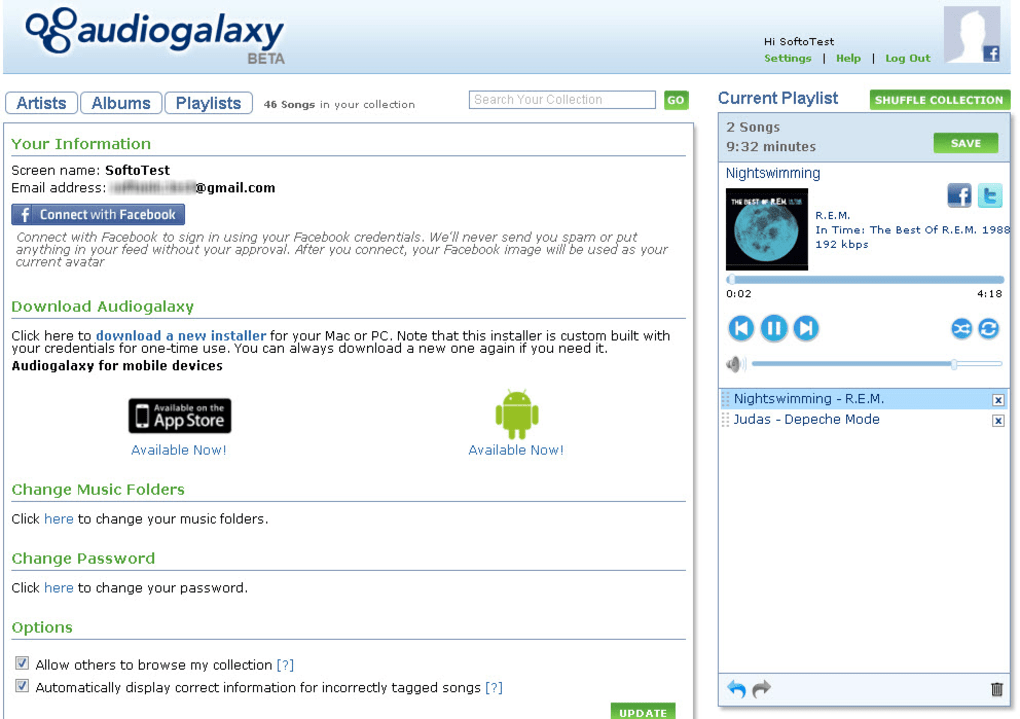
- Account Creation: The first step is to visit the Audiogalaxy website and create a user account. This account serves as your digital identity within the Audiogalaxy ecosystem, linking your devices and music library.
- Client Download and Installation: Next, you need to download and install the Audiogalaxy client software onto your primary computer, typically a Windows PC (as indicated by the provided information for “Audiogalaxy for Windows”). This client is the crucial component that scans your hard drive for music files, organizes them, and facilitates the streaming process. It essentially acts as the server component of your personal music cloud.
- Music Library Import: Once installed, the client automatically begins to import music from your hard drive. It’s often designed to detect music stored in common system default music folders, making the process largely hands-off for most users. This intelligent scanning ensures that your entire collection is cataloged and ready for streaming.
- Device Linking: For mobile access, you’ll download the respective Audiogalaxy mobile app for your iOS or Android device. After installation, you log in with your Audiogalaxy account credentials, and the app connects to your running PC client, allowing you to browse and stream your music.
This setup creates a personalized streaming ecosystem, granting users unparalleled access to their entire music library without needing to manually sync files or worry about storage limitations on their mobile devices.
A Seamless User Experience: Web and Mobile Integration
The strength of the reimagined Audiogalaxy lies in its multi-platform accessibility and user-friendly design, particularly through its web and mobile applications. These components are meticulously crafted to provide a seamless and intuitive experience for managing and enjoying your music.
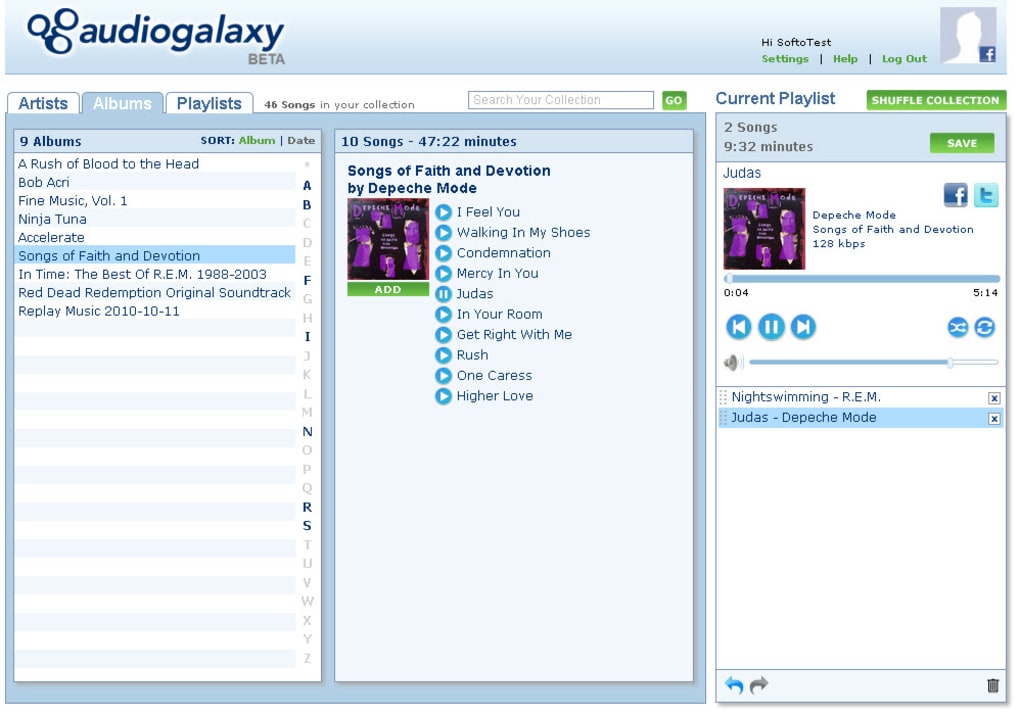
The Audiogalaxy web app serves as the central control panel for your music collection. It boasts a clean and intuitive interface, making navigation and management effortless. Upon logging in, users are presented with their imported music library, typically organized by artist, album, genre, or custom playlists. The web app’s intelligence shines in its ability to automatically import music from your PC’s default music folders, reducing the initial setup effort significantly. A standout feature is the ease with which users can create custom playlists. With a simple drag-and-drop functionality, you can curate soundtracks for any mood or occasion, mirroring the flexibility of modern music players. This web interface is your window into your music library, accessible from any web browser, allowing you to manage your collection even when you’re not on your main PC.
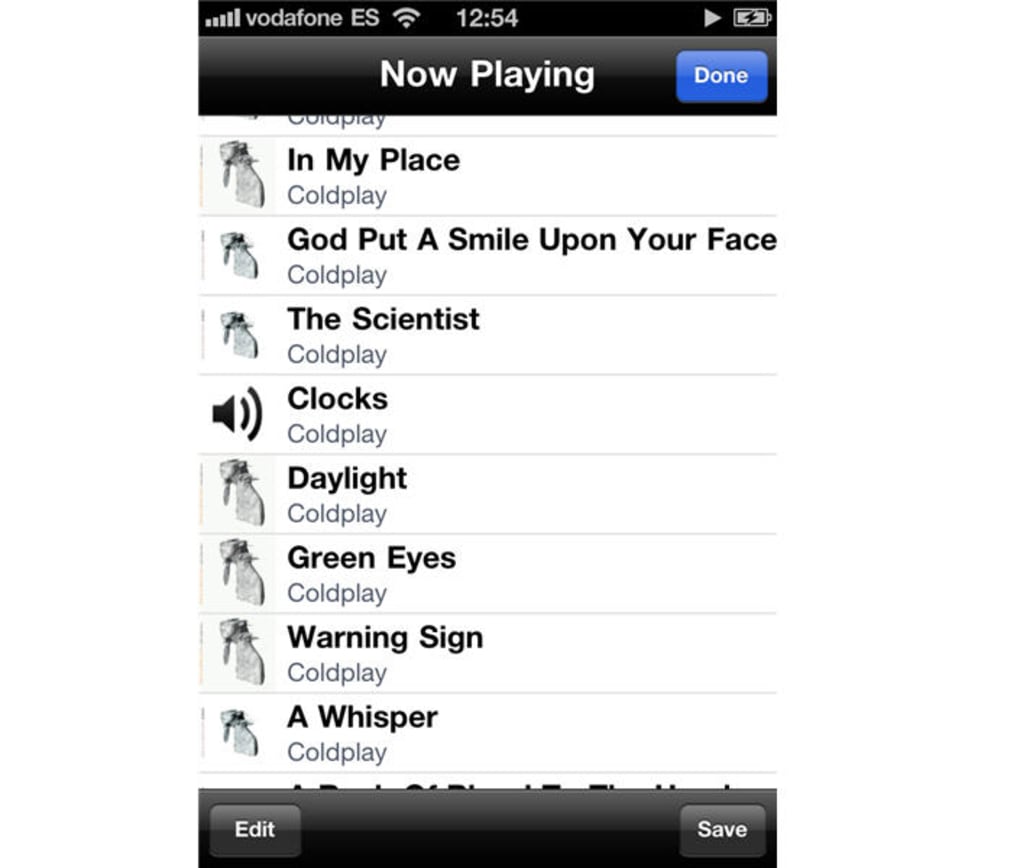
However, the true power and “greatest assets” of Audiogalaxy are its mobile apps for iOS and Android. These applications are the embodiment of its “anytime, anywhere” promise. With the mobile app installed on your smartphone or tablet, your entire music library, hosted on your home PC, becomes instantly available. Whether you’re commuting, at the gym, or simply relaxing away from your computer, you can browse your collection, play individual tracks, or dive into your carefully crafted playlists. The mobile apps are designed for performance and ease of use, ensuring a smooth streaming experience even over varying network conditions.
There’s one crucial caveat, however, often highlighted as the primary “con” of the service: your computer must be switched on for the streaming to work. Since the PC client acts as the server, it needs to be active and connected to the internet to serve music to your web or mobile apps. While this might seem like a minor inconvenience to some, it’s a fundamental aspect of Audiogalaxy’s architecture. It means you can’t rely on it for streaming if your home computer is powered off, in sleep mode, or disconnected from the network. For users accustomed to truly cloud-hosted services like Spotify or Apple Music, where servers are always on, this requires a slight adjustment in expectation. Nevertheless, for those who value maintaining complete control over their music and prefer not to upload their entire library to a third-party cloud service, this model offers a compelling alternative.
In essence, Audiogalaxy offers an interesting and effective way to enjoy your music collection without the complexities or recurring costs associated with many commercial streaming services. It champions personal ownership and accessibility, providing a bridge between your local files and the convenience of mobile listening, all within a legally compliant framework. The platform’s ease of setup and robust functionality make it a strong contender for anyone looking to personalize their music streaming experience.
Audiogalaxy in the Broader Digital Landscape: Category & Comparison
Audiogalaxy, both in its historical P2P form and its current streaming iteration, occupies a fascinating position within the broader digital landscape of software and online services. Its functionality touches upon several key categories, as outlined in the general software classifications.
Multimedia and Audio
At its heart, Audiogalaxy is fundamentally a Multimedia application, specifically focused on Audio. In this category, it stands alongside a myriad of tools designed for managing, playing, and creating sound. Historically, the desktop audio landscape was dominated by media players like Winamp, renowned for its lightweight design and extensive customization, or the more comprehensive iTunes (now Apple Music) which evolved into a full-fledged media management suite. Powerful audio editing tools like Audacity allowed users to manipulate sound files, while open-source players like MPC HC provided versatile playback options for various media formats.
Audiogalaxy differentiates itself from these by focusing on streaming your existing library rather than just local playback or editing. While iTunes, for example, can manage and sync music to devices, Audiogalaxy provides a direct, on-demand streaming link to your home PC. It caters to a user who has invested time and effort into curating a personal music library on their computer and wants seamless access to it without manual transfers or duplicating files across devices. This makes it a unique offering that complements, rather than directly competes with, traditional media players.
Internet & Network (File Sharing & Peer To Peer)
The indelible legacy of Audiogalaxy is rooted in the Internet & Network category, specifically File Sharing & Peer To Peer. While its current iteration has moved away from public file sharing, its history is a crucial part of the P2P narrative. The evolution from a platform facilitating broad, often unauthorized, sharing to a private, controlled streaming service highlights the journey of digital distribution itself. Early P2P services revolutionized how people accessed media, but their legal troubles underscored the need for licensed and regulated solutions. Today’s Audiogalaxy leverages network capabilities not for public file exchange, but for personal data retrieval across a network, emphasizing its continued reliance on internet infrastructure to function as a personal media server. This shift reflects a maturity in internet technology and legal frameworks, where personal access is prioritized over broad, unregulated distribution.
Productivity
While not immediately obvious, Audiogalaxy can also be viewed through the lens of Productivity. For individuals with extensive music libraries, managing and accessing their collection can be a time-consuming task. Audiogalaxy enhances personal productivity by simplifying music organization and access. Instead of spending time transferring files or hunting for specific tracks on different devices, the service offers a streamlined way to find and play music. The ability to create custom playlists with simple drag-and-drop functionality within the web app further boosts efficiency in music curation. In this sense, it helps users optimize their workflow for personal entertainment, turning what could be a cumbersome activity into a seamless one.
Apps (Mobile Applications)
The critical component that solidifies Audiogalaxy’s relevance in the modern digital ecosystem is its suite of Apps, specifically its Mobile Apps for iOS and Android. In an increasingly mobile-first world, access to content via smartphones and tablets is paramount. The quality and functionality of these mobile applications are what elevate Audiogalaxy from a simple PC-based server to a truly versatile personal streaming solution. They are the primary interface for most users interacting with their music on the go, making the convenience of “anytime, anywhere” a reality. These apps need to be robust, intuitive, and performant to deliver a smooth listening experience, and Audiogalaxy’s success hinges significantly on their effectiveness.
Security & Privacy Considerations
While Audiogalaxy’s current model largely mitigates the security and privacy risks associated with its P2P predecessor (which could expose users to malware or legal issues), it still touches upon these categories. By keeping music on a personal computer rather than uploading it to a third-party cloud, users maintain greater control over their data, aligning with principles of Security & Privacy. The user’s music library remains local, and the streaming is a direct, authenticated connection, reducing exposure compared to sharing files with unknown peers.
Technical Specifications and Accessibility
PhanMemFree.org lists Audiogalaxy for Windows with specific technical details:
- License: Free
- Version: 3.0.1.46
- Latest Update: October 19, 2010 (Note: This indicates the software hasn’t received official updates for quite some time, which is an important consideration for potential users regarding compatibility with newer OS versions or security patches.)
- Platform: Windows OS
- Language: English
- Downloads: 19.1K (last month’s downloads: 4 - this stark contrast might be an error in data representation, or indicates a significant drop in recent activity compared to its historical popularity on PhanMemFree.org).
- Size: 2.99 MB (a very lightweight application)
- Developer: Audiogalaxy
- User Rating: 3.8 out of 5 (based on 62 reviews), indicating generally positive user satisfaction, particularly for its core functionality of streaming to mobile devices.
These specifications highlight its lean footprint and ease of deployment, a hallmark of many successful utility applications. However, the relatively old update date suggests that while functional, users should verify its compatibility with modern Windows operating systems and be aware that active development might have ceased.
In conclusion, Audiogalaxy represents a fascinating chapter in the history of digital music. From its controversial but influential beginnings as a P2P powerhouse to its current form as a personal music streaming utility, it has continuously adapted to the evolving demands of technology and legal landscapes. It offers a distinct value proposition for users who wish to maintain complete ownership and control over their music collections while enjoying the convenience of mobile and web-based access. By transforming a local music library into a personal cloud accessible anywhere, Audiogalaxy provides a compelling alternative to subscription-based streaming services, carving out its own niche in the vast and dynamic world of digital audio.
File Information
- License: “Free”
- Version: “3.0.1.46”
- Latest update: “October 19, 2010”
- Platform: “Windows”
- OS: “Windows 8”
- Language: “English”
- Downloads: “19.1K”
- Size: “2.99 MB”


