
BB Flashback Express is a free screen recording application designed for creating compact, high-quality AVI and Flash movies with sound. While primarily marketed as a screen capture tool, its ease of use and straightforward interface make it a popular choice for users seeking to create tutorials, demos, or simply record their screen activity. This review delves into the strengths and weaknesses of BB Flashback Express, analyzing its features, performance, and overall user experience.
Ease of Use and Recording Functionality
One of BB Flashback Express’s most significant strengths is its user-friendly interface. The program boasts a simple, intuitive design, making it accessible even to users with limited technical experience. The recording process is initiated through a straightforward wizard that guides users through the configuration of essential settings. This wizard simplifies the process of selecting video quality, specifying the sound source (system audio, microphone, or both), and defining the recording area. Users can easily choose to capture the entire screen, a specific window, or a custom-defined region. Notably, BB Flashback Express supports multiple monitor configurations, accommodating users with multi-screen setups. The ability to incorporate webcam footage as picture-in-picture video adds another layer of versatility, particularly useful for creating engaging tutorials or presentations where the user’s face is visible alongside the screen recording.
The program’s recording capabilities are efficient and effective. Its “record only screen changes” technology ensures that only alterations to the screen are captured, leading to smaller file sizes without compromising video quality. This feature is advantageous for creating high-quality recordings while maintaining manageable file sizes, especially beneficial for users dealing with storage limitations or uploading videos to online platforms. This technology contributes to smooth, professional-looking results, even when recording at high frame rates.
Post-Recording Features and Editing Capabilities
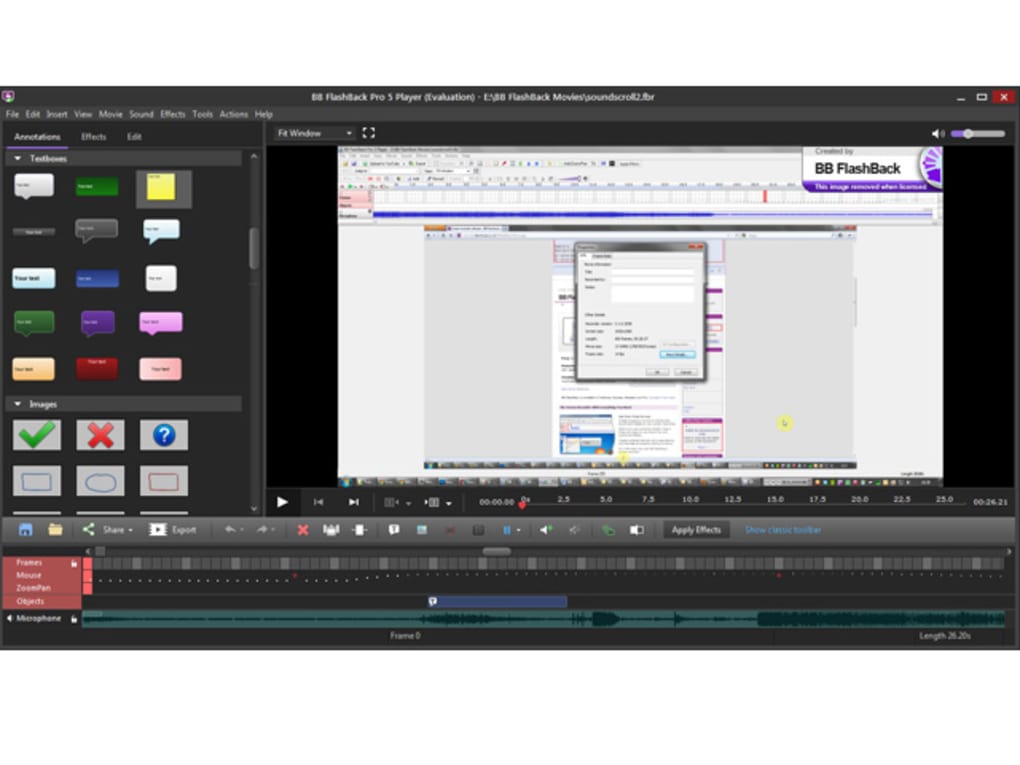
While BB Flashback Express excels in screen recording functionality, its post-recording capabilities are significantly more limited. The bundled player allows for basic playback controls and offers some level of sound and video quality adjustment. However, the editing features are notably lacking. Users cannot perform advanced edits such as cropping, trimming, or removing sections of the recording. This limitation is a significant drawback for users requiring robust editing capabilities. The lack of extensive editing tools necessitates the use of external video editing software if more sophisticated modifications are required.
The export options are similarly constrained. The program allows exports to AVI and Flash video formats, but lacks support for many widely used formats like MP4 or MOV. This limited range of export options can pose inconvenience for users who need to share their recordings in specific file formats compatible with various platforms or editing software. The absence of more versatile export options might lead users to explore alternative screen recorders with more comprehensive capabilities.
Performance and System Requirements
BB Flashback Express generally performs well, efficiently capturing screen activity with minimal impact on system resources. The recording process is generally smooth and responsive, even during demanding tasks. The program’s efficient use of system resources is commendable, particularly for users working with older hardware or those performing resource-intensive tasks alongside the recording process. The minimal performance impact enhances its overall usability and prevents interruptions during recordings. However, some users have reported occasional lag or slowdowns, particularly during recordings of highly dynamic screen activity. The experience might vary depending on the system specifications and the complexity of the recorded content.
The software’s system requirements are relatively modest. It’s compatible with a broad range of Windows operating systems, making it accessible to a wide user base. This broad compatibility ensures that the software can be used effectively across various systems, expanding its user base significantly. However, the specific system requirements and compatibility details should be consulted directly from the official website or documentation to ensure optimal performance based on individual system specifications.
Uploading and Sharing Capabilities
A notable advantage of BB Flashback Express is its direct uploading functionality to popular online video-sharing platforms. The program provides one-click uploading capabilities to YouTube, Blip.tv, and Revver, streamlining the process of sharing recordings online. This ease of sharing enhances the usability of the program, especially for users creating content intended for online dissemination. This convenient feature saves users time and effort that might be needed if they had to manually upload their videos through other means. However, this functionality might not always be up-to-date with changes in these platforms, potentially causing problems in future versions.
Comparison with Alternative Screen Recorders
BB Flashback Express faces competition from several other screen recording applications, each with its own strengths and weaknesses. Some alternatives offer more advanced editing features, a broader range of export options, or better performance. However, BB Flashback Express holds its own with its simplicity, user-friendly interface, and efficient recording capabilities.
Alternative programs like FlashBack (the full, paid version), ShowMore - Free Screen Recorder, and Free Screen Recorder offer varying features and functionalities. FlashBack, for example, provides a more comprehensive suite of editing and publishing features, but at a cost. Free Screen Recorder and ShowMore offer free alternatives with varying levels of functionality and editing capabilities. Choosing the best option depends heavily on the individual needs and priorities of the user; some will prioritize ease of use and free access, others will choose more extensive capabilities, even if they need to pay for them.
Conclusion
BB Flashback Express is a solid free screen recording application that excels in its ease of use and efficient recording capabilities. Its straightforward wizard-driven interface makes the recording process simple, even for beginners. The program’s focus on capturing only screen changes results in smaller file sizes without sacrificing video quality. However, its limitations in editing features and export options might discourage users who need more advanced post-recording capabilities. For users who primarily need a straightforward, easy-to-use screen recorder that requires little technical knowledge, BB Flashback Express is an excellent choice. However, users seeking robust editing capabilities or a broader range of export options might need to explore alternative solutions. The balance between simplicity and functionality will be the determining factor in whether or not this software is the right choice for an individual user.
File Information
- License: “Free”
- Latest update: “July 18, 2025”
- Platform: “Windows”
- OS: “Windows 7”
- Language: “English”
- Downloads: “59.3K”
- Size: “162.90 MB”


