
In today’s interconnected world, Bluetooth technology has become an indispensable component of our digital lives. From wireless headphones and keyboards to smart home devices and file sharing, Bluetooth facilitates seamless communication between a myriad of devices. However, beneath this apparent simplicity lies a complex ecosystem of versions and standards, each offering distinct capabilities and limitations. For many users, particularly those with older computer systems or a desire for precise technical information, identifying the exact Bluetooth version of their device can be a puzzling and time-consuming task. This is where a specialized utility like Bluetooth Version Finder steps in, offering a free, lightweight, and incredibly efficient solution to this common predicament. Developed by Sordum, a name synonymous with practical and effective system tools, Bluetooth Version Finder simplifies what would otherwise be a tedious diagnostic process into a straightforward, one-click operation.
The Crucial Role of Bluetooth in Modern Computing
Bluetooth technology has undergone a remarkable evolution since its inception, steadily enhancing its speed, range, energy efficiency, and security features with each new iteration. From Bluetooth 1.0 to the latest Bluetooth 5.4 and beyond, every version introduces improvements that directly impact the user experience. These advancements are not merely numerical increments; they represent fundamental shifts in how devices can interact, what kind of data they can transfer, and over what distances.
For instance, earlier versions of Bluetooth (like 2.0 or 2.1) offered relatively limited data transfer rates and were primarily suited for basic tasks like connecting headsets. With the introduction of Bluetooth 3.0 (High Speed), significant boosts in data throughput became possible, leveraging Wi-Fi for bulk data transfers. Bluetooth 4.0 ushered in Bluetooth Low Energy (BLE), revolutionizing the landscape for IoT devices, wearables, and sensors by drastically reducing power consumption. Subsequent versions, 4.1, 4.2, and especially the monumental leap to Bluetooth 5.0, further extended range, increased bandwidth, and improved reliability, making it suitable for demanding applications like streaming high-fidelity audio, robust mesh networking, and even precise indoor positioning. The latest iterations continue to refine these capabilities, introducing features like LE Audio for superior sound quality and multi-stream capabilities.
The ubiquitous nature of Bluetooth means it’s embedded in almost every modern electronic device we use daily. Our smartphones, laptops, smartwatches, fitness trackers, wireless speakers, gaming controllers, and even smart home hubs all rely on Bluetooth to communicate. This widespread adoption underscores the importance of understanding the specific version of Bluetooth your devices support, as it directly dictates their compatibility, performance, and the features you can leverage.
Understanding Bluetooth Standards and Their Impact
Each Bluetooth standard brings with it a suite of enhancements that can significantly impact a device’s functionality. For example:
- Bluetooth 1.x: Basic connectivity, limited range, slower speeds. Mostly obsolete today.
- Bluetooth 2.x (EDR): Enhanced Data Rate (EDR) improved speeds up to 3 Mbps, better for basic audio and data.
- Bluetooth 3.0 (HS): Utilized Wi-Fi for high-speed data transfer (up to 24 Mbps) for larger files.
- Bluetooth 4.0 (LE): Introduced Bluetooth Low Energy (BLE), crucial for low-power devices like wearables and sensors. Also featured improved security.
- Bluetooth 4.1/4.2: Refinements to LE, allowing for more robust connections, IPv6 support, and better data packet capacity.
- Bluetooth 5.0: A major upgrade, offering 2x speed, 4x range, and 8x broadcasting message capacity compared to Bluetooth 4.2. Critical for IoT, mesh networking, and advanced audio.
- Bluetooth 5.1: Introduced Angle of Arrival (AoA) and Angle of Departure (AoD) for precise indoor positioning capabilities.
- Bluetooth 5.2 (LE Audio): Enabled LE Audio, bringing higher quality audio, multi-stream support, and hearing aid compatibility. Also features Enhanced Attribute Protocol (EATT).
- Bluetooth 5.3/5.4: Further optimizations for energy efficiency, security, and connection stability.
The implication here is profound: a device running an older Bluetooth version might not be able to connect to newer peripherals, or if it can, it might not be able to utilize all their advanced features. For instance, if you have a pair of cutting-edge Bluetooth 5.2 headphones that support LE Audio, but your computer only has Bluetooth 4.0, you won’t be able to experience the superior audio quality and multi-device connectivity that LE Audio offers. Similarly, features like “Nearby Share” in Windows, which allows for quick file sharing between compatible devices, often require a minimum Bluetooth version (e.g., Bluetooth 4.0 with LE support) and a specific Windows operating system version to function correctly. This is a common point of frustration for users who assume all Bluetooth devices are universally compatible.
Why Identifying Your Bluetooth Version is Essential
For the average user, knowing their Bluetooth version might seem like a trivial detail. However, there are several compelling reasons why this information is not just useful, but often critical:
- Compatibility Checks: Before purchasing new Bluetooth peripherals (headphones, keyboards, mice, game controllers), users need to ensure their existing system can support them fully. A mismatch in Bluetooth versions can lead to limited functionality or complete incompatibility.
- Troubleshooting: When experiencing connection issues, slow data transfer, or intermittent dropouts, knowing the Bluetooth version can be a vital diagnostic step. It helps determine if the problem lies with an outdated standard or if newer features are simply unsupported.
- Feature Access: Many modern applications and operating system features, such as advanced audio codecs, multi-device pairing, or proximity services, are contingent on a specific Bluetooth version. Identifying your version helps you understand why certain features might be unavailable.
- Driver Updates: Manufacturers often release drivers optimized for specific Bluetooth versions. Knowing your hardware’s version helps you locate and install the correct drivers for optimal performance and stability.
- Upgradability Decisions: For users with older computers, knowing their Bluetooth version can inform decisions about upgrading internal components (e.g., replacing a Wi-Fi/Bluetooth combo card) or investing in a USB Bluetooth adapter to access newer standards.
- Security Considerations: Newer Bluetooth versions often come with enhanced security protocols, making connections more resilient to eavesdropping and malicious attacks. Understanding your version can highlight potential vulnerabilities if you’re still on an older standard.
Most modern operating systems, especially Windows, provide ways to check your Bluetooth version through the Device Manager. However, this process often involves navigating through multiple menus, expanding device trees, and interpreting technical specifications, which can be daunting for non-technical users. Furthermore, older computer systems might not even display this information clearly or at all, leaving users in the dark. This is precisely the gap that Bluetooth Version Finder aims to bridge, offering a user-friendly and instant solution.
Introducing Bluetooth Version Finder: A Seamless Solution
Bluetooth Version Finder is presented as a straightforward, free, and lightweight utility designed specifically for Windows users. Its primary purpose is to identify the exact Bluetooth version corresponding to the device connected to your PC. Developed by Sordum, a creator known for a suite of practical tools such as Mouse Settings Changer, DNS Jumper, Defender Control, Fix Print Spooler, and WebCam On-Off, Bluetooth Version Finder inherits a lineage of simple yet highly effective solutions to common Windows challenges.
The core appeal of this tool lies in its utter simplicity. While modern desktops can display Bluetooth versions, they typically require “a few extra steps.” Older computers, on the other hand, often completely lack this capability within their native settings. Bluetooth Version Finder eliminates this complexity. Instead of requiring users to delve into the Device Manager, navigate through various device properties, and decipher cryptic technical details, the program operates with remarkable ease: you simply “run it.” Upon execution, the utility automatically detects and displays the Bluetooth version of your connected device, along with other pertinent firmware specifications.
This means users no longer need to remember specific navigation paths within the Device Manager or struggle with interpreting hardware IDs. The process is streamlined to a single action, making it accessible to everyone, regardless of their technical proficiency. The only prerequisite is that the Bluetooth device you wish to query must be active and connected to your PC at the time of running the application.
Eliminating the Guesswork and Simplifying Diagnostics
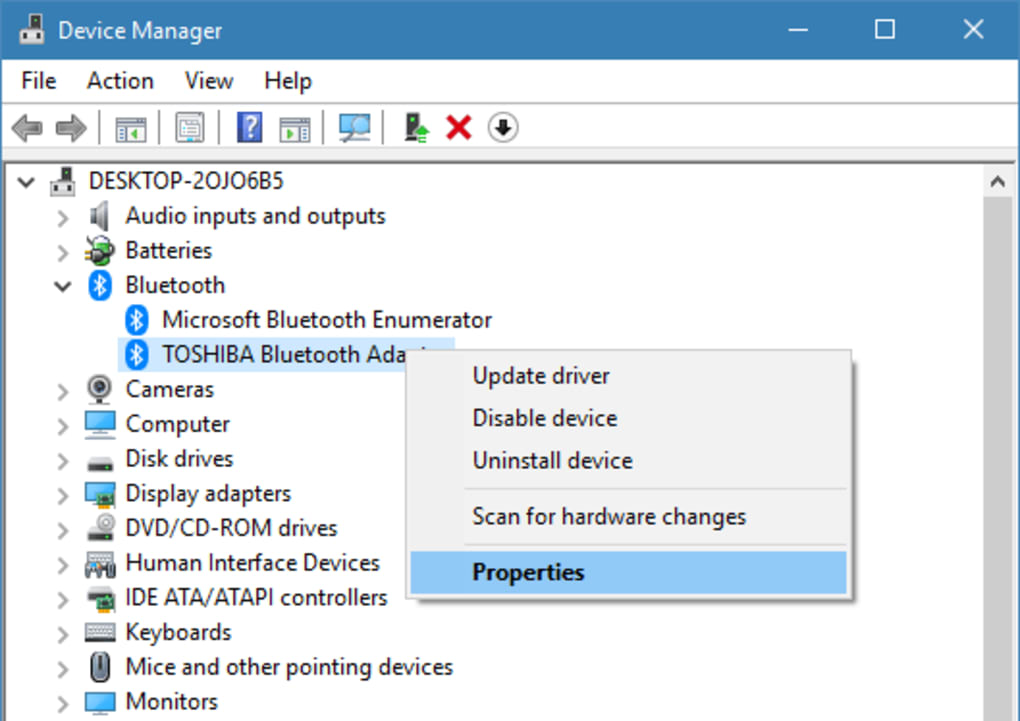
The traditional method of finding Bluetooth information involves:
- Opening the Device Manager.
- Locating the “Bluetooth” category.
- Expanding it to find your specific Bluetooth adapter.
- Right-clicking on the adapter and selecting “Properties.”
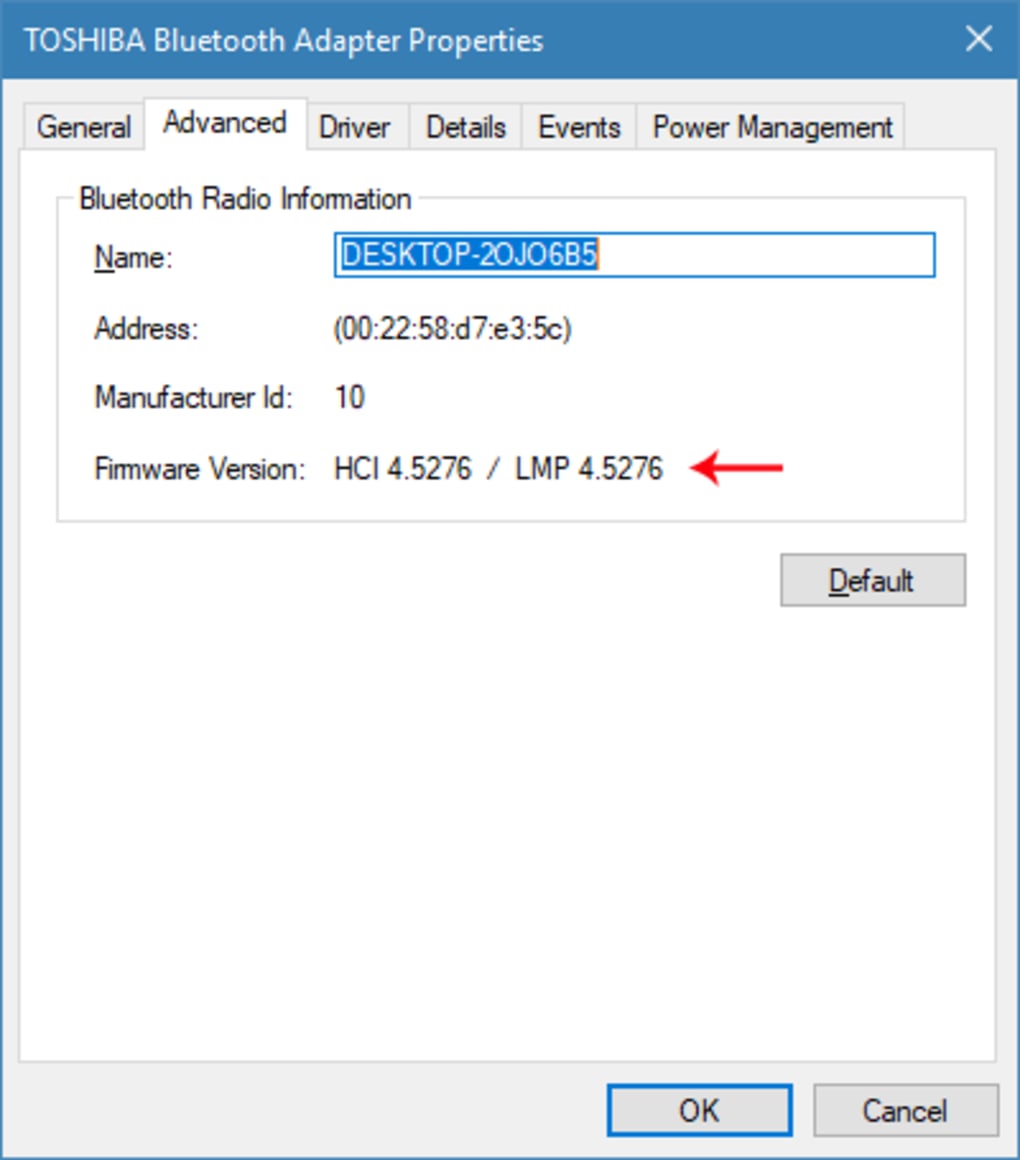
- Navigating to the “Advanced” tab (if available) or checking “Details” with specific property selections (e.g., “Firmware version” or “Manufacturer Name”).
- Deciphering the LMP (Link Manager Protocol) version number to cross-reference it with a table that maps LMP versions to Bluetooth core specification versions.
This multi-step, often confusing process is exactly what Bluetooth Version Finder bypasses. Its “run and find out” methodology is a stark contrast, transforming a potentially frustrating search into an immediate discovery. For IT support professionals, this means quicker diagnostics; for casual users, it means less frustration and more time saved. This level of convenience, particularly for a free application, makes it a valuable addition to any user’s toolkit.
Moreover, the tool’s lightweight nature ensures it doesn’t consume significant system resources. At a mere 464.37 KB (as per the provided information), it’s a tiny footprint application that can be quickly downloaded, executed, and even stored on a USB drive for portable diagnostics without impacting system performance.
Deep Dive into Device Information
Bluetooth Version Finder isn’t just a one-trick pony that displays a simple version number. The provided description highlights that “aside from the version, more detailed specifications related to the firmware will be displayed through this software solution.” This additional context is invaluable. Firmware details can often provide insights into the specific hardware manufacturer, the capabilities of the Bluetooth chip, and potentially even specific revisions that might influence performance or compatibility.
Furthermore, the utility offers an explanation as to “why you can’t access the features or options of your device.” This diagnostic feedback is a standout feature. Instead of merely stating a version number, the tool aims to provide actionable intelligence. For example, it might clarify that a feature like “Nearby Share” isn’t accessible because “it is only compatible with Windows desktops that have higher operating systems” or because the detected Bluetooth version lacks the necessary LE (Low Energy) support. This proactive explanation helps users understand limitations and avoids unnecessary troubleshooting attempts, saving considerable time and effort. It translates raw technical data into understandable, user-centric insights. This is particularly beneficial for less tech-savvy individuals who often encounter such compatibility roadblocks without understanding the underlying cause.
User Experience, Practicality, and Who Benefits
The success of any utility software often hinges on its user experience and practical value. Bluetooth Version Finder excels in both areas, embodying the philosophy of simplicity and efficiency that Sordum’s tools are known for. Its design ethos is clearly geared towards minimizing user effort while maximizing information delivery.
Effortless Operation for Every User
The user interface, though not explicitly described in detail, is implied to be minimal and functional given its single-purpose nature. The phrase “Just simply run it and the program can do the rest of the job” paints a clear picture: no complex installation wizards, no obscure configuration settings, and no convoluted menus. Users download the executable, run it, and immediately receive the desired information. This “one-click” approach is paramount for broad accessibility, catering to:
- Novice Users: Who may be intimidated by system settings and technical jargon.
- Experienced Users: Who appreciate efficiency and want to bypass manual navigation.
- IT Support Technicians: Who need quick diagnostic tools for remote or on-site assistance.
The lightweight nature of the application (less than 0.5 MB) means it downloads quickly, launches instantly, and consumes negligible system resources. This makes it an ideal portable tool that can be run directly from a USB drive, making it perfect for technicians who work across multiple machines.
Real-World Scenarios Where Bluetooth Version Finder Shines
While its primary function seems niche, the utility proves invaluable in a variety of real-world scenarios:
- New Device Setup: A user buys new Bluetooth 5.2 headphones and wonders why they can’t utilize LE Audio features on their older desktop. Running Bluetooth Version Finder immediately shows the PC only supports Bluetooth 4.0, explaining the limitation.
- Troubleshooting Connectivity: A user’s Bluetooth mouse keeps disconnecting. Checking the Bluetooth version might reveal an outdated standard that struggles with modern device protocols, suggesting a driver update or a USB adapter upgrade.
- Laptop Upgrades: Someone wants to upgrade their laptop’s internal Wi-Fi/Bluetooth card. Before purchasing, they can use the tool to confirm their current Bluetooth version and understand the potential benefits of upgrading to a newer standard.
- File Sharing Issues: A user tries to use Windows’ Nearby Share feature but finds it grayed out. Bluetooth Version Finder could confirm an unsupported Bluetooth version, saving them from fruitless attempts at software troubleshooting.
- Gaming Peripherals: A gamer experiences latency with their wireless controller. Identifying an older Bluetooth standard (e.g., 2.1) could point to a hardware bottleneck that a newer version (e.g., 5.0 with lower latency) would resolve.
- Educational Purposes: For those learning about computer hardware or networking, the tool provides immediate, verifiable information about a crucial component.
The utility’s ability to provide context—not just data—is its most powerful feature. It answers not just “what version is it?” but also “why can’t I do X with it?”. This shifts it from a simple data display tool to a diagnostic assistant.
Technical Insights and Developer Reputation
Beyond its user-facing simplicity, Bluetooth Version Finder is built on a solid technical foundation, reflecting the expertise of its developer. Understanding its technical specifications and the reputation of Sordum provides further confidence in its reliability and effectiveness.
Core Functionality and Performance
- License: Free. This is a significant advantage, making essential diagnostic information accessible to everyone without cost barriers.
- Version: 1.24.8(10). Indicates ongoing development and refinement, suggesting that the tool is maintained and updated. The “Latest update January 31, 2023” further supports this, showing it’s current.
- Platform: Windows. It’s specifically designed for Windows operating systems.
- OS Support: Windows 7 and presumably newer versions like Windows 10/11, given the “Windows” platform and general compatibility of such utilities.
- Language: English, making it widely accessible globally.
- Downloads: With 22.6K downloads (and 309 last month), it shows a consistent user base and demand for this specific functionality.
- Size: 464.37 KB. Extremely small, confirming its lightweight nature and minimal impact on system resources.
The tool directly interfaces with the Windows operating system’s hardware abstraction layer or specific Bluetooth drivers to query the Link Manager Protocol (LMP) version number. The LMP version is a specific numerical identifier that maps directly to a Bluetooth Core Specification version. For instance, LMP 6.x corresponds to Bluetooth 4.0, LMP 9.x to Bluetooth 5.0, and so on. Bluetooth Version Finder automates this lookup and presents the human-readable Bluetooth version, along with additional firmware details it can extract. Its efficiency in doing so underscores clean coding and effective system interaction.
The Sordum Legacy: A Track Record of Useful Utilities
Bluetooth Version Finder is a product of Sordum, a developer widely recognized in the Windows utility space. Sordum has cultivated a reputation for creating highly practical, free, and often portable tools that address specific user needs that Microsoft’s default offerings sometimes overlook or complicate. Their portfolio includes:
- Mouse Settings Changer: A tool for advanced mouse configuration.
- DNS Jumper: A popular utility for easily changing DNS servers.
- Defender Control: Allows users to enable or disable Windows Defender with ease.
- Fix Print Spooler: Helps resolve common printing issues.
- WebCam On-Off: Provides quick control over webcam access.
The common thread among Sordum’s applications is their focus on simplification, direct functionality, and a no-frills approach. They solve a specific problem efficiently, without bloatware or complex interfaces. This track record lends significant credibility to Bluetooth Version Finder. Users can trust that the application is designed to be effective, safe, and free from unnecessary complexities, aligning with PhanMemFree’s (formerly Softonic’s) commitment to clean and reliable software. PhanMemFree.org (formerly Softonic.com) in its description highlights the “Security Status: Free,” reinforcing this trust.
The “Pros” listed by PhanMemFree – “Lightweight,” “Completely free,” “Acquire Bluetooth information instantly,” and “Saves time and effort” – perfectly summarize its strengths. The single “Con,” “Do nothing other than display Bluetooth device information,” is less of a flaw and more a testament to its specialized, focused design. It doesn’t attempt to be an all-encompassing Bluetooth management suite but rather excels at its singular, defined purpose.
Conclusion: Empowering Your Wireless Ecosystem
In an era defined by pervasive wireless connectivity, understanding the underlying technology that powers our devices is becoming increasingly important. Bluetooth, while seemingly simple, harbors a nuanced ecosystem of versions and standards that dictate compatibility, performance, and feature availability. For users navigating this landscape, especially those dealing with older computer systems or complex troubleshooting scenarios, identifying the precise Bluetooth version can be a frustrating hurdle.
Bluetooth Version Finder emerges as an indispensable utility that elegantly resolves this challenge. By streamlining the diagnostic process into a single, effortless click, it empowers users of all technical backgrounds to instantly ascertain critical Bluetooth information. It not only reveals the core Bluetooth version but also delves into deeper firmware specifications and provides crucial explanations for feature limitations, transforming raw data into actionable insights.
As a free, lightweight, and consistently updated tool from the reputable developer Sordum, Bluetooth Version Finder embodies the ideal blend of simplicity, efficiency, and reliability. It saves time, reduces frustration, and equips users with the knowledge necessary to make informed decisions about their wireless peripherals, troubleshoot connectivity issues, and fully leverage the capabilities of their devices. For anyone seeking to demystify their system’s Bluetooth capabilities, or simply looking for a quick and accurate diagnostic tool, Bluetooth Version Finder stands out as an essential addition to their digital toolkit, highly recommended by platforms like PhanMemFree.org for its focused excellence.
File Information
- License: “Free”
- Version: “1.2”
- Latest update: “January 31, 2023”
- Platform: “Windows”
- OS: “Windows 7”
- Language: “English”
- Downloads: “22.8K”
- Size: “464.37 KB”


