
SearchMyFiles is a freeware application designed to provide users with a more robust and detailed file search capability than the built-in Windows search functionality. While it may not be the fastest search tool on the market due to its lack of indexing, its comprehensive feature set and ability to perform intricate searches makes it a valuable asset for users needing precise control over their file searches. This review will delve into its strengths, weaknesses, and overall utility, exploring its features, performance, and user experience.
Feature-Rich Search Capabilities: Beyond the Basics
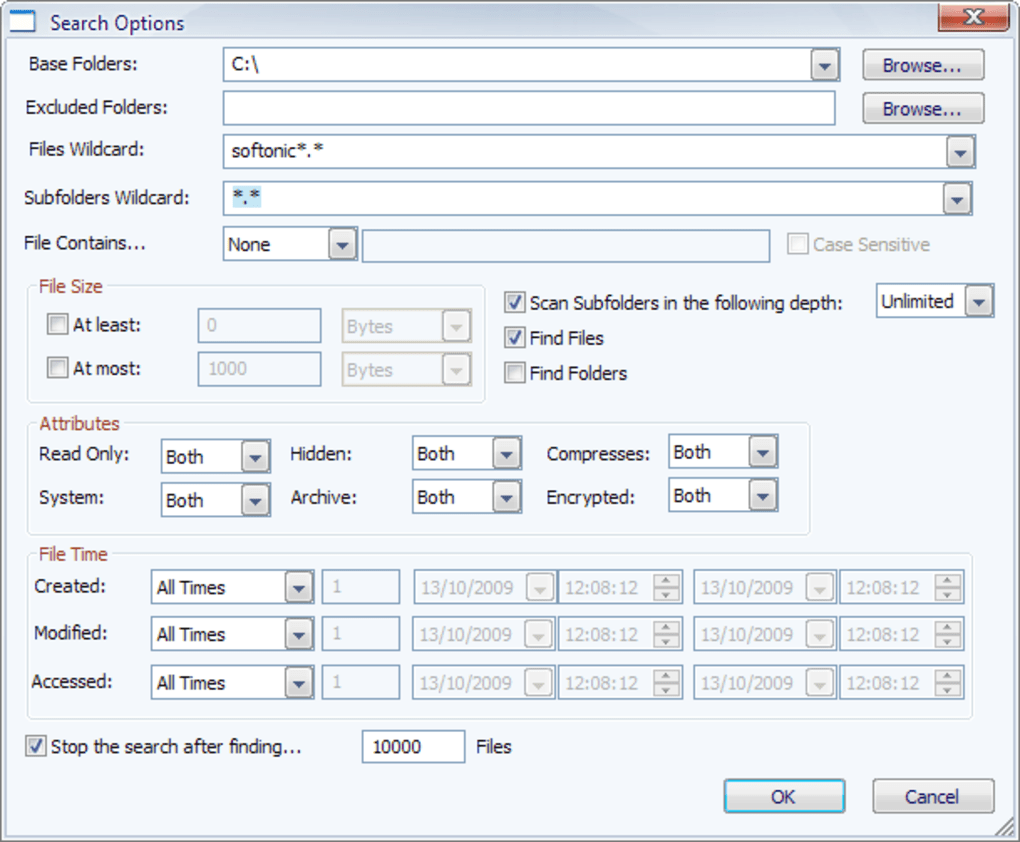
Unlike the simpler, often less precise search offered by the default Windows search, SearchMyFiles empowers users with a highly granular level of control. This allows for searches far more specific than what is readily available through standard operating system tools. Users can define their search parameters with remarkable precision, targeting files based on a variety of criteria:
-
Specific Folders and Drives: SearchMyFiles allows users to pinpoint specific directories or entire drives to limit the search scope. This significantly improves search speed, especially on systems with numerous drives or large amounts of data. The ability to exclude specific folders or drives is also crucial for refining search results and avoiding irrelevant hits.
-
File Content: This feature enables searches for files containing specific text strings. This functionality extends beyond simple keyword matching; users can utilize wildcard characters and regular expressions to perform more advanced searches. This capacity is particularly beneficial for locating files based on specific data within the files themselves, rather than just relying on filenames.
-
Binary Data Search: For users needing to search for files containing specific binary data, SearchMyFiles provides the capability to locate files based on hexadecimal values. This is incredibly useful for identifying files based on their internal structure or identifying corrupted files based on specific binary patterns.
-
File Size Range: The ability to specify minimum and maximum file sizes allows users to quickly narrow down the search to files within a particular size range. This is incredibly helpful for quickly locating large or small files, which can be vital in managing disk space or finding specific types of documents.
- File Attributes: SearchMyFiles extends its functionality beyond content and size, offering the ability to search for files with specific attributes. Users can include or exclude files based on whether they are read-only, hidden, compressed, or encrypted. This makes the utility very powerful for users who need to find specific types of files quickly, based on their properties rather than their content.
User Interface and Experience: Simplicity Meets Complexity
SearchMyFiles boasts a straightforward interface. Despite its extensive search capabilities, the program presents a relatively simple layout. However, its intuitive nature is counterbalanced by the need for a degree of technical understanding to leverage the full range of its features. Users familiar with file systems and search criteria will find the program relatively easy to navigate. Beginners, however, may find the lack of a visual progress indicator and the complexity of some options slightly challenging.
The absence of a progress bar can be frustrating. Large searches might take an extended period, leaving users uncertain whether the search is stalled or still processing. While the lack of an elaborate graphical interface maintains a lightweight footprint, a progress bar would significantly improve user experience. The absence of any visual feedback other than the eventual presentation of results increases the likelihood of users interrupting a search prematurely, before it has fully completed.
Performance and Resource Consumption: A Trade-off for Comprehensive Features
SearchMyFiles sacrifices speed for comprehensiveness. Its lack of indexing means it performs a sequential scan of specified folders and drives. This approach, while effective, results in slower search times compared to indexed search engines like Everything. However, this approach also means there is no pre-processing time, making SearchMyFiles readily available for use without the need for a lengthy initialization process.
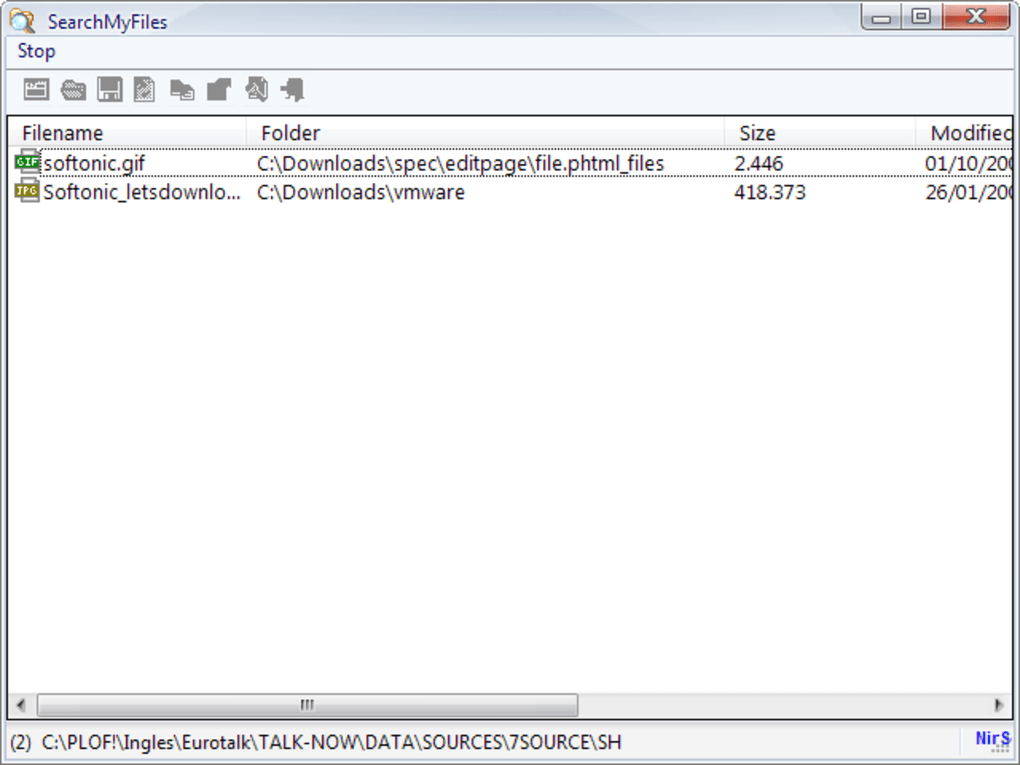
The program’s low resource consumption is a significant advantage. Its lightweight nature makes it suitable for systems with limited resources. It doesn’t heavily tax the system’s CPU or memory, making it an ideal option for older or less powerful computers.
Comparison with Alternative Search Utilities
Several alternative search utilities compete with SearchMyFiles, each offering its own strengths and weaknesses. Here’s a brief comparison:
-
Everything: Everything is known for its blazing-fast speed, thanks to its real-time indexing. However, this comes at the cost of resource consumption and a less extensive set of search parameters than SearchMyFiles.
-
Agent Ransack: Agent Ransack provides a more user-friendly interface and a good balance of speed and feature set. However, it may not offer the same level of granular control over search parameters as SearchMyFiles.
-
Windows Search: The built-in Windows search is convenient but often lacks the precision and advanced filtering options of dedicated search utilities.
Strengths and Weaknesses: A Balanced Perspective
Strengths:
- Comprehensive Search Options: Offers a remarkable level of detail in defining search criteria.
- Lightweight and Resource-Efficient: Doesn’t consume significant system resources.
- No Installation Required: Portable and easily deployable.
- Free and Open Source: Available at no cost.
- Supports a Wide Range of File Attributes: Searches based on read-only, hidden, compressed, and encrypted attributes.
Weaknesses:
- Slow Search Speed: The lack of indexing results in slow performance for large searches.
- Lack of Progress Indicator: Makes it difficult to judge search progress.
- Steeper Learning Curve: Requires some technical understanding to fully utilize advanced features.
Conclusion: A Valuable Tool for Specific Needs
SearchMyFiles is not a one-size-fits-all solution. Its strength lies in its ability to perform highly specific and intricate searches that other utilities struggle to match. Users who need a powerful tool to locate files based on detailed criteria, especially file attributes or binary content, will find it incredibly valuable. However, its slower speed and lack of a progress bar can be significant drawbacks. It excels where precision is paramount, even if it takes longer to achieve the desired results. Therefore, the choice of whether to use SearchMyFiles hinges on prioritizing speed versus the depth and specificity of the search. For those who prioritize comprehensive search capabilities over speed, SearchMyFiles remains a powerful and valuable free tool.
File Information
- License: “Free”
- Latest update: “June 17, 2025”
- Platform: “Windows”
- OS: “Windows 2003”
- Language: “English”
- Downloads: “78.5K”
- Size: “113.03 KB”


