
DeskFX Free Audio Enhancer Software, developed by NCH Software, is a free audio enhancement program for Windows PCs. It offers a system-wide equalizer and a suite of audio effects, providing users with extensive control over their audio experience. Whether you’re a casual listener seeking simple improvements or an audiophile demanding precise adjustments, DeskFX aims to cater to a wide range of needs. This review will delve into its features, usability, and overall effectiveness, comparing it to similar software and highlighting its strengths and weaknesses.
System-Wide Equalization and Beyond
At its core, DeskFX functions as a system-wide equalizer. This means that its effects apply to all audio output from your computer, regardless of the source. Whether you’re listening to music on Spotify, watching videos on YouTube, or playing games, DeskFX will process the audio, allowing for consistent sound adjustments across all applications. This is a significant advantage over programs that only affect specific applications or require individual configuration for each media player.
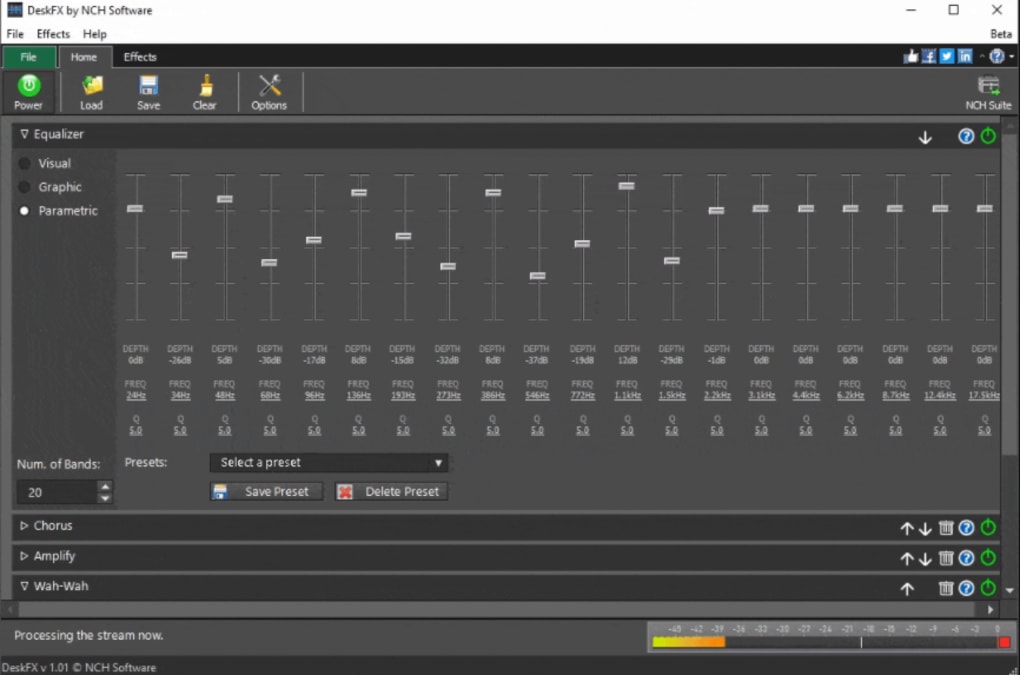
The software’s standout feature is its 20-band equalizer. This provides a granular level of control over the frequency spectrum, allowing users to meticulously adjust the volume of different frequency ranges. This level of precision is not always found in free audio enhancer software, making it a powerful tool for those seeking precise audio tuning. For example, you can boost bass frequencies for a richer, more impactful sound, or attenuate harsh high frequencies for a smoother listening experience. The visual representation of the equalizer makes adjustments intuitive, even for users unfamiliar with audio engineering principles.
Beyond the equalizer, DeskFX offers a variety of other audio effects. These include:
-
Reverb: Adds a sense of space and ambience to the audio, simulating the sound of a particular environment, such as a concert hall or a small room. This is particularly useful for enhancing music or podcasts, adding depth and realism to the sound.
-
Bass Boost: Increases the intensity of low-frequency sounds, enhancing the bass response of your audio. This is beneficial for users who prefer a more powerful and impactful bass in their music.
- Other effects: While the specific list may vary depending on the version, DeskFX typically includes additional effects to manipulate various audio aspects. This might include treble boost, presence control, and other tools to fine-tune your audio preferences.
These effects can be layered and combined to create highly customized sound profiles, allowing for extensive experimentation and personalization.
Presets and User-Friendly Interface
Recognizing that not all users are audio engineers, DeskFX includes a selection of pre-defined sound presets. These presets offer a starting point for users who are unfamiliar with equalization or who prefer a quick and easy way to enhance their audio. These presets cover various audio genres and preferences, providing a convenient way to explore different sound profiles.
The software’s user interface is generally praised for its intuitiveness. While it features a multitude of options, the layout is clear and well-organized, making navigation straightforward. The visual representation of the equalizer and other effects simplifies the process of making adjustments, even for beginners. Most controls are self-explanatory, with hover tooltips providing additional information when needed. This user-friendly design makes DeskFX accessible to a broad range of users, irrespective of their technical expertise.
Performance and System Resources
DeskFX is designed to be lightweight and efficient, minimizing its impact on system resources. The developers claim low latency and CPU usage, which is critical for real-time audio processing. In practice, the software generally performs well, even on less powerful systems, without causing noticeable lag or performance issues during playback. This efficient performance ensures a smooth listening experience without compromising the quality of the enhanced audio.
Comparing DeskFX to its Competitors
DeskFX stands out amongst its free counterparts due to its extensive feature set. While some alternatives like Equalizer APO offer powerful equalization capabilities, they often lack the breadth of additional effects found in DeskFX. Furthermore, Equalizer APO’s interface might be considered less user-friendly for beginners, requiring more technical knowledge to navigate and customize effectively.
Commercial alternatives such as Graphic Equalizer Pro often boast advanced features and refined interfaces, but come at a price. DeskFX provides a compelling free alternative, offering a significant portion of the functionality found in paid software without the associated cost. Therefore, DeskFX occupies a unique position in the market, providing a powerful and versatile free option that rivals many paid competitors in terms of features and ease of use.
Limitations and Potential Drawbacks
Despite its strengths, DeskFX does have some limitations. The most commonly mentioned drawback is the potential learning curve. While the interface is generally user-friendly, mastering the full extent of the software’s capabilities might require some time and experimentation, particularly for users unfamiliar with audio equalization and sound processing techniques. This initial investment in learning the interface and experimenting with settings should not be considered a major flaw, as the comprehensive functionality ultimately justifies the learning process.
Another potential limitation relates to the presets. While useful for beginners, the variety and quality of presets might not satisfy all users. Those with highly specific preferences might find that they still need to manually adjust settings to achieve their desired sound signature, minimizing the impact of the provided presets.
Conclusion: Is DeskFX Right for You?
DeskFX Free Audio Enhancer Software presents a compelling option for users seeking to improve their PC’s audio output. Its system-wide equalization, extensive audio effects, user-friendly interface, and efficient performance make it a powerful and versatile tool. While there is a minor learning curve for those new to audio enhancement software, the comprehensive feature set and the abundance of possibilities it unlocks make the time investment worthwhile.
The software is particularly well-suited for users who:
- Want system-wide audio adjustments.
- Desire fine-grained control over the frequency spectrum.
- Appreciate a wide array of audio effects for creative sound manipulation.
- Prefer a user-friendly interface that makes complex adjustments accessible.
If you’re looking for a free, powerful, and user-friendly audio enhancer for your Windows PC, DeskFX deserves serious consideration. It effectively bridges the gap between simple equalization tools and more complex, often paid, audio enhancement suites. Its combination of power, flexibility, and accessibility makes it a top contender in the free audio enhancement software market.
File Information
- License: “Free”
- Latest update: “July 28, 2025”
- Platform: “Windows”
- OS: “Windows XP”
- Language: “English”
- Downloads: “22.5K”
- Size: “1.75 MB”


