
dupeGuru is a software application designed to identify and manage duplicate files on a computer system. This review delves into its features, performance, strengths, weaknesses, and overall user experience, providing a comprehensive assessment for potential users.
Finding and Managing Duplicates: How dupeGuru Works
At its core, dupeGuru is a duplicate file finder. Unlike simpler tools that only compare filenames, dupeGuru offers a sophisticated approach. It can scan files based on both filenames and file content. This dual-pronged approach is crucial, as it allows the detection of duplicates even when filenames differ but the underlying content remains identical. This is particularly useful for identifying files that have been renamed, saved in different formats, or modified slightly over time. The fuzzy matching algorithm for filename scans further enhances its capabilities, identifying similar filenames even with minor variations in spelling or capitalization.
The software’s ability to scan file content is a standout feature. This allows dupeGuru to pinpoint duplicates within documents, images, and other file types where minor edits might not alter the filename but still result in redundant files. This level of granular analysis significantly improves its efficacy compared to tools solely relying on filename comparisons. This deep scanning, however, requires more processing power and time than a simple filename comparison.
Once duplicates are detected, dupeGuru provides a clear and organized overview. It groups similar files together, allowing users to easily review and select the duplicates they wish to manage. This grouping system is essential for avoiding accidental deletion of important files. Users aren’t forced to simply delete; dupeGuru allows the flexibility to delete, move, or copy duplicate files as needed, offering greater control over the process.
User Interface and Experience: A Mixed Bag
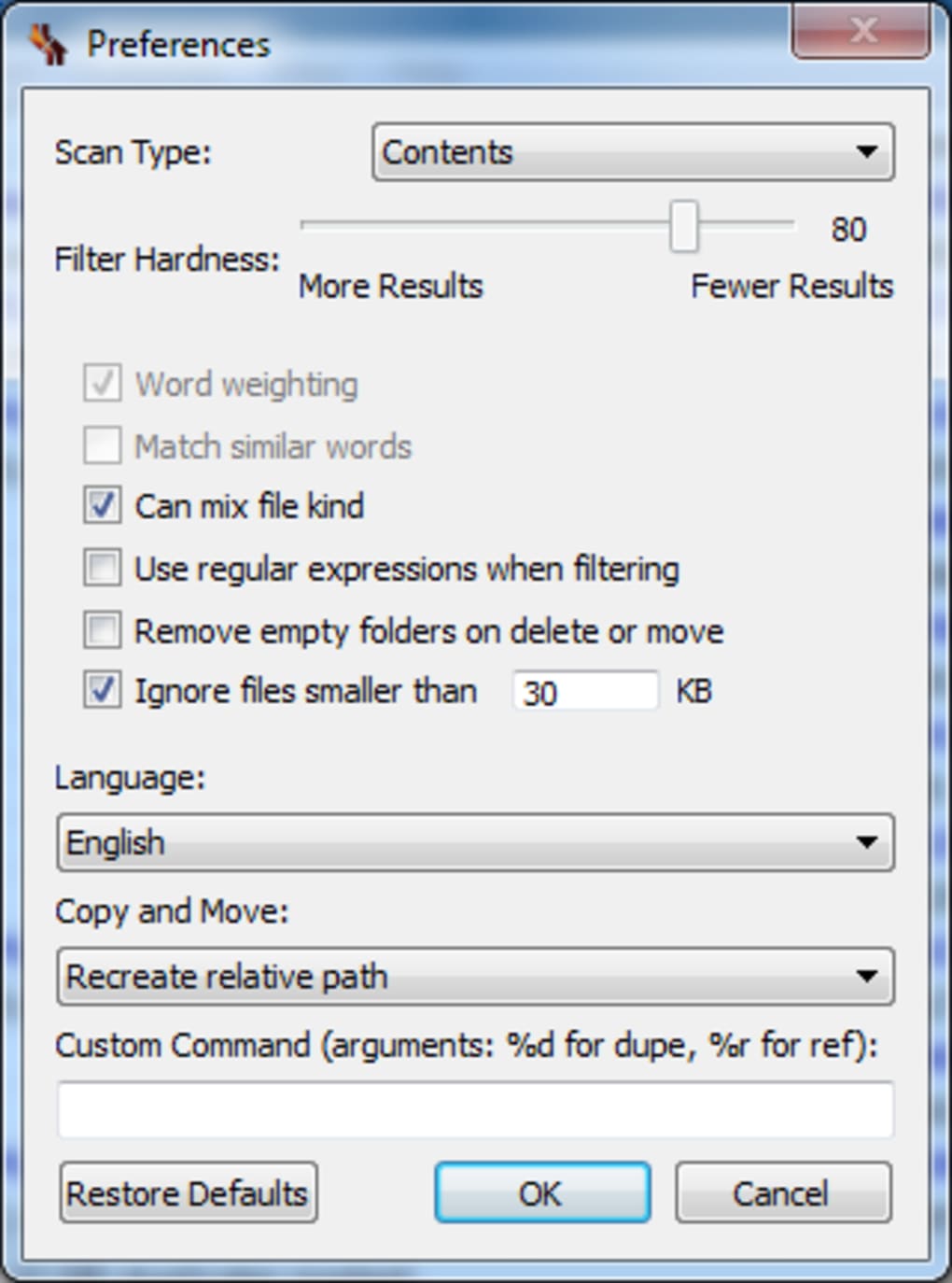
dupeGuru’s user interface has undergone a recent overhaul, resulting in a generally more polished and modern look. Navigation is relatively intuitive, making it easy to initiate scans and review the results. However, the ease of use is not entirely consistent. Accessing and adjusting preferences, particularly during frequent scans requiring customized search parameters, can prove cumbersome. While the main functions are straightforward, users seeking detailed control over the scan process might encounter some frustration navigating the settings menu.
The visual representation of duplicate files could be improved. While the grouping is effective, clearer visual indicators distinguishing original files from duplicates would enhance user experience. A more intuitive color-coding scheme or visual cues would make it easier to discern between similar and identical files, reducing the risk of accidental data loss.
Performance and Efficiency: Speed and Accuracy
dupeGuru’s speed is generally lauded. It efficiently scans even large volumes of data, providing results in a reasonable timeframe. The speed of the scan depends significantly on the size of the dataset, the type of scan (filename or content), and the system’s processing power. Content scanning, being more resource-intensive, naturally takes longer.
However, despite its speed, dupeGuru isn’t infallible. User reviews consistently highlight instances where the software either misses genuine duplicates or mistakenly flags non-duplicates as such. The accuracy, therefore, presents a trade-off with the speed. This inaccuracy can lead to data loss if users blindly delete files based on the program’s analysis. Carefully reviewing the results before taking any action is crucial. The default 30MB file size ignore setting, while potentially improving scan speed, also introduces the risk of missing larger duplicate files. This setting should be adjusted based on the user’s specific needs and files being scanned.
The “Folders” scan type, a relatively recent addition, allows users to target specific folders, streamlining the process and improving efficiency by avoiding unnecessary scanning of irrelevant areas. This feature addresses a previous limitation and enhances the overall functionality.
Security and Safety: Protecting Your Data
dupeGuru prioritizes data safety, employing a reference directory system and a robust grouping mechanism to prevent accidental deletion of important files. Before initiating any action, users have the opportunity to review the identified duplicates, ensuring they are making informed decisions. This layered approach minimizes the risk of unintended data loss.
Despite these safety measures, user vigilance remains paramount. The software’s occasional misidentification of duplicates underscores the importance of manually verifying the results before performing any deletions. Regular backups are always recommended before undertaking any significant file management operation, irrespective of the software used.
Versions and Editions: Catering to Specific Needs
dupeGuru is available in several editions, including dedicated versions for music and images (dupeGuru Music Edition and dupeGuru Picture Edition). These specialized editions cater to users with specific file management requirements. For instance, the Music Edition might be tailored to handle the nuances of music files, such as identifying duplicates based on metadata in addition to file content.
Conclusion: A Useful but Imperfect Tool
dupeGuru provides a valuable service for managing duplicate files, offering a relatively fast and efficient method of identifying them. Its dual scanning approach (filenames and content), and the option to customize the process, surpasses the capabilities of many simpler duplicate file finders. However, the software’s occasional inaccuracies highlight the need for careful review of the results before taking any actions. Blindly trusting the program’s output could lead to data loss.
While the recent interface improvements have enhanced usability, certain aspects of the user experience, such as accessing preferences, could be further refined. Improvements in the visual representation of duplicate files, making it easier to distinguish between genuine duplicates and near-duplicates, would significantly improve user confidence and reduce the risk of accidental deletions. Despite these shortcomings, dupeGuru remains a useful tool for managing duplicate files, provided users exercise caution and carefully review its findings before taking any actions on their data. Its speed and comprehensive approach make it a valuable asset for users dealing with large volumes of data, but its accuracy should not be taken for granted. Users should be prepared to manually verify its findings to ensure the safety of their files.
File Information
- License: “Trial version”
- Latest update: “May 15, 2025”
- Platform: “Windows”
- OS: “Windows XP”
- Language: “English”
- Downloads: “36.2K”
- Size: “27.55 MB”


