
SequoiaView, a freeware utility for Windows, offers a unique approach to visualizing hard drive contents. Released in 2002 and last updated in 2005, it remains a surprisingly effective tool for quickly identifying large files and understanding disk space allocation, even in today’s landscape of more modern alternatives. While no longer actively developed, its innovative use of squarified treemaps continues to hold a certain appeal for users seeking a simple, visually intuitive method of disk analysis. This article delves into the history, functionality, and legacy of SequoiaView.
Understanding SequoiaView’s Functionality
SequoiaView distinguishes itself from other disk analysis tools through its use of a visualization technique called “cushion treemaps.” Traditional treemaps represent file sizes as rectangles within a larger space, often resulting in numerous thin, elongated rectangles that are difficult to interpret. SequoiaView’s squarified treemaps, however, strive to create squares and near-squares, making the relative sizes of files immediately apparent. This visual clarity allows users to quickly identify the largest files and folders on their hard drives, a crucial feature for managing disk space efficiently.
The program’s interface is remarkably straightforward. Upon launching, it scans the selected drive (by default, the C: drive) and generates a visual representation of the file system. Each square or rectangle corresponds to a file or folder, with its size directly proportional to the amount of disk space it occupies. The color-coding often enhances this visual representation, though the exact color scheme isn’t specified in available documentation. This visual summary provides a comprehensive overview of the drive’s contents at a glance. Users can easily spot large files or folders that are consuming significant disk space.
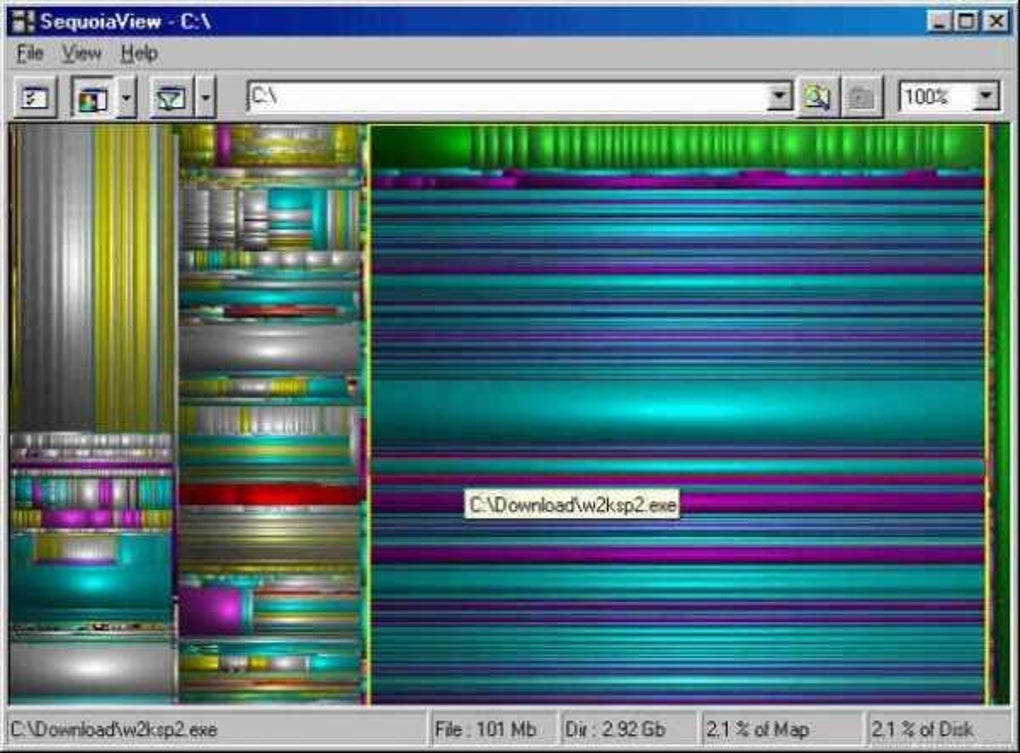
Beyond the visual representation, SequoiaView doesn’t offer advanced features found in more modern disk analysis tools. It lacks features like detailed file information displays, the ability to directly delete files from the visualization, or support for detailed analysis of file types. Its primary function is to provide a rapid visual overview. This simplicity, however, is also its strength. The lack of complex features makes the software extremely lightweight and fast, leading to quick analysis times even on older systems. The immediate visualization, without any complex menus or settings, is particularly valuable for quickly identifying space-consuming files.
SequoiaView’s Historical Context and Legacy
Released in 2002 by Win Frontier Corporation (now known as WINフロンティア株式会社), SequoiaView’s release predates the widespread adoption of solid-state drives (SSDs) and the massive storage capacities available today. At the time, hard drive space was a significant constraint for many users. A tool that could rapidly visualize disk space usage was invaluable for identifying and managing large files and folders.
SequoiaView’s popularity peaked in the mid-2000s, likely due to its unique visualization technique and the relatively limited alternatives available at the time. Its lightweight nature and ease of use made it accessible to a broad audience, even those unfamiliar with complex system utilities. Reviews from the period frequently praised its speed and visual clarity. While the program’s last update was in September 2005, its simplistic design and functionality mean it continues to function effectively on many legacy systems.
In the current technological landscape, however, SequoiaView’s functionalities are largely superseded by more feature-rich disk analysis tools. Many modern equivalents offer far more detailed insights into file types, usage patterns, and advanced features such as file duplication detection and automated cleanup options. These tools often incorporate interactive elements and advanced filtering options, allowing for a more granular analysis than SequoiaView provides.
Despite its limitations, SequoiaView retains a nostalgic value for some users. Its distinctive approach to data visualization and its straightforward, no-frills design are a testament to a time when simplicity was often prioritized over complexity. Its continued availability as freeware provides a valuable glimpse into the evolution of disk analysis software. The focus on visual representation remains relevant, especially for users who prefer a quick, intuitive overview of their hard drive’s contents without getting bogged down in technical details.
Comparing SequoiaView to Modern Alternatives
Modern disk analysis tools offer a significantly broader range of functionalities compared to SequoiaView. While SequoiaView effectively visualizes file sizes through its treemap representation, modern tools provide much more detail. Many allow users to explore files and folders directly within the interface, providing detailed information such as file size, type, creation date, and last access time. This level of detail allows for more informed decisions about which files to keep, archive, or delete.
Furthermore, contemporary tools often offer automated cleanup features, such as identifying and deleting duplicate files or temporary files that consume significant disk space without contributing to the system’s functionality. These automation features enhance productivity, allowing users to reclaim disk space with minimal manual intervention.
Modern tools typically support larger disk capacities and more complex file systems with greater ease. SequoiaView’s capabilities may be limited when dealing with modern hard drive sizes and the complexities of modern operating systems. More recent tools tend to be more robust in handling diverse file types and advanced file system structures, particularly when dealing with the complexity introduced by SSDs.
However, it’s important to note that this increase in functionality often comes at the cost of increased system resource usage and a more complex user interface. SequoiaView’s simplicity and speed remain advantages for users who prioritize a quick visual overview over detailed analysis. The choice between SequoiaView and a modern alternative depends entirely on the user’s specific needs and priorities. For users needing a basic overview, SequoiaView remains a surprisingly viable option, particularly on older machines with limited resources.
User Reviews and Community Perception
While SequoiaView lacks an active, dedicated community forum, user reviews from its heyday highlight its strengths and weaknesses. Many praise its speed, ease of use, and effective visualization of hard drive space. The immediate visual representation of file sizes is frequently cited as a key advantage. Users appreciated its ability to quickly identify large files or folders consuming significant disk space, facilitating efficient space management.
However, the lack of advanced features is also a recurring theme in user feedback. The absence of features like detailed file information, direct file deletion from the interface, and sophisticated filtering options limits its applicability for tasks beyond basic disk space analysis. The relatively simple interface, while praised for its ease of use, may feel limiting compared to the more feature-rich tools available today.
Despite the absence of current active development and community support, SequoiaView’s historical reception illustrates its niche strength. Its simplicity and straightforward approach to disk space visualization were valued by users who prioritized speed and visual clarity above extensive features. Its legacy serves as a reminder of the importance of clear, intuitive interfaces in software design, even within the constantly evolving landscape of computer technology. The program successfully filled a specific need within its context, even if that need is less prominent in the current environment of abundant storage space and more sophisticated analysis tools.
File Information
- License: “Free”
- Version: “1.3”
- Latest update: “September 27, 2005”
- Platform: “Windows”
- OS: “Windows 2000”
- Language: “English”
- Downloads: “72.4K”
- Size: “567.05 KB”


