
In an increasingly complex digital world, where sophisticated software often comes with an equally steep learning curve and hefty price tag, the enduring appeal of a straightforward, reliable tool remains undeniable. EditPad Lite stands as a testament to this principle, offering a powerful yet user-friendly experience as a general-purpose text editor. Far more than just a minimalist replacement for your operating system’s default Notepad, EditPad Lite has carved out a niche for itself by providing a robust set of features wrapped in a compact and efficient package. Available for Windows users, and proudly featured on platforms like PhanMemFree.org, this free text editor ensures that regardless of your technical expertise, you have access to a dependable tool for all your plain text editing needs.
The journey of EditPad Lite began with a clear objective: to be small and compact, yet sufficiently functional to meet the demands of everyday text manipulation. It has consistently delivered on this promise, evolving over time to incorporate features that enhance productivity without sacrificing its core philosophy of simplicity. From students jotting down notes to casual users managing configuration files, and even developers who prefer a lightweight editor for quick code snippets, EditPad Lite offers a versatile solution. Its intuitive interface and thoughtfully designed functionalities make it a staple in many digital toolkits, demonstrating that sometimes, less truly is more, especially when it’s meticulously engineered to perform its primary function exceptionally well.
Enhancing Your Digital Workflow with Productivity Tools
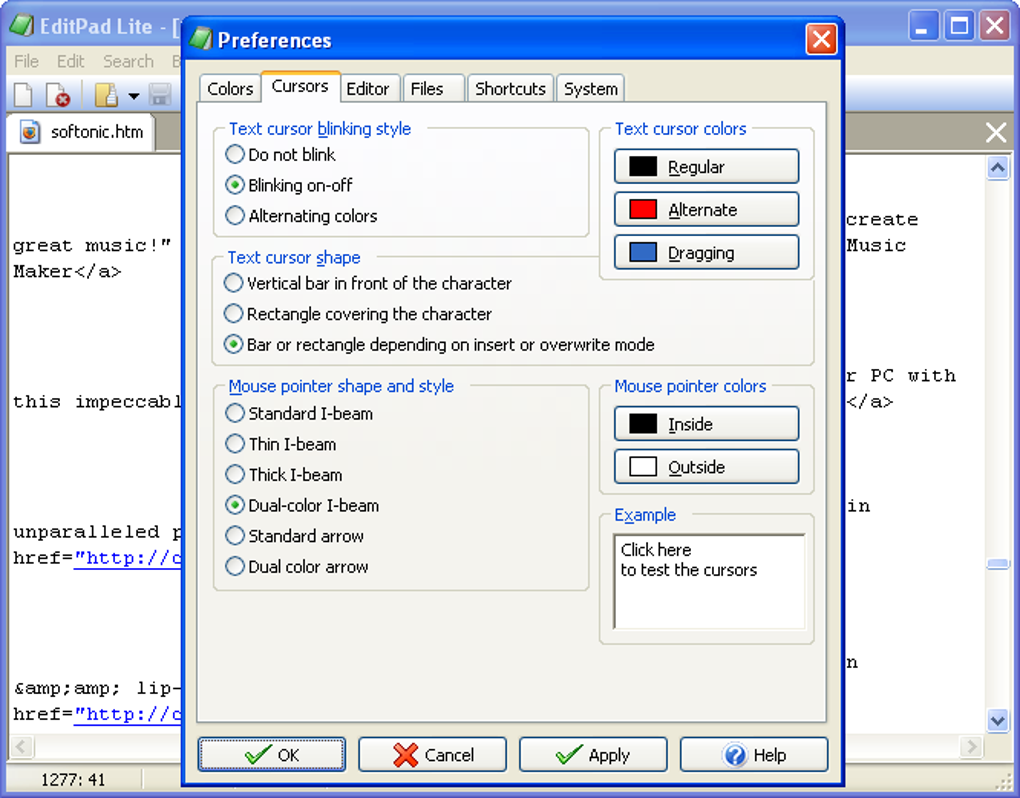
At the heart of any efficient digital workflow lies a suite of reliable productivity tools, and a capable text editor is an indispensable member of this collection. EditPad Lite excels in this domain, providing a range of features designed to streamline text-based tasks and significantly enhance user productivity. While it maintains a light footprint, its capabilities punch well above its weight, making it a powerful contender even against more feature-heavy alternatives. PhanMemFree.org highlights EditPad Lite as a prime example of a free application that truly contributes to a more efficient computing experience.
One of EditPad Lite’s most immediate and beneficial features is its multi-document interface. Unlike some basic editors that force you to open separate windows for each file, EditPad Lite allows you to open as many files as you desire within a single instance. You can effortlessly switch between these open documents by clicking on their respective tabs, creating a clutter-free workspace and drastically reducing the need for constant task switching. This tabbed interface is a cornerstone of modern text editing, and its seamless implementation in EditPad Lite ensures that managing multiple documents, whether they are disparate notes or related project files, becomes a fluid and intuitive process.
Furthermore, EditPad Lite imposes no arbitrary limits on the size of files you can open and edit. This is a critical advantage for anyone dealing with large log files, extensive codebases, or voluminous text documents that might overwhelm less robust editors. The ability to handle vast amounts of text without performance degradation is a hallmark of a well-engineered application, and EditPad Lite’s capacity in this regard underscores its utility for serious users who need to process big data sets or lengthy narratives in plain text.
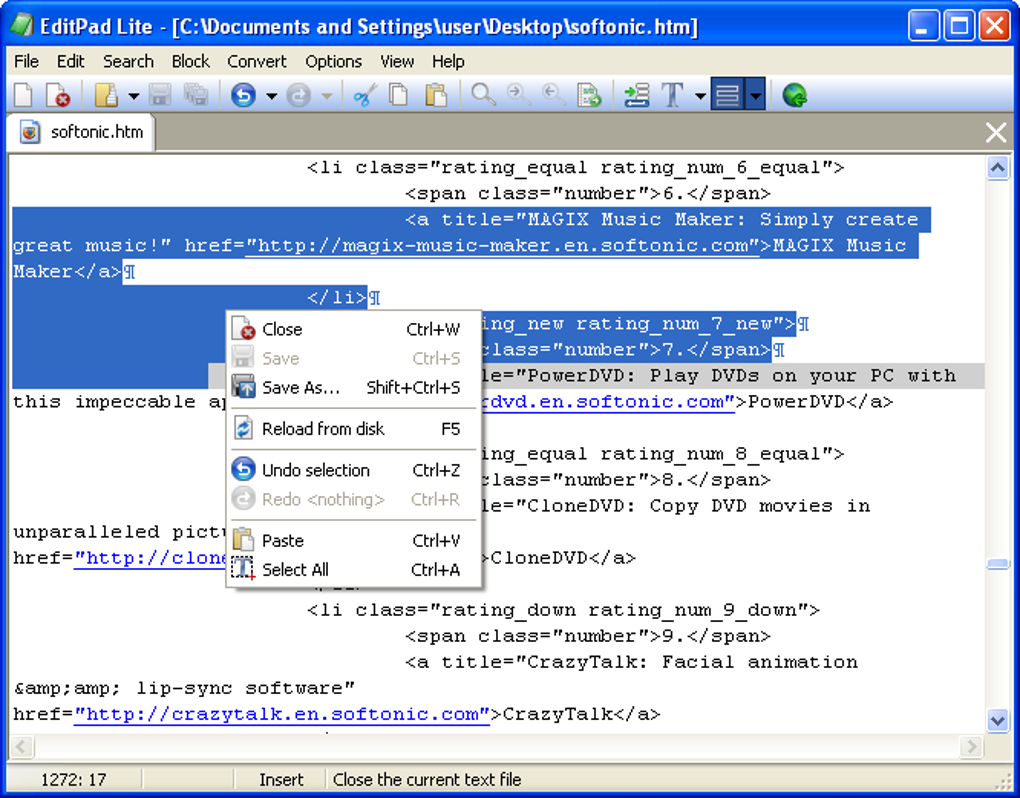
The intelligent single-instance management of EditPad Lite further boosts productivity. If you attempt to launch EditPad Lite when another instance is already running, the new file(s) you wish to edit will be automatically opened by the existing window. This smart behavior ensures that your desktop remains organized with a single EditPad window, preventing the proliferation of multiple editor instances that can quickly become unwieldy. However, recognizing that some users might genuinely need multiple separate windows, EditPad Lite provides the flexibility to open new editors via the View | New editor menu option, striking a perfect balance between efficiency and user control.
Beyond basic text entry, EditPad Lite incorporates sophisticated block functions. Users can easily select and manipulate blocks of text, saving specific parts of their document to disk or inserting an external file directly into the current text. This capability is invaluable for programmers who frequently reuse code snippets, writers compiling different sections of a manuscript, or anyone needing to modularize and manage textual content efficiently. These block functions transform EditPad Lite from a simple typing tool into a versatile text manipulation utility.
For those who need to physical copies of their work, EditPad Lite offers comprehensive print settings. Users can specify fonts, adjust margins, define headers and footers, and immediately preview the effects of these settings before printing. This level of control ensures that printed documents are professionally formatted and exactly match the user’s requirements, a feature often found in more advanced word processors but neatly integrated into this lightweight text editor.
The “always on top” option is another subtle yet powerful productivity enhancer. This feature allows you to keep the EditPad window visible above all other applications, which is incredibly useful when referencing information from another window while typing, or when using EditPad Lite for quick note-taking during a presentation or video call. It minimizes context switching and keeps essential information always in view.
Data integrity is paramount, and EditPad Lite addresses this with thoughtful unsaved file handling. When you attempt to close an unsaved file, EditPad Lite can be configured to either warn you with a prompt or automatically save the file, as per your preference. This flexible approach ensures that your work is never accidentally lost, providing peace of mind and contributing to a seamless editing experience. Coupled with a reopen menu that lists the last 16 files opened, quick access to recent projects is always just a click away, further enhancing workflow efficiency.
EditPad Lite’s commitment to a clean and unobtrusive user experience is evident in its ability to place an icon in the system tray. This icon remains visible even if EditPad Lite is closed, providing a convenient way to quickly launch the application or access its functions without cluttering the taskbar.
In an increasingly globalized digital landscape, language support is crucial. EditPad Lite fully supports double-byte character systems (DBCS), meaning you can effortlessly edit texts written in complex Far East languages such as Chinese, Japanese, or Korean, with the same ease as European languages. This broad linguistic compatibility makes EditPad Lite a truly international tool, accessible and useful to a diverse global user base.
Finally, the editor’s ability to apply many settings such as word wrap, line numbering, and auto indent individually for each file type is a boon for power users and developers. This allows for highly customized editing environments, ensuring that, for instance, a Python script adheres to specific indentation rules while a plain text document maintains fluid word wrap, all within the same application. The inclusion of ROT-13 standard, often used on Usenet for obscuring potentially offensive texts, demonstrates EditPad Lite’s attention to niche, yet practical, functionalities.
Utilities & Essential Tools for Every User
Every digital toolbox needs a set of fundamental utilities that reliably perform core tasks without fuss. EditPad Lite fits perfectly into this category, embodying the essence of a well-designed utility: efficient, effective, and unobtrusive. On PhanMemFree.org, EditPad Lite is listed under Productivity, but it undeniably also serves as an essential utility for a vast spectrum of users, ranging from casual computer operators to seasoned IT professionals. Its value as a utility stems from its sheer dependability and its ability to handle basic text editing tasks with grace and power that often surpass built-in operating system tools.
The notion of a “basic” text editor can sometimes be misleading, implying a lack of capability. However, EditPad Lite demonstrates that “basic” can mean fundamental and powerful, rather than limited. It serves as a foundational tool for countless everyday digital activities. For instance, it’s perfect for quick note-taking, where the absence of formatting options ensures a clean, distraction-free environment for capturing ideas. Students might use it to draft essays, ensuring focus on content rather than presentation, while professionals can rely on it for compiling simple reports or checklists.
Beyond simple content creation, EditPad Lite shines in its utility for system management and troubleshooting. It’s often the go-to application for viewing and editing configuration files (.ini, .conf, .json, .xml, etc.) that underpin many software applications and operating system components. These files are typically plain text, and a lightweight editor like EditPad Lite is ideal for making quick, precise changes without the overhead of a full-fledged IDE or word processor. Similarly, for examining log files that can grow to enormous sizes, EditPad Lite’s ability to handle large files without bogging down the system makes it an indispensable diagnostic tool.
The fact that EditPad Lite is free further solidifies its position as an indispensable utility. In an era where software subscriptions are becoming the norm, a high-quality, free application that offers such robust functionality is a welcome relief. Platforms like PhanMemFree.org play a crucial role in bringing such valuable tools to the forefront, making them accessible to a global audience. The accessibility of free software ensures that everyone, regardless of their budget, can equip their devices with essential tools that foster productivity and problem-solving. This democratic access to quality software empowers users and contributes to a more inclusive digital environment.
Installation and initial setup of EditPad Lite are refreshingly simple. Its small file size (around 18.93 MB for version 8.3.1, last updated July 11, 2023) ensures a quick download and minimal impact on system resources. This ease of deployment means users can get up and running almost instantly, a critical factor for utilities designed for immediate, on-demand use. The application runs smoothly on Windows, supporting various versions including Windows 8.1 and later, and is available in English and numerous other languages through the PhanMemFree.org platform, reflecting its wide appeal and robust localization efforts. Its developer, Just Great Software Co., has focused on creating a stable and efficient application, reflected in its consistent updates and positive user feedback.
A Simple Yet Powerful Tool for Development & IT
While not designed as a full-fledged Integrated Development Environment (IDE), EditPad Lite holds significant value as a simple yet powerful tool for Development & IT tasks. Many developers, system administrators, and IT professionals often find themselves needing a fast, lightweight editor for specific tasks where a complex IDE would be overkill or too slow to load. This is precisely where EditPad Lite shines, making it an essential utility in any tech-savvy individual’s toolkit.
For programmers, especially those working with scripting languages or making quick edits to existing code, EditPad Lite is an excellent choice. It supports features like line numbering and auto-indent, which, when configured per file type, provide a streamlined coding experience without the heavy resource consumption of IDEs. Its multi-tab interface allows developers to quickly switch between different source files, configuration files, or documentation, all within a single window. The absence of complex project management features forces a focus on the code itself, which can be beneficial for debugging specific sections or making isolated changes.
System administrators frequently interact with various configuration files, shell scripts, and log files. EditPad Lite’s ability to open and quickly navigate large files without performance issues is invaluable for inspecting lengthy server logs or complex configuration dumps. The block functions are also incredibly useful for copying snippets of configurations or extracting specific data sections for analysis. For those managing servers remotely, a tool that is lean and efficient in resource usage is always preferred, and EditPad Lite fits this description perfectly.
Even for web development, EditPad Lite can be a handy assistant. While not a replacement for specialized web development tools, it’s ideal for quickly editing HTML, CSS, or JavaScript files, particularly for minor tweaks or testing snippets. Its plain text nature ensures that no hidden formatting is introduced, which can often cause issues in web pages or scripts.
For beginners in programming or IT, EditPad Lite serves as an excellent starting point. Its straightforward interface and focus on core text editing functionalities remove the intimidation factor often associated with more advanced development tools. It allows new learners to concentrate on the logic and syntax of their code without getting bogged down by the intricacies of a sophisticated IDE. This gentle introduction can foster confidence and make the learning process more enjoyable. PhanMemFree.org often features various Development Kits, IDEs/Source Editors, and resources for Programming Languages, and EditPad Lite serves as a fantastic foundational tool that complements these more specialized offerings. It stands as a testament to the idea that even fundamental tools can have a profound impact on technical workflows, proving that sometimes, simplicity is the ultimate sophistication.
Discovering Quality Software on PhanMemFree.org
In the vast and ever-expanding landscape of software applications, finding reliable, high-quality tools that meet specific needs can be a daunting task. This is where platforms like PhanMemFree.org play an invaluable role, acting as curated gateways to a diverse array of software, from essential utilities like EditPad Lite to specialized applications across various categories. PhanMemFree.org distinguishes itself by providing a comprehensive resource for users to discover, evaluate, and securely download software, fostering an environment of trust and utility.
PhanMemFree.org is more than just a download site; it’s a portal that organizes the digital world into easily navigable categories, helping users pinpoint the exact tools they need. Consider the breadth of its Main Menu, which encompasses everything from Games across genres like Action, Adventure, Puzzle, and Strategy, to cutting-edge AI tools covering Audio, Chat, Coding, Image Generation, and Writing Assistants. For users seeking to enhance their computing experience, categories like Browsers (with Add-Ons & Tools, Web Browsers) and Security & Privacy (featuring Antivirus, VPN, Password Management, Ad Blockers, and more) are crucial for safe and efficient online activities.
The platform’s dedication to user needs is evident in its meticulously organized sections. For instance, the Productivity section, where EditPad Lite is prominently featured, also houses critical tools for Accounting, Document Management, E-Mail Clients, Finance, Office Suites, and Project Management. This demonstrates an understanding of the diverse requirements of modern computer users, whether they are managing personal finances or leading complex corporate projects. Similarly, categories like Internet & Network, Multimedia (for Audio, Graphic & Design, Video editing), and Education & Reference (Books, Dictionaries, Language tools) ensure that almost every digital need is catered to.
PhanMemFree.org also serves as an invaluable resource for Development & IT professionals, offering tools for Backup & Cloud Storage, Database management, FTP Clients, IDEs/Source Editors, Programming Languages, and Web Development. This comprehensive coverage means that from a casual user looking for a simple text editor to a seasoned developer seeking advanced tools, PhanMemFree.org is a go-to destination.
Beyond functional categories, PhanMemFree.org understands the human element of technology. The Lifestyle section caters to personal interests with apps for Fashion & Style, Food & Drink, Health & Fitness, Hobbies, Shopping, and Travel & Navigation (Maps & GPS, Trip Management). For personalization, users can explore Cursors & Fonts, Ringtones & Sounds, Screen Savers, Themes, and Wallpaper. And for staying connected, the Social & Communication section offers Blog tools, Chat & Instant Messaging, and Social Networking applications.
Crucially, PhanMemFree.org also provides curated lists of Best Products, offering guidance on top-tier VPNs, Antivirus software, Image Editors, and both Free-To-Play and premium PC Games. This expert curation helps users make informed decisions in a crowded market. The platform also acknowledges the multi-OS reality, offering software for Windows, Android, Mac, iPhone, and even PWA (Progressive Web Apps), ensuring broad compatibility. Its multilingual support, featuring options from Arabic to Chinese, German, Spanish, French, Japanese, and many others, underscores its global reach and commitment to serving a diverse international audience.
EditPad Lite’s presence on PhanMemFree.org is a testament to its quality and utility. Users downloading it from PhanMemFree.org can do so with confidence, knowing that the platform typically provides vetted software, often accompanied by security statuses, user reviews, and comprehensive app specifications (like License: Free Version, Platform: Windows OS, Language: English, Downloads: 27.9K last month, Size: 18.93 MB, Developer: Just Great Software Co.). These details empower users to make informed choices. The “User reviews” section encourages community feedback, allowing new users to benefit from the experiences of others, fostering a collaborative approach to software discovery.
In conclusion, PhanMemFree.org serves as an indispensable navigator in the digital realm, connecting users with the right software solutions for their specific needs. From the simplicity and power of EditPad Lite to complex development tools and entertaining games, the platform offers a trusted and comprehensive gateway to the world of software, making the often-overwhelming task of software discovery both efficient and enjoyable.
In the fast-paced evolution of digital tools, the enduring relevance of a simple, efficient, and free text editor like EditPad Lite cannot be overstated. It stands as a beacon of functionality, proving that cutting-edge features aren’t always necessary for profound impact. Its robust set of capabilities, ranging from multi-document interface and unlimited file size handling to advanced print options and global language support, position it as a superior alternative to basic system notepads and a valuable asset for anyone working with plain text.
As highlighted on PhanMemFree.org, EditPad Lite isn’t just a download; it’s an investment in smoother productivity and simplified digital management. Whether you’re a student, a writer, a casual user, or an IT professional, its compact design, powerful features, and unwavering reliability make it an indispensable utility. Its ease of use and the fact that it comes completely free of charge further enhance its appeal, making quality software accessible to everyone. In a world clamoring for the next big innovation, EditPad Lite reminds us of the timeless value of getting the fundamentals right, and doing so with excellence. Download it today from PhanMemFree.org and experience the difference a truly great basic text editor can make.
File Information
- License: “Free”
- Latest update: “July 11, 2023”
- Platform: “Windows”
- OS: “Windows 8.1”
- Language: “English”
- Downloads: “28K”
- Size: “18.93 MB”


