
Emu-OS is a free, open-source video game utility software designed to emulate various classic gaming consoles. Unlike traditional emulators that run as standalone applications, Emu-OS is a live Ubuntu-based GNU/Linux distribution packaged as an ISO image. This unique approach allows users to run a collection of emulators from a bootable disk or USB drive, eliminating the need to install anything directly onto their main operating system. This eliminates the potential for conflicts with existing software and keeps the main system clean. However, it does require the use of a game controller; keyboard and mouse navigation is not supported.
What is Emu-OS and How Does it Work?
Emu-OS leverages the EmulationStation software to provide a user-friendly interface for accessing and playing ROMs of classic games. The ISO image contains a curated set of emulators, meticulously configured and ready to use. This “all-in-one” approach simplifies the process of setting up retro gaming significantly, contrasting with the complexities often associated with individually installing and configuring multiple emulators. By operating from a bootable medium, Emu-OS keeps the user’s primary operating system untouched, preserving its integrity and avoiding potential conflicts.
It’s crucial to differentiate Emu-OS from the similarly-named EmuOS, a separate project part of Emupedia.net. While both aim to provide access to classic games, EmuOS focuses on web-based emulation of titles such as Doom and Flappy Bird, alongside classic applications like Winamp and Photopea. EmuOS also offers a selection of older Windows operating system interfaces (Windows 95, 98, and ME) for a nostalgic experience. In contrast, Emu-OS concentrates solely on providing an emulator suite for a variety of retro gaming consoles.
.jpg)
The Emu-OS ISO file is optimized for both 32-bit and 64-bit x86 and x86_64 architectures, offering broad compatibility with modern computer systems. It requires a minimum of 1GB of storage space on the bootable medium (a USB flash drive or a CD/DVD). Upon booting, users are presented with a standard boot menu, offering various options, including a normal start, safe graphics mode, a direct installer start, a system memory diagnostic test, and the ability to boot an existing operating system from a local drive. In case of boot failures, the provided backupintrid.gz file can be used to replace intrid.gz to resolve potential issues.
Supported Consoles and Platforms
Emu-OS provides comprehensive support for a range of classic gaming platforms, offering a wide selection of retro gaming experiences:
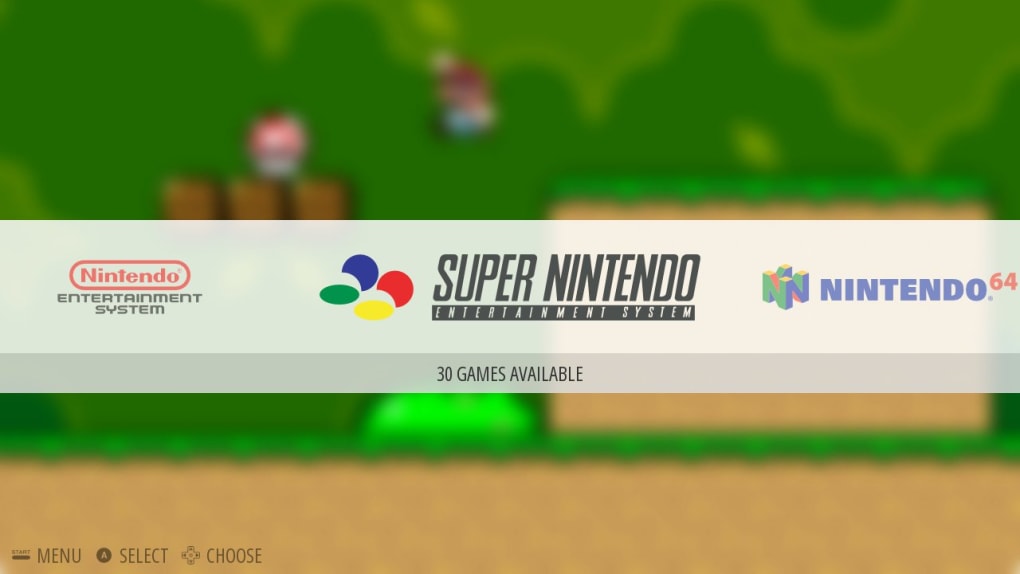
- Nintendo Entertainment System (NES): Experience the 8-bit era with iconic titles like Super Mario Bros. and The Legend of Zelda. Emu-OS allows you to relive the pixelated adventures that defined a generation of gamers.
-
Super Nintendo Entertainment System (SNES): Take a leap into 16-bit gaming with the SNES’s impressive library. From Super Metroid’s atmospheric exploration to the vibrant worlds of Super Mario World, Emu-OS opens the door to countless classic SNES experiences.
-
Nintendo 64 (N64): The move to 3D gaming is represented with the N64’s iconic titles like Super Mario 64 and The Legend of Zelda: Ocarina of Time. Experience the revolutionary 3D graphics and gameplay that redefined console gaming.
-
PlayStation (PS1): Enjoy the groundbreaking 3D graphics and diverse game library of the original PlayStation. From racing games like Gran Turismo to RPG epics like Final Fantasy VII, Emu-OS provides access to a huge library of games that defined the PlayStation era.
-
PlayStation Portable (PSP): Experience the handheld power of the PSP, with its impressive portable library of games spanning various genres and styles. Emu-OS provides a way to enjoy these titles on a larger screen.
-
Disk Operating System (DOS): Travel back to the early days of PC gaming with support for classic DOS games. Emu-OS allows you to relive the pixelated adventures of titles that laid the groundwork for modern gaming.
-
Windows over Wine: Emu-OS offers the ability to run select Windows games through Wine, a compatibility layer enabling Windows applications to run on Linux-based systems. This opens up a range of additional classic PC titles.
-
Atari: Relive the very earliest days of home console gaming with Atari’s simplistic, yet innovative and groundbreaking titles. Emu-OS allows access to the foundation upon which much of modern gaming is built.
This extensive support makes Emu-OS a versatile solution for anyone interested in revisiting classic console and computer games.
User Interface and Control
Emu-OS’s interface is designed to be simple and intuitive, leveraging the strengths of EmulationStation. Navigation is streamlined and user-friendly, although it is important to note that the system is designed to be used with a compatible game controller. Keyboard and mouse controls are disabled within the emulation environment, ensuring optimal playability with the intended input device. The default username and password are both “emuos,” providing easy access.
The live environment nature of Emu-OS makes it a space-saving solution. Since all files reside on the bootable media, the user’s primary hard drive or SSD remains unaffected. This keeps your primary operating system clean and prevents potential conflicts with other software.
Advantages and Disadvantages
Emu-OS offers several significant advantages:
Pros:
- Comprehensive Emulation Support: Offers a wide range of emulator support, encompassing several major gaming consoles and platforms, providing a broad retro gaming experience.
- Space-Saving Design: The live ISO image nature means no installation is needed on your primary system, saving hard drive space. All emulators and ROMs (which must be supplied separately) are loaded from the bootable medium.
- User-Friendly Interface: The EmulationStation front-end provides a clean and intuitive user interface for easy game selection and management.
- Multiple Boot Options: Offers various boot options, allowing for troubleshooting and customization based on system configurations.
- Portability: The system’s bootable nature allows you to transport your retro gaming library with you on a USB drive or CD/DVD.
However, there are also some limitations to consider:
Cons:
- Controller Required: Keyboard and mouse input is not supported; a compatible controller is essential for gameplay.
- Not a Direct Run: The ISO file must be burned to a disk or written to a USB drive to function; it cannot be run directly from a mounted image file.
- ROMs Not Included: Emu-OS itself does not include ROM files; users are responsible for sourcing and managing their own game ROMs, respecting copyright laws.
Conclusion
Emu-OS provides a compelling solution for retro gaming enthusiasts who want a convenient and space-efficient method to access a vast library of classic games. Its all-in-one approach simplifies the process of setting up and managing multiple emulators, making it an attractive option for both beginners and experienced retro gamers. However, the requirement of a game controller and the inability to run the system directly from the ISO file are factors to keep in mind before using this emulator. Ultimately, Emu-OS represents a valuable tool for preserving and enjoying the legacy of classic video game consoles.
File Information
- License: “Free”
- Version: “3.8.6”
- Latest update: “July 15, 2022”
- Platform: “Windows”
- OS: “Windows 7”
- Language: “English”
- Downloads: “12.8K”
- Size: “62.00 Bytes”


