
In the ever-evolving landscape of digital entertainment, the allure of retro gaming remains steadfast. For many, the original PlayStation (PSX or PS1) holds a special place, representing a pivotal era in console gaming history. Titles like Final Fantasy VII, Metal Gear Solid, Resident Evil, and Gran Turismo defined a generation, offering revolutionary 3D graphics and immersive gameplay. While modern consoles boast unparalleled fidelity and complex narratives, there’s an undeniable charm in revisiting these pixelated masterpieces. This desire to re-experience gaming’s golden age has fueled the popularity of emulators – software programs that allow modern computers to mimic older hardware. Among these, the Emurayden PSX Emulator stands out as a free, lightweight, and historically significant option for Windows users looking to dive back into the vast library of PlayStation classics.
Released in an era when PlayStation emulation was still finding its footing, Emurayden PSX Emulator offered a straightforward solution for playing PSX games on personal computers. Predominantly designed for Windows 95 and earlier versions, with its last major update noted on May 20, 2011, this emulator carved a niche for itself through its simplicity and “plug-and-play” ethos. Unlike some of its more complex counterparts, Emurayden aimed to provide a hassle-free experience, allowing users to quickly load their beloved titles without extensive configuration. Its compact size, requiring less storage space than many other applications in the PC games category, further cemented its appeal to users in regions where internet speeds or storage capacity might have been more constrained. Despite its age, Emurayden PSX Emulator continues to be sought after by a segment of the retro gaming community, particularly those with a fondness for its no-frills approach to reliving the magic of the original PlayStation.
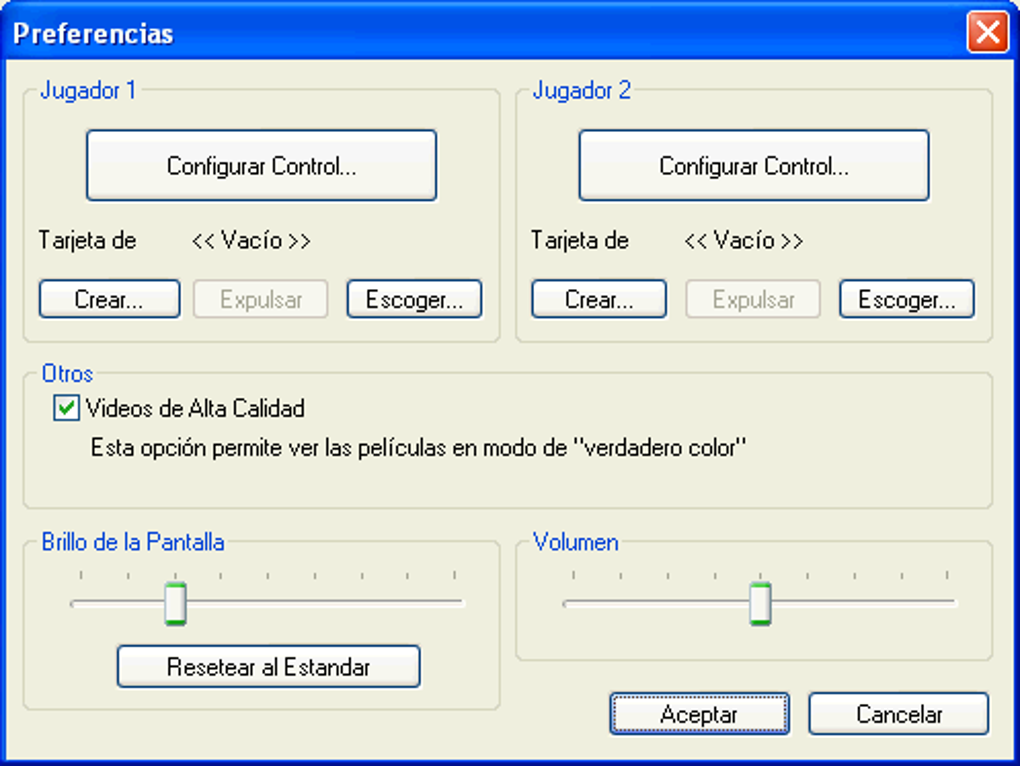
Delving into Emurayden PSX Emulator’s Features and Specifications
Emurayden PSX Emulator, while not the most feature-rich emulator available today, holds a significant position due to its simplicity and historical context. Understanding its core functionalities and specifications reveals why it was, and in some aspects still is, a favored choice for specific user groups.
Core Functionality and Compatibility
At its heart, Emurayden PSX Emulator is designed to flawlessly mimic the hardware of the original PlayStation (PSX/PS1), enabling users to run PlayStation game discs or image files (ROMs/ISOs) on their Windows PC. Its primary function is to translate the PlayStation’s unique architecture into instructions that a standard Windows operating system can understand and execute. This allows for the playback of classic titles with varying degrees of accuracy, depending on the game and the user’s system.
One of its most defining characteristics, as per the available information, is its compatibility profile. Emurayden was specifically developed for “Windows 95 and previous versions,” indicating its roots in an earlier computing era. While this might suggest limitations on modern operating systems like Windows 10 or 11, many users find success running it through Windows’ built-in compatibility modes or virtual machines. The emulator’s small footprint, weighing in at a mere 1.94 MB, is a testament to its efficient coding and focus on core emulation without bloatware or extensive graphical enhancements. This lightweight nature means it requires minimal system resources, making it accessible even on older or less powerful PCs.

User Experience and Interface
A key differentiator for Emurayden PSX Emulator is its user-centric design, which prioritizes ease of use. The phrase “No installation, Plug and Play” frequently appears in user reviews and descriptions, highlighting its streamlined approach. This meant that users could simply download the executable file and run it directly, bypassing the often-complex installation processes associated with other software. This was a significant advantage, particularly for less tech-savvy users or those who preferred a quick entry into their gaming sessions.
However, the user experience wasn’t entirely without its quirks. A recurring sentiment among user reviews points to a minor but noticeable frustration: the language. One user review from November 2013, for instance, praises the emulator’s functionality – “the program just work so fine. I enjoy it playing my old game via this emulator” – but adds a caveat: “one thing I really don’t like from this emu its the language not English :( But overall its the best choice for psx emulator.” This suggests that while the emulator performed well, some interface elements or messages might have been in a language other than English, creating a slight barrier for a portion of its global user base. Despite this, the overall consensus leans towards it being a “good emulator” that effectively serves its purpose of running PSX games. Its simplicity, for many, outweighed the minor inconvenience of a non-English interface.
Historical Context and Updates
Emurayden PSX Emulator, version 2.21, saw its last reported update on May 20, 2011. This date is crucial for understanding its place in the timeline of emulation development. In 2011, emulation technology had already advanced significantly since the days of Windows 95, with more sophisticated emulators like ePSXe and PCSX2 (for PlayStation 2) gaining prominence. Emurayden’s 2011 update suggests a final polish or bug fix before its development likely ceased or slowed significantly.
The fact that it was updated even in 2011, long after the original PlayStation’s commercial lifespan had ended, speaks to the continued demand for PSX emulation. However, the lack of subsequent updates means that Emurayden has not benefited from the advancements in emulation accuracy, performance optimization for modern hardware, or feature additions that contemporary emulators have seen. This positions Emurayden as a historical artifact in some ways – a snapshot of emulator development from a particular era. While it might lack cutting-edge features like extensive plugin support for graphics and sound, high-resolution rendering, or sophisticated save states, its enduring legacy lies in its straightforward functionality and its role in introducing many to the world of PSX emulation. The historical context explains its niche appeal: a reliable, albeit basic, gateway for nostalgic gamers who appreciate its original design philosophy.
The Enduring Appeal of PlayStation 1 Emulation
The desire to play classic PlayStation 1 games on modern hardware is a powerful force driving the emulation scene. It’s not merely about playing old games; it’s about reconnecting with personal history, preserving digital artifacts, and discovering foundational titles that shaped the gaming industry. Emurayden PSX Emulator, among others, serves this purpose, contributing to a broader cultural movement.
Why Emulate PSX Games?
Several compelling reasons explain why gamers continue to turn to emulators like Emurayden for their PSX fix:
- Nostalgia and Emotional Connection: For millions of players, the PlayStation 1 was their first introduction to 3D gaming, complex narratives, and iconic characters. Revisiting these games isn’t just entertainment; it’s a journey back to childhood or formative years, evoking powerful memories and emotions. The sound of the PS1 boot-up sequence alone can trigger a flood of nostalgic feelings.
- Preservation of Gaming History: Physical media degrades over time, and original consoles can fail. Emulation offers a crucial way to digitally preserve games that might otherwise be lost to time. Many classic PSX titles are not readily available on modern digital storefronts or have not received official remasters, making emulation the only practical way to experience them.
- Accessibility and Convenience: Owning an original PS1, along with a CRT TV (for the most authentic experience), can be cumbersome and expensive. Emulators allow players to run these games on their existing PC, often with the convenience of modern controllers, save states, and even network play in some advanced emulators. This broadens access to classic titles for a new generation of gamers and makes it easier for veterans to dive back in.
- Enhancements and Modifications: While Emurayden itself is basic, many emulators offer features beyond the original hardware’s capabilities. These include higher internal resolutions, texture filtering, widescreen hacks, fan translations, and even custom mods. These enhancements can breathe new life into older games, making them more palatable for modern sensibilities without sacrificing their original charm.
- Cost-Effectiveness: Emulators themselves are typically free, and legally obtaining game ROMs (from discs you already own, for example) can be more economical than hunting down rare physical copies of games.
Emurayden’s Niche in the Emulator Landscape
In a world populated by highly advanced and actively developed emulators like ePSXe, PCSX2 (for PlayStation 2), RetroArch, and PPSSPP (for PSP), Emurayden PSX Emulator maintains a distinct, albeit smaller, niche. Its primary appeal lies in its utter simplicity and historical significance.
- Barebones and Beginner-Friendly (with caveats): For users who simply want to load a game and play without tinkering with dozens of settings, Emurayden’s “plug-and-play” nature is ideal. It bypasses the complexity of plugin selection, BIOS configuration, and advanced video/audio settings that more sophisticated emulators require. This makes it a quick entry point for those new to emulation, provided they overcome any potential language barriers in the interface.
- Low System Requirements: Because of its age and minimalist design, Emurayden runs exceptionally well on older or underpowered computers. This is a significant advantage for users who don’t have a high-end gaming PC but still wish to enjoy PSX titles. Its small file size further contributes to its accessibility.
- Historical Reference: For those interested in the evolution of emulation software, Emurayden serves as an interesting artifact. It represents an earlier stage of development, focusing on core functionality rather than extensive enhancements. It can be a useful tool for understanding how emulation began before becoming the sophisticated technology it is today.
- Specific Game Compatibility: While not universally true, some older emulators might exhibit unique compatibility or performance with certain niche games that more modern emulators occasionally struggle with, or vice versa. This can make Emurayden a go-to for particular titles if other emulators present issues.
In essence, Emurayden doesn’t compete with the likes of ePSXe on features or graphical fidelity. Instead, it offers an alternative path: a direct, no-frills method to experience PSX games, particularly for users with older systems or those who prioritize immediate gameplay over extensive customization. Its enduring presence, even years after its last update, speaks volumes about its effectiveness in fulfilling this specific, straightforward need.
Installation, Configuration, and Troubleshooting
Getting started with Emurayden PSX Emulator is relatively straightforward due to its design philosophy, but users on modern operating systems might encounter specific challenges. Understanding the process and potential pitfalls is key to a smooth retro gaming experience.
Getting Started with Emurayden
The most appealing aspect of Emurayden PSX Emulator, highlighted prominently in its description, is its “no installation” feature. This means you won’t typically find a setup wizard or an installer package. Instead, the process usually involves:
- Downloading the Emulator: The first step is to download the Emurayden PSX Emulator executable file (V2.21, 1.94 MB) from a reputable source like PhanMemFree.org. Always ensure you are downloading from a trusted site to avoid malicious software.
- Extracting (if necessary): Often, the downloaded file will be in a compressed format, such as a ZIP archive. You’ll need a file compression utility (like 7-Zip or WinRAR) to extract the contents to a folder of your choice.
- Launching the Emulator: Once extracted, locate the Emurayden executable file (e.g.,
emurayden.exe) and double-click it to launch the program. Unlike many modern applications, it should open directly without any initial setup prompts.
This simplicity harks back to an earlier era of computing where standalone executables were more common, offering a quick and direct way to access the software’s functionality.
Loading Games (ROMs/ISOs)
Once Emurayden is running, the next crucial step is to load your PlayStation game files. PlayStation games are typically found in disc image formats (like .bin/.cue, .iso, .img, or .mdf). It’s important to stress the ethical and legal aspect: only play games you legally own.
- Obtain Game Files: Ensure you have legally obtained PlayStation game image files (ROMs or ISOs) stored on your computer.
- Access Load Game Option: Within the Emurayden interface (which might require some navigation if parts are not in English, as per user reviews), there should be an option to “Load CD-ROM” or “Open ISO” or similar. This is usually found in a “File” or “Game” menu at the top of the emulator window.
- Select Your Game: Browse your computer’s file system to locate your game image file. Select it and confirm.
- Start Playing: If successful, the game should begin to load, often displaying the PlayStation boot-up sequence before the game’s title screen appears.
Since Emurayden is a more basic emulator, it might not have extensive options for virtual disc drives or advanced file management, making the direct loading of ISOs or BIN/CUE sets the most common method.
Common Challenges and Solutions
Despite its simplicity, users, especially those on modern systems, might encounter a few hurdles:
- Compatibility on Newer Windows Versions: Emurayden was built for Windows 95/ME. Running it directly on Windows 10 or 11 might lead to crashes, graphical glitches, or failure to launch.
- Solution: Right-click on the
emurayden.exefile, go to “Properties,” then the “Compatibility” tab. Experiment with running the program in compatibility mode for “Windows 95,” “Windows 98/Me,” or “Windows XP.” You might also try checking “Run this program as an administrator.” For persistent issues, consider using a virtual machine (like VirtualBox or VMware) with an older Windows OS installed.
- Solution: Right-click on the
- Language Barrier: As noted by user reviews, parts of the interface might not be in English.
- Solution: Unfortunately, without official language packs or community translations, this can be challenging. Users might need to rely on trial and error, context clues, or online guides/screenshots to navigate menu options. Given its simple interface, core functions like “Load Game” are usually visually identifiable or in a standard menu location.
- Controller Setup: Emulators often require configuration for gamepads. Emurayden, being older, might have limited support for modern USB controllers or require manual mapping.
- Solution: Look for a “Settings,” “Config,” or “Controller” option within the emulator. You might need to manually map your gamepad buttons to the corresponding PlayStation controls (D-pad, X, O, Square, Triangle, L1/R1, L2/R2). If direct gamepad input doesn’t work, third-party tools like JoyToKey or Xpadder can map gamepad inputs to keyboard presses, allowing Emurayden to recognize them.
- BIOS File: Most PSX emulators require a PlayStation BIOS file (SCPH1001.bin, etc.) to function correctly. While some emulators include a HLE (High-Level Emulation) BIOS, others, especially older ones, might demand a physical BIOS file.
- Solution: You’ll typically need to place a legally obtained BIOS file (dumped from your own PlayStation console) into a specific folder within Emurayden’s directory, usually named “BIOS” or “system.” The emulator’s documentation or online communities can usually specify the exact filename and location required. Running without a proper BIOS can lead to crashes or games not starting.
- Graphical or Audio Issues: Occasional glitches in graphics or sound can occur due to incompatibility or incomplete emulation.
- Solution: Given Emurayden’s basic nature, there might not be extensive configuration options to fix these. Ensuring your graphics drivers are updated (even for an old emulator) can sometimes help. For more severe issues, exploring alternative emulators might be a more effective solution.
While Emurayden PSX Emulator champions simplicity, its age necessitates a degree of troubleshooting for optimal performance on contemporary systems. However, its small size and lack of an involved installation process make it an attractive option for those willing to put in a little effort for a taste of classic PlayStation gaming.
Comparing Emurayden with Contemporary Alternatives
The world of PlayStation 1 emulation has evolved considerably since Emurayden’s inception. While Emurayden still holds a certain nostalgic charm and functional niche, it’s beneficial to compare it against other prominent PS1 emulators to understand its place in the broader ecosystem.
Emurayden vs. ePSXe
ePSXe (enhanced PSX emulator) is arguably one of the most well-known and widely used PlayStation 1 emulators. It launched around the same time as many early emulators and has seen continuous development and refinement. The comparison highlights Emurayden’s core philosophy against ePSXe’s more advanced approach:
- Feature Set and Customization: ePSXe shines in its extensive customization options. It uses a plugin-based architecture for graphics, sound, and input, allowing users to choose from a variety of plugins that cater to different system configurations and desired visual/audio enhancements. This means users can, for instance, render games at higher resolutions, apply texture filtering, and use advanced shaders, making old games look significantly better than on original hardware. Emurayden, by contrast, offers a more fixed, “what you see is what you get” experience, with minimal configuration options beyond basic game loading.
- Ease of Use: Emurayden’s “no installation, plug-and-play” model makes it simpler to get started if it runs without compatibility issues. ePSXe, while powerful, requires more initial setup, including selecting and configuring plugins and a BIOS. This can be daunting for novices but offers immense flexibility for experienced users.
- Development and Support: ePSXe has seen more consistent updates and has a larger, more active community providing support, guides, and plugin development. Emurayden’s last update was in 2011, meaning it lacks official support for modern operating systems or hardware, and its community resources are more limited.
- Performance and Accuracy: Both can run a wide range of PSX games. However, ePSXe, with its more advanced plugins and optimizations, generally offers better performance, higher accuracy, and fewer graphical/audio glitches on modern systems. Its ability to utilize GPU acceleration is a major advantage. Emurayden’s performance is tied more closely to its original design, which may not scale as well with newer hardware.
- System Requirements: Emurayden is extremely lightweight and can run on very old or low-spec PCs. ePSXe, while still efficient, benefits significantly from more powerful hardware, especially when utilizing high-resolution graphics plugins.
In summary, ePSXe is the choice for users seeking a highly customizable, feature-rich, and visually enhanced PSX emulation experience, willing to invest time in setup. Emurayden appeals to those who prioritize absolute simplicity, low system requirements, and a direct, no-frills method of playing classic games, often appreciating its historical context.
Emurayden vs. Other PS1 Emulators (e.g., AdriPSX, Connectix Virtual Game Station)
Beyond ePSXe, the PS1 emulation scene has seen various contenders throughout its history, each with its unique characteristics:
- AdriPSX Playstation Emulator: Also listed as a free program for Windows, AdriPSX is another simple, lightweight emulator. Like Emurayden, it typically focuses on core emulation without extensive enhancements. Its performance and compatibility can vary, but it represents another option for users looking for straightforward PSX playback. The key differences often come down to subtle variations in game compatibility or specific UI preferences.
- Connectix Virtual Game Station (VGS): This emulator holds a unique place as one of the few commercial PSX emulators that existed, available as a trial version. It was known for its high compatibility and performance at the time, particularly on Macintosh systems, but also had a Windows version. VGS was controversial due to its effectiveness, prompting legal action from Sony. While no longer actively developed or easily available, its historical significance and commercial background set it apart from the free, community-driven projects like Emurayden and ePSXe. Emurayden’s continued free availability and open-source-like distribution contrast sharply with VGS’s commercial model.
- RetroArch (with PSX cores): RetroArch is a powerful frontend for various emulation cores, including several for PSX (e.g., Beetle PSX HW, PCSX ReARMed). While not an emulator itself, it integrates multiple emulators under a unified interface, offering immense flexibility, advanced features (shaders, rewinding, netplay), and cross-platform support. However, its setup can be significantly more complex than Emurayden, requiring users to understand cores, assets, and advanced settings. Emurayden remains the simpler choice for those intimidated by RetroArch’s vastness.
- PCSX2 (for PlayStation 2): While not a direct competitor for PS1 games, PCSX2 is often mentioned in the same breath due to its popularity as a PlayStation emulator. It’s designed for PS2 games but can sometimes run PS1 titles via backward compatibility modes within PS2 games. However, for dedicated PS1 emulation, a native PS1 emulator like Emurayden or ePSXe is generally more appropriate and efficient.
In essence, Emurayden PSX Emulator represents a particular philosophy in emulation: straightforward, free, and functional, albeit basic. Its longevity on platforms like PhanMemFree.org and its enduring download count, even years after its last update, attest to its continued utility for a specific segment of the retro gaming community that values simplicity and direct access over advanced features and cutting-edge performance. For a quick dip into PlayStation 1 nostalgia without the overhead, Emurayden still serves its purpose admirably.
Conclusion
The Emurayden PSX Emulator, despite its origins in an earlier computing era and its last update dating back to 2011, continues to hold a distinct and significant place in the world of retro gaming. It stands as a testament to the early days of PlayStation emulation, offering a free, lightweight, and remarkably straightforward pathway for users to relive the golden age of PS1 gaming. Its “no installation, plug-and-play” philosophy made it highly accessible, especially for users on older Windows 95/ME systems, and continues to appeal to those who prioritize simplicity over complex configuration.
While modern alternatives like ePSXe and RetroArch offer vastly superior graphical enhancements, extensive customization, and ongoing development for contemporary operating systems, Emurayden’s charm lies precisely in its unpretentious nature. It requires minimal system resources, making it a viable option for a broad spectrum of PCs, and its small file size ensures a quick download from platforms like PhanMemFree.org. For the nostalgic gamer who simply wants to load a favorite classic like Final Fantasy or Resident Evil and dive straight into the experience without fuss, Emurayden provides a direct and efficient solution.
The occasional language barrier or the need to navigate compatibility settings on newer Windows versions are minor hurdles that many enthusiasts are willing to overcome for the sake of its ease of use and historical value. Emurayden PSX Emulator isn’t just a piece of software; it’s a bridge to cherished memories, a tool for preserving gaming history, and a celebration of the enduring appeal of the original PlayStation. For those embarking on a journey back to the blocky 3D worlds and unforgettable soundtracks of the PS1 era, Emurayden remains a reliable, if rudimentary, companion, reminding us that sometimes, the simplest solutions are the most enduring.
File Information
- License: “Free”
- Version: “2.21”
- Latest update: “May 20, 2011”
- Platform: “Windows”
- OS: “Windows ME”
- Language: “English”
- Downloads: “150.2K”
- Size: “1.94 MB”


