
Event Log Explorer is a free, powerful, and versatile software application designed for viewing, monitoring, and analyzing event logs within Microsoft Windows operating systems. It significantly expands upon the functionality of the standard Windows Event Viewer, adding numerous features to streamline the process of log analysis and troubleshooting. This comprehensive guide delves into the capabilities of Event Log Explorer, examining its key features, benefits, and how it can be used to efficiently manage and understand the wealth of information contained within your system’s event logs.
Understanding Windows Event Logs: A Foundation for Effective Monitoring
Before exploring the specifics of Event Log Explorer, it’s crucial to understand the role and importance of Windows event logs. These logs record a vast array of system activities, providing a detailed chronological record of events that occur within the operating system and its applications. This information is invaluable for troubleshooting problems, monitoring system performance, and identifying security breaches. Windows event logs are typically categorized into several key types:
-
Security Log: This log tracks security-relevant events, such as logon attempts (successful and failed), access control changes, and security policy modifications. Analyzing the security log is essential for identifying and responding to potential security threats.
-
System Log: This log records critical events related to the core functioning of the operating system, including system startups and shutdowns, driver loading and unloading, and hardware failures. System log analysis helps pinpoint the source of system instability or crashes.
-
Application Log: This log contains entries generated by applications running on the system. These entries can range from informational messages to error reports, offering insights into application behavior and potential problems.
-
Other Custom Logs: Besides the standard logs, applications can create their own custom logs, providing more specific information regarding their own operations.
The standard Windows Event Viewer offers a basic interface for examining these logs, but its functionality is limited. This is where Event Log Explorer steps in, offering a significantly enhanced experience.
Key Features and Benefits of Event Log Explorer
Event Log Explorer surpasses the limitations of the built-in Windows Event Viewer by offering a rich set of features designed for efficient log management and analysis:
-
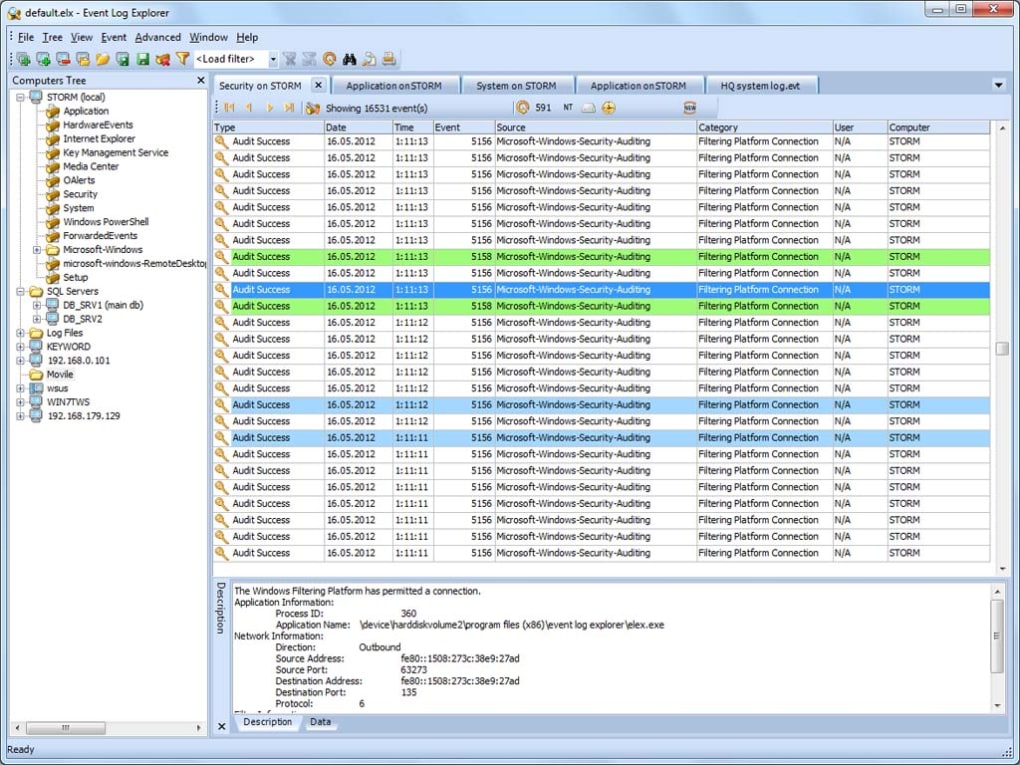
Multi-Document Interface (MDI): Unlike the single-log view of the Event Viewer, Event Log Explorer allows users to open and view multiple event logs simultaneously within a single window. This multi-document interface significantly improves workflow, allowing for side-by-side comparisons and more efficient investigation of related events across different log types.
-
Favorites Management: For users regularly monitoring specific computers and their logs, Event Log Explorer offers a favorites system. This allows users to group frequently accessed computers and their associated logs into a hierarchical tree structure, providing quick and easy access to the most relevant information. This feature is particularly beneficial for administrators managing multiple systems.
-
Comprehensive Log Viewing and Archiving: Event Log Explorer not only provides access to standard Windows event logs but also allows users to view and manage event log files (.evtx) directly. This ability to work with saved log files is crucial for offline analysis, historical trend identification, or situations where direct access to the running system is not possible. The software also offers robust archiving features, allowing for the efficient storage and retrieval of event logs for future reference and analysis.
-
In-Log Event Descriptions: Event Log Explorer integrates event descriptions directly within the log window. This eliminates the need for constant reference to external documentation or online resources, accelerating the analysis process and providing a more user-friendly experience.
-
Flexible Sorting and Filtering: Users can efficiently sort the event list using any column in ascending or descending order. This highly customizable sorting functionality, coupled with advanced filtering options, allows users to quickly narrow down the vast amount of data in the event logs to the specific entries of interest. Filters can be applied to virtually any criteria, including specific event IDs, timestamps, source applications, and even text within the event descriptions themselves.
-
Quick Filtering: For rapid filtering of event logs, a Quick Filter feature allows users to filter based on specified criteria with just a few mouse clicks. This intuitive approach dramatically speeds up the process of locating specific events, improving overall efficiency.
-
Powerful Search Functionality: Event Log Explorer provides a powerful search function enabling users to locate events based on any criteria, including event descriptions, event IDs, sources, and more. This feature is invaluable for finding specific occurrences within the logs, simplifying complex troubleshooting tasks.
-
Printing and Exporting: The software allows exporting event logs in various formats including text, CSV, and HTML, making it easier to share or archive the data. Further, users can directly print selected logs or entire log files, providing a hard copy for record-keeping or further analysis.
Advanced Usage Scenarios and Practical Applications
The capabilities of Event Log Explorer extend beyond simple log viewing; they provide practical solutions for a variety of scenarios:
-
Security Auditing and Threat Detection: By efficiently filtering and searching the security log, users can identify suspicious activities, failed login attempts, and access control violations, aiding in proactive threat detection and response.
-
System Troubleshooting and Performance Monitoring: The ability to analyze system and application logs allows for the rapid identification of system errors, driver conflicts, and application malfunctions. This significantly speeds up the troubleshooting process. Performance monitoring is facilitated by analyzing system-related events to identify potential bottlenecks or performance issues.
-
Application Debugging and Development: Developers can use Event Log Explorer to monitor the behavior of their applications, identifying and resolving errors or unexpected behavior during testing and deployment.
-
Forensics and Incident Response: The ability to archive and export logs makes Event Log Explorer useful for digital forensics and incident response teams. This allows for offline analysis of event data, crucial for investigations and security audits.
-
Compliance and Regulatory Reporting: The exporting capabilities facilitate the creation of reports for regulatory compliance purposes, ensuring that relevant event data is available for auditing and verification.
Comparing Event Log Explorer to Alternatives
While other tools exist for monitoring and analyzing Windows event logs, Event Log Explorer distinguishes itself with its ease of use, powerful filtering and searching capabilities, and comprehensive feature set. Many alternatives require specialized technical expertise, intricate configuration, or are commercially priced. Event Log Explorer provides a user-friendly interface that is accessible to both novice and experienced users without the cost or complexity of these alternatives.
Conclusion: Empowering Efficient Log Management
Event Log Explorer emerges as a valuable tool for anyone working with Windows systems, whether for system administration, security monitoring, application development, or incident response. Its intuitive interface and robust feature set transform the often daunting task of event log analysis into a straightforward and efficient process, ultimately leading to improved system stability, enhanced security posture, and faster troubleshooting. The ability to view multiple logs concurrently, utilize advanced filtering, and quickly search within event logs simplifies complex troubleshooting and investigation tasks. Event Log Explorer’s free availability and user-friendly design further solidify its place as a highly recommended tool for anyone managing Windows event logs.
File Information
- License: “Free”
- Latest update: “July 12, 2023”
- Platform: “Windows”
- OS: “Windows 2000”
- Language: “English”
- Downloads: “7.7K”


