
In the realm of personal computing, the file manager serves as a fundamental utility, the gateway through which users interact with their digital assets. For decades, Microsoft Windows has offered its built-in solution, Windows File Explorer (formerly Windows Explorer), as the primary tool for navigating directories, opening files, and organizing data. While functional, many users seek alternatives that offer more advanced features, a more streamlined workflow, or simply a different approach to an essential task. Among these alternatives, ExplorerXP emerged as a noteworthy contender, providing a distinct set of functionalities designed to empower users with greater control and insight into their file systems.
ExplorerXP, as its name subtly suggests, was initially conceived and gained traction during the era of Windows XP, a period when users were increasingly looking for customizable and efficient software solutions. It positions itself not as a revolutionary overhaul of file management but rather as an intelligent refinement of the core experience offered by Windows Explorer. The essence of ExplorerXP lies in its strategic enhancements, particularly its adoption of a tabbed interface, a feature that significantly differentiates it from the default Windows offering of its time. This innovation, coupled with its ability to display crucial information like total folder sizes, aimed to address common frustrations and improve productivity for users dealing with vast and complex file structures.
However, like any specialized tool, ExplorerXP comes with its own set of trade-offs. While it excels in certain areas, it may not match the ubiquitous compatibility and seamless integration of the native Windows File Explorer. Understanding these advantages and disadvantages is key to appreciating ExplorerXP’s place in the ecosystem of file management utilities, and for determining if it remains a valuable tool for specific user needs, even in a landscape that has evolved considerably since its inception. PhanMemFree, a platform dedicated to providing software solutions, highlighted ExplorerXP as a free utility for Windows users, emphasizing its unique features and practical applications.
Introducing ExplorerXP: An Alternative Approach to File Browsing
The fundamental act of managing files – moving, copying, deleting, and organizing – forms the backbone of any computing experience. For many, the default Windows File Explorer is sufficient. Yet, for power users, professionals, or anyone dealing with a significant volume of digital content, the standard offering can sometimes feel restrictive or lacking in specific functionalities. This is where applications like ExplorerXP step in, offering a different perspective on file navigation and organization.
Core Functionality and Comparison to Windows Explorer
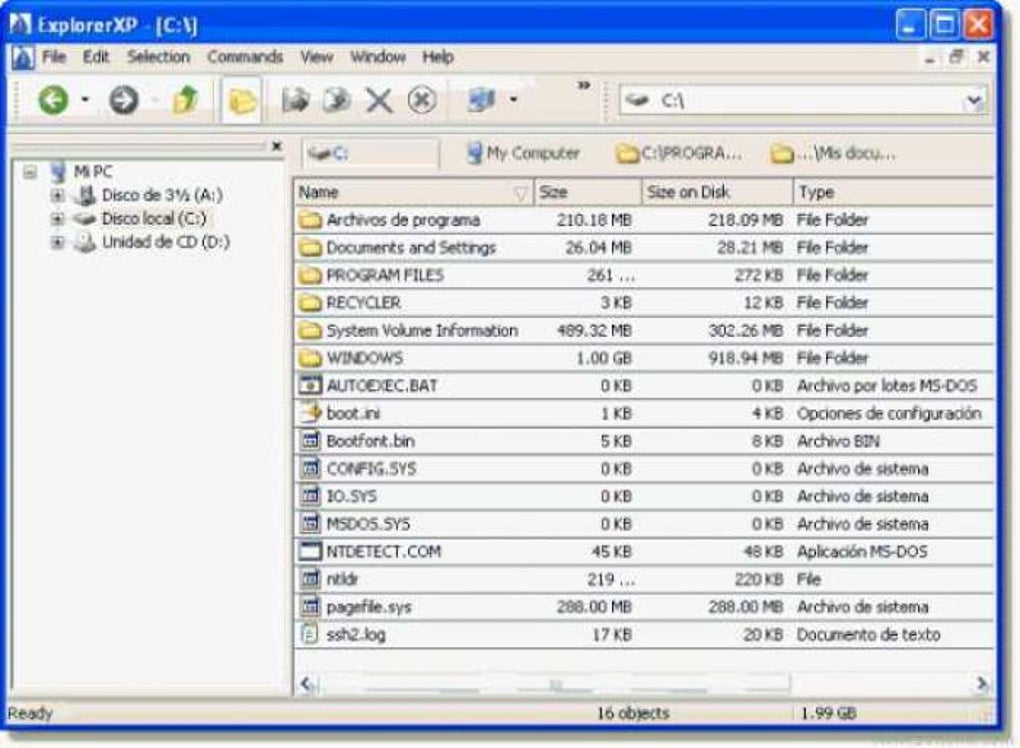
At its heart, ExplorerXP functions as a file manager, much like the Windows File Explorer. It allows users to browse through their computer’s directories, open files, and perform basic file operations. The critical distinction, however, lies in its approach to user interface and information display. While the traditional Windows Explorer typically operates on a window-per-folder or a single-pane interface that requires extensive back-and-forth navigation, ExplorerXP introduces a paradigm shift with its tabbed interface. This feature, which was not standard in Windows Explorer during ExplorerXP’s prime, revolutionized how users could interact with multiple directories simultaneously. Instead of opening several independent windows, each consuming precious screen real estate and contributing to desktop clutter, ExplorerXP consolidated these operations into a single application window, managed through intuitive tabs.
Furthermore, ExplorerXP aimed to provide more actionable data to the user directly within the interface. One of its most celebrated features, and a significant point of comparison against its native counterpart, was its ability to instantly display the total size of folders. In standard Windows Explorer, determining a folder’s size often involves right-clicking, selecting properties, and waiting for a calculation – a process that can become tedious and time-consuming when assessing multiple folders or managing disk space. ExplorerXP bypassed this inefficiency, presenting this vital information proactively, thereby streamlining the process of identifying large directories, managing storage, and performing cleanup operations.
The Philosophy Behind ExplorerXP
The development philosophy behind ExplorerXP appears to have been centered on enhancing efficiency and providing essential data points that were either absent or inconvenient to access in the default Windows environment. It wasn’t about reinventing the wheel but rather about refining the existing model to better suit the demands of users who needed more than just basic navigation. The focus was on practicality: how can a file manager make the user’s life easier, particularly when dealing with extensive file systems?
This philosophy manifested in its design choices: a lightweight footprint, ease of use, and a clear presentation of information. The tool wasn’t laden with complex features that only a niche segment of users would ever touch. Instead, it concentrated on perfecting core functionalities and adding highly practical enhancements. The idea was to create a tool that, once adopted, would become an “essential Windows complement,” as one user review on PhanMemFree highlighted, particularly for those managing “many thousands of files” across “3 - 10 partitions, umpteen folders each and untold numbers of files.” This suggests a target audience of power users, system administrators, or anyone whose daily workflow heavily involved intricate file organization and disk space management.
Key Features and Distinct Advantages
ExplorerXP gained its following not by being radically different, but by offering thoughtful improvements to the established file management paradigm. Its advantages are particularly evident when considering the state of file management tools at the time of its initial popularity.
Tabbed Interface: Streamlining Multitasking
Perhaps the most universally lauded feature of ExplorerXP is its tabbed interface. Before Windows Explorer eventually adopted tabs (much later, in Windows 10 and 11), ExplorerXP provided a crucial productivity boost. Imagine trying to move files between several deeply nested folders, or comparing the contents of multiple directories. In the absence of tabs, this would typically involve:
- Opening multiple instances of Windows Explorer, each consuming a separate entry on the taskbar and creating visual clutter.
- Navigating back and forth within a single window, a cumbersome process when dealing with distant locations.
ExplorerXP’s tabs elegantly solved this problem. Users could open different directories within the same application window, switching between them with a simple click, much like browsing multiple webpages in a web browser. This not only reduced desktop clutter but also significantly enhanced the speed and efficiency of tasks involving multiple locations. Copying and pasting between tabs became a fluid, intuitive process, allowing users to maintain context without losing their place in other folders. The ability to have “large number of tabs in single view” and “multiple instances of same folder or partition” within the same interface was a game-changer for many.
Unveiling Folder Sizes: A Critical Advantage for Organization
Another standout feature, repeatedly praised by its users, is ExplorerXP’s capability to “Shows total folder size.” This seemingly minor detail has profound implications for effective disk management and organization. In the traditional Windows Explorer, a user would have to manually request the properties of each folder to see its size. This process, while functional for one or two folders, becomes agonizingly slow and impractical when attempting to:
- Identify which folders are consuming the most disk space for cleanup.
- Locate specific large files or groups of files.
- Monitor the growth of certain directories.
- Balance data across multiple partitions or drives.
ExplorerXP automatically calculated and displayed the size of each folder alongside its name. This instant visibility provided an unparalleled advantage for users who needed to keep their partitions “clean enough to permit running the computer at a decent pace,” as one PhanMemFree user described. It transformed the chore of disk space analysis into a quick glance, empowering users to make informed decisions about file retention and deletion much more efficiently. This feature alone was often cited as the primary reason for adopting ExplorerXP, especially by those dealing with “3 - 10 partitions, umpteen folders each and untold numbers of files.”
Efficient File Operations: Copy, Paste, and Rename
Beyond navigation and information display, ExplorerXP also earned accolades for its robust and efficient handling of core file operations. The reference content specifically highlights “Good copy-pasting” as a pro. When dealing with large volumes of data or complex directory structures, the reliability and speed of copy and paste operations are paramount. ExplorerXP provided a smooth experience, allowing users to “cutting and copying between and within windows” (referring to its internal tabbed windows) with confidence.
Additionally, user testimonials mention the ability to “change names of individual or groups of folders and files.” While bulk renaming tools are often separate utilities, the implication here is that ExplorerXP offered a streamlined or improved way to manage file and folder names, contributing to its overall reputation as a tool for efficient organization. These subtle improvements in fundamental operations collectively contributed to a more satisfying and productive user experience, reducing friction in daily computing tasks.
Lightweight Design and Ease of Use
In an era when software often became bloated with features, ExplorerXP stood out for being “Light and easy to use.” Its executable size was modest (around 2.07 MB, as per PhanMemFree’s specs), and its resource consumption was generally low. This meant it could run efficiently even on older or less powerful machines, making it accessible to a broader range of users. The interface, while offering more information, remained intuitive, avoiding unnecessary complexity. For users who valued speed and responsiveness over elaborate aesthetics, ExplorerXP presented an ideal balance. Its straightforward design meant a minimal learning curve, allowing users to quickly integrate it into their workflow and immediately benefit from its enhancements without significant effort. This “little program,” as a user described it, “enormously speeds up organizing and finding the files I need.”
Understanding the Limitations and Trade-offs
While ExplorerXP offers compelling advantages, it’s crucial to acknowledge its limitations and the trade-offs involved in choosing it over the native Windows File Explorer or other alternative solutions. These drawbacks, though sometimes minor, can impact the overall user experience for specific tasks or in certain environments.
Performance Considerations and Loading Speed
One of the listed cons for ExplorerXP is “Slightly slow loading.” While generally considered lightweight, the initial startup or loading time for ExplorerXP might have been perceived as slower compared to the almost instantaneous appearance of the default Windows File Explorer, which is deeply integrated into the operating system. For users accustomed to immediate responsiveness, this slight delay could be a minor annoyance. This isn’t to say ExplorerXP was inherently slow in operation once loaded, but rather that its initial launch could feel less snappy. The calculation and display of folder sizes, while a significant benefit, also likely contributed to this initial loading time, as the application needs to scan and process directory information that Windows Explorer only calculates on demand.
Compatibility Challenges and File Previews
The reference content points to “Poor hook compatibility” and “Poor file previews” as notable drawbacks. “Hook compatibility” refers to how well a program integrates with the broader operating system and third-party software. Windows Explorer, being native, seamlessly integrates with shell extensions, context menu entries added by other applications (like archiving tools, cloud sync services, or security software), and various system-level functionalities. ExplorerXP, as a separate application, might not have had the same level of deep integration. This could mean:
- Missing Context Menu Options: Right-clicking on a file or folder in ExplorerXP might not always display the full range of context menu options provided by other installed software, which are typically hooked into Windows Explorer. As one user noted, “in Windows Vista, 7, 8, right-click menu has the usual options for dealing with a file or folder, but options are not labeled,” suggesting an incomplete or less polished integration.
- Issues with Shell Extensions: Some applications rely on specific shell extensions to display overlay icons (e.g., green checkmarks for cloud-synced files) or custom preview handlers. ExplorerXP might not fully support these, leading to a less informative or consistent experience compared to the native explorer.
“Poor file previews” further compounds this. Modern file managers often include built-in preview panes that allow users to view the content of various file types (images, documents, videos) without opening them in a separate application. If ExplorerXP lacked robust support for these previews, it would necessitate opening files externally more frequently, thus interrupting the workflow that its tabbed interface aimed to streamline. This might be a significant inconvenience for graphic designers, photographers, or anyone who frequently sorts through media files.
The Need for Customization and Tweaking
The reference also states that ExplorerXP “Requires tweaking” and specifically mentions, “It’s also worth changing settings to resize columns, as the default settings don’t do things like this, but ExplorerXP can.” This indicates that while the application offers powerful customization options, some essential functionalities, like properly sized columns for better readability or information display, might not be optimally configured out-of-the-box. Users would need to delve into the settings to tailor the interface to their preferences. For some, this is an enjoyable aspect of personalizing software; for others, it represents an extra step or a lack of immediate polish. A perfectly tuned default experience is often preferred, and the need for manual adjustment, even for basic layout, can be seen as a minor friction point.
User Perspective and Legacy: A Tool Through the Years
The true testament to a software’s utility often comes from its long-term users. ExplorerXP, despite its minor shortcomings, garnered a dedicated user base who found its specific advantages invaluable, especially over a significant period of Windows operating system evolution.
Enduring Value for Power Users
The anonymous review on PhanMemFree dated January 22, 2013, provides crucial insight into ExplorerXP’s lasting appeal. The user describes it as an “essential Windows complement when dealing with many thousands of files.” This isn’t a casual endorsement; it highlights ExplorerXP’s strength in scenarios where the default Windows Explorer becomes cumbersome. The reviewer’s professional and personal use across multiple computers, consistently from its inception, underscores a deep reliance on the program.
The key benefit reiterated by this user is the “instant[aneous] sees sizes of each of these items.” This confirms that the folder size display was not just a novelty but a critical feature for practical tasks like “looking for lost folders and files of given sizes and keeping partitions clean enough to permit running the computer at a decent pace.” For individuals whose work involves managing large datasets, complex project folders, or server environments, the time saved by this single feature could be substantial, justifying any minor inconveniences. The comparison to “commercial programs which also show folder sizes” but are “much more complex, more potential, and typically much slower than explorerXP” further solidifies ExplorerXP’s position as a lean, efficient, and specialized tool for this particular task. The user’s statement, “I start virtually every session with this little program, and it enormously speeds up organizing and finding the files I need,” speaks volumes about its integration into a productive workflow.
Cross-OS Compatibility (XP, Vista, 7, 8)
The user review also provides valuable historical context regarding ExplorerXP’s compatibility. It explicitly states that the program “has worked for Windows XP, Vista, 7 and now 8.” This demonstrates remarkable longevity and adaptability for a utility developed primarily during the Windows XP era. Maintaining compatibility across successive generations of Windows operating systems, which often introduce significant changes to the underlying file system and GUI frameworks, is a non-trivial feat. This broad compatibility meant that users who upgraded their operating system could often continue to rely on ExplorerXP without needing to find a new solution or relearn a different interface. This stability contributed to its status as a trusted utility for its established user base. While its latest update on PhanMemFree is listed as July 11, 2023, the core development period and widespread adoption seem to have aligned with these earlier Windows versions.
Historical Context and Updates
ExplorerXP’s version 1.1.04, with its last update listed in 2023 on PhanMemFree.org, suggests that while its peak popularity might have been in earlier Windows versions, it has seen continued maintenance or at least a presence on software distribution platforms. This ensures that users seeking a straightforward, tabbed file manager with folder size display can still access and potentially utilize it. The “Downloads” count of 33.5K (total) and “Last month’s downloads” of 69 on PhanMemFree.org indicate a niche but persistent interest in the utility, demonstrating that even with the advent of more modern file managers and native tabbed support in Windows, ExplorerXP continues to serve a specific segment of users.
Technical Specifications and Accessibility
Understanding the technical details and how a software is distributed is crucial for potential users. ExplorerXP, as presented on PhanMemFree.org, comes with clear specifications that inform users about its nature and requirements.
License, Version, and Platform Details
According to the information available on PhanMemFree.org, ExplorerXP operates under a Free license. This is a significant factor in its appeal, as it provides powerful functionalities without any cost, making it an accessible option for individuals and small businesses alike. The version listed is 1.1.01.07, although a different version (1.1.04) is mentioned elsewhere on the page, suggesting minor iterations or specific builds. Consistency in version numbering is important, but the key takeaway is that it’s a mature product that has seen some updates over time.
The primary platform for ExplorerXP is Windows, and specifically, it lists Windows XP as a compatible OS, which aligns with its historical context. However, as evidenced by user reviews, its functional compatibility extended well into Windows Vista, 7, and 8. This broad platform support for older operating systems ensures that users of legacy systems, or those preferring a minimalist approach even on newer systems, can consider ExplorerXP as a viable option. The language of the program is English, making it directly accessible to a wide global audience. PhanMemFree.org also lists availability in various other languages, indicating localized versions or at least translated descriptions for international users.
Download Statistics and Availability
The download statistics on PhanMemFree.org provide a snapshot of ExplorerXP’s reach and ongoing interest:
- Downloads: 33.5K total downloads.
- Last month’s downloads: 69 downloads.
- Size: 2.07 MB.
These figures illustrate that ExplorerXP, while not a blockbuster application, has been downloaded by tens of thousands of users over its lifetime. The monthly download count, though modest, suggests a continued, albeit niche, interest in the program. Its small file size (2.07 MB) is another testament to its lightweight nature, ensuring quick downloads and minimal storage footprint, which is beneficial for systems with limited resources or slow internet connections. The developer is simply listed as “explorerxp,” indicating it might have been a passion project or developed by a small team rather than a large software house. PhanMemFree.org maintains the download link, ensuring its continued accessibility for those who wish to try it.
Developer Information
The developer is simply identified as “explorerxp.” This implies that it might have been an independent project, or the developer chose to remain anonymous under the software’s brand name. In the world of freeware and open-source contributions, such naming is not uncommon. It suggests a focus on the utility itself rather than a corporate brand. This kind of development often leads to highly specialized and efficient tools because they are born out of a specific need felt by the developer and a community. The enduring presence of ExplorerXP on platforms like PhanMemFree.org, despite potential changes in developer activity, speaks to its foundational utility and the value it provides.
Exploring Alternatives and Similar File Managers
The landscape of file managers for Windows is rich and diverse, with many developers offering their own take on how best to navigate and organize digital data. ExplorerXP exists within this ecosystem, competing and complementing other utilities.
Other Notable File Management Solutions
PhanMemFree.org, in its typical fashion of providing users with choices, lists several alternatives and related tools to ExplorerXP, showcasing the variety available:
- Windows File Explorer: The default and most ubiquitous file manager. While ExplorerXP aimed to improve upon it, Windows File Explorer has itself evolved, eventually incorporating features like tabs (in Windows 10 and 11) that were once a unique selling point for alternatives. It’s the baseline against which all others are often measured.
- Explorer++: Described as “An innovative alternative to Windows Explorer,” Explorer++ is another free, open-source file manager that also boasts a tabbed interface, making it a direct competitor or a similar solution to ExplorerXP. Its higher rating (4.1 stars vs. ExplorerXP’s 3.2 on PhanMemFree.org) suggests it might offer a more modern or feature-rich experience.
- FindeXer: A “Customizable shortcut menu for Windows File Explorer,” FindeXer takes a different approach, enhancing the existing Windows Explorer rather than replacing it. It focuses on customizability and quick access, appealing to users who prefer to stick with the native solution but want more power.
- FileVoyager: A “freeware file manager for Microsoft Windows using two panels.” Dual-panel file managers are popular among power users for tasks involving frequent transfers or comparisons between two directories. This design philosophy is distinct from ExplorerXP’s single-pane, tabbed approach but caters to similar efficiency-driven users.
- NexusFile, freeCommander, UltraExplorer, RX Explorer: These are other examples of file managers that offer various features, from dual-panel views to extensive customization options and unique interfaces. They collectively represent the ongoing effort to refine and enhance file management beyond what the operating system natively provides.
- PowerMenu, XNeat Windows Manager, IZArc2Go: These are more utility-focused tools that enhance aspects of window management, desktop organization, or file compression, rather than being full-fledged file managers. They often integrate with or complement file managers, offering additional functionalities.
The existence of such a wide array of alternatives underscores a persistent demand for specialized file management tools. While Windows Explorer provides a solid foundation, users continue to seek out applications like ExplorerXP for specific enhancements—be it tabs for multitasking, automatic folder size display for disk hygiene, or robust copy-pasting for large data operations. The choice among these tools often comes down to individual workflow preferences, the specific features prioritized, and the willingness to trade off native integration for specialized power. ExplorerXP carved out its niche by offering a simple, lightweight, and effective solution to common file management frustrations, particularly in the days before the default Windows File Explorer caught up with some of its innovations.
File Information
- License: “Free”
- Latest update: “July 11, 2023”
- Platform: “Windows”
- OS: “Windows XP”
- Language: “English”
- Downloads: “33.6K”
- Size: “2.07 MB”


