
Minecraft, the beloved block-building sandbox game, has captivated millions with its boundless creative potential and endless exploration. Yet, for many seasoned players, the vanilla experience, while foundational, eventually gives way to a desire for something more: more challenges, more content, more ways to play. This is where the vibrant world of Minecraft modding comes into its own, transforming the familiar game into an entirely new adventure. However, navigating the complexities of installing, configuring, and managing these modifications can be a daunting task, often acting as a barrier for players eager to dive into enhanced gameplay. This is precisely the problem Feed The Beast (FTB) Launcher was designed to solve.
Feed The Beast Launcher is not just another utility; it is a dedicated, free-to-use platform that acts as the essential gateway to a universe of pre-packaged, curated modpacks for Minecraft. It streamlines the entire process, from installation to game launch, making the rich tapestry of modded Minecraft accessible to a wider audience than ever before. For anyone looking to significantly enhance their Minecraft experience without wrestling with manual file placements, dependency conflicts, or tricky configurations, the FTB Launcher emerges as an indispensable tool. It empowers players to transcend the boundaries of the original game, opening doors to custom worlds, intricate technological systems, powerful magical spells, and completely redefined survival challenges, all with unprecedented ease.
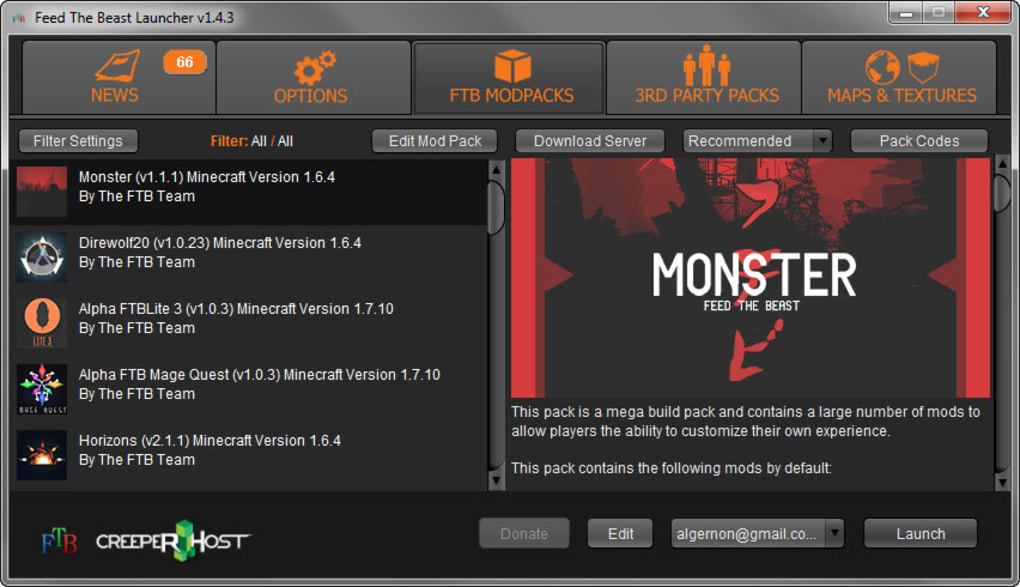
Revolutionizing Your Minecraft Experience with FTB Launcher
At its core, the Feed The Beast Launcher is a specialized application crafted to facilitate the playing of Minecraft with modpacks. Modpacks, in essence, are collections of various Minecraft modifications (mods) that have been carefully selected, configured, and tested to work together harmon harmoniously. They often revolve around a specific theme, challenge, or gameplay style, offering a cohesive and deeply integrated experience that individual mods rarely achieve on their own. The FTB Launcher serves as the primary interface through which players can browse, download, install, update, and launch these complex modpacks, effectively abstracting away the technical hurdles that traditionally accompany extensive modding.
Before the advent of robust launchers like FTB, engaging with multiple mods in Minecraft was a painstaking process. Players often had to manually download each mod, ensure version compatibility with both Minecraft itself and other installed mods, resolve conflicts, and meticulously place files into the correct directories. This was a time-consuming, error-prone endeavor that required a significant level of technical understanding and patience. A single misstep could lead to crashes, corrupted saves, or an unplayable game. The Feed The Beast Launcher dramatically simplifies this, acting as a one-stop solution that handles these intricate details behind the scenes. It automates the download of all necessary mod files, their dependencies, and any accompanying resource packs or configuration tweaks, presenting the player with a ready-to-play, fully integrated modded instance.
The impact of this simplification cannot be overstated. By removing the technical barriers, the FTB Launcher democratizes access to modded Minecraft. It means that players who might otherwise be intimidated by the complexities of manual mod installation can now effortlessly explore hundreds of hours of new content. Whether it’s the thrill of building automated factories with advanced machinery, venturing into mystical dimensions filled with powerful magic, or embarking on epic quests with custom generated landscapes, the FTB Launcher puts these grand adventures within easy reach. It transforms the act of modding from a frustrating chore into an exciting, accessible exploration of new gameplay possibilities, truly making Minecraft “just get bigger” for its dedicated community.
Diving Deep into the World of Modpacks
The true power and appeal of the Feed The Beast Launcher lie in its extensive library of modpacks. These aren’t just random assortments of mods; they are carefully curated, often themed, and thoroughly tested collections designed to offer a cohesive and expanded gameplay experience. The term “Feed The Beast” itself originated from a popular Minecraft map and challenge, evolving into a brand synonymous with high-quality, stable modpacks. The launcher provides access to a vast array of these creations, each offering a distinct flavor of Minecraft that goes “beyond vanilla.”
One of the most compelling aspects of FTB modpacks is their thematic diversity. You’ll find packs dedicated to:
- Technological Advancement: These modpacks often focus on industrial automation, complex machinery, power generation, and advanced logistics. Players can construct sprawling factories, automate resource gathering, build intricate computer systems, and even explore space. Mods like IndustrialCraft, Thermal Expansion, Applied Energistics, and Create are staples in this genre, allowing for an incredible depth of engineering gameplay.
- Magical Arts and Mysticism: For those who prefer spells over circuits, magic-focused modpacks introduce intricate magical systems, arcane rituals, mythical creatures, and new dimensions steeped in enchantment. Mods such as Thaumcraft, Botania, Blood Magic, and Ars Nouveau enable players to master various forms of magic, brew powerful potions, summon allies, and delve into ancient secrets.
- Survival and Adventure: Many modpacks significantly ramp up the difficulty of survival or introduce extensive adventure elements. This could involve new challenging mobs, altered world generation with dangerous biomes, intricate questlines, or entirely new dimensions to conquer. Packs in this category might feature mods like Twilight Forest, Aether, or Roguelike Dungeons, transforming exploration into a high-stakes endeavor.
- Creative Freedom and Building: While all modpacks offer creative potential, some focus heavily on expanding building options, decorative blocks, and aesthetic tools. These packs can include mods that add thousands of new blocks, furniture items, and architectural elements, allowing players to construct truly breathtaking structures and detailed environments.
- Expert and Progression-Based Packs: These modpacks are designed for experienced players seeking a true challenge. They often feature heavily altered crafting recipes, complex progression trees, and gated content that requires mastery of multiple mods to advance. These packs can offer hundreds, if not thousands, of hours of dedicated gameplay, pushing players to think critically and innovate.
The Feed The Beast team, along with community developers, meticulously tests and updates these modpacks, ensuring a stable and enjoyable experience. This curation means players can trust that the mods within a pack are compatible and won’t lead to frequent crashes or game-breaking bugs. Furthermore, many FTB modpacks come with integrated questing systems, guiding players through the various mods and providing structured goals beyond Minecraft’s traditional sandbox freedom. This not only introduces players to the complexities of a new mod but also offers a sense of progression and achievement within the expanded game world. By providing such a rich and diverse ecosystem of content, the FTB Launcher truly transforms Minecraft from a single game into a platform for countless distinct and deeply engaging adventures.
Key Features and How FTB Launcher Simplifies Modding
The Feed The Beast Launcher distinguishes itself through a suite of features designed to make the modding experience as smooth and user-friendly as possible. Beyond simply installing modpacks, it provides tools that empower players to manage their game instances, customize settings, and seamlessly integrate additional content. This comprehensive approach is what truly enhances the game, offering “much more besides” just basic modpack installation.
One of the most immediate benefits is the simplified account and game settings selection. Upon launching the FTB Launcher, players are presented with an intuitive interface where they can easily select their Minecraft account, ensuring they are logging into the correct profile. Crucially, the launcher also allows for effortless adjustment of various game settings specific to each modpack instance. This includes allocating more RAM (a necessity for heavily modded Minecraft), adjusting Java arguments, and configuring display resolutions. These settings are stored per modpack, meaning you don’t have to reconfigure them every time you switch between different modded experiences, saving valuable time and preventing frustration.
Another standout feature is the streamlined custom content import. While FTB modpacks come pre-packaged with a vast amount of content, many players enjoy personalizing their experience further with additional texture packs, shader packs, or even individual mods not included in the original pack. The FTB Launcher makes this process incredibly simple. If you have a custom texture pack, a new map, or a standalone mod (.jar file), the launcher provides an easy mechanism to add these to your chosen modpack instance. Instead of manually digging through game directories, you can often drag and drop files or use dedicated import functions within the launcher, and it handles the integration, drastically speeding up customization. This means players can tailor their visual experience or augment existing modpacks without the typical headaches associated with manual file management.
Beyond user-facing convenience, the FTB Launcher also handles critical technical aspects automatically. It ensures automatic updates for modpacks and their dependencies. When a modpack developer releases an update (e.g., bug fixes, new mod versions, performance improvements), the launcher can detect and apply these updates with minimal user intervention. This guarantees that players are always running the latest and most stable versions of their favorite modpacks. Furthermore, it intelligently manages mod dependencies, ensuring that all required libraries and supporting mods are correctly installed, preventing common crash causes related to missing components.
The launcher also contributes to performance optimization for modded instances. Heavily modded Minecraft can be incredibly resource-intensive, often requiring more RAM and CPU power than the vanilla game. The FTB Launcher allows users to easily allocate additional RAM directly from its interface, a crucial step for maintaining smooth gameplay. It also integrates well with performance-enhancing mods often included in modpacks, helping to provide the best possible frame rates and stability, even with hundreds of mods running simultaneously.
Finally, the Feed The Beast Launcher fosters a strong community and curation environment. The FTB team is deeply involved in the modding scene, working closely with mod developers to ensure the quality and stability of their official modpacks. This commitment to curation means that players are less likely to encounter abandoned or broken packs, and they benefit from ongoing support and refinement. The launcher itself serves as a hub, connecting players to a vast ecosystem of modded content and the community that builds and enjoys it. This collective effort ensures that the Feed The Beast Launcher remains a robust, reliable, and continually evolving platform for exploring the endless possibilities of Minecraft.
Getting Started, Community, and The FTB Advantage
Embarking on your modded Minecraft journey with the Feed The Beast Launcher is a straightforward process, designed to minimize friction and maximize playtime. The journey begins with downloading and installation of the launcher itself from PhanMemFree. Once installed, its intuitive interface welcomes you, setting the stage for choosing your first modpack. The launcher typically presents a comprehensive list of available FTB modpacks, often categorized or searchable, allowing you to easily browse through the diverse offerings. Each modpack listing usually provides a brief description, version information, and sometimes a difficulty rating or thematic tags, helping you make an informed decision.
Once a modpack is selected, the launcher handles the entire download and installation process. It fetches all necessary game files, mods, and dependencies, preparing a self-contained instance of Minecraft specifically for that modpack. This isolation is a significant advantage, as it means different modpacks won’t interfere with each other, nor will they affect your vanilla Minecraft installation. After installation, simply click “Launch,” and the launcher will boot up your chosen modded Minecraft adventure.
The Feed The Beast Launcher shines due to several distinct advantages, making it a preferred choice for many in the modded Minecraft community:
- Unparalleled Ease of Use: Its primary strength lies in simplifying the notoriously complex world of mod installation. For casual players and veterans alike, the ability to install and launch elaborate modpacks with a few clicks is a game-changer.
- Vast and Vetted Modpack Library: FTB boasts an extensive collection of high-quality, stable, and well-supported modpacks. The curation process ensures that these packs are thoroughly tested and maintained, reducing the likelihood of encountering game-breaking bugs.
- Regular Updates and Stability: The developers of the FTB Launcher and the modpacks themselves are committed to providing frequent updates, ensuring compatibility with new Minecraft versions, fixing bugs, and introducing fresh content. This dedication leads to a more stable and continually evolving player experience.
- Strong Community Support: The Feed The Beast brand is backed by a large and active community. This means abundant resources, forums, wikis, and content creators dedicated to FTB modpacks are available, offering help, tutorials, and shared experiences.
- Completely Free: One of the most appealing aspects of the FTB Launcher is that it is entirely free to download and use. This accessibility means anyone can dive into the enhanced world of modded Minecraft without any financial barrier.
However, like any specialized tool, there are a few considerations. The FTB Launcher is primarily of use to Minecraft players interested in modding. More casual players who prefer the vanilla experience may not find it useful, as its purpose is specifically to manage complex mod installations. Furthermore, while the launcher simplifies the technical aspect of modding, the modpacks themselves can be incredibly complex. Players new to modded Minecraft may face a learning curve when trying to understand the mechanics of new mods and how they interact. Finally, running heavily modded Minecraft through the FTB Launcher (or any launcher) can be resource-intensive, requiring a computer with sufficient RAM and processing power to ensure smooth performance.
While Feed The Beast is a dominant player, it’s worth noting that the modded Minecraft ecosystem includes alternatives like Technic Launcher, ATLauncher, and MultiMC. Each has its strengths, often catering to slightly different niches or offering unique features. For example, MultiMC is known for its lightweight design and granular control over individual instances. However, FTB Launcher’s tight integration with its own curated modpack library, its focus on user experience, and its strong community backing continue to solidify its position as a go-to choice for millions seeking to expand their Minecraft horizons.
In conclusion, the Feed The Beast Launcher stands as an essential tool for any Minecraft enthusiast eager to explore the expansive and creative world of modded gameplay. By demystifying the complexities of mod installation and management, it has opened the floodgates to countless hours of new adventures, challenges, and creative possibilities. Whether you’re an aspiring engineer, a powerful mage, or a seasoned explorer, the FTB Launcher provides the frictionless path to a Minecraft experience that is truly bigger, bolder, and more exciting than ever before. Download it today from PhanMemFree and prepare to reshape your understanding of what Minecraft can be.
File Information
- License: “Free”
- Latest update: “July 11, 2023”
- Platform: “Windows”
- OS: “Windows 8.1”
- Language: “English”
- Downloads: “120.5K”
- Size: “9.99 MB”


