
In the vast digital landscape we navigate daily, effective file management is not merely a convenience but a necessity. From managing burgeoning photo albums and extensive music libraries to organizing critical work documents and personal archives, the sheer volume of digital assets can quickly become overwhelming. At the heart of this organizational challenge lies the often tedious and error-prone task of renaming files. While seemingly simple, manual renaming can consume countless hours, especially when dealing with hundreds or thousands of items. This is precisely where a specialized tool like File Grinder steps in, offering a robust and intelligent solution to automate and streamline this crucial aspect of digital life.
File Grinder is not just another generic file renamer; it’s a sophisticated utility specifically designed to leverage the inherent intelligence embedded within your digital files: their meta-tags. For years, digital content creators, producers, and users have relied on meta-tags—those invisible snippets of information stored within a file—to describe, categorize, and identify content. Whether it’s the EXIF data in a photograph detailing camera settings and location, the ID3 tags in an MP3 file indicating artist, album, and genre, or the metadata in an ebook specifying author and title, these tags hold a wealth of information. File Grinder intelligently taps into this rich vein of data, transforming what would be a monotonous manual process into an efficient, automated, and remarkably precise operation.

The core premise of File Grinder is elegantly simple yet profoundly powerful: why manually type out file names when the information you need is already perfectly preserved within the files themselves? By allowing users to define intricate renaming templates that dynamically pull data from these meta-tags, File Grinder liberates individuals and businesses from the drudgery of manual file organization. This not only saves an immense amount of time but also significantly reduces the potential for human error, leading to a consistently organized and easily navigable file system.
While the primary function of File Grinder revolves around media files, where meta-tags are most prevalent and standardized, its utility extends to other document types as well. Supported formats include a wide array of multimedia files such as images (JPG), audio (MP3, WMA, APE, AAC, Ogg), and video (MPEG, AVI). Beyond multimedia, File Grinder also caters to ebooks (FB2) and even HTML files, demonstrating its versatility in handling various digital assets. This broad compatibility ensures that users can centralize their renaming efforts across different types of content, making it an indispensable tool for anyone managing diverse digital libraries.
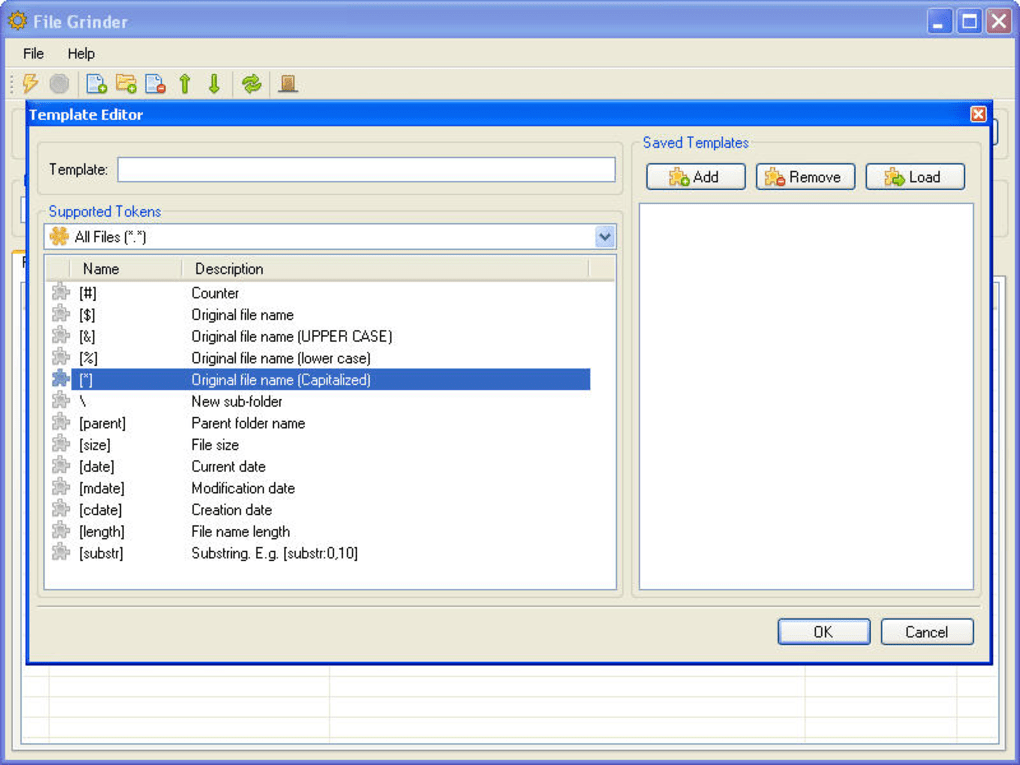
One of File Grinder’s standout features is its powerful and intuitive template editor. This is where users unlock the true potential of meta-tag-driven renaming. Instead of being confined to a rigid set of renaming rules, the template editor provides an expansive canvas for customization. Users can design and save multiple renaming templates, each tailored to specific purposes or different file formats. For instance, a photographer might create a template to rename JPG files based on their capture date and camera model, while a music enthusiast could use another to organize MP3s by artist, album, and track number. The ability to create and manage these distinct profiles ensures maximum flexibility and adaptability to virtually any organizational scheme.
The real-time preview mechanism integrated into File Grinder further enhances user confidence and control. As you apply changes or tweak your renaming templates, all proposed modifications are displayed instantly on the program’s interface. This immediate visual feedback allows you to scrutinize every detail and confirm that the new file names meet your exact specifications before committing to the actual renaming process. This preventative measure is invaluable, as it virtually eliminates the risk of accidental misnaming or data loss, a common concern with any bulk file operation.

For power users and those with more complex renaming requirements, File Grinder’s support for regular expressions is a game-changer. Regular expressions, often abbreviated as regex, are sophisticated sequences of characters that define search patterns. By incorporating regex, File Grinder transcends simple meta-tag extraction, enabling users to perform highly granular and conditional renaming tasks. This could involve extracting specific parts of a meta-tag, reordering elements, or applying complex transformations based on patterns found within existing file names or metadata. This advanced functionality transforms File Grinder from a mere renaming tool into a powerful data manipulation utility, capable of tackling even the most intricate organizational challenges.
Beyond its core renaming capabilities, File Grinder extends its utility to general file management by supporting batch operations for moving and copying files. This means that once your files are perfectly renamed and organized according to your templates, you can also seamlessly relocate them to appropriate directories or duplicate them for backup purposes, all within the same streamlined workflow. This integration of multiple file management tasks into a single interface significantly enhances overall efficiency and user convenience.
However, no software is without its minor quirks. One small drawback noted by users is the somewhat hidden location of the “Find and Replace” utility. While a powerful feature in its own right, allowing users to modify specific text strings within file names or metadata, accessing it requires clicking a small arrow button beside the Template Editor. Furthermore, its interface is not immediately intuitive, potentially requiring a brief period of exploration for new users to fully grasp its functionality. Despite this minor navigational hurdle, the utility itself remains a valuable addition for fine-tuning renaming operations.
Utilities & Tools: Enhancing File Management
In the broader ecosystem of digital utilities and tools, File Grinder carves out a significant niche, particularly within the domain of file management. Modern operating systems offer basic file renaming capabilities, but these are often limited to manual, one-by-one adjustments or simple sequential numbering. When confronted with hundreds or thousands of files, such rudimentary tools are inadequate. This is where specialized utilities like File Grinder become indispensable.
Consider its role alongside other common utilities:
- File Managers: While dedicated file managers like Windows Explorer, Finder, or third-party alternatives offer robust navigation and basic operations, they typically lack the intelligent, metadata-driven renaming power of File Grinder. File Grinder complements these tools by providing a superior method for naming and organizing files before or after they are managed through a file explorer.
- File Compression Tools: Programs like WinZip or 7-Zip are crucial for reducing file sizes and archiving. File Grinder helps ensure that the files within these archives are consistently named and easily identifiable, improving the overall integrity and searchability of compressed collections.
- Data Recovery Software: In the unfortunate event of data loss, recovery tools strive to retrieve files. Once recovered, these files often come with generic or corrupted names. File Grinder can be instrumental in restoring logical names to recovered media files, making them usable again by leveraging any remaining metadata.
- Clocks & Alarms / Calculators & Converters: These general utilities serve different purposes, but the common thread is enhancing daily digital tasks. File Grinder’s focus on automation aligns perfectly with the goal of improving digital workflow efficiency, making it a valuable addition to any utility toolkit.
File Grinder’s lightweight footprint (only 237.19 KB) and free license further solidify its position as an accessible and essential utility. It’s a tool that doesn’t demand significant system resources but delivers substantial organizational benefits. The fact that it’s designed for Windows 7 and later, a widely adopted operating system, ensures broad compatibility for a vast user base. Its existence underscores the ongoing need for specialized software that addresses specific pain points in digital file management, going beyond what operating systems natively provide.
Boosting Productivity Through Automated Renaming
Productivity in the digital age is heavily reliant on efficiency and organization. Cluttered desktops, ambiguously named files, and disorganized folders are notorious productivity killers, leading to wasted time searching for information and increased mental fatigue. File Grinder directly tackles these challenges, positioning itself as a powerful productivity enhancer.
The link between file organization and productivity is direct and measurable:
- Time Saving: The most obvious benefit is the sheer amount of time saved. Imagine manually renaming 500 photographs from a vacation, carefully extracting dates, locations, and subjects. This could take hours. File Grinder, by leveraging EXIF data, can perform this task in minutes, leaving you free to focus on more creative or critical activities. For music libraries with thousands of tracks, manually correcting ID3 tags and renaming files is a monumental undertaking; File Grinder automates this with precision.
- Reduced Cognitive Load: When files are consistently named and logically organized, the mental effort required to locate specific items dramatically decreases. There’s no need to remember vague file names or sift through folders guessing contents. This frees up cognitive resources for higher-level tasks, enhancing overall focus and decision-making.
- Error Reduction: Manual renaming is prone to typos, inconsistencies, and accidental deletions. File Grinder’s template-driven approach, coupled with real-time preview, ensures accuracy and consistency across all renamed files. This eliminates frustrating errors that can complicate file management later on.
- Improved Collaboration: In professional environments, consistent file naming conventions are crucial for team collaboration. When everyone adheres to a shared naming structure, finding and sharing files becomes seamless. File Grinder can enforce these standards automatically, ensuring that all team members benefit from an organized and predictable file system, whether for project management assets or shared documentation.
- Enhanced Archiving and Backup: Well-named files are easier to archive, retrieve from backups, and integrate into long-term storage solutions. File Grinder contributes to a robust data management strategy by ensuring that files are always identifiable and correctly categorized, which is essential for compliance, historical record-keeping, and disaster recovery.
File Grinder’s impact on productivity can be compared to the benefits derived from other productivity tools:
- Document Management Systems: While full-fledged document management systems handle complex workflows and version control, File Grinder provides the foundational organization at the file level, ensuring that individual documents are correctly identified before being integrated into larger systems.
- Agenda & Calendars / Project Management: These tools help organize tasks and schedules. File Grinder organizes the underlying assets that those tasks and projects rely upon, ensuring that when a deadline approaches, finding the necessary media or document is quick and stress-free.
By automating a historically mundane and time-consuming task, File Grinder allows individuals and organizations to reclaim valuable time and mental energy, directing it towards more meaningful and productive endeavors. It transforms chaotic file collections into meticulously organized repositories, boosting efficiency across personal and professional digital lives.
Mastering Your Multimedia Library with File Grinder
Multimedia files constitute a significant portion of most digital collections, encompassing everything from personal photographs and home videos to vast music libraries and digital movie archives. Managing these diverse formats, each with its own set of embedded metadata, can be particularly challenging. File Grinder excels in this domain, providing an unparalleled solution for organizing and mastering your multimedia library.
Let’s delve into how File Grinder specifically caters to various multimedia types:
- Photography (JPG): Digital cameras embed a wealth of EXIF (Exchangeable Image File Format) data into JPG files. This includes details like capture date and time, camera model, lens information, exposure settings, GPS coordinates (if available), and even copyright information. File Grinder can harness this data to rename photos automatically. Imagine renaming all your vacation photos from “IMG_1234.JPG” to “2023-07-15_Hawaii_Beach_NikonD850.JPG” or organizing them into folders based on date and location. This capability is invaluable for photographers, photo enthusiasts, and anyone with a large collection of images.
- Audio (MP3, WMA, APE, AAC, Ogg): Music files are arguably where metadata (primarily ID3 tags for MP3s, but similar structures exist for other formats) plays the most critical role. These tags contain information such as artist, album, track title, track number, genre, year, and even album art. File Grinder’s ability to read and apply these tags for renaming is a godsend for music lovers. You can easily standardize file names like “Artist - Album - TrackNum - SongTitle.mp3” or create specific folders for each artist and album. This ensures a perfectly ordered music library that integrates seamlessly with media players and facilitates easy browsing.
- Video (MPEG, AVI): While video metadata can be less standardized than audio or image tags, many video files still contain useful information. This could include title, director, year, and sometimes even episode numbers for TV series. File Grinder can extract this information to rename video files, turning generic “video_001.mp4” into “Movie Title (Year) - Director.mp4” or “TV Show S01E05 - Episode Title.avi”. This is particularly useful for those building personal movie or TV show archives, ensuring consistency and easy identification.
- Streaming Videos: While File Grinder directly deals with local files, by ensuring your downloaded or captured streaming videos are well-named, it improves the experience when you organize them locally before perhaps uploading to a personal media server.
- Graphic & Design: For designers who might generate numerous versions or elements, renaming based on embedded properties or custom tags (if supported by the file type) can help track iterations or categorize assets.
The template editor’s flexibility is especially evident when dealing with multimedia. Users can craft specific templates for each type:
- A “Music Template” could prioritize
Artist - Album - TrackNumber - Title. - A “Photo Template” might use
YYYY-MM-DD_CameraModel_Location. - A “Video Template” could be
Title_Resolution_Date.
The real-time preview, in this context, is critical. Imagine a complex music renaming scheme where you want to ensure the track number is always two digits (e.g., “01” instead of “1”). The preview immediately shows if your template or regular expression achieves this, preventing mass misnaming.
File Grinder empowers users to go beyond basic organization, allowing them to truly master their multimedia collections, making them searchable, browsable, and a pleasure to interact with.
Advanced Features for Power Users and Developers
While File Grinder’s ease of use and immediate benefits make it appealing to a broad audience, its underlying power and advanced functionalities truly shine for power users, developers, and IT professionals who demand greater control and flexibility. The inclusion of regular expressions (regex) and the robust template editor are key differentiators in this regard.
Regular Expressions (Regex): Unlocking Precision
For those unfamiliar, regular expressions are sequences of characters that define a search pattern, primarily for use in pattern matching with strings, or string searching and “find and replace” operations. In File Grinder, regex allows users to:
- Extract Specific Data: If a meta-tag contains more information than needed, regex can parse it to extract only the relevant parts. For example, if a camera model tag is “Canon EOS 5D Mark IV (Firmware v1.3.1)”, a regex pattern could extract just “Canon EOS 5D Mark IV”.
- Reorder Elements: Reformat dates from “MM/DD/YYYY” to “YYYY-MM-DD” or swap “Lastname, Firstname” to “Firstname Lastname” based on patterns.
- Conditional Renaming: Apply different renaming logic based on whether a certain pattern exists in the metadata or existing filename.
- Clean Up Inconsistent Data: Remove unwanted characters, extra spaces, or specific keywords that may have been erroneously embedded in meta-tags or initial file names.
For a developer working with a large repository of assets, or an IT professional managing system logs or specialized documents that might have embedded, semi-structured data, File Grinder’s regex support transforms a potentially cumbersome manual data extraction task into an automated, repeatable process. This level of control is rarely found in simple file renamers, positioning File Grinder as a more versatile tool.
The Template Editor: A Developer’s Playground
The template editor goes beyond simple drag-and-drop meta-tag inclusion. It acts as an interface for scripting renaming logic without requiring actual code. Users can construct complex sequences of meta-tags, static text, and conditional logic, all within a visual framework.
- Layered Profiles: Create templates for different projects or clients, ensuring consistent naming conventions across various work streams. A developer might have a template for source code files, another for documentation, and yet another for project assets.
- Dynamic Placeholders: Beyond standard meta-tags, the editor can potentially incorporate other dynamic elements like date/time stamps of renaming, sequential numbering, or even environmental variables (though this would require advanced features not explicitly detailed in the original snippet, it’s a natural extension of such an editor).
- Test and Refine: The real-time preview is particularly crucial here. Developers and power users can quickly iterate on their regex patterns and template designs, seeing the immediate effects of their changes without fear of damaging actual files. This iterative feedback loop dramatically speeds up the development of effective renaming strategies.
Integration with Development Workflows
While File Grinder is a GUI application, its efficiency and precision make it a valuable companion in development and IT workflows:
- Asset Management: For game developers, web designers, or software engineers, managing thousands of sprites, images, audio clips, or code snippets can be a nightmare. File Grinder ensures these assets are consistently named, making them easier to reference in code, integrate into builds, and track in version control systems.
- Documentation Organization: Technical documentation, manuals, and tutorials can quickly become unwieldy. File Grinder can apply naming conventions based on document metadata, ensuring that all related materials are logically grouped and easily discoverable.
- Database Integration (Indirect): While not directly a database tool, IT professionals often deal with exporting data or reports from databases. File Grinder can help rename these exported files based on their content or associated metadata, making them ready for archival or further processing.
The presence of such advanced capabilities elevates File Grinder from a basic utility to a sophisticated instrument for those who demand precise control over their digital assets. It bridges the gap between simple user-friendly tools and complex scripting solutions, offering a powerful middle ground for efficient and intelligent file management.
In conclusion, File Grinder stands out as a highly effective and intelligent solution for the perennial challenge of file organization. By leveraging the often-overlooked power of meta-tags, it automates a tedious process, saves valuable time, and significantly enhances the accuracy and consistency of file naming. Its support for a wide array of multimedia formats, coupled with a robust template editor and advanced features like regular expressions, makes it an indispensable tool for everyone from casual users with burgeoning photo collections to power users and developers managing complex digital assets. While its “Find and Replace” tool could benefit from a more prominent and intuitive interface, this minor quibble pales in comparison to the substantial benefits it offers. For those seeking a quick, easy, and exceptionally smart way to rename, move, and copy files, File Grinder is undoubtedly the answer, promising a more organized and productive digital experience for Windows users.
File Information
- License: “Free”
- Version: “0.1.2.0”
- Latest update: “April 15, 2010”
- Platform: “Windows”
- OS: “Windows 7”
- Language: “English”
- Downloads: “3.7K”
- Size: “237.19 KB”


