
The Free Desktop Clock application offers a refreshing alternative to the standard Windows clock, providing users with a highly customizable and feature-rich digital clock experience. Beyond its primary function of displaying the time, this free software incorporates numerous options for personalization, making it an attractive choice for those seeking to enhance their desktop’s visual appeal and functionality. This comprehensive review explores the features, pros, cons, and alternatives to help you determine if Free Desktop Clock is the right choice for your needs.
Customizable Skins and Themes
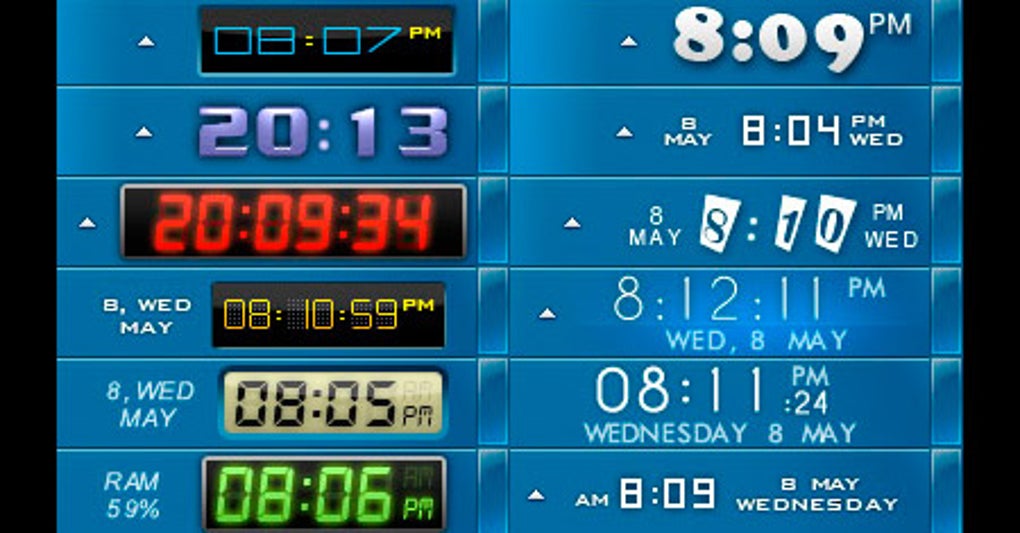
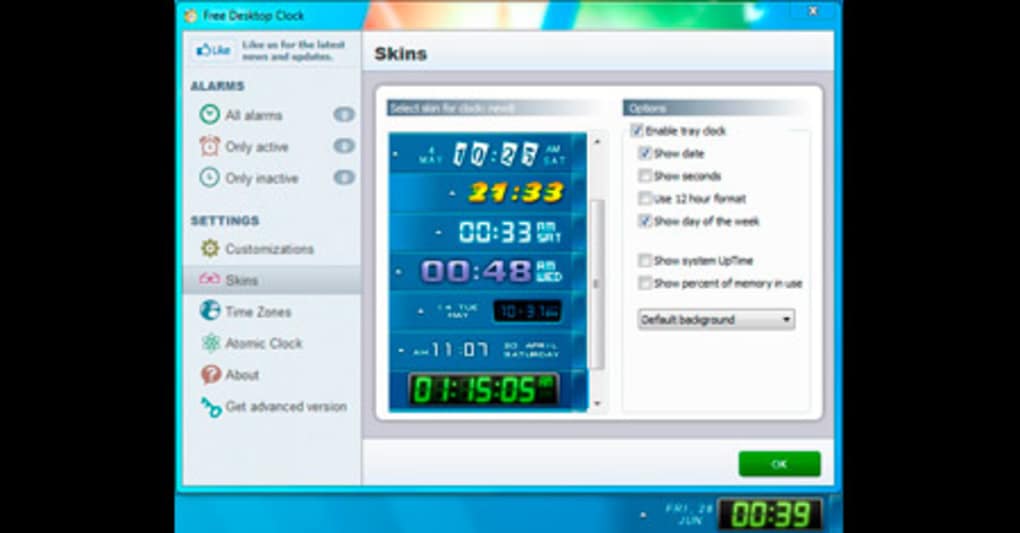
One of the most appealing aspects of Free Desktop Clock is its extensive collection of customizable skins and themes. Instead of being limited to a single, default clock style, users can choose from a diverse range of designs to match their personal preferences or complement their desktop background. These skins vary significantly in appearance, ranging from minimalist and modern designs to retro-inspired aesthetics and more elaborate, stylized displays. This level of customization allows users to seamlessly integrate the clock into their overall desktop environment, ensuring it enhances rather than detracts from their visual experience. The ability to select different fonts, colors, and sizes further expands the customization possibilities, empowering users to create a truly unique and personalized clock experience. This flexibility caters to a broad spectrum of user tastes, ensuring that there’s a suitable design for virtually every user.
Beyond Timekeeping: Additional Features and Functionality
Free Desktop Clock is more than just a visually appealing time display. It integrates additional functionalities that add to its overall utility. For example, the inclusion of a fully customizable calendar allows users to keep track of important dates and appointments directly on their desktop, eliminating the need to switch to a separate calendar application. This integration streamlines workflow and keeps essential information readily accessible. Furthermore, the clock’s ability to synchronize with atomic servers around the world ensures that the time displayed is always accurate and precise. This feature is particularly useful for users who require precise timekeeping for professional or personal reasons. This combination of timekeeping, calendar integration, and atomic time synchronization makes Free Desktop Clock a practical and versatile tool for both personal and professional use.
Ease of Use and Installation
Free Desktop Clock stands out for its user-friendly interface and straightforward installation process. The application is designed with simplicity in mind, ensuring that even users with limited technical expertise can easily navigate its settings and customize its appearance. The installation process is quick and hassle-free, requiring minimal user interaction. Once installed, the clock begins functioning immediately, requiring no further configuration. This intuitive design makes the software accessible to a wide range of users, regardless of their technical proficiency. The clear and concise menu options facilitate easy navigation and customization, allowing users to effortlessly tailor the clock to their specific needs. This ease of use significantly enhances the overall user experience, making Free Desktop Clock a convenient and practical tool for everyday use.
Pros and Cons: Weighing the Benefits and Drawbacks
While Free Desktop Clock offers numerous advantages, it’s crucial to consider both its strengths and weaknesses before making a decision. On the positive side, the availability of numerous customizable skins offers a high degree of personalization. The addition of a built-in calendar enhances its functionality beyond simple timekeeping. The software is also relatively lightweight and doesn’t consume excessive system resources. The ability to synchronize with atomic time servers ensures accuracy, which is invaluable for many users. However, the free version doesn’t support all the advertised features; some functionalities may require a paid upgrade. Additionally, the inclusion of third-party applications during installation is a potential concern, as it could introduce unwanted software. Careful consideration of these pros and cons is essential to determine if Free Desktop Clock aligns with your individual requirements and comfort level.
Alternatives and Competitors
The market offers a variety of alternative desktop clock applications, each with its unique features and capabilities. Some alternatives provide more extensive customization options, while others may focus on specific functionalities like alarm setting or world clock features. Direct comparisons with these competitors are necessary to determine the most suitable option based on specific preferences and needs. Examining reviews and ratings of other applications can provide valuable insights into their strengths and limitations, helping users make an informed decision. Consideration of factors like ease of use, customization options, features, and system requirements is crucial in selecting a desktop clock application that best meets individual expectations. A comprehensive comparison of available alternatives empowers users to make a well-informed decision based on their specific priorities and technical preferences.
User Reviews and Feedback
User reviews and feedback provide invaluable insights into the real-world experiences of Free Desktop Clock users. These reviews often highlight both the positive and negative aspects of the application, offering a balanced perspective that supplements the technical specifications and features listed in official descriptions. Positive reviews often praise the software’s customizable skins, intuitive interface, and the convenience of the integrated calendar. Conversely, negative reviews sometimes mention issues with third-party software bundled during installation or limitations in the free version. Careful analysis of both positive and negative feedback helps to create a comprehensive picture of the user experience, ultimately aiding in the decision-making process.
Security and Privacy Considerations
As with any software download, security and privacy considerations are paramount. It is essential to download the Free Desktop Clock application from reputable sources like the official website or trusted app stores to minimize the risk of malware or unwanted software. Examining the software’s privacy policy is also crucial to understand how user data is handled and protected. Considering the security reputation of the developer and checking for reviews that mention any security concerns can provide additional peace of mind. Prioritizing secure download sources and understanding the software’s privacy policy are essential steps to ensure a safe and secure user experience.
Conclusion: Is Free Desktop Clock Right for You?
Free Desktop Clock offers a compelling blend of visual appeal, functionality, and ease of use. Its extensive collection of customizable skins and the inclusion of a calendar function enhance its value proposition. However, the limitations of the free version and the potential inclusion of third-party applications require careful consideration. Weighing the pros and cons against the features of alternative desktop clock applications is crucial. Ultimately, the suitability of Free Desktop Clock depends on individual needs and priorities. If highly customizable appearance and an integrated calendar are important, Free Desktop Clock may be a viable option. However, users concerned about bundled software or requiring all features may find alternative applications more suitable. Careful research and consideration of personal requirements are key to making an informed choice.
File Information
- License: “Free”
- Latest update: “July 15, 2022”
- Platform: “Windows”
- OS: “Windows 2000”
- Language: “English”
- Downloads: “229K”
- Size: “2.99 MB”


