
The Free Visio Viewer, developed by Media Freeware, offers a straightforward solution for users needing to access and view Visio files without the expense or complexity of installing the full Microsoft Visio suite. This review delves into its functionality, ease of use, and overall value proposition, comparing it to the full-fledged Microsoft Visio program and exploring suitable alternatives.
Functionality and Ease of Use
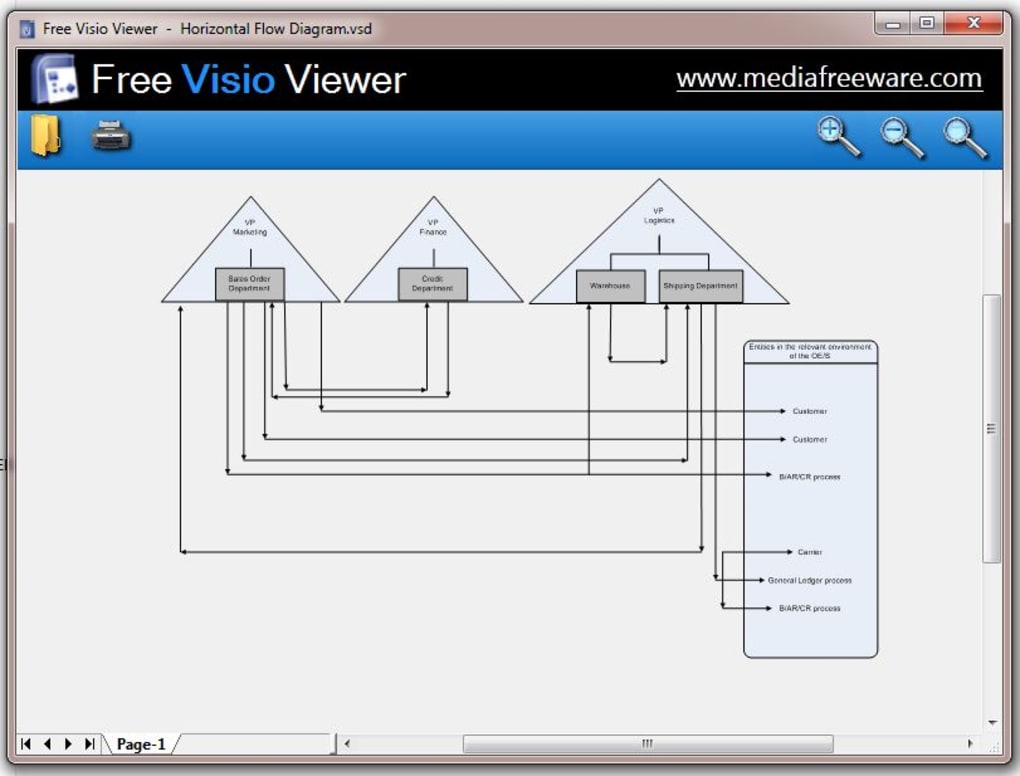
The Free Visio Viewer’s primary strength lies in its simplicity. Its core function is the viewing of Visio files (.vsdx, .vsd, etc.), and it performs this task effectively. Users can open Visio documents, seamlessly zoom in and out for detailed examination, and print the viewed content. The interface is clean and intuitive, requiring minimal technical expertise to navigate. The straightforward approach makes it ideal for users who only occasionally need to view Visio diagrams and don’t require the advanced editing and creation capabilities of Microsoft Visio.
Installation is quick and uncomplicated, a notable advantage over the often more resource-intensive installation process associated with comprehensive software suites like Microsoft Visio. The ease of installation and user-friendly interface contribute significantly to the overall positive user experience, making it accessible to users of all technical skill levels.
However, the simplicity of the Free Visio Viewer is also its limitation. The software is strictly a viewer; it does not allow for any editing or modification of the Visio files. Users wishing to create new diagrams, edit existing ones, or add annotations are directed to use the full version of Microsoft Visio. This limitation needs to be considered before selecting this software. If editing functionality is required, the Free Visio Viewer is not the appropriate choice.
Comparison with Microsoft Visio
Microsoft Visio is a powerful diagramming and visualization tool offering an extensive range of features that are absent in the Free Visio Viewer. While the Free Visio Viewer serves its niche well as a simple viewing tool, Microsoft Visio provides a comprehensive solution for creating, editing, and sharing a variety of diagrams, including flowcharts, network diagrams, organization charts, and more.
Microsoft Visio’s capabilities extend far beyond simple viewing:
- Diagram Creation: Microsoft Visio provides a wide array of templates and shapes to build a diverse range of diagrams.
- Editing and Annotation: Users can freely edit diagrams, add text, shapes, and annotations, and incorporate data from external sources.
- Collaboration: Microsoft Visio facilitates collaboration through features allowing multiple users to work on the same diagram simultaneously.
- Data Linking: It allows for dynamic data linking, enabling diagrams to reflect real-time data changes.
- Export Options: Microsoft Visio offers extensive export options, allowing users to save diagrams in various formats.
The Free Visio Viewer, by contrast, lacks these advanced features, focusing solely on the visual representation of existing Visio files. This makes the Free Visio Viewer suitable only for users whose needs are confined to viewing, not creating or editing, Visio documents.
Choosing between the Free Visio Viewer and Microsoft Visio depends entirely on the user’s needs. For occasional viewing tasks, the Free Visio Viewer is a lightweight and efficient solution. However, for those who require the robust functionality needed to create, edit, and collaborate on diagrams, Microsoft Visio is the necessary choice, despite its cost and increased system resource consumption.
Alternatives to Free Visio Viewer
Several alternative software programs exist for viewing Visio files, offering varying levels of functionality and compatibility. These alternatives may present advantages depending on the user’s specific requirements and operating system. Some alternatives might offer more advanced features like basic editing capabilities or support for a wider array of file formats.
The decision of which viewer to use depends heavily on the specific needs of the user. Considerations include whether editing capabilities are required, the frequency of use, the operating system being used, and the cost. While the Free Visio Viewer offers a convenient free option for simple viewing, other alternatives might offer better compatibility, more advanced features, or better integration with other software.
System Requirements and Compatibility
The Free Visio Viewer is designed for Windows operating systems, specifically Windows 7 and later versions. This compatibility ensures it can function seamlessly on a wide range of Windows computers. The relatively modest system requirements allow it to run efficiently even on older or less powerful machines. This makes it an accessible option for a large user base. However, users of other operating systems, such as macOS or Linux, will need to explore alternative Visio viewers, as the Free Visio Viewer is not compatible with these platforms.
While the software’s low system requirements are a positive aspect, it is crucial to keep the software updated to its latest version to ensure optimal performance and security. Outdated software can be vulnerable to security breaches, making it important to regularly check for updates and install them promptly.
Security and Privacy Considerations
Like any software, the Free Visio Viewer’s security and privacy should be considered. While the software itself is relatively lightweight and unlikely to pose significant security risks, using outdated software can create vulnerabilities. Downloading only from reputable sources, like the official website or trusted download platforms, is crucial to mitigating the risk of malware or viruses. Keeping the software updated also plays a key role in protecting against security threats.
Regarding user privacy, the Free Visio Viewer primarily functions as a viewing tool, and its data handling practices are minimal. However, always reviewing the software’s privacy policy and terms of service is a best practice when installing any software. Understanding how the software collects and uses user data is essential to ensuring informed consent and data protection.
Conclusion
The Free Visio Viewer is a useful tool for users with a limited need to view Visio files. Its simple interface, quick installation, and free availability make it an attractive option for casual users. However, its lack of editing capabilities and limited platform compatibility means it’s not a suitable replacement for the full Microsoft Visio suite or for users who require advanced diagramming features. Before choosing the Free Visio Viewer, users should carefully consider their specific needs and explore alternative options to ensure they select the most appropriate software for their tasks. Those needing editing capabilities or working on different operating systems should explore other viewer options or consider investing in the full Microsoft Visio application.
File Information
- License: “Free”
- Version: “1”
- Latest update: “January 31, 2023”
- Platform: “Windows”
- OS: “Windows 7”
- Language: “English”
- Downloads: “35.5K”
- Size: “22.02 MB”


