
Junkware, encompassing spyware, adware, and other potentially unwanted programs (PUPs), significantly impacts operating system performance. These intrusive programs often install themselves without explicit user consent, leading to sluggish systems, unwanted pop-up advertisements, and potential security vulnerabilities. Effectively combating junkware requires specialized tools, and the Junkware Removal Tool (JRT) emerges as a prominent solution for Windows users. This comprehensive guide explores the capabilities, features, and limitations of JRT, providing users with a clear understanding of its role in maintaining a clean and efficient computing environment.
Understanding Junkware and its Impact
Before delving into the specifics of JRT, it’s crucial to grasp the nature of junkware and its detrimental effects. Junkware isn’t simply unwanted software; it actively interferes with system functionality. Its pervasive nature makes manual removal incredibly difficult, often requiring extensive technical knowledge and considerable time. The consequences of neglecting junkware removal can include:
-
Performance Degradation: Junkware consumes system resources, slowing down boot times, application loading, and overall system responsiveness. Background processes associated with junkware continually compete for CPU cycles and memory, leaving less available for essential tasks.
-
Security Risks: Many junkware programs act as vectors for more malicious threats. They can compromise system security by creating vulnerabilities exploited by viruses, Trojans, and ransomware. Additionally, some junkware collects sensitive user data, potentially leading to identity theft or privacy violations.
-
Browser Hijacking: Junkware frequently targets web browsers, modifying default search engines, homepages, and even installing unwanted toolbars. This can lead to frustrating redirects, intrusive advertisements, and compromised browsing experience.
-
Annoying Pop-ups and Advertisements: The constant barrage of pop-up ads and intrusive notifications is a hallmark of junkware. These distractions disrupt workflows and can even lead to accidental clicks on malicious links.
Introducing the Junkware Removal Tool (JRT)
The Junkware Removal Tool (JRT), developed by Malwarebytes, offers a straightforward solution to the problem of unwanted programs. It acts as a specialized scanner designed to detect and remove various types of junkware, enhancing system performance and security. While not a full-fledged antivirus program, JRT excels at identifying and eliminating specific categories of unwanted software that often evade detection by traditional antivirus solutions. Its lightweight nature and focused approach make it a valuable addition to any comprehensive security strategy.
JRT’s Key Features and Capabilities
JRT’s strength lies in its ability to target specific types of junkware that are notoriously difficult to remove manually. Its capabilities include:
-
Detection of Common PUPs: JRT features a comprehensive database of known junkware programs, including toolbars, browser extensions, and other potentially unwanted applications. This allows it to accurately identify and remove these programs, even if they are deeply embedded within the system.
-
Registry Key Removal: Junkware frequently alters registry settings, making its removal complex. JRT meticulously scans the Windows registry to identify and remove registry keys associated with identified junkware, ensuring a thorough eradication of the unwanted program.
-
File and Folder Deletion: JRT not only removes program files but also systematically deletes any associated folders and files that may remain after the main program is removed. This ensures a comprehensive cleanup of the system.
-
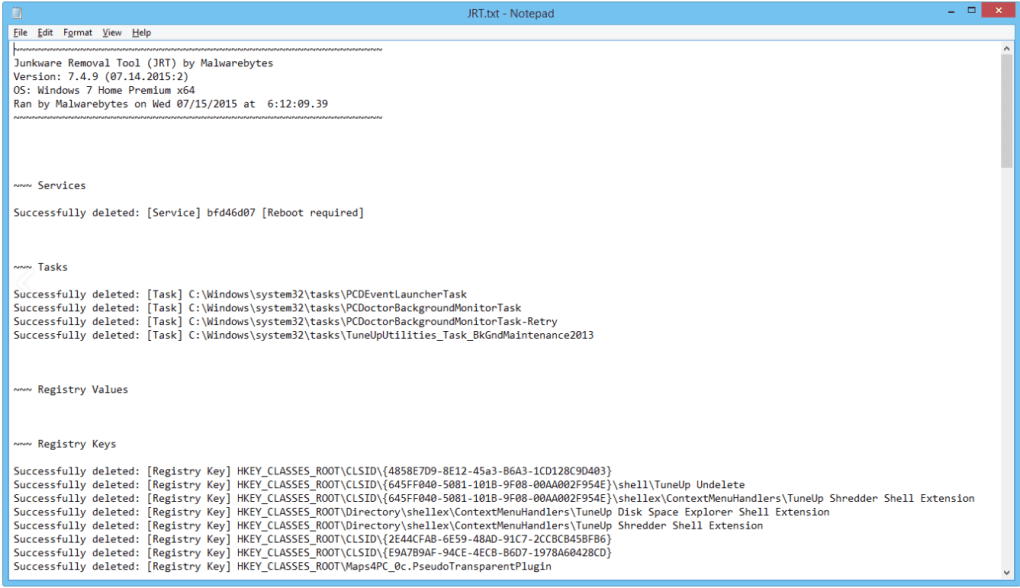
Log File Generation: After scanning and removing junkware, JRT creates a detailed log file that documents all the detected and removed items. This provides valuable information for users and system administrators, allowing them to understand the nature and extent of the junkware infestation.
JRT’s Limitations and Considerations
While JRT is a powerful tool, it’s essential to acknowledge its limitations:
-
Not a Replacement for Antivirus: JRT is not a replacement for a comprehensive antivirus solution. It focuses specifically on junkware and does not offer protection against viruses, Trojans, or ransomware. It is vital to use JRT in conjunction with a robust antivirus program.
-
Potential for Configuration Issues: Some users have reported occasional configuration problems during installation. These issues are relatively infrequent but underscore the need to follow the installation instructions carefully.
-
System Restart Required: After running JRT, a system restart is often necessary to fully apply the changes and ensure that the removed junkware does not reappear upon reboot.
JRT: A Practical Tool for Maintaining System Health
The Junkware Removal Tool represents a valuable asset for maintaining a clean and efficient Windows environment. Its ability to target and remove various types of junkware, combined with its ease of use and lightweight design, makes it a practical choice for both home users and IT professionals. However, it’s critical to remember that JRT complements, rather than replaces, other essential security measures, such as a comprehensive antivirus program. By combining JRT with a robust antivirus solution, users can establish a comprehensive security strategy that safeguards their systems from the full range of cyber threats, including junkware.
Its focus on detecting and removing specific types of potentially unwanted programs fills a gap in traditional antivirus software, addressing a common source of system degradation and security vulnerabilities. The detailed log files provided after each scan offer users a clear understanding of the detected threats and the actions taken, adding transparency and accountability to the process.
By understanding the capabilities and limitations of the Junkware Removal Tool, users can leverage its power to maintain a healthy and productive computing experience. While not a silver bullet, JRT provides a highly effective layer of protection against junkware, leaving users with a cleaner, faster, and more secure operating system. Remember always to combine this tool with robust antivirus software and safe browsing practices for the most complete protection.
File Information
- License: “Free”
- Latest update: “June 11, 2025”
- Platform: “Windows”
- OS: “Windows 8.1”
- Language: “English”
- Downloads: “879”
- Size: “1.79 MB”


