
LICEcap is a free, user-friendly desktop utility designed for capturing specific screen areas and exporting them as GIF animations or LCF files. Its minimalist interface and lightweight nature have contributed to its widespread popularity among users seeking a straightforward screen recording solution for Windows and macOS. While lacking advanced editing features found in more comprehensive screen recording software, LICEcap excels in its simplicity and ease of use, making it an ideal choice for creating quick demonstrations, tutorials, and other short animated screen captures. This review delves into LICEcap’s functionality, ease of use, supported file formats, and its suitability for various applications.
Ease of Use and Key Features
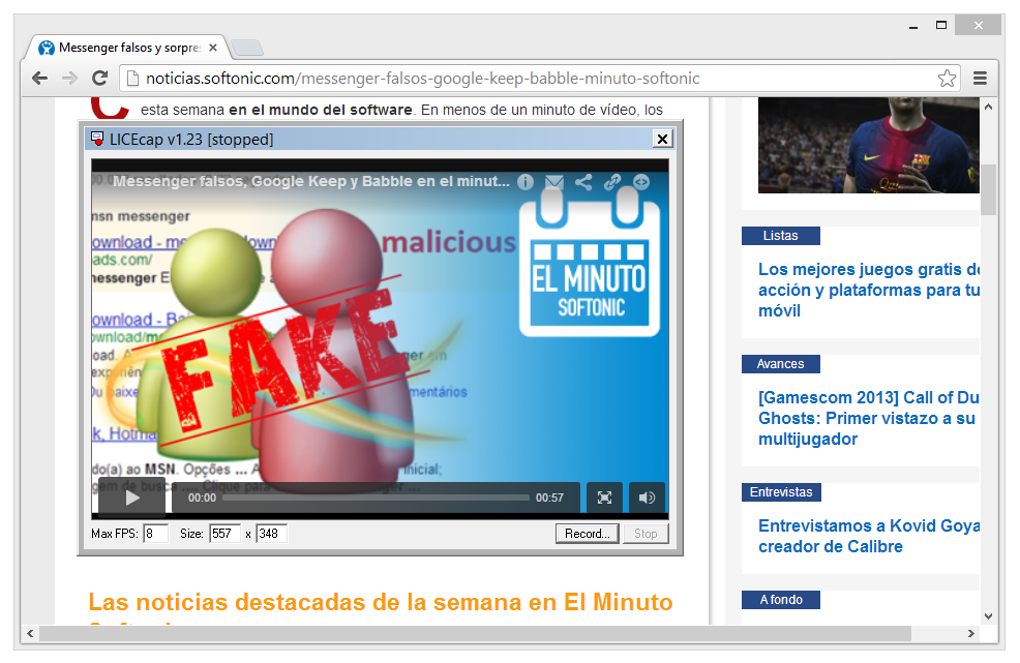
LICEcap’s intuitive design makes it incredibly easy to use, even for individuals with limited technical expertise. The program’s core functionality revolves around a resizable box that appears upon launch. Users simply drag and resize this box to encompass the desired screen area for recording. Once the area is selected, clicking the “Record” button initiates the screen capture process. While the recording box can be moved during capture to include different screen sections, resizing is not possible once recording begins. This requires users to carefully plan their capture area beforehand to ensure all desired elements are included.
A notable feature is the “Pause” option, allowing users to temporarily halt recording. This pause functionality enables the insertion of text frames or other visual elements into the animation, adding a degree of customization and enhancing the appeal of the final output. This capability allows for the creation of more engaging and informative tutorials or demonstrations.
Furthermore, LICEcap supports a global hotkey – Shift + Space – providing a convenient method for toggling the pause function during recording. The program also accurately records mouse clicks, ensuring a comprehensive capture of user interactions within the selected screen area. Unlike some other screen recording tools, LICEcap offers adjustable maximum recording frame rates, enabling users to control CPU performance and resource usage. This is particularly helpful when recording demanding applications or for optimizing performance on less powerful systems. Finally, LICEcap automatically includes a basic title frame and displays elapsed time in all recordings, adding valuable context to the captured footage.
Supported File Formats and Output Quality
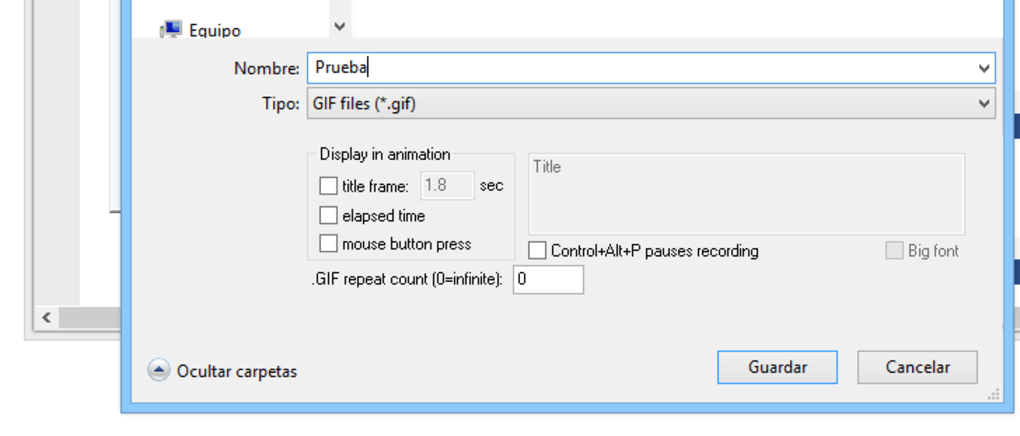
LICEcap primarily saves recordings in GIF format, a widely recognized and easily embeddable format suitable for online sharing. However, the GIF format’s inherent limitations can lead to relatively large file sizes, even for short recordings. A 5-10 second animation might easily reach 0.5 MB, impacting upload times and requiring a stable internet connection for seamless sharing.
To address the size constraints of GIF, LICEcap also supports lossless LCF (LICEcap Compressed File) format. LCF files generally offer higher compression ratios than GIFs, resulting in smaller file sizes while maintaining high-quality visuals with up to 265 colors per frame. LCF files also maintain accurate timestamping. These LCF files can be played using the developer’s REAPER playback tool and can be converted to other formats like GIF or JPG using the same tool.
LICEcap’s Use in Creating Desktop Tutorials and Demonstrations
LICEcap’s ability to record screen activity and save the output in the high-quality LCF format makes it well-suited for creating desktop tutorials and demonstrations. The inherent quality of LCF files, combined with the program’s built-in command-line utility for format conversion (to PNG, for example), ensures that users can easily share their creations across various platforms and software. The simplicity and lightweight nature of LICEcap significantly reduce the technical barrier to entry. The tool’s compatibility with various Windows versions further enhances its accessibility and ensures smooth operation without performance lags or crashes.
Strengths and Weaknesses of LICEcap
LICEcap’s key strength lies in its simplicity and ease of use. Its clean interface allows users to quickly begin recording and exporting their screen captures. The option to move the recording box dynamically during the capture process adds flexibility, enabling the capture of multiple screen areas within a single recording. The adjustable frame rate and hotkey functionality further enhance the user experience and provide valuable customization options.
However, LICEcap’s lack of editing capabilities represents a significant limitation. Users cannot trim, modify, or otherwise edit recordings within the application itself. This necessitates the use of third-party editing software for any post-production work. Furthermore, the relatively large file sizes of GIF outputs, while mitigated somewhat by the LCF option, remain a consideration for users with limited bandwidth or those sharing recordings via platforms with upload size restrictions.
LICEcap Compared to Other Screen Recording Software
While LICEcap fulfills its niche as a simple, user-friendly screen recorder, it lacks the advanced features found in more comprehensive software like Snagit, CamStudio, or FastStone Capture. These alternatives often include extensive editing tools, a broader range of output formats, and additional functionalities such as annotation, audio recording, and webcam integration. However, this added functionality comes at the cost of increased complexity and often a higher price point or less intuitive interface.
Conclusion: A Practical Tool for Specific Needs
LICEcap’s straightforward design and ease of use make it a valuable tool for specific screen recording tasks. For users needing a quick, simple way to create short animated screen captures for demonstrations, tutorials, or informal sharing, LICEcap provides an efficient solution. Its ability to record in LCF format, offering high-quality outputs with smaller file sizes, enhances its overall appeal. However, its lack of editing functions and potential for larger GIF files should be considered. Users requiring more extensive editing capabilities or broader output options may find more feature-rich screen recording software more suitable to their needs. Ultimately, LICEcap’s effectiveness hinges on the user’s specific requirements; for straightforward screen recording tasks, it remains a dependable and easily accessible option. It excels in simplicity and ease of use, and for those needs, its performance is commendable.
File Information
- License: “Free”
- Latest update: “May 22, 2023”
- Platform: “Windows”
- OS: “Windows XP”
- Language: “English”
- Downloads: “172K”
- Size: “256.96 KB”


