
In the realm of digital preservation and retro gaming, the Multiple Arcade Machine Emulator (MAME) stands as a monumental achievement, dedicated to recreating the experience of thousands of classic arcade games on modern hardware. However, MAME itself, while incredibly powerful and accurate, can present a somewhat daunting interface for new users, often relying on command-line prompts or a very bare-bones GUI. This is where a robust frontend becomes invaluable, streamlining the user experience and transforming a complex emulator into an accessible arcade portal. Among the numerous options available, MameUI64 has consistently distinguished itself as a long-standing, efficient, and highly user-friendly solution for managing and emulating arcade games on Windows. It’s more than just a launcher; it’s a meticulously crafted gateway to an expansive universe of vintage coin-op entertainment, offering a blend of simplicity, deep customization, and unwavering compatibility that caters to both casual players and dedicated arcade historians. For anyone looking to dive into the rich history of arcade gaming without the typical hurdles, MameUI64 provides a compelling and complete package, making the dream of a personal arcade cabinet on a PC a tangible reality.
The Enduring Appeal of Arcade Emulation
The golden age of arcade gaming, spanning from the late 1970s through the 1990s, produced a cultural phenomenon that captivated millions. Arcades were vibrant, noisy hubs of excitement, innovation, and social interaction. Games like Pac-Man, Space Invaders, Donkey Kong, Street Fighter II, and countless others not only pushed the boundaries of technology but also ingrained themselves into popular culture. Today, these seminal titles remain cherished, not just for their nostalgic value but for their pure, unadulterated gameplay mechanics that often stand the test of time.
The advent of emulation has provided a vital bridge to this past, allowing current and future generations to experience these classics without the need for increasingly rare and fragile original hardware. MAME, in particular, has become the de facto standard for arcade emulation due to its unwavering commitment to accuracy and preservation. Its primary goal is to document the internal workings of arcade machines to prevent them from being lost to time, rather than solely focusing on playability. This dedication, while noble and essential, often results in an interface that prioritizes functionality over user-friendliness.
What is MAME and Why Do We Need Frontends?
MAME (Multiple Arcade Machine Emulator) is an open-source project designed to accurately recreate the hardware of arcade game systems. It does this by emulating the CPU, sound chips, display, and other components of original arcade cabinets, allowing their original game ROMs (Read-Only Memory) to run as they would on the actual machines. This level of accuracy is crucial for preservation but also means that MAME can be quite complex to configure and manage. A typical MAME installation involves a command-line interface or a very basic GUI that requires users to know specific ROM names, command arguments, and configuration file structures.
This complexity is where frontends like MameUI64 step in. A frontend acts as a graphical user interface (GUI) layer on top of the core MAME emulator. It abstracts away the technical intricacies, providing a visual, intuitive way to browse, organize, launch, and configure games. Instead of typing commands or editing obscure text files, users interact with a friendly windowed application that lists games, displays their details, and offers easy access to settings. For the average user who simply wants to enjoy a classic game, a frontend transforms MAME from a technical tool into an entertainment portal, making the vast library of arcade classics readily accessible and enjoyable. MameUI64 excels in this role, providing a streamlined experience that doesn’t sacrifice any of MAME’s underlying power or flexibility.
Diving Deep into MameUI64’s Feature Set
MameUI64 distinguishes itself through a rich array of features designed to enhance every aspect of the arcade emulation experience. From its initial setup to advanced customization, the frontend prioritizes both ease of use and powerful options, ensuring that users can tailor their gaming environment to perfection.
Intuitive Interface and ROM Management
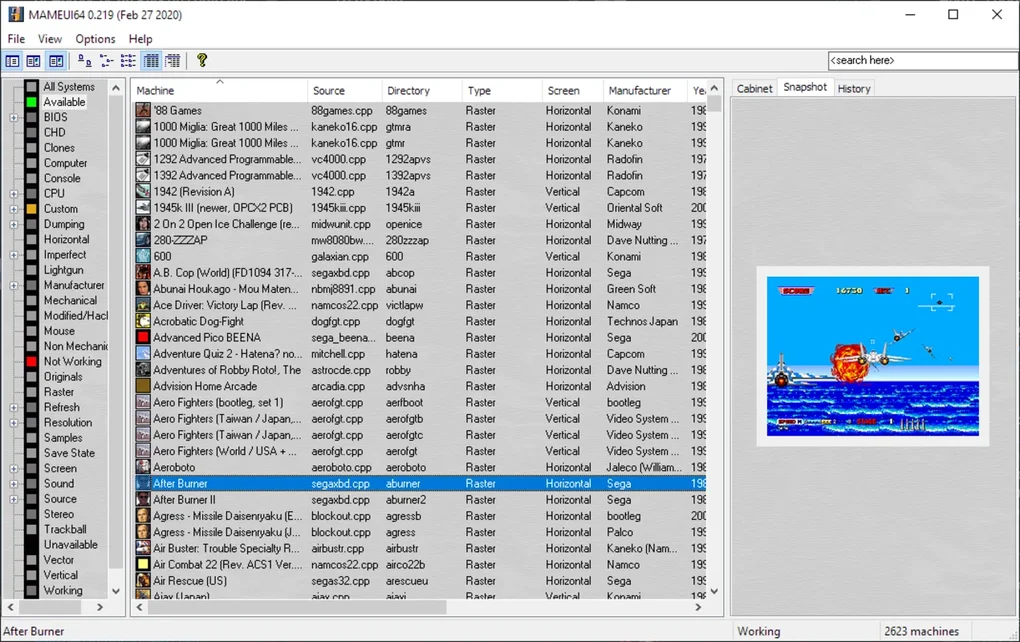
One of MameUI64’s most celebrated attributes is its user-friendly interface. Upon launching the application and pointing it to your local ROM folders, MameUI64 automatically scans and compiles a detailed list of all compatible arcade titles. This list is not just a bland directory; it’s a meticulously organized database that can be filtered and sorted by a multitude of criteria. Users can quickly locate games by release year, genre (fighting, shooter, platformer, puzzle, etc.), developer, number of players, or even the specific arcade machine hardware that supported the title. This robust filtering system is invaluable for large collections, allowing enthusiasts to quickly navigate through thousands of games and pinpoint exactly what they want to play.
Beyond simple listing, MameUI64 empowers users with comprehensive ROM management tools. It aligns perfectly with modern MAME compatibility standards, which are constantly evolving as new preservation efforts uncover more accurate ways to emulate hardware. MameUI64 keeps pace with these updates, allowing users to verify their ROM sets, identify missing files, and ensure their games are compatible with the currently installed MAME core. This ensures a high degree of adaptability and reduces the frustration often associated with maintaining a large MAME collection. The interface also supports displaying additional metadata, such as game descriptions, historical notes, and even ratings, turning the game list into an educational resource as well as a launchpad.
Advanced Customization and Visual Fidelity
Modern displays, with their high resolutions and crisp pixels, can sometimes make older arcade games look stark and unappealing, highlighting rough pixelation that wasn’t apparent on original CRT monitors. MameUI64 addresses this by offering a wealth of graphics settings and post-processing filters. Users can tweak display parameters such as resolution, aspect ratio, and stretching options to ensure games look their best on contemporary screens. More importantly, MameUI64 includes advanced filters designed to replicate the authentic visual characteristics of classic CRT (Cathode Ray Tube) monitors. These include scanline effects, which simulate the horizontal lines visible on old TVs, and various shader effects that introduce subtle blooming, ghosting, or curvature, all contributing to a genuine retro aesthetic. The ability to fine-tune these visual elements means players can achieve anything from a pixel-perfect sharp image to a warm, fuzzy, and incredibly authentic arcade parlor look.
The frontend also allows for extensive interface customization. This isn’t just about changing colors or fonts; MameUI64 enables users to enhance organization visually. It can scan ROMs for associated images, icons, cabinet artwork, marquees, title screens, and even in-game screenshots. These visuals are then integrated directly into the interface, transforming a simple text list into a rich, graphical browser. Imagine scrolling through your game collection and seeing the original arcade cabinet artwork for each title, or a screenshot instantly reminding you of the gameplay. This visual enrichment not only makes the frontend more aesthetically pleasing but also significantly improves the browsing experience, helping users rediscover forgotten gems or quickly identify favorites.
Seamless Control Configuration and Device Support
No arcade experience is complete without responsive and accurate controls. MameUI64 excels in this area, offering robust control mapping capabilities. Users can easily configure keyboard inputs, assign functions to mouse movements, and, crucially, integrate external gaming devices. This includes a wide array of USB gamepads, joysticks, and specialized arcade fight sticks. The mapping interface is intuitive, allowing for precise assignment of buttons and directional inputs to each game or globally across all titles. This means you can use your favorite modern controller for fighting games, a classic joystick for retro shooters, or even a customized arcade panel with full confidence that MameUI64 will handle the inputs flawlessly.
The support for external devices extends beyond just standard controllers. MameUI64 is designed to work seamlessly with specialized arcade peripherals, ensuring that the authentic feel of playing classic games is preserved. This includes support for spinner controllers (for games like Arkanoid), trackballs (for titles like Centipede or Marble Madness), and light guns (for games such as Operation Wolf). The ability to configure and utilize these specific devices significantly enhances the immersion, offering an experience that closely mirrors playing on original arcade hardware. Furthermore, MameUI64 often includes options for customizing sensitivity, dead zones, and other advanced input parameters, allowing for highly personalized control schemes that cater to individual preferences and game requirements. This attention to detail in input management truly sets MameUI64 apart as a comprehensive solution for serious arcade enthusiasts.
Installation, Setup, and Optimizing Your Arcade Experience
Getting MameUI64 up and running is a straightforward process, but understanding some key steps and optimization tips can significantly enhance your retro gaming journey. The process generally involves acquiring the software, pointing it to your game files, and then fine-tuning settings for the best possible experience.
Getting Started: A Step-by-Step Guide
The first step is to download MameUI64. You can typically find the latest stable version on reputable emulation websites or via direct links. Ensure you download the version compatible with your Windows operating system (64-bit). Once downloaded, installation is usually as simple as extracting the archive to a folder of your choice. MameUI64 is often a standalone executable, meaning no complex installation wizard is required.
After extraction, launch the MameUI64 executable. The frontend will likely open to an empty game list. The crucial next step is to tell MameUI64 where your MAME ROMs are located. Navigate to the options or preferences menu (often found under “Options” -> “Directories” or similar). Here, you’ll specify the path to your ROMs folder. It’s generally recommended to keep your ROMs in a dedicated, organized folder. You might also want to set paths for other assets like artwork, videos, and snaps if you have them.
Once the ROM path is set, MameUI64 will prompt you to audit or scan your ROMs. This process involves the frontend checking your ROM files against its internal database to verify their integrity and compatibility with the MAME core it uses. This step is vital because MAME ROMs are often comprised of multiple files (e.g., parent ROMs, clone ROMs, BIOS files), and even a single missing or incorrect file can prevent a game from running. The audit will categorize your games, identifying playable titles, those with missing files, or even unsupported ones. This detailed feedback is incredibly helpful for maintaining a healthy and functional game library. After the scan, your comprehensive list of playable arcade titles will populate the main window, ready for you to explore.
Fine-Tuning Performance and Aesthetics
With your games listed, you can now delve into optimizing MameUI64 for both performance and visual appeal. The frontend offers a plethora of global and per-game settings accessible through its intuitive menus.
For performance, consider the following:
- Video Options: Under the video settings, you can choose between various rendering APIs (e.g., Direct3D, OpenGL) and adjust resolutions. For older, less demanding games, performance is rarely an issue, but for more intensive titles, selecting the right renderer and ensuring your graphics drivers are up to date can make a difference. You can also toggle features like triple buffering or wait-for-vertical-sync (VSync) to reduce screen tearing.
- Sound Options: MameUI64 allows you to configure sound output, including sample rates and audio buffering. Ensure these match your system’s capabilities for optimal sound quality without crackling or lag.
- CPU Throttling: Some very old games might run too fast on modern CPUs. MameUI64 provides options to throttle the CPU speed, allowing you to slow down emulation to match the original game’s pace.
Aesthetically, MameUI64 offers extensive options to recreate the classic arcade look:
- Post-processing Filters (Shaders): This is where MameUI64 truly shines. Within the video options, you’ll find a wide range of shaders. Experiment with different scanline filters to achieve varying levels of line visibility and intensity. Look for CRT (Cathode Ray Tube) shaders that simulate the curvature, phosphorescence, and subtle imperfections of old arcade monitors. Many shaders even mimic specific monitor types, offering incredible fidelity to the original display technology.
- Aspect Ratio and Scaling: While modern games are often widescreen, most arcade games were designed for 4:3 aspect ratios. MameUI64 allows you to maintain the correct aspect ratio, preventing games from looking stretched or squashed. You can also choose between integer scaling (which keeps pixels perfectly square) or non-integer scaling, depending on your preference for sharpness versus screen real estate.
- Artwork and Customization: As mentioned earlier, MameUI64 allows you to integrate cabinet art, marquees, and game screenshots. Make sure your artwork files are in the correct directories and MameUI64 is configured to display them. This visual enrichment significantly enhances the browsing experience and contributes to the overall immersive atmosphere. You can also customize the frontend’s theme, fonts, and colors to match your personal taste.
By methodically going through these settings, you can transform MameUI64 into a personalized arcade hub that not only plays games flawlessly but also looks and feels authentically retro. The depth of customization ensures that whether you prefer a pristine, pixel-perfect image or a perfectly simulated CRT glow, MameUI64 has the tools to achieve it.
Beyond the Basics: Community and Alternatives
While MameUI64 provides a fantastic standalone experience, engaging with the broader MAME community and understanding its place among other frontends can enrich your overall arcade emulation journey. The world of MAME is vast and constantly evolving, driven by dedicated enthusiasts and developers.
The MAME community is a vibrant hub of activity, with official forums, fan sites, and online repositories. These platforms are invaluable resources for troubleshooting, discovering new games, sharing configuration tips, and staying updated on MAME development. Many users contribute to the community by creating custom artwork, developing new shaders, or sharing optimized configuration files for specific games. Participating in these communities can significantly enhance your MameUI64 experience, allowing you to leverage the collective knowledge and creative output of fellow enthusiasts. If you encounter an issue or are looking for a specific type of visual filter, these communities are often the first and best place to seek help.
While MameUI64 is a superb choice, it’s also worth acknowledging that other MAME frontends exist, each with its own philosophy and feature set. Some popular alternatives include:
- MAME Classic: Often bundled with MAME or available as a simple, no-frills frontend. It offers basic game listing and launching without extensive customization options.
- MAME Plus!: An alternative MAME build that historically included additional features not present in the official MAME, such as extra display options or enhanced sound. While the official MAME has absorbed many of these over time, MAME Plus! retains a following.
- Extra M.A.M.E.: Another frontend focused on simplicity, aiming to get users into games quickly with minimal setup. It might appeal to those who find MameUI64’s extensive options overwhelming.
- LaunchBox/Big Box: These are premium, highly customizable frontends that support a wide range of emulators, not just MAME. They offer unparalleled visual customization, scraping of game data, and a media-rich presentation, making them ideal for building comprehensive retro gaming libraries or arcade cabinet setups. While more complex and often paid (for Big Box), they represent the pinnacle of frontend experiences.
Understanding these alternatives can help users appreciate why MameUI64 strikes such a compelling balance. It provides significantly more features and customization than basic frontends like MAME Classic or Extra M.A.M.E. without the steeper learning curve or commercial aspect of a premium solution like LaunchBox/Big Box. It’s often the perfect middle ground for users seeking a powerful yet accessible MAME experience.
Why MameUI64 Remains a Top Choice for Arcade Enthusiasts
In a landscape filled with various emulation options and frontends, MameUI64 has cemented its position as a consistently reliable and highly recommended choice for Windows users. Its enduring popularity stems from a potent combination of robust features, intuitive design, and a commitment to keeping pace with the evolving MAME core.
For a straightforward yet powerful arcade machine emulation experience on PC, MameUI64 truly proves to be a top choice. It demystifies the MAME emulator, transforming a technical tool into an engaging and accessible platform for reliving arcade history. From its comprehensive ROM management that allows for easy filtering and organization of vast game libraries, to its sophisticated graphics options that enable players to recreate authentic CRT monitor effects or enjoy crisp, modern visuals, MameUI64 provides an unparalleled level of control over the emulation experience.
The frontend’s meticulous attention to detail extends to its control configuration, offering seamless support for a wide array of input devices, including specialized arcade peripherals, ensuring that every game feels just as it should. Furthermore, the extensive interface customization, allowing for the integration of artwork, screenshots, and visual themes, transforms the game browsing experience into an enjoyable journey through arcade history.
Whether you are a seasoned retro gamer with fond memories of pumping quarters into arcade cabinets, or a newcomer curious about the origins of video games, MameUI64 offers a complete and satisfying solution. It empowers users to build their ultimate virtual arcade, accessible at the click of a button, preserving the magic and excitement of a bygone era for generations to come. With MameUI64, the golden age of arcade gaming is not just a memory; it’s a living, playable reality on your Windows PC.
Disclaimer: PhanMemFree (formerly Softonic) scans all files hosted on its platform to assess and avoid any potential harm for your device. Our team performs checks each time a new file is uploaded and periodically reviews files to confirm or update their status. This comprehensive process allows us to set a status for any downloadable file. We do not encourage or condone the use of any program if it is in violation of local laws. PhanMemFree.org may receive a referral fee if you click or buy any of the products featured here.
File Information
- License: “Free”
- Version: “0.267”
- Latest update: “September 25, 2024”
- Platform: “Windows”
- OS: “Windows 11”
- Language: “English”
- Downloads: “647”
- Size: “88.12 MB”


