
MecaNet Keyboard is a free, comprehensive typing tutor designed to help users of all skill levels improve their touch typing proficiency. Available for Windows, this application offers a blend of structured lessons and engaging games, making the learning process both effective and enjoyable. Whether you’re a complete beginner or looking to refine your existing skills, MecaNet Keyboard provides the tools and resources you need to become a more efficient and accurate typist.
Learning to Type with MecaNet Keyboard
MecaNet Keyboard’s core functionality revolves around its structured curriculum, comprised of 20 comprehensive lessons. These lessons systematically introduce and reinforce proper typing techniques, focusing on hand placement, finger coordination, and efficient keystrokes. The program’s design is meticulously crafted to build a strong foundation in touch typing, progressively introducing new concepts and challenges as the user progresses. The lessons are not merely theoretical; they incorporate practical exercises designed to translate knowledge into skill. This hands-on approach ensures that users aren’t just passively absorbing information but actively engaging with the material, fostering quicker learning and better retention.
Beyond the structured lessons, MecaNet Keyboard offers a range of engaging typing games. These games gamify the learning process, transforming potentially tedious practice sessions into fun and rewarding experiences. The incorporation of games is crucial, as it keeps users motivated and engaged, counteracting the common feeling of monotony associated with repetitive practice drills. The games not only enhance the learning experience but also allow users to test their skills in a less formal environment, thereby reinforcing the techniques learned in the lessons.
This dual approach – combining structured lessons with engaging games – is a key strength of MecaNet Keyboard. It caters to diverse learning styles, ensuring that users can find a method that best suits their needs and preferences. For those who prefer a more structured approach, the comprehensive lessons provide a clear path to mastering touch typing. For those who thrive on challenge and immediate feedback, the interactive games provide a fun and effective means of reinforcement.
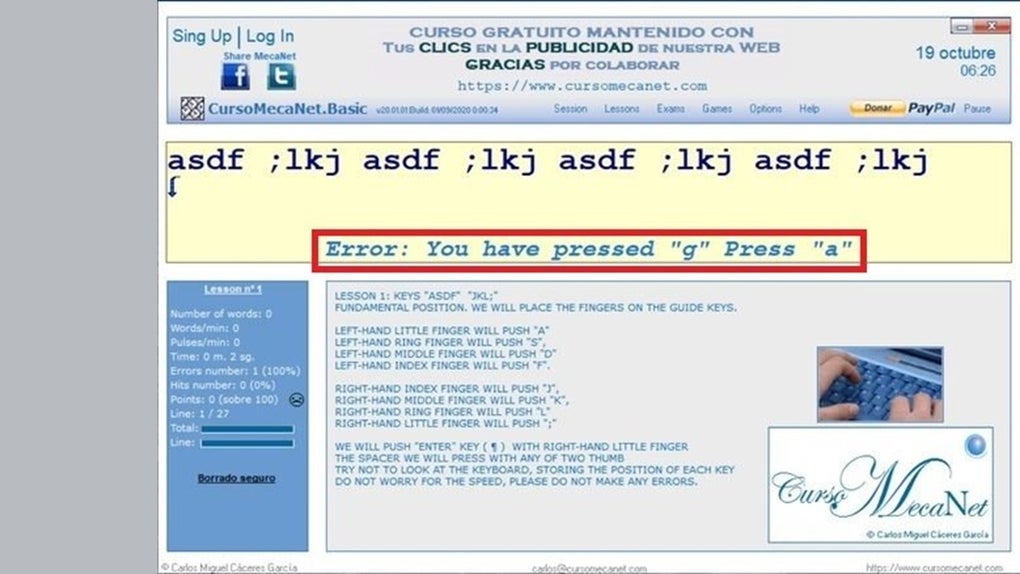
The software also allows for custom exercises, a feature that addresses individual learning needs. Users can tailor their practice sessions to focus on specific words or letter combinations that they find challenging. This level of personalization allows for targeted practice, addressing weaknesses and solidifying strengths. By focusing on areas where improvement is needed, users can accelerate their learning and overcome specific hurdles more efficiently. The ability to customize exercises also reflects the software’s adaptability to different skill levels and learning styles.
Finally, MecaNet Keyboard incorporates a comprehensive statistics tracking system. This allows users to monitor their progress, track their typing speed and accuracy over time, and identify areas where improvement is still needed. The detailed statistics offer valuable insight into individual performance, providing users with tangible evidence of their growth and motivating them to continue practicing. This feedback loop is crucial for maintaining motivation and making the learning process more rewarding.
MecaNet Keyboard’s Strengths and Weaknesses
MecaNet Keyboard boasts several notable strengths that contribute to its effectiveness as a touch typing tutor. The custom exercises feature allows for targeted practice, addressing individual weaknesses effectively. The incorporation of typing games transforms the learning process into a more engaging and less tedious experience. Furthermore, the comprehensive statistics tracking provides valuable feedback, allowing users to monitor their progress and identify areas needing improvement. The structured lessons provide a clear pathway to mastering touch typing techniques, guiding users through the learning process step-by-step.

However, MecaNet Keyboard is not without its limitations. One significant drawback is its lack of support for Bengali, Chinese, and Japanese characters. This significantly restricts its accessibility to users who primarily use these writing systems. This limitation is a notable constraint for users who require touch typing proficiency in these languages and suggests a potential area for future development and enhancement. While the software is otherwise comprehensive, this omission significantly restricts its potential user base.
System Requirements and Technical Specifications
MecaNet Keyboard is designed for Windows operating systems, specifically compatible with Windows 11. The software’s relatively small size (3.64 MB) ensures minimal impact on system resources. It is available in Spanish and English, catering to a significant portion of the global user base. As of June 3, 2025, the latest update (version 25.04.27) offers further improvements and refinements to the application. The free license makes the software accessible to a wide audience, removing financial barriers to learning touch typing.
User Experience and Community Feedback
While concrete user reviews for MecaNet Keyboard are currently unavailable, the features and design of the software suggest a positive user experience. The combination of structured lessons, engaging games, and customizable exercises caters to diverse learning styles and preferences. The comprehensive statistics tracking provides valuable feedback, helping users monitor their progress and stay motivated. The software’s simple interface and straightforward design are likely to contribute to ease of use, making it accessible even to users with limited computer experience.
The lack of readily available user reviews might be attributed to the software’s relatively recent release or limited marketing efforts. However, the software’s features suggest a potentially positive reception among users, especially those seeking a free and comprehensive touch typing tutor. Future user feedback and reviews will provide further insight into the actual user experience and help refine the software even further. The developers’ responsiveness to user feedback and potential updates will be critical in shaping the long-term success and user satisfaction of MecaNet Keyboard.
Conclusion
MecaNet Keyboard stands as a strong contender in the field of free touch typing tutors for Windows users. Its blend of structured lessons, engaging games, customizable exercises, and comprehensive statistics tracking offers a well-rounded approach to learning and improving touch typing skills. While the lack of support for certain character sets presents a limitation, the overall features and ease of use suggest a valuable resource for users seeking to improve their typing proficiency. The continued development and user feedback will be crucial in addressing limitations and enhancing the already impressive features of this application. For those seeking a free and comprehensive method to improve their touch typing skills, MecaNet Keyboard deserves strong consideration.
File Information
- License: “Free”
- Latest update: “June 3, 2025”
- Platform: “Windows”
- OS: “Windows 11”
- Language: “Spanish”
- Downloads: “211”
- Size: “3.64 MB”


