
MemoryCleaner, as its name clearly indicates, is a straightforward application designed to reclaim memory space on your computer. This free tool boasts a user-friendly interface, making it accessible to users of all technical skill levels. Its intuitive design and limited scheduling features offer a degree of automation, enhancing its practicality. Similar to other memory optimization tools like Memory Cleaner: Ram Booster and Windows Memory Cleaner, MemoryCleaner aims to improve your computer’s performance by freeing up RAM, leading to faster boot times and quicker task execution.
Understanding Memory Clutter and its Impact on Performance
Modern computers, while powerful, are susceptible to performance degradation due to memory clutter. Over time, numerous applications and processes accumulate in the system’s RAM, consuming valuable resources. These programs, often running silently in the background, may not be actively used by the user, yet they still occupy memory. This accumulation of unnecessary processes and data fragments contributes to slower boot times, increased lag during operation, and an overall less responsive system. This is where MemoryCleaner steps in.
MemoryCleaner addresses this problem by identifying and clearing out this unnecessary memory clutter. By freeing up RAM, it effectively alleviates the strain on the system, leading to a noticeable improvement in responsiveness and speed. The perceived “speed boost” is a direct result of the increased available memory, allowing the computer to operate more efficiently and swiftly. Think of it like cleaning out a cluttered desk – removing unnecessary items immediately makes it easier to find what you need and work more efficiently. The same principle applies to your computer’s memory.
The Simplicity and Ease of Use of MemoryCleaner
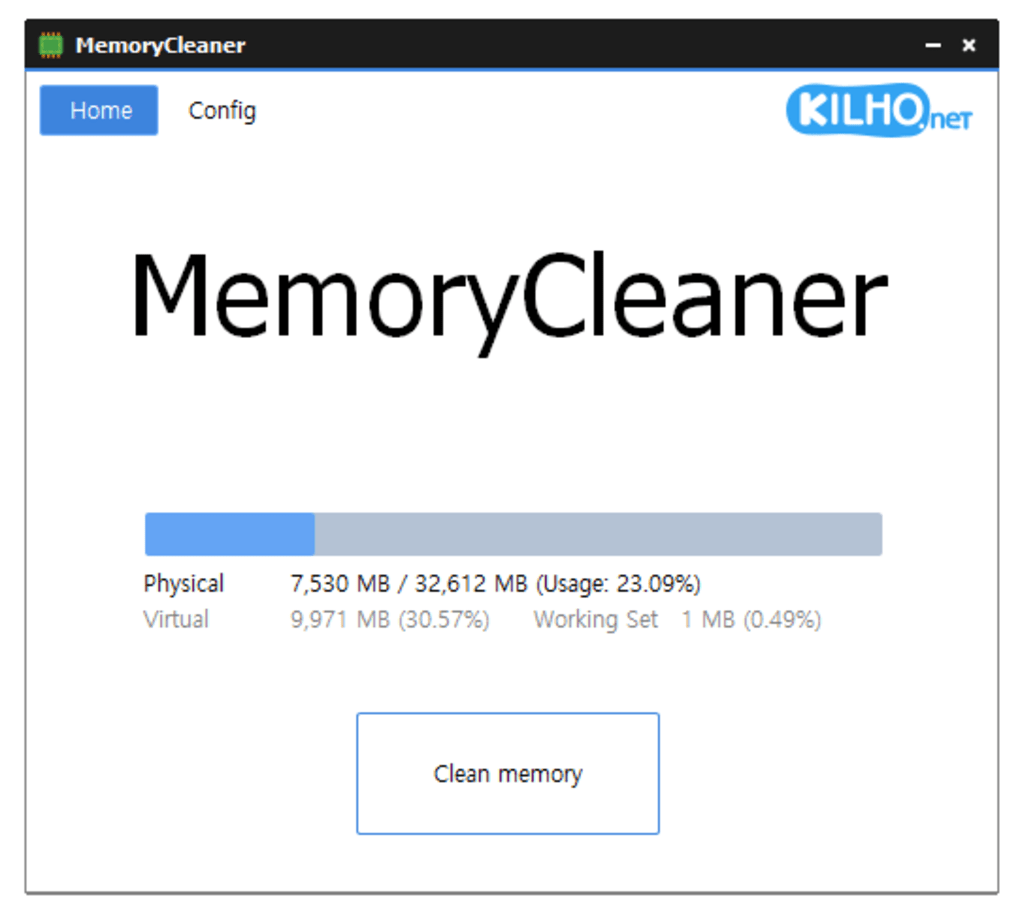
One of MemoryCleaner’s most significant strengths lies in its exceptionally simple user interface. The main window is uncluttered and intuitive, featuring a single, prominent button to initiate the memory-cleaning process. While lacking extensive customization options, this minimalist approach makes the tool incredibly accessible to even the most novice users. There’s no steep learning curve; users can quickly understand and utilize the program’s core functionality without needing a manual or prior experience with similar tools.
The scheduling functionality, while present, is equally straightforward, offering basic control over when the cleaning process automatically runs. This feature further enhances the tool’s usability, enabling users to optimize their system’s performance regularly without manual intervention. The focus on simplicity ensures a seamless user experience, prioritizing ease of use over extensive feature sets. This targeted approach makes MemoryCleaner ideal for those seeking a quick and efficient solution to memory management, without needing to navigate complex settings or options.
Limitations and Feature Considerations
While MemoryCleaner excels in its simplicity and ease of use, its minimalist design also implies certain limitations. The lack of advanced settings for memory cleaning means users have minimal control over the process. There are no customizable options to target specific types of memory usage or prioritize certain processes. The scheduling functionality, though useful, is relatively basic compared to more sophisticated memory management tools. Users seeking granular control over the cleaning process or sophisticated optimization techniques might find MemoryCleaner’s functionality somewhat limited.
Furthermore, MemoryCleaner focuses solely on memory cleaning; it doesn’t offer other system optimization features commonly found in more comprehensive utilities. It doesn’t include disk cleanup, registry cleaning, or startup program management. This narrow focus, while contributing to its simplicity, also restricts its overall capabilities. Users needing a more holistic approach to system optimization might benefit from exploring more feature-rich alternatives.
However, this limited feature set is precisely what contributes to MemoryCleaner’s efficiency and ease of use. Its small size and minimal resource consumption make it an ideal tool for users who simply need a reliable and lightweight application to free up RAM and improve their computer’s performance without the complexities of more advanced tools. The choice of using MemoryCleaner versus a more comprehensive utility should be based on individual needs and technical proficiency.
System Requirements, Size, and Technical Specifications
MemoryCleaner is exceptionally lightweight, requiring only a minimal download size (around 2 MB). This small footprint ensures that it doesn’t consume significant disk space or system resources during operation. This efficient design makes it suitable for use on computers with limited storage capacity or older hardware. The program’s compatibility with a wide range of Windows operating systems further broadens its accessibility.
The technical specifications are straightforward, indicating its simplicity and focus on a specific function. It operates entirely within the limitations of its core functionality: efficiently freeing up RAM. There are no complex dependencies or demanding system requirements, ensuring compatibility and usability for a vast range of users and system configurations.
Conclusion: MemoryCleaner – A Simple Yet Effective Tool
MemoryCleaner offers a straightforward solution for users seeking a simple, effective, and lightweight tool to improve their computer’s performance by freeing up RAM. Its minimalist design, combined with its ease of use, makes it an excellent choice for both novice and experienced users. While its limited feature set might not appeal to those seeking advanced optimization capabilities, its small size, minimal resource consumption, and intuitive interface make it a practical choice for those prioritizing simplicity and speed. Ultimately, MemoryCleaner fulfills its intended purpose effectively, providing a reliable and accessible solution for basic RAM management. The decision to use MemoryCleaner should be guided by the user’s specific needs; if a simple, efficient RAM cleaner is required, then MemoryCleaner effectively meets that requirement. Users needing more comprehensive system optimization should consider alternatives offering more extensive features and settings.
File Information
- License: “Free”
- Version: “1.0”
- Latest update: “July 15, 2022”
- Platform: “Windows”
- OS: “Windows 8”
- Language: “English”
- Downloads: “6.4K”
- Size: “2.05 MB”


