
In today’s fast-paced, interconnected world, effective collaboration is no longer a luxury but a necessity for teams across all sectors. From spontaneous brainstorming sessions to structured project planning, the ability to visualize, share, and refine ideas collectively drives innovation and productivity. Enter Microsoft Whiteboard, a versatile digital canvas designed specifically to empower Microsoft users to transform their abstract thoughts into tangible, shareable insights. More than just a drawing tool, it’s a dynamic workspace that bridges the gap between individual creativity and collective intelligence, making it an indispensable asset for modern teams.
First introduced as a dedicated app for Windows and integrated into Microsoft Teams, Whiteboard provides a freeform environment where ideas can flow as freely as ink on paper, yet with all the advantages of digital technology. While its touch-first and pen-first interface caters especially well to devices like the Surface Pro, it remains perfectly accessible and highly functional for users operating with traditional desktop setups, mouse, and keyboard. Its seamless synergy with other components of the Microsoft Office suite ensures that it integrates smoothly into existing workflows, becoming a natural extension for teams already leveraging Microsoft’s ecosystem for their daily productivity needs. This integration positions Microsoft Whiteboard not just as an isolated utility but as a vital cog in the larger machine of digital collaboration and ideation.
The Dynamic World of Microsoft Whiteboard: An Introduction
Microsoft Whiteboard represents a paradigm shift in how individuals and teams approach creative thinking and problem-solving. By providing an expansive digital canvas, it liberates users from the constraints of physical whiteboards, allowing for limitless expansion and iteration of ideas. This introduction explores its fundamental offerings and its strategic placement within the broader Microsoft universe, establishing its role as a premier tool for modern collaboration.
A Canvas for Limitless Creativity
At its core, Microsoft Whiteboard is an expansive, freeform digital canvas designed for unfettered expression. Imagine a whiteboard that never runs out of space, where you can jot down notes, sketch diagrams, and organize thoughts without ever needing to erase. Users can type text directly onto the board, providing clarity and structure, or unleash their creativity with digital ink, drawing freehand shapes, arrows, and complex illustrations. The beauty of this digital medium lies in its flexibility: every element, whether typed text, an inked drawing, a sticky note, or an imported image, is a distinct object that can be moved, resized, copied, or deleted independently.
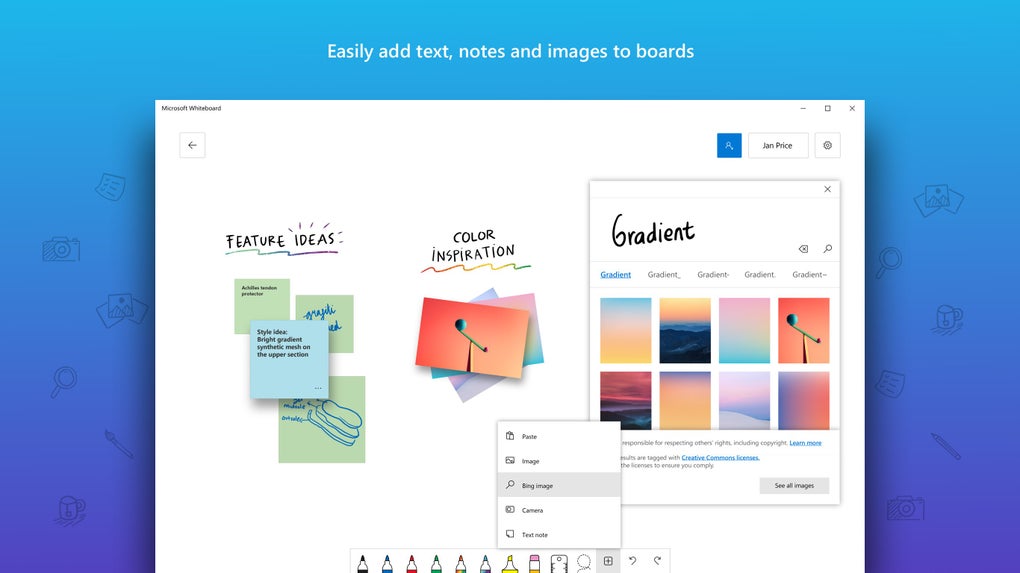
This object-oriented approach transforms the whiteboard into a dynamic workspace rather than a static image. Team members can easily add digital sticky notes to capture quick thoughts, reminders, or action items, and these can be color-coded and moved around for categorization. Images, screenshots, and even documents can be imported directly onto the canvas, providing visual context and rich media support for discussions. The ability to stack and overlay these elements allows for sophisticated organization and layering of information, enabling teams to build complex visual narratives or decompose intricate problems. This fluidity makes Whiteboard an ideal platform for design thinking, concept mapping, and detailed process visualization, offering a level of adaptability that traditional whiteboards simply cannot match.
Seamless Integration with the Microsoft Ecosystem
One of Microsoft Whiteboard’s most compelling strengths is its deep-rooted integration within the Microsoft ecosystem. For organizations and individuals already invested in Microsoft’s suite of productivity tools, Whiteboard feels like a natural and indispensable extension. It’s designed to work harmoniously with applications like Microsoft Teams, where it can be launched directly within meetings to facilitate real-time interactive discussions, and its contents can be easily shared and revisited. This integration transforms passive meetings into engaging, interactive sessions where every participant can contribute visually and collaboratively.
Furthermore, all content created within Microsoft Whiteboard is automatically and securely saved to the Microsoft cloud. This cloud-centric approach offers several critical advantages. Firstly, it ensures perpetual availability; users can pick up exactly where they left off, regardless of device or location, making hybrid work models more efficient and accessible. There’s no risk of losing valuable ideas sketched out during a rapid brainstorming session. Secondly, it simplifies sharing and access control, adhering to Microsoft’s robust security protocols. Teams can manage permissions, ensuring that only authorized individuals have access to sensitive information while maintaining easy collaboration for approved members. This synergy extends to how Whiteboard complements other applications like Microsoft OneNote. While OneNote excels in structured note-taking and document management, Whiteboard provides a more free-form, visual, and collaborative space for initial ideation and diagramming. The two applications, though distinct, can serve different phases of a project lifecycle, with Whiteboard often being the starting point for visual exploration before ideas are refined and documented in OneNote or other Office applications. This intelligent interoperability enhances overall team productivity and ensures a cohesive digital workspace experience.
Unleashing Collaborative Power: Features and Functionality
The true power of Microsoft Whiteboard emerges in its ability to foster dynamic, real-time collaboration. It’s not merely a shared drawing board; it’s an intelligent platform that understands and enhances human interaction. This section delves into its advanced features, particularly intelligent inking and its robust real-time collaboration capabilities, showcasing how they transform individual input into collective output.
Intelligent Inking: From Doodles to Diagrams
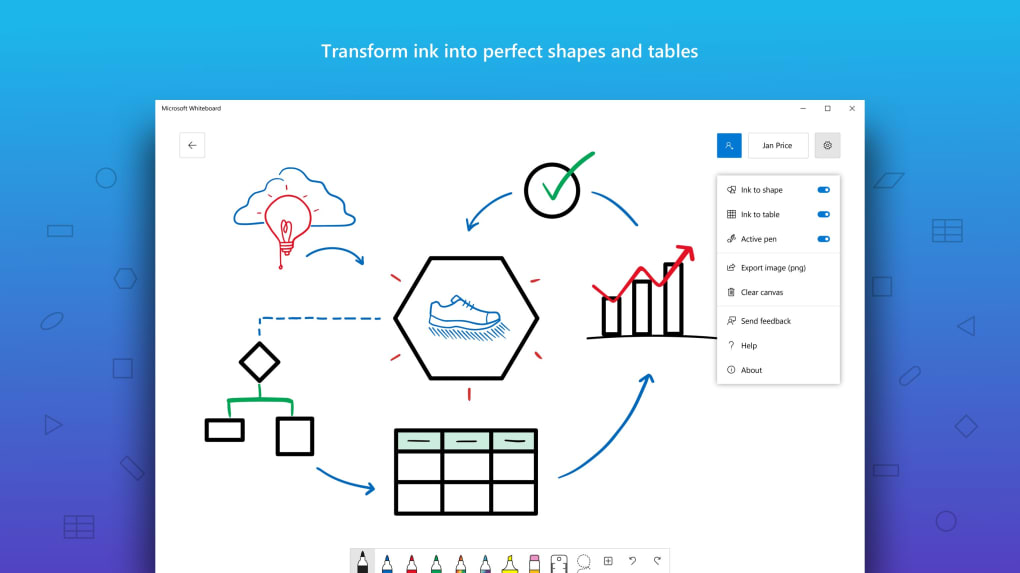
Microsoft Whiteboard elevates the traditional act of drawing by incorporating intelligent inking technology, a feature that significantly enhances both aesthetics and functionality. This isn’t just about digitizing pen strokes; it’s about making those strokes smarter and more usable. When users draw freehand, especially with a stylus on a touch-enabled device, Whiteboard’s intelligent inking can recognize common shapes like circles, squares, triangles, and arrows, and instantly snap them into perfectly geometric forms. A hastily drawn circle can become a flawless circle, and a wobbly line can transform into a perfectly straight one. This capability is invaluable for creating professional-looking diagrams, flowcharts, and sketches without needing to be an accomplished artist.
Beyond simple shape recognition, intelligent inking extends to more complex structures. Users can draw rudimentary tables, and Whiteboard will automatically transform them into neatly aligned grids, ready for data entry or categorization. This dramatically speeds up the process of structuring information during brainstorming or planning sessions. Moreover, the ability to copy, paste, and combine these intelligently recognized shapes and lines opens up possibilities for sophisticated visual compositions. Designers can rapidly prototype UI elements, architects can sketch out floor plans, and engineers can draft system diagrams with unprecedented ease. This feature democratizes visual communication, allowing anyone to convey complex ideas clearly and precisely, irrespective of their drawing prowess. It ensures that the focus remains on the ideas themselves, rather than the technical execution of the drawings.
Real-time Teamwork, Anywhere, Anytime
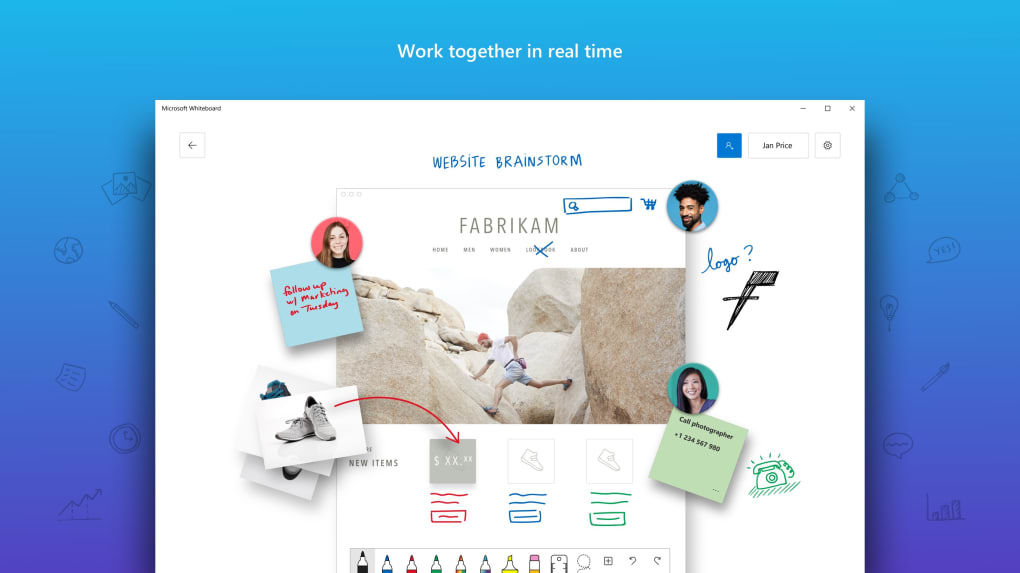
The heart of Microsoft Whiteboard lies in its unparalleled real-time collaboration features. In an era where teams are often geographically dispersed, Whiteboard ensures that physical distance does not impede collective progress. Any user with access to a shared canvas can see every contribution as it happens, creating a truly synchronous and immersive collaborative experience. This means multiple team members can be inking, typing, and adding content simultaneously on the same board, just as they would around a physical whiteboard, but with infinite space and digital advantages.
This real-time interaction extends beyond merely adding content. Collaborators can provide immediate feedback and suggestions directly on the canvas, using digital ink to highlight points, add comments on sticky notes, or even draw directly adjacent to an existing idea. This direct, visual feedback loop is incredibly powerful for iterative design, problem-solving, and brainstorming, allowing ideas to evolve rapidly through collective input. For scenarios like writing out process flows, developing architectural diagrams, or preparing brainstorm presentations, Whiteboard becomes an interactive hub where every team member can contribute to the narrative. The automatic saving to the Microsoft cloud ensures that every revision and contribution is preserved, creating a living document that can be revisited and modified at any time. There is no practical limit to the number of people who can collaborate on a single canvas, making it suitable for both small agile teams and large departmental brainstorming events, provided all participants have Microsoft accounts, which serves as the secure gateway to this collaborative ecosystem.
Beyond Brainstorming: Practical Applications Across Industries
While Microsoft Whiteboard excels in brainstorming, its utility extends far beyond initial ideation. Its adaptable nature and collaborative features make it a powerful tool for a diverse range of applications across various industries and personal use cases. This section explores how different sectors can leverage Whiteboard to enhance productivity, foster learning, and streamline creative processes.
Enhancing Productivity in Business
In the corporate world, Microsoft Whiteboard proves invaluable for various aspects of project management, strategy development, and daily operations. Project teams can use it to map out complex workflows, create Gantt-like charts for task allocation, or visualize dependencies between different project phases. The ability to add sticky notes for tasks and assign them to individuals, then move them around as progress is made, provides a highly visual and intuitive project tracking system. During strategy meetings, leadership teams can use Whiteboard to construct SWOT analyses, stakeholder maps, or customer journey diagrams collaboratively. The infinite canvas allows for comprehensive exploration of different scenarios and strategic options without being confined by space. Furthermore, design and marketing teams can leverage Whiteboard for rapid prototyping of user interfaces, sketching out campaign concepts, or storyboarding video content. The visual nature of the tool facilitates clearer communication of abstract design ideas and allows for immediate feedback from stakeholders, accelerating the design sprint cycle.
Revolutionizing Education and Learning
For educators and students, Microsoft Whiteboard offers a dynamic platform to transform traditional learning environments into interactive digital spaces. Teachers can use it to deliver engaging lessons, creating interactive diagrams, annotating documents in real-time during virtual classes, or explaining complex concepts visually. Students can actively participate by adding their own notes, asking questions visually, or collaborating on group projects. Imagine a science class where students collectively label a diagram of the human body, or a history class where they collaboratively build a timeline of events. Whiteboard’s shared canvas fosters active learning and peer-to-peer collaboration, enabling students to work together on assignments, develop mind maps for essay planning, or even present their findings in a visually rich format. It supports diverse learning styles and encourages creative expression, making abstract subjects more accessible and engaging. The cloud-saving feature ensures that all classroom materials and student work are readily available for review and future reference.
Personal Organization and Creative Expression
Microsoft Whiteboard isn’t just for teams; it also serves as a powerful tool for individual productivity and creative expression. For personal organization, it can function as an expansive digital notebook where you can jot down ideas, create to-do lists, or plan personal projects using sticky notes and freeform drawings. The ability to import images and documents makes it ideal for visual journaling, mood boarding, or collecting inspirations for hobbies and personal ventures. Artists and hobbyists can use it as a digital sketchpad, experimenting with ideas, creating concept art, or simply doodling without the constraints of physical materials. Writers might use it for plotting storylines, character development, or mapping out complex narratives. Its lightweight nature compared to heavier applications like OneNote makes it quick to launch for capturing fleeting thoughts or sketching out a sudden burst of inspiration. Whether you’re planning a vacation, organizing your personal finances visually, or brainstorming ideas for a new creative project, Whiteboard provides an intuitive and flexible canvas to bring your thoughts to life.
Navigating the Nuances: Understanding Whiteboard’s Strengths and Limitations
Like any powerful tool, Microsoft Whiteboard comes with its own set of advantages and specific limitations. Understanding these nuances is crucial for users to maximize its benefits while being aware of potential challenges. This section provides a balanced perspective, highlighting its key strengths and discussing areas where it might require consideration or alternative approaches.
Advantages of Choosing Microsoft Whiteboard
The numerous benefits of Microsoft Whiteboard make it a highly recommended tool for collaborative environments. Firstly, its good inter-app synergy with Microsoft Office programs ensures that it seamlessly integrates into existing workflows for users already accustomed to the Microsoft ecosystem. This reduces friction and accelerates adoption within organizations. Secondly, its innate design for collaboration means it intrinsically supports team-based activities, allowing multiple users to contribute simultaneously in real-time, regardless of their physical location. This is a game-changer for distributed teams and hybrid work models.
The intelligent inking technology stands out as a significant advantage, transforming crude doodles into polished shapes, lines, and tables. This not only makes the output look more professional but also significantly aids in clarity and readability, especially when conveying complex ideas visually. Users don’t need to be skilled artists to create impactful diagrams. Finally, the infinite and freeform canvas provides an unparalleled sense of creative freedom. There are no boundaries to ideation; users can expand their thoughts laterally, vertically, or in any direction, ensuring that no idea is constrained by space. This boundless digital space fosters uninhibited creativity and allows for comprehensive visual mapping of even the most intricate concepts. These combined advantages position Microsoft Whiteboard as a robust and intuitive platform for collective ideation and visual communication.
Addressing the Caveats: Exclusivity, Performance, and Alternatives
While Microsoft Whiteboard offers substantial benefits, it’s important to acknowledge its specific limitations to set appropriate expectations and ensure optimal usage. The primary caveat is its exclusivity to Microsoft account owners. This means that while anyone can be invited to a board, they must have a Microsoft account (personal, work, or school) to access and contribute. This might pose a barrier for organizations or individuals who do not primarily operate within the Microsoft ecosystem, potentially requiring guests to create accounts, which can be an inconvenience. For teams where not everyone has a Microsoft account, this exclusivity can limit its universal adoption.
Another common feedback point relates to its performance, with some users reporting that it can be quite laggy, especially when dealing with very large canvases filled with numerous elements or during intense real-time collaboration with many participants. This can impact the fluidity of the user experience and, in critical moments, disrupt the creative flow. Similarly, zooming the canvas to see short texts can be a bit hard, requiring precise manipulation to read smaller annotations or details, which can be cumbersome on certain devices or without a stylus.
In comparison to Microsoft OneNote, Whiteboard is often perceived as more lightweight and focused purely on the freeform canvas experience, whereas OneNote is a comprehensive digital notebook for structured information. While Whiteboard holds its unique ground, these performance issues and its exclusivity mean that teams might consider alternatives if their primary users are outside the Microsoft ecosystem, or if they require extremely high-performance real-time drawing with vast amounts of content. Tools like Mural, Miro, or even simpler web-based whiteboards offer different feature sets and ecosystems that might better suit specific non-Microsoft-centric needs or offer potentially smoother performance on certain hardware configurations. However, for teams deeply integrated into Microsoft 365, Whiteboard’s benefits largely outweigh these minor drawbacks, especially given its continuous development and integration improvements by Microsoft.
Maximizing Your Microsoft Whiteboard Experience
To truly harness the full potential of Microsoft Whiteboard, users and teams should adopt certain best practices and stay informed about its evolving capabilities. By strategically leveraging its features and understanding its position within the broader digital landscape, organizations can significantly enhance their collaborative efforts.
Best Practices for Effective Collaboration
To make the most of Microsoft Whiteboard, consider these practical tips for maximizing team collaboration:
- Define a Clear Purpose: Before diving into a session, establish the objective of the whiteboard. Is it for brainstorming, project planning, mind mapping, or presentation? A clear goal helps structure contributions and keeps the session focused.
- Utilize Templates (If Available/Created): While Whiteboard offers a freeform canvas, starting with a basic template for common activities (e.g., SWOT analysis, Kanban board, sprint planning) can provide structure and accelerate the setup process.
- Encourage Diverse Input Methods: Remind participants that they can use ink, text, sticky notes, and images. Different methods suit different types of input and learning styles. The intelligent inking can help less confident drawers.
- Organize and Group Ideas: As the canvas fills, encourage users to group related ideas, use different sticky note colors for categories, or draw frames around sections. This helps maintain clarity and makes it easier to navigate a large board.
- Use Reactions and Comments: Leverage Whiteboard’s reaction features (likes, hearts, etc.) and comment capabilities to provide quick feedback or ask clarifying questions without disrupting the main flow of ideas.
- Regularly Review and Refine: Collaboration isn’t a one-off event. Schedule follow-up sessions to revisit the whiteboard, update progress, refine ideas, or extract action items. The cloud-saving ensures continuity.
- Manage Access Wisely: For sensitive projects, ensure that access permissions are properly set, only inviting necessary team members. For broader brainstorming, consider making boards accessible to a wider audience.
- Leverage Integrations: For Microsoft Teams users, launch Whiteboard directly within meetings to ensure all attendees have immediate access and can contribute seamlessly during discussions.
By following these best practices, teams can transform their Whiteboard sessions from simple digital drawing into highly productive, engaging, and outcome-driven collaborative experiences.
Future Prospects and Continuous Improvement
Microsoft Whiteboard is not a static product; it’s continuously evolving with regular updates and new feature rollouts. Microsoft is committed to enhancing its capabilities, often incorporating user feedback to improve performance, add new templates, and deepen integrations with other Microsoft 365 services. We can anticipate further refinements in intelligent inking, more robust template libraries, and potentially advanced AI-driven features that could help categorize ideas, summarize discussions, or even suggest connections between disparate inputs.
As hybrid work models become the norm, the demand for sophisticated, reliable, and accessible collaboration tools will only grow. Microsoft Whiteboard is well-positioned to meet these evolving needs, offering a centralized platform where creativity, planning, and teamwork converge. Its ongoing development signifies Microsoft’s commitment to providing comprehensive solutions that empower teams to innovate and achieve their goals, regardless of their physical location. Despite minor caveats, its core strengths—deep integration, intelligent features, and boundless canvas—make it a highly recommended application for any team looking to foster dynamic and effective digital collaboration. As an integral part of the Microsoft productivity suite, its future looks bright, promising an even more intuitive and powerful experience for its users on PhanMemFree.
In conclusion, Microsoft Whiteboard stands out as a remarkably versatile and powerful collaboration tool. It provides an intuitive, seemingly infinite canvas for teams to articulate, visualize, and evolve their ideas in real-time. While its exclusivity to Microsoft account owners and occasional performance nuances are considerations, these are often outweighed by its seamless integration with the Microsoft Office suite, intelligent inking technology, and robust real-time collaboration capabilities. For any organization or individual deeply embedded in the Microsoft ecosystem and seeking to enhance productivity through visual collaboration, Microsoft Whiteboard is an indispensable addition, transforming how ideas are born, shared, and brought to fruition.
File Information
- License: “Free”
- Version: “varies-with-device”
- Latest update: “November 24, 2021”
- Platform: “Windows”
- OS: “Windows 11”
- Language: “English”
- Downloads: “312.7K”


