
Mod Organizer 2 (MO2) for Skyrim is a powerful and indispensable utility for players of Bethesda’s acclaimed RPG, The Elder Scrolls V: Skyrim, and other compatible games. Developed by Gamerpoets, MO2 revolutionizes the way players manage and utilize mods, simplifying a process that can otherwise be complex and time-consuming. This guide will delve into the features, benefits, and overall functionality of MO2, providing a complete understanding of why it’s a must-have for any serious Skyrim modder.
Understanding the Challenges of Skyrim Modding
Before exploring the advantages of MO2, it’s crucial to understand the inherent challenges associated with modding Skyrim. The game’s popularity has spawned a vast and ever-growing community of mod creators, resulting in a massive library of modifications available for download. These mods range from simple texture enhancements to entirely new gameplay mechanics, quests, and even entire overhauls of the game’s world.
However, managing this plethora of mods can quickly become overwhelming. Manually installing and uninstalling mods often leads to conflicts, crashes, and the potential for irreversible damage to the game files. Manually tracking which mods are active, their dependencies, and resolving conflicts between them is a significant undertaking, requiring meticulous record-keeping and a deep understanding of the game’s file structure. Without a robust modding tool like MO2, players risk spending more time troubleshooting conflicts than actually enjoying the game.
Introducing Mod Organizer 2: A Revolutionary Approach to Mod Management
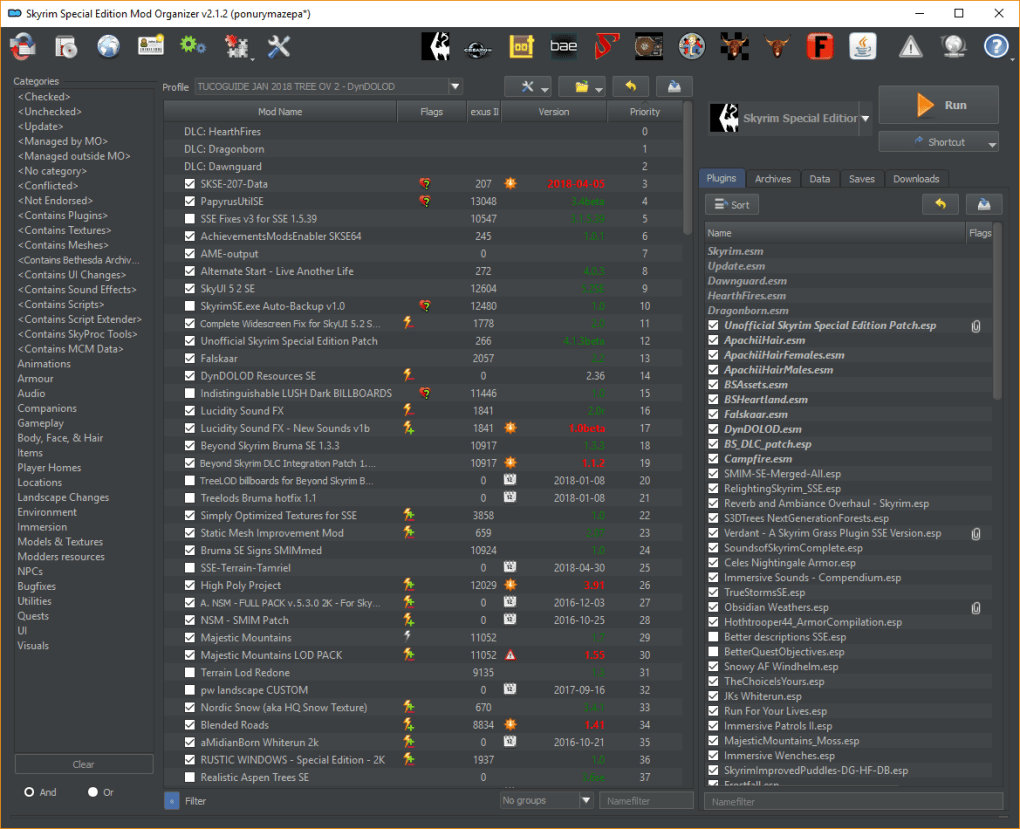
Mod Organizer 2 directly addresses these challenges by employing a Virtual File System (VFS). This innovative approach allows MO2 to manage mods in a completely separate location from the game’s installation directory. This “virtual” installation means that mods are essentially “layered” onto the base game without directly altering the original files.
This separation offers several key benefits:
-
Preservation of Game Integrity: MO2 ensures that your original Skyrim installation remains untouched. This protects against accidental corruption or the need to reinstall the game if a mod causes problems. You can safely experiment with different mod combinations without fear of permanently modifying the base game files.
-
Simplified Installation and Uninstallation: Installing and uninstalling mods becomes incredibly streamlined. MO2 handles the complexities of file placement and dependencies, making the process quick, easy, and less prone to errors. Removing a mod is equally straightforward; simply disabling it in MO2 effectively removes its influence without leaving behind any remnants in the game’s directory.
-
Conflict Resolution: MO2 significantly reduces the risk of mod conflicts. By isolating each mod within its own virtual space, it minimizes the chances of mods overwriting each other or interfering with core game files. This minimizes crashes and instability issues that are common when managing mods manually.
-
Modular Modding: MO2 promotes a modular approach to modding. You can easily activate and deactivate individual mods or groups of mods to create different gameplay experiences without having to reinstall everything. This flexibility is invaluable for experimentation and creating custom game profiles tailored to specific playstyles or scenarios.
-
Profile Management: One of MO2’s most powerful features is its ability to create and manage multiple game profiles. Each profile represents a distinct mod setup, allowing you to switch seamlessly between different configurations without having to manually enable and disable mods. This is particularly useful for creating different playthroughs, testing new mods, or sharing your mod setups with others.
Key Features and Functionality of Mod Organizer 2
Beyond its core VFS functionality, MO2 boasts a range of additional features designed to enhance the modding experience:
-
User-Friendly Interface: MO2 features an intuitive graphical user interface, making it easy to navigate even for users with limited experience in modding. The interface provides clear visual representations of your installed mods, their dependencies, and their status (enabled/disabled).
-
Mod Dependency Management: MO2 automatically detects and handles mod dependencies, ensuring that mods that rely on other mods are correctly installed and loaded in the proper order. This eliminates manual intervention and prevents potential conflicts caused by incorrect dependency loading.
-
Built-in Download Manager: While not a primary function, MO2 provides a built-in download manager, making it easy to download mods directly from Nexus Mods or other popular sources. This simplifies the acquisition and management of new mods within the MO2 framework.
-
Plugin Management: MO2 allows fine-grained control over individual plugins (
.esp,.esmfiles) within a mod. This level of granular control enables advanced users to precisely manage which plugins are active, even within a larger mod package. -
Backup and Restore Functionality: MO2 includes comprehensive backup and restore functionalities. This protects your mods and configurations against unexpected issues and allows for easy restoration of previous states. Regular backups are essential for preserving your mod setup and minimizing the potential for data loss.
-
Community Support and Resources: MO2 has a large and active online community, providing ample resources, tutorials, and support for users. This vibrant community ensures that help is readily available when encountering issues or needing assistance with complex mod setups.
Beyond Skyrim: MO2 Compatibility
While prominently used for Skyrim, MO2’s functionality extends to other Bethesda games and even beyond. Its versatility makes it a valuable tool for managing mods in a range of titles, reducing the learning curve for modding various games. This cross-game compatibility is a significant advantage for users who enjoy multiple Bethesda titles.
Conclusion: Streamlining the Skyrim Modding Experience
Mod Organizer 2 for Skyrim is more than just a mod manager; it’s a comprehensive solution that streamlines and simplifies the entire modding process. Its virtual file system, intuitive interface, and advanced features make it an indispensable tool for anyone looking to enhance their Skyrim experience through modding. By ensuring the integrity of your base game, simplifying installation and uninstallation, resolving conflicts, and facilitating efficient profile management, MO2 empowers players to explore the vast world of Skyrim mods without the fear of instability or data loss. Its ease of use and powerful functionality make it a must-have tool for both novice and experienced Skyrim modders alike, unlocking a level of customization and gameplay previously unattainable without such a robust and reliable system.
File Information
- License: “Free”
- Latest update: “July 12, 2023”
- Platform: “Windows”
- OS: “Windows 7”
- Language: “English”
- Downloads: “2.5K”
- Size: “90.28 MB”


