
Motrix is a free and open-source download manager designed for PC users. Developed by agalwood, this versatile internet tool stands out for its broad compatibility, supporting a wide range of download sources and seamlessly integrating across major desktop operating systems. Beyond its core functionality, Motrix also acts as a download accelerator, potentially boosting transfer speeds and enhancing the overall downloading experience. This review will delve into its features, ease of use, and limitations, comparing it to other popular download managers like Internet Download Manager.
Features and Functionality: A User-Friendly Approach to Downloads
Motrix presents a robust feature set within an intuitive interface. It functions not only as a general-purpose download manager but also as a torrent client, accommodating downloads from various sources such as HTTP links, FTP servers, and BitTorrent networks. Users can initiate downloads by simply dragging and dropping .torrent files or .magnet links directly into the program’s main window. This drag-and-drop functionality, combined with a clean and modern user interface, significantly contributes to its user-friendliness.
The program’s interface is designed for simplicity and efficiency. A clear and concise sidebar presents a list of active downloads, allowing for easy monitoring and management. The addition of a “+” button on the sidebar facilitates the quick addition of new download URLs or torrent files. This streamlined approach minimizes the learning curve, making Motrix accessible to users of all technical skill levels. From within the same window where downloads are added, users can customize the download directory and rename files before the download begins, offering granular control over the process.
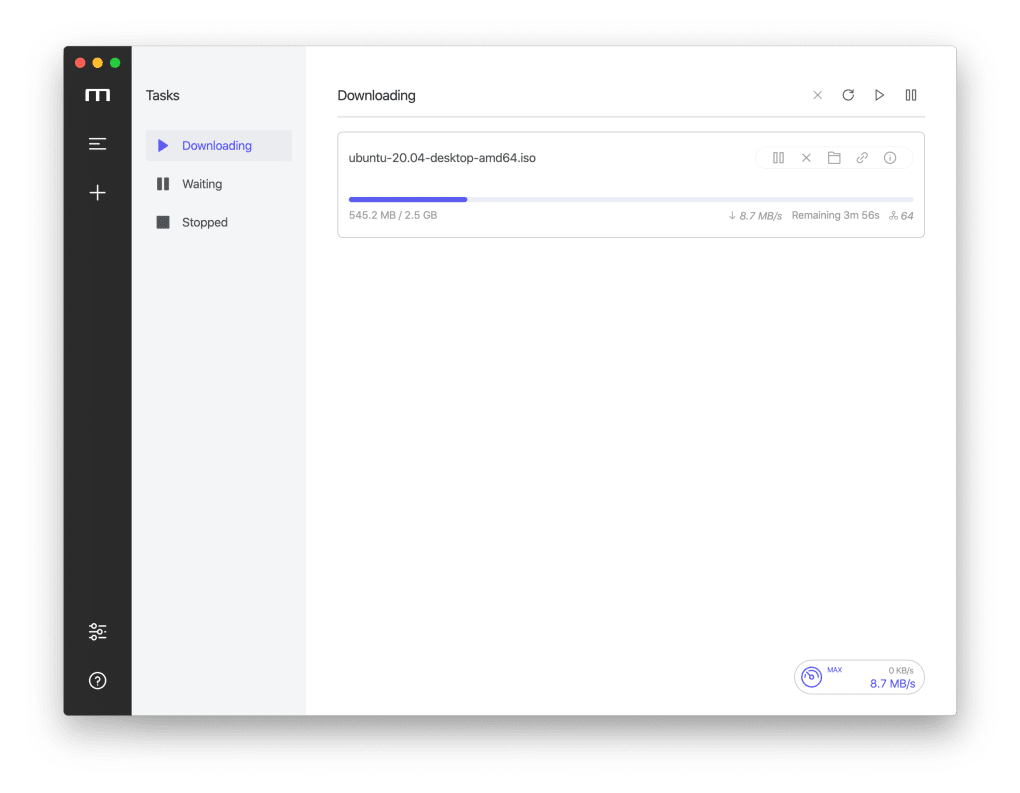
Simultaneous downloads are another key feature. Motrix allows users to manage up to 10 concurrent downloads, significantly speeding up the process of acquiring multiple files. This capability is particularly beneficial for users downloading large files or multiple files simultaneously. This multi-tasking ability sets it apart from simpler download managers that handle only one download at a time. The ability to set speed limits and schedules further enhances this control, enabling users to optimize their download processes according to their network bandwidth and availability. This functionality is critical for users who wish to avoid overwhelming their internet connection during peak usage times or during times when they have other bandwidth-intensive tasks running.
Strengths and Weaknesses: A Balanced Assessment
Motrix presents a compelling blend of advantages and drawbacks. Its major strengths lie in its ease of use, cross-platform compatibility, and its support for various download protocols. The intuitive interface and streamlined workflow make it a joy to use, even for users who are new to download managers. Its cross-platform compatibility ensures seamless usage across different operating systems, maximizing accessibility. The support for multiple download sources—HTTP, FTP, and BitTorrent—further broadens its appeal.
However, some limitations exist, particularly concerning its torrent download capabilities. While supporting both .torrent and .magnet links, it lacks some essential features typically found in dedicated torrent clients. A significant drawback is its inability to selectively choose specific files within a .magnet link download. This restricts users from downloading only the necessary parts of a torrent, potentially wasting bandwidth and storage space. Furthermore, the absence of detailed information regarding peers and seeds in torrent downloads represents a considerable deficiency. This information is vital for understanding the download speed potential and health of the torrent, something experienced torrent users rely heavily upon to monitor the download progress effectively.
The lack of these features limits its appeal to advanced torrent users who depend on granular control and detailed information for efficient and effective torrent management. While it serves as a functional torrent client for casual users, more experienced individuals may find its capabilities insufficient compared to specialized BitTorrent clients offering more comprehensive features and detailed statistics.
Comparison with Other Download Managers: Finding the Right Tool for Your Needs
Motrix positions itself within a competitive landscape of download managers, including established names like Internet Download Manager (IDM). While both offer similar core functionalities, Motrix distinguishes itself through its open-source nature and cross-platform support. IDM, on the other hand, is proprietary software with a paid license, and while it boasts a more advanced feature set, this often comes at a higher price point.
The choice between Motrix and IDM, or other download managers, hinges on individual needs and preferences. Users seeking a free, open-source solution with good cross-platform compatibility will likely find Motrix suitable. On the other hand, users requiring advanced features such as enhanced torrent management capabilities, detailed download statistics, or specialized scheduling options might find IDM or similar commercial download managers more appropriate. The decision ultimately involves balancing the desired feature set with budget and software licensing considerations.
Conclusion: A Solid Contender in the Download Manager Arena
Motrix offers a compelling solution for users seeking a user-friendly, cross-platform compatible download manager. Its intuitive interface, support for multiple download sources, and ability to handle multiple concurrent downloads make it an attractive choice. While its torrent client functionality could benefit from improvements such as selective file downloading from .magnet links and providing more detailed peer and seed information, it remains a competent option for many users. Its open-source nature and free accessibility are significant advantages.
Whether Motrix is the ideal download manager depends on the user’s specific requirements. For casual users, its simplicity and ease of use are significant strengths. However, power users or those who heavily rely on torrent downloads may find its limitations frustrating, and more comprehensive solutions might be necessary. The open-source nature of Motrix also means it may have less active development and potentially fewer feature updates and bug fixes than a commercially backed product such as IDM. Ultimately, the best download manager is the one that best meets an individual’s needs and preferences.
File Information
- License: “Free”
- Latest update: “May 23, 2023”
- Platform: “Windows”
- OS: “Windows 7”
- Language: “English”
- Downloads: “12.1K”
- Size: “107.83 MB”


