Finding missing album art for your MP3 collection can be a tedious task, especially with large libraries. MP3 Cover Downloader aims to simplify this process by automatically searching for and applying album covers to your music files. This review will delve into the software’s functionality, ease of use, advantages, drawbacks, and ultimately, whether it’s a worthwhile addition to your digital music management toolkit.
Functionality and User Interface
MP3 Cover Downloader presents a straightforward interface designed for ease of use. The core function is remarkably simple: users select the folder containing their MP3 files, and the program initiates a search for matching album art. The software uses various online databases and resources to locate potential covers, often presenting multiple options for each song. This allows users to choose the artwork that best suits their preferences. The selection process is intuitive, involving a simple click to select the desired image followed by an “Apply” button to integrate the cover into the MP3 file’s metadata.
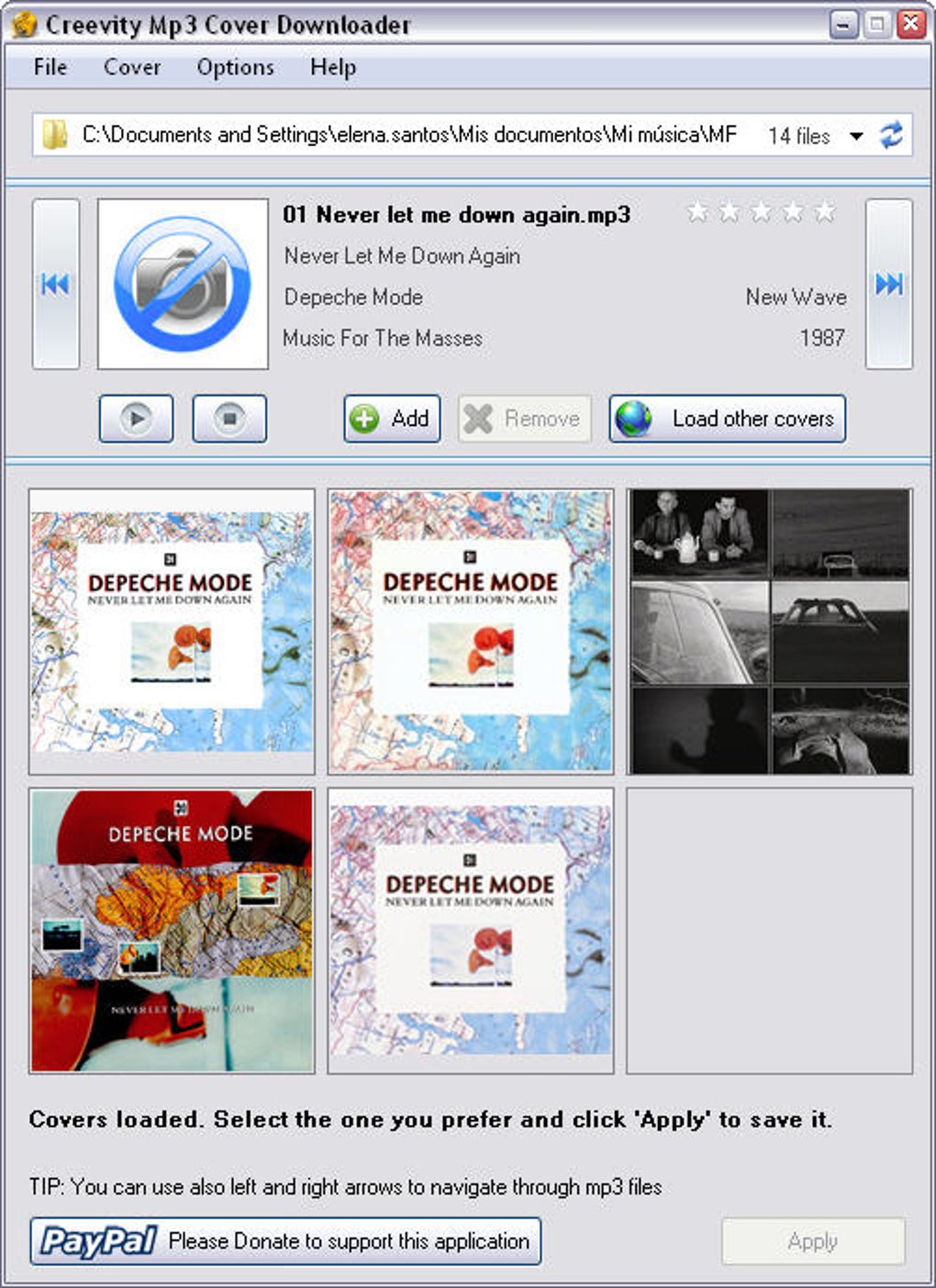
Beyond the core function, MP3 Cover Downloader offers additional features. Notably, users can import images from their local hard drive, which can be beneficial for cases where the automatic search fails to find a suitable cover or if users have a specific image they wish to use. The inclusion of a star-based rating system, similar to that found in iTunes, provides a handy way to organize and rate songs within the application itself. The “Load Other Covers” button is a valuable addition, allowing users to refine the search parameters and potentially retrieve more accurate or alternative artwork options, enhancing the probability of finding the perfect cover image.
The program’s interface is clean and uncluttered, making navigation intuitive even for users unfamiliar with similar software. The minimal design prioritizes functionality over visual complexity, ensuring a user-friendly experience that avoids overwhelming the user with unnecessary features or options.
Pros and Cons: A Balanced Perspective
While MP3 Cover Downloader boasts several strengths, it also suffers from some limitations. Understanding both the advantages and disadvantages is crucial for making an informed decision about its suitability for individual needs.
Advantages:
- Speed and Efficiency: The search process is generally quick and efficient, especially for smaller to medium-sized music libraries. The software’s ability to quickly locate and display multiple cover options significantly reduces the time spent manually searching for album art.
- Multiple Cover Options: The provision of multiple cover choices allows users to select the image they find most appealing or accurate. This flexibility is a welcome feature that ensures users have control over the visual representation of their music.
- Import Functionality: The ability to import custom images from a user’s hard drive adds an extra layer of flexibility. This is invaluable when dealing with less common albums or if a user possesses a preferred cover image not readily available online.
- User-Friendly Interface: The simple and intuitive interface requires minimal technical expertise, making it accessible to a broad range of users, regardless of their prior experience with similar software.
- Integrated Rating System: The inclusion of a star-rating system offers a useful organizational tool for managing and categorizing music within the application itself.
Disadvantages:
- Lack of Subfolder Support: A significant drawback is the program’s inability to recursively scan subfolders. This forces users to process each folder individually, rendering the software cumbersome for users with extensive, deeply nested music libraries. This limitation significantly impacts usability and efficiency for users with larger collections.
- Potential for Inaccuracy: While the software generally performs well, there are instances where it may fail to locate the correct album art or provide inaccurate results. This highlights the limitations of relying solely on automated searches and underscores the need for user verification and manual selection.
- Limited Advanced Features: MP3 Cover Downloader lacks advanced features found in more sophisticated music management software. Features such as batch processing, automatic tagging, or integration with other music players are absent, limiting its capabilities compared to more comprehensive solutions.
- Resource Consumption: Although generally lightweight, the program may consume more system resources than expected, especially when processing large numbers of files concurrently. This can lead to performance slowdowns or interruptions depending on the system’s specifications and other running applications.
Comparison with Alternative Software
The market offers several alternative applications aimed at similar tasks. Some directly compete with MP3 Cover Downloader’s functionality, while others provide more comprehensive music management features. Comparing MP3 Cover Downloader to these alternatives helps determine its relative strengths and weaknesses.
While direct competitors may offer similar core functionalities, many lack the user-friendly interface that MP3 Cover Downloader provides. However, more advanced solutions offer significantly richer features such as batch processing, automated metadata tagging, and broader support for various audio formats, extending beyond the core function of merely downloading album covers. The choice often boils down to balancing the desired level of functionality against ease of use. For users solely requiring a simple and quick method to locate missing album art, MP3 Cover Downloader could suffice. Conversely, users needing a more comprehensive music management solution would benefit from investing in a more feature-rich application.
Conclusion: Who is MP3 Cover Downloader For?
MP3 Cover Downloader proves effective for users with smaller to medium-sized music collections who require a straightforward solution for finding and applying missing album art. Its intuitive interface and quick search capabilities are its main selling points. However, the lack of subfolder support and limited advanced features make it unsuitable for users with extensive and deeply nested music libraries or those seeking advanced music management capabilities beyond basic album art retrieval. While its simplicity is appealing, potential users should carefully consider their specific needs and the size of their music collections before deciding if MP3 Cover Downloader aligns with their requirements. For users with larger collections or those seeking a more holistic music management experience, investing in a more advanced application with batch processing and broader functionalities would prove a more efficient and effective long-term solution.
File Information
- License: “Free”
- Latest update: “May 23, 2024”
- Platform: “Windows”
- OS: “Windows Vista”
- Language: “English”
- Downloads: “39.2K”
- Size: “1.33 MB”