
In the vast and ever-expanding digital soundscape, access to music is paramount for many. Whether for creative projects, offline listening during commutes, or simply curating a personal collection of cherished tunes, the ability to search for and download MP3s directly from online sources remains a highly sought-after functionality. The MP3 Search and Downloader application for Windows stands as a dedicated tool designed to fulfill this very need, offering users a straightforward and efficient method to acquire audio content from one of the internet’s most comprehensive multimedia platforms: YouTube.
Developed by DCT Global, this software solution emerged as a significant utility, particularly catering to users who prioritize simplicity and directness in their music acquisition process. While streaming services have largely revolutionized how we consume music, the demand for ownership and offline accessibility persists, and tools like MP3 Search and Downloader address this niche effectively. Its appeal lies in its promise of converting the visual richness of YouTube videos into a readily playable audio format, making it an invaluable asset for anyone looking to build or augment their digital music library. With its focus on user-friendliness and performance, it aims to streamline the often cumbersome process of extracting audio from video content, allowing users to enjoy their favorite tracks anywhere, anytime.
Unlocking a World of Sound: Core Features and Functionality
The MP3 Search and Downloader is built upon a foundation of key features designed to make the process of finding and downloading music as seamless as possible. Its integration with YouTube is at the heart of its utility, transforming the video-sharing giant into a personal audio repository.
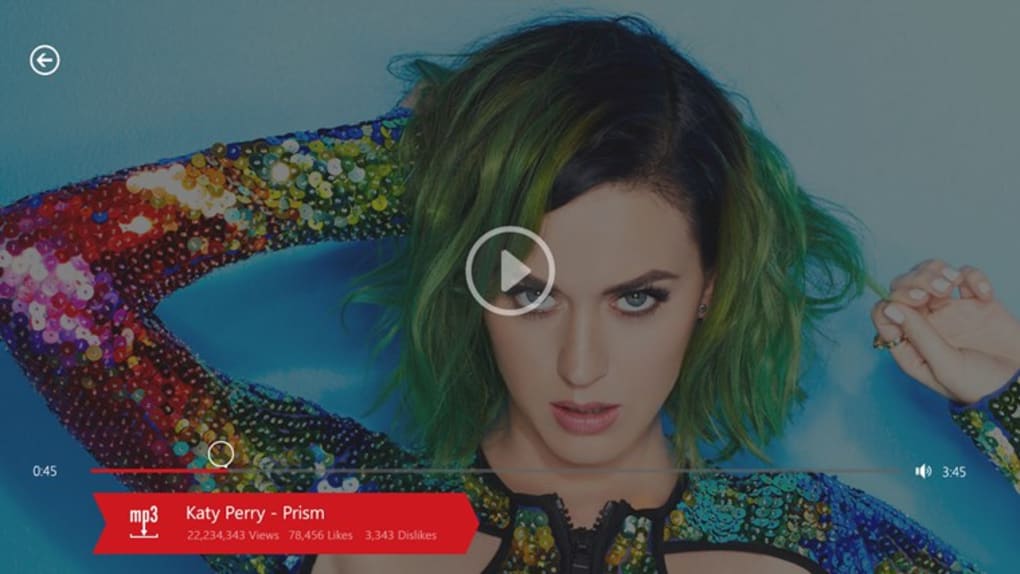
Seamless YouTube Integration for Audio Extraction
At its core, the application’s primary function is to facilitate the download of audio tracks from YouTube videos. YouTube is an undisputed powerhouse of content, housing an incredible array of music videos, live performances, official soundtracks, fan-made covers, and much more. For many, it serves as the de facto platform for music discovery. However, YouTube’s native functionality is geared towards video streaming, not audio downloading. This is where MP3 Search and Downloader steps in, bridging the gap by allowing users to effortlessly convert the audio stream of any YouTube video into a downloadable MP3 file. This feature is particularly beneficial for those who wish to listen to specific songs, instrumentals, or spoken-word content without requiring an active internet connection or needing to keep a video player open. The ease with which one can “easily download any track from YouTube videos” is a cornerstone of its appeal, simplifying what could otherwise be a multi-step, technically challenging process for the average user.
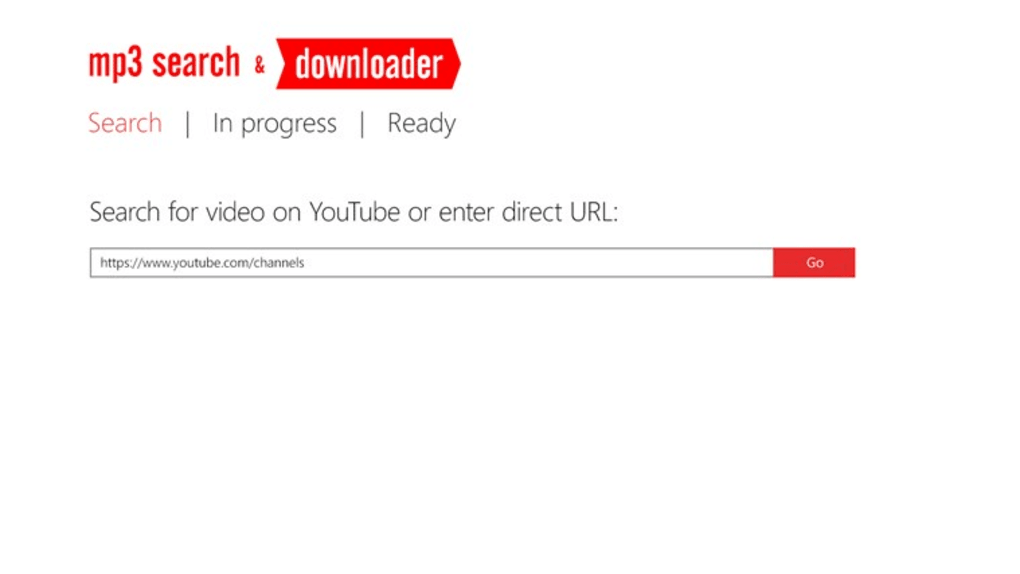
Intuitive Search and Pre-Download Preview Capabilities
Beyond simple downloading, the application integrates a robust search function that allows users to “easily search for videos on YouTube” directly within its interface. This eliminates the need to open a separate web browser, navigate to YouTube, find the desired video, and then copy its URL into the downloader. By consolidating the search and download functions, MP3 Search and Downloader offers a more streamlined workflow. Users can type in a song title, artist name, album, or any relevant keywords, and the application will present search results just as YouTube would.
A critical aspect of a successful download experience is ensuring that the correct content is being acquired. To this end, the application includes the “ability to watch the video before downloading audio track.” This preview functionality is invaluable. It allows users to confirm that the search result corresponds to the specific version of the song or audio content they are looking for. For instance, if there are multiple live versions, remixes, or covers of a song, the preview ensures that the user downloads the intended one, preventing unnecessary downloads and saving time and bandwidth. This thoughtful inclusion significantly enhances user satisfaction by adding a layer of verification before committing to an audio download.

Optimized Performance and User-Centric Design
User experience extends beyond functionality to include the look and feel of the application. The developers have emphasized a “stylish design,” suggesting a visually appealing and modern interface that makes navigation intuitive and enjoyable. In an age where software design plays a crucial role in adoption, a clean, uncluttered, and aesthetically pleasing interface can significantly improve how users interact with the application. A stylish design typically implies logical layouts, easy-to-understand icons, and responsive controls, minimizing the learning curve for new users.
Coupled with design is performance, and MP3 Search and Downloader boasts “good performance.” This indicates that the application operates efficiently, processing search queries quickly, initiating downloads without significant lag, and handling the conversion process smoothly. Good performance implies a minimal drain on system resources, fast download speeds (limited by internet connection, of course), and a stable experience free from crashes or freezes. For an application that deals with potentially large media files and real-time interaction with an online service like YouTube, robust performance is essential for user satisfaction. The combination of a stylish interface and reliable performance ensures that the journey from searching for a track to enjoying it offline is both pleasant and efficient.
Why Choose an MP3 Search and Downloader?
In an era dominated by ubiquitous streaming services, the question often arises: why opt for an MP3 search and downloader? The answer lies in a combination of factors related to ownership, accessibility, and personalization that streaming platforms, despite their convenience, sometimes cannot fully address.
Building Your Personal Music Library: Ownership and Curation
For many music enthusiasts, there’s an intrinsic value in owning their music. Streaming services offer access, but not true ownership; your library exists as long as your subscription is active and the content remains available on the platform. An MP3 Search and Downloader, by contrast, empowers users to “download to your device most popular music, soundtracks of the highest grossing movies and just your favorite music,” granting them permanent ownership of these files. This means the music resides directly on their hard drive, immune to changes in streaming catalogs, subscription cancellations, or internet outages.
This ownership translates into unparalleled freedom in curating a personal music library. Users can organize their tracks exactly as they prefer, create custom playlists that are not confined to a single app, and even integrate these files into various media players or devices without compatibility issues often encountered with proprietary streaming formats. For DJs, content creators, or those with specific audio editing needs, having raw MP3 files is indispensable. It provides the foundation for remixes, background music for videos, or simply a meticulously organized collection that reflects individual taste and nostalgia. The emphasis on “very easily” achieving this goal highlights the application’s appeal to users who value direct control over their digital assets.
Accessibility and Offline Listening: Music Beyond the Cloud
Perhaps one of the most compelling reasons for using an MP3 downloader is the ability to enjoy music without an internet connection. In many scenarios – during air travel, in areas with poor cellular reception, or simply to conserve mobile data – offline listening is not just a convenience, but a necessity. Streaming services offer limited offline download options, often tied to premium subscriptions and specific devices, and the downloaded files are typically encrypted and only playable within their respective apps.
MP3 Search and Downloader breaks these shackles. Once a track is downloaded, it’s a standard MP3 file that can be transferred to any compatible device – a smartphone, a portable MP3 player, a car stereo, or an external hard drive. This ensures that your “favorite music” is always available, regardless of network availability or geographical restrictions. This level of accessibility is crucial for commuters, travelers, and anyone who wants uninterrupted access to their soundtrack of choice, turning the internet into a truly “personal music library” that transcends the need for constant connectivity. It also opens up possibilities for sharing music with friends (within legal boundaries) or using it in contexts where streaming is impractical or impossible.
Navigating the Digital Landscape: Safety and Legality
While the allure of easy music downloads is strong, it’s crucial to address the significant considerations of safety and legality that accompany such tools. Understanding these aspects is not just about compliance but also about ensuring a secure and ethical digital experience.
Understanding Copyright and Fair Use in Digital Downloads
The most critical legal consideration when using any MP3 downloader is copyright. The vast majority of music available on YouTube is copyrighted material. Downloading copyrighted music without permission from the rights holder typically constitutes copyright infringement. This is a complex area, as “laws concerning the use of this software vary from country to country.” Some content on YouTube might be licensed under Creative Commons or be in the public domain, making it legally permissible to download. However, a significant portion is not.
PhanMemFree, like many reputable software platforms, explicitly states, “We do not encourage or condone the use of this program if it is in violation of these laws.” This disclaimer underscores the user’s responsibility to understand and adhere to local and international copyright laws. For personal, non-commercial use, the legal landscape can be grey, with some jurisdictions having “fair use” or “private copy” exceptions. However, sharing downloaded copyrighted material or using it commercially without a license is almost always illegal. Users of MP3 Search and Downloader should therefore exercise caution and due diligence, ensuring they only download content for which they have the right or permission, or content that falls under legal exceptions in their region. The convenience of the tool should not overshadow the ethical and legal obligations of digital citizenship.
Ensuring Software Security and Reliability
Beyond legal concerns, the security of the software itself is paramount. Users are entrusting their systems to applications that interact with the internet and download files. PhanMemFree emphasizes “Security Status” and conducts rigorous checks: “In PhanMemFree we scan all the files hosted on our platform to assess and avoid any potential harm for your device.” They perform checks “each time a new file is uploaded and periodically reviews files to confirm or update their status.” This process allows PhanMemFree to classify software as “Clean” (extremely likely clean, no threats detected by 50+ antivirus services) or “Warning” (potentially malicious or unwanted bundled software, but often false positives).
For MP3 Search and Downloader, its listing on PhanMemFree indicates it has undergone such scrutiny. While the application’s last update was February 18, 2015 (V1.0.0.6), indicating a lack of recent developer support, the initial “Security Status” provided by PhanMemFree at the time of its review would have been a guide for users. However, older software, even if initially clean, can become vulnerable over time as new security threats emerge. Users should always download software from trusted sources like PhanMemFree.org and run their own up-to-date antivirus scans before and after installation. The “good performance” of the application also indirectly contributes to security, as stable, well-coded software is less likely to introduce vulnerabilities or lead to system instability compared to poorly optimized alternatives.
Installation, Compatibility, and Alternatives
Understanding how to acquire, install, and what other options exist is crucial for any potential user considering MP3 Search and Downloader.
System Requirements and Version Details
MP3 Search and Downloader is designed for the Windows operating system. Specifically, while the PhanMemFree listing mentions “Windows 10” in the context of related search topics, its release date of February 18, 2015, with version “V1.0.0.6”, suggests compatibility with earlier Windows versions as well, likely Windows 7, 8, and possibly even XP/Vista, common during that period. For modern users, it would certainly function on Windows 10 and likely Windows 11, though optimal performance and full feature integration might be less guaranteed given its age.
The application is listed as a “Paid” software (Full Version), indicating that while a trial might be available, the full functionality requires purchase. Its developer is DCT Global. With “14K Downloads” overall and “73 Last month’s downloads” at the time of the review, it shows a consistent if modest user base. The language support is primarily English, but PhanMemFree also lists availability in many other languages, demonstrating a wider reach. This information is vital for users to determine if the software will run on their system and if its payment model aligns with their expectations.
Exploring Similar Applications and Evolving Landscape
The market for MP3 search and downloaders is dynamic, with many alternatives catering to various user preferences. PhanMemFree’s listing provides a helpful “Alternative apps” section, which can guide users if MP3 Search and Downloader doesn’t fully meet their needs or if they seek more recent or free options.
Some notable alternatives mentioned include:
- AnyMusic MP3 Downloader: Often highlighted for its ability to listen to music anywhere, anytime, usually with broader source support.
- Free Music & Video Downloader: A straightforward tool that aims to turn the internet into a personal music library, often implying support for various platforms beyond YouTube.
- Mp3 Cover Downloader: While distinct in its focus (finding missing album covers), it complements other downloaders by helping to complete metadata for downloaded tracks.
- YTD Music Downloader Pro: A popular choice for saving YouTube videos and songs, often known for its comprehensive features and ease of use.
- Music Download Free: A media center with in-app search and a built-in media player, offering an all-in-one solution.
- GoTube - Video Downloader for YouTube 4K. MP4 & MP3 Music: Indicates support for higher quality downloads and both video and audio formats.
- MP3Skull Free Mp3 Music Downloader: Leverages a well-known name in the MP3 search space, often focusing on ease of searching and downloading.
These alternatives showcase the diverse landscape of tools available. While MP3 Search and Downloader focuses primarily on YouTube audio extraction, other applications might offer wider source compatibility, integrated players, advanced batch downloading, or support for higher fidelity formats. The choice often comes down to specific needs, desired features, and, crucially, whether the user prefers a paid, full-featured application or a free, potentially more basic one. The age of MP3 Search and Downloader (last updated 2015) might also steer users towards more contemporary alternatives that offer updated compatibility and security features, although for those with older Windows systems, it might still be a viable and stable option.
The Future of Digital Music Discovery
The digital music landscape is continuously evolving. From the early days of peer-to-peer sharing to the current dominance of subscription-based streaming, and now the rise of AI-powered music generation, the methods by which we discover and consume music are constantly in flux. Despite these changes, the fundamental desire for personal control over one’s audio library remains a constant for a significant segment of users.
Tools like MP3 Search and Downloader represent a pivotal moment in this evolution, providing a bridge between the vast, user-generated content of platforms like YouTube and the individual’s desire for a curated, offline-accessible collection. While its last update dates back to 2015, its underlying principles—easy search, previewing, and direct download from a major source—are timeless and continue to inform the development of newer applications. The demand for “Youtube Audio Downloader,” “Mp3 Music Downloader,” and “Audio Downloader For Windows” remains high, as evidenced by related search topics on platforms like PhanMemFree.
Looking ahead, we can anticipate further advancements in this niche. AI could enhance search capabilities, offering more personalized recommendations for audio tracks. Integration with cloud services could streamline the synchronization of downloaded libraries across multiple devices. Furthermore, as content creators increasingly use platforms like YouTube, the need for tools that allow users to ethically and legally acquire audio for personal use, such as for remixing or educational purposes (where fair use applies), will persist. The challenges of copyright and licensing will undoubtedly evolve with technology, but the core utility of an MP3 search and downloader in empowering users to shape their personal auditory world is likely to endure, albeit in increasingly sophisticated and legally compliant forms.
Conclusion
The MP3 Search and Downloader for Windows, developed by DCT Global, offers a clear and concise solution for users seeking to download audio tracks from YouTube videos. Its strength lies in its simplicity and directness, providing integrated search, video preview, and efficient downloading capabilities, all wrapped in a user-friendly interface. Priced as a full version, it targets users who value ownership and offline access to their music, transforming YouTube into a personalized audio library.
While the application’s last update was in early 2015, its core functionalities remain relevant for those operating on compatible Windows systems. The ability to easily acquire popular music, movie soundtracks, and personal favorites for offline enjoyment speaks to a persistent user need not fully met by streaming-only paradigms. However, potential users must remain acutely aware of the legal landscape surrounding copyright and fair use, ensuring responsible and ethical digital practices. Platforms like PhanMemFree provide valuable security vetting and lists of alternatives, guiding users toward safe and suitable software choices.
Ultimately, MP3 Search and Downloader stands as a testament to the enduring appeal of digital music ownership and the desire for tools that empower users to curate their personal soundscapes. In a continually shifting digital environment, it remains a robust option for those who prioritize control and accessibility in their pursuit of the perfect playlist.
File Information
- License: “Full”
- Version: “1.0.0.6”
- Latest update: “February 18, 2015”
- Platform: “Windows”
- OS: “Windows 10”
- Language: “English”
- Downloads: “14.1K”


