
Music Tag is a software application designed to simplify the process of organizing and enriching your digital music collection. It offers a user-friendly interface for managing metadata – the information associated with your music files, such as artist, album, track title, and album art – allowing you to efficiently update, edit, and even add missing information. This detailed guide explores the features, functionalities, and benefits of Music Tag, comparing it to other similar applications, and addressing potential concerns.
Understanding Music Metadata and its Importance
Before delving into the specifics of Music Tag, let’s establish the significance of music metadata. Music metadata is essentially the descriptive information attached to your audio files. This goes beyond just filenames; it includes crucial details like:
- Artist: The name of the artist or band.
- Album: The title of the album the track belongs to.
- Title: The name of the individual track.
- Year: The year the album or track was released.
- Genre: The musical genre the track falls under (e.g., rock, pop, jazz).
- Track Number: The position of the track within the album.
- Album Art: The cover art of the album.
Accurate and complete metadata is essential for several reasons:
-
Organization: Properly tagged music files make browsing and finding specific songs or albums much easier. Imagine trying to find a particular song in a collection of hundreds or thousands of untagged files – it’s a daunting task. Metadata allows you to sort and filter your library based on artist, album, genre, and other parameters.
-
Enhanced Playback Experience: Many music players and streaming services utilize metadata to display information about the currently playing track. This includes displaying album art, artist information, and song titles, enhancing the overall listening experience.
-
Compatibility: Accurate metadata ensures compatibility with a wider range of devices and software. Some devices and applications may not correctly display or play music files lacking essential metadata.
-
Backup and Restoration: If you ever need to back up or restore your music library, accurate metadata helps you to maintain the integrity and organization of your collection.
Music Tag’s Core Functionality: Retrieving, Editing, and Managing Metadata
Music Tag excels in automating the often tedious process of managing music metadata. Its core features include:
-
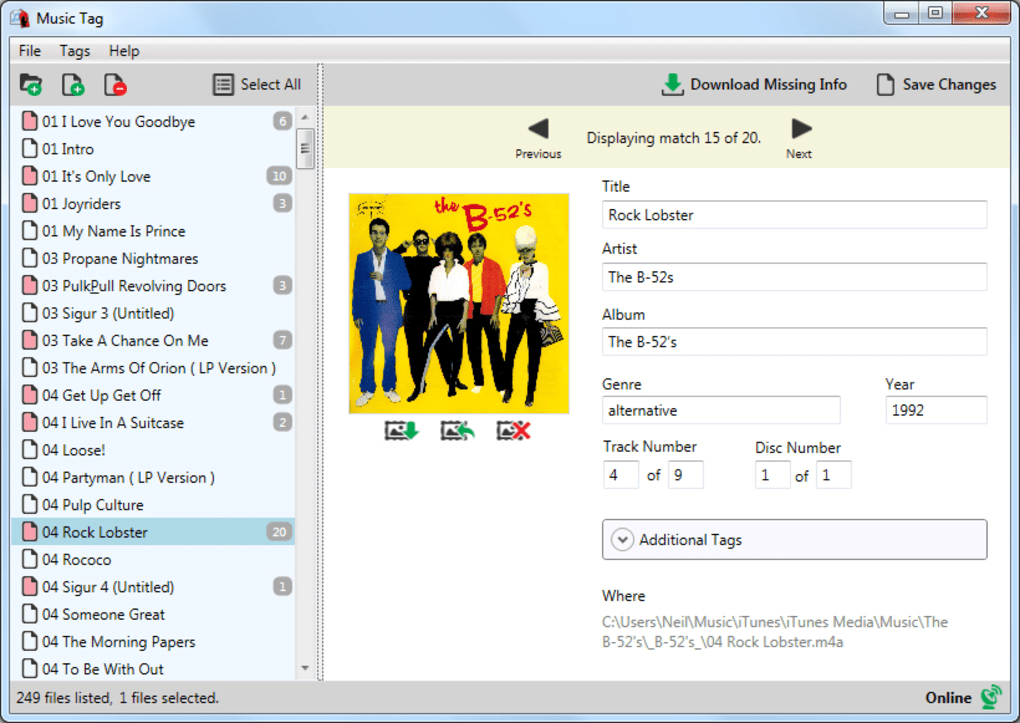
Automated Tagging: Utilizing advanced digital fingerprinting technology, Music Tag can identify your music files even if they lack any initial tags. This technology analyzes the unique audio signature of each track to match it against a vast database of over 35 million songs, identifying the correct metadata in the process. This function significantly saves time and effort, particularly for large music libraries.
-
Manual Tag Editing: Music Tag provides an intuitive interface for manually editing and correcting existing metadata. This is useful for situations where the automatic tagging might be inaccurate or incomplete. Users can directly input or adjust information such as artist name, album title, track title, and other details.
-
Album Art Download: Alongside retrieving track information, Music Tag automatically downloads and embeds the corresponding album art. This ensures a visually appealing and complete representation of your music collection.
-
Batch Processing: Handling large collections is straightforward thanks to Music Tag’s ability to process multiple files simultaneously. This bulk tagging capability significantly reduces the time required for managing extensive libraries.
-
Cross-Platform Compatibility: The metadata added or corrected by Music Tag is compatible with a wide range of devices and applications, including PCs, Macs, iTunes, iOS devices, and Android devices. This ensures that the enhanced organization and information remain consistent across your various platforms.
Comparing Music Tag to Alternative Solutions
Music Tag isn’t the only application available for music metadata management. Several alternative solutions exist, each with its own strengths and weaknesses. A comparative analysis can help users make informed decisions based on their specific needs:
-
Mp3tag: A widely used and free, open-source option, Mp3tag offers extensive features for editing music tags, but it lacks Music Tag’s automatic identification capabilities. It relies heavily on manual input, making it less efficient for large libraries.
-
MetatOGGer: This free application is another popular choice, providing good functionality for tagging music files. However, like Mp3tag, it primarily focuses on manual editing and lacks the automatic identification feature crucial for efficiently processing large collections.
-
TagScanner: TagScanner presents a strong contender in the field of music tag editors, offering a robust set of tools for managing metadata. Nevertheless, it is mainly a manual tagging tool, and doesn’t provide the automatic identification that Music Tag boasts.
-
ID3 Tag Editor: Another free and open-source option, ID3 Tag Editor focuses on editing ID3 tags specifically, but like others mentioned above, it heavily relies on manual input and lacks the automatic metadata retrieval capabilities of Music Tag.
The key differentiator for Music Tag is its powerful automatic identification system based on digital fingerprinting. While alternative solutions are effective for manual tagging and offer various features, none match Music Tag’s ability to rapidly and accurately identify and fix missing metadata in large music libraries.
User Experience and Interface
Music Tag’s user interface is designed for ease of use and intuitive navigation. Even users unfamiliar with music metadata management should find the application straightforward to use. The clean and uncluttered layout minimizes distractions, making the tagging process efficient and stress-free. Its features are logically organized, simplifying access to essential functionalities. The application’s simplicity is a major advantage, particularly for users seeking a quick and efficient solution without the need to navigate a complex interface.
Potential Limitations and Considerations
While Music Tag offers numerous advantages, certain limitations should be considered:
-
Database Reliance: The automatic tagging relies heavily on the accuracy and completeness of its internal song database. While the database encompasses over 35 million songs, some obscure or lesser-known tracks may not be identified correctly, requiring manual intervention.
-
Internet Connection: The automatic tagging and album art download features require an active internet connection. Without an internet connection, the automated capabilities of Music Tag are unavailable.
-
Trial Version: Music Tag is offered as a trial version. The limitations of this trial version should be carefully reviewed before committing to purchase a full license.
Despite these limitations, Music Tag’s advantages in automation and speed significantly outweigh these minor drawbacks for most users.
Conclusion
Music Tag presents a robust and user-friendly solution for managing music metadata. Its innovative use of digital fingerprinting technology offers a significant advantage over other similar applications, simplifying the process of organizing and enriching large music libraries. While alternative solutions offer manual tagging capabilities, none offer the same level of automated efficiency. The user-friendly interface, combined with the power of automated tagging, makes Music Tag a valuable tool for music enthusiasts and anyone seeking to streamline their music collection management. Considering the speed and accuracy of its automatic tagging, Music Tag provides a powerful and efficient solution for those seeking a streamlined approach to music organization.
File Information
- License: “Trial version”
- Version: “1.18”
- Latest update: “June 16, 2014”
- Platform: “Windows”
- OS: “Windows 8”
- Language: “English”
- Downloads: “9.1K”
- Size: “5.41 MB”


