
In an era dominated by digital media, the way we consume music has fundamentally shifted. Gone are the days of vast CD collections and physical liner notes, replaced by sprawling digital libraries stored on hard drives, cloud services, and mobile devices. While this transition offers unparalleled convenience and access, it also introduces a new challenge: managing and organizing thousands of audio files. This is where a music tag editor becomes an indispensable tool, transforming a chaotic collection into a meticulously organized, easily navigable, and truly personal music experience.
At its core, a music tag editor is software designed to modify the metadata embedded within audio files. This metadata, often referred to as “tags,” contains crucial information about a song, such as the artist, album, title, year of release, genre, track number, and even album art and lyrics. Without accurate tags, your digital music library is little more than a jumble of files named “Track 01.mp3” or cryptic alphanumeric strings. A robust music tag editor like the one developed by Assistanttools, initially a simple, trial version software for Windows, empowers users to regain control, making their digital music experience seamless and enjoyable.
Multimedia: The Heart of Digital Audio Organization
The digital realm thrives on organization, and nowhere is this more apparent than within the vast category of multimedia. Music, being a primary form of multimedia, relies heavily on structured data for efficient playback, search, and categorization. A music tag editor sits at the very heart of this organizational process, bridging the gap between raw audio files and a rich, informative listening experience.
When we talk about “Audio” and “Music & Radio” within the broader “Multimedia” landscape, we’re not just discussing the sound itself, but the entire ecosystem that surrounds it. This includes how music is stored, retrieved, played, and appreciated. Imagine trying to find a specific song by your favorite artist amidst thousands of files, all generically named. It would be a nightmare. This is precisely why metadata—the information stored in tags—is paramount. It allows media players (whether on your desktop, smartphone, or smart speaker) to display album art, create intelligent playlists, sort by genre, and enable quick searches.
Historically, music tag editors gained prominence with the rise of the MP3 format. Early MP3 files often lacked proper metadata, leading to the chaotic digital libraries many users experienced. Tools emerged to address this, allowing users to manually input or correct information. As technology evolved, so did the capabilities of these editors. Modern tag editors can automatically fetch album information from online databases, embed high-resolution album art, and even convert filenames to tags and vice versa, providing a holistic solution for digital audio management.
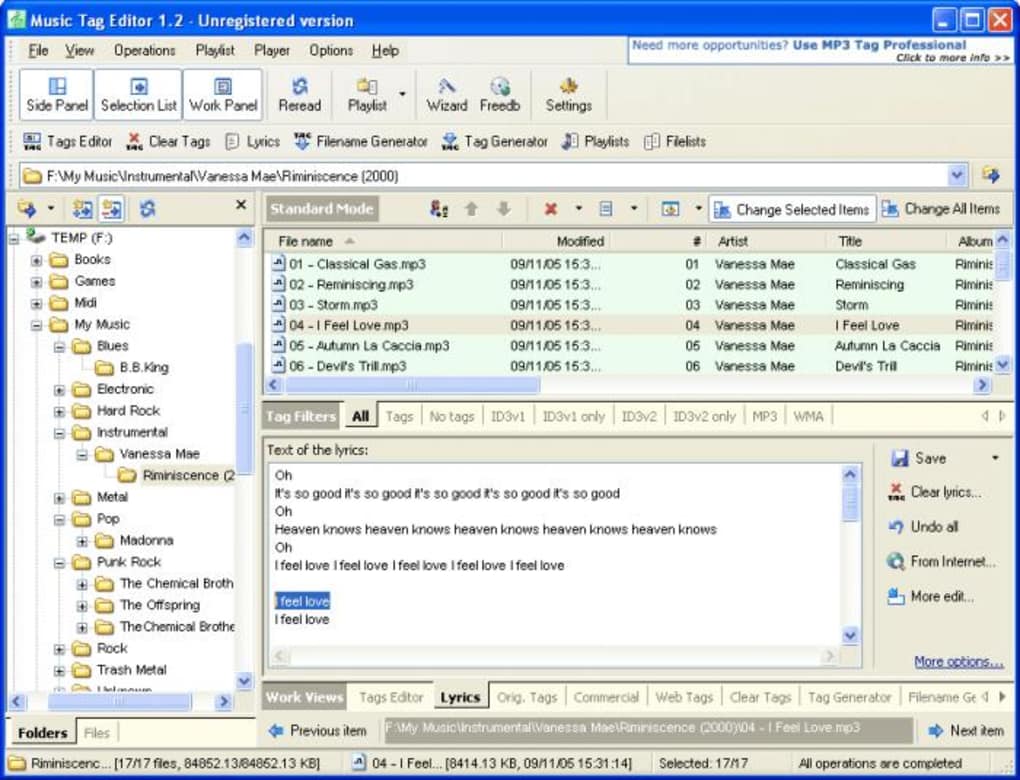
The specific “Music Tag Editor” by Assistanttools, a trial version software available for Windows, embodies this foundational need. Although its last update was in 2007 (version 1.61), it served as a practical utility for users of Windows 98 and later versions to manage their WMA and MP3 files. Its simplicity made it accessible, proving that even a straightforward application could significantly enhance the user’s interaction with their digital music collection. For users on older Windows systems or those seeking a minimalist tool, it offered a direct way to edit ID3 tags, which are the standard metadata containers for MP3 files. Its popularity, particularly in regions like India, underscored the universal demand for efficient music organization tools. The fact that it took up less storage than many other audio software applications also contributed to its appeal for users with limited system resources at the time.
Beyond personal libraries, the principles of tagging extend to radio recordings and other audio content. If you record an internet radio stream or a podcast, a tag editor allows you to add vital information like the date, broadcast title, or relevant speakers, turning an unidentifiable audio clip into a well-documented resource. In essence, a music tag editor is not just a utility; it’s a foundational component for anyone serious about managing their digital audio assets within the vast and ever-growing world of multimedia.
Enhancing Your Digital Library: Beyond Basic Tagging
While the fundamental task of a music tag editor is to modify basic metadata, modern tools offer a suite of advanced features that go “beyond basic tagging,” profoundly enhancing the utility and navigability of your digital music library. These functionalities transform a simple collection into a powerful, searchable, and aesthetically pleasing archive.
One of the most critical evolutions in music tagging has been the sophistication of ID3 tags. Initially, ID3v1 offered limited fields (title, artist, album, year, genre, comment). ID3v2, however, introduced a much more expansive and flexible structure, allowing for fields like album art, lyrics, composer, disc number, BPM (beats per minute), publisher, and even custom frames. A good music tag editor supports these advanced fields, enabling a level of detail that caters to casual listeners and audiophiles alike. For WMA files, similar metadata structures are utilized, and a versatile editor will handle both seamlessly. The “Music Tag Editor” by Assistanttools, for instance, specifically noted its compatibility with both WMA and MP3 tags, showcasing its utility for common audio formats of its time.
Advanced features often include:
- Batch Editing: Imagine needing to change the genre for an entire album or a series of compilation tracks. Manually editing each file would be tedious. Batch editing allows users to select multiple files and apply changes to a shared field simultaneously, saving immense time and ensuring consistency.
- Filename-to-Tag and Tag-to-Filename Conversion: This is a powerhouse feature. If you have files named like “Artist - Album - Track Name.mp3” but no embedded tags, the editor can parse the filename and automatically populate the respective tag fields. Conversely, if your tags are perfect but your filenames are generic (“01.mp3”), the editor can rename the files based on the embedded tags (e.g., “Artist - Album - 01 - Song Title.mp3”), making your files instantly identifiable even outside of a media player.
- Album Art Embedding: Visually, album art is crucial. Editors allow users to embed album cover images directly into the audio file. This ensures that the artwork appears consistently across all media players and devices, improving the aesthetic appeal of your library. Many editors can also automatically fetch album art from online sources.
- Automatic Tagging from Online Databases: This is perhaps the most significant time-saver. Instead of manual input, advanced editors can connect to databases like MusicBrainz, Discogs, or FreeDB. By analyzing the audio fingerprint or existing partial tags, they can identify the song and album, then automatically populate all missing metadata, including artist, album, tracklist, genre, and year.
- Lyrics Embedding: For those who love to sing along or simply appreciate the words, many editors allow embedding full lyrics into the audio file, which can then be displayed by compatible media players.
- Custom Tag Fields: Some niche users might require custom metadata not covered by standard fields. Advanced editors occasionally offer the flexibility to create and manage custom tags, catering to specific organizational needs.
- Regular Expressions (Regex) for Renaming/Tagging: For power users, the ability to use regular expressions in renaming and tagging operations provides unparalleled flexibility and precision for complex batch operations.
These advanced capabilities position music tag editors not just as simple “utilities” but as sophisticated tools for comprehensive “file management” within the context of digital audio. They ensure data integrity, enhance user experience, and ultimately preserve the rich context of your music. The ability to manage tags efficiently is a cornerstone of maintaining a clean, accessible, and enjoyable digital music collection that goes far beyond merely having the audio files themselves.
Cross-Platform Accessibility: Music Tag Editors on Windows and Beyond
The evolution of computing has been marked by a shift from single-platform dominance to a diverse ecosystem where users interact with their digital content across multiple operating systems and devices. Music tag editors have had to adapt to this changing landscape, offering solutions that cater to Windows, macOS, Linux, Android, and even iOS users.
Historically, Windows has been a prominent platform for digital audio enthusiasts, largely due to its widespread adoption and the availability of numerous third-party software solutions. The “Music Tag Editor” by Assistanttools is a classic example of this. Designed specifically for Windows 98 and former versions, and updated through 2007, it represented a vital utility for Windows users during that era. Its focus on WMA and MP3 tag editing underscored the primary audio formats prevalent on Windows PCs at the time. It was a straightforward, English-only application that served its purpose effectively, especially given its minimal storage footprint (3.07 MB).
However, as the digital world diversified, so did the demand for cross-platform solutions. The rise of smartphones and tablets, particularly those running Android, introduced a new dimension to music management. Users no longer wanted their meticulously tagged music collection confined to their desktop computer. They needed the ability to access, play, and even modify tags on the go. This led to the development of “Music Tag Editor for Android,” a distinct application catering to the mobile operating system. While the core functionality of editing ID3 tags remains, the user interface and specific features are adapted for touch-based interaction and the unique file management structures of mobile devices.
The challenge of cross-platform accessibility extends beyond just having separate apps for different operating systems. It also involves ensuring compatibility and consistency. For example, if you tag your music meticulously on your Windows PC using an advanced editor, you’d expect those tags and embedded album art to display correctly when the files are transferred to your Android phone or a different media player on a macOS device. This interoperability relies on universal tagging standards like ID3, which most reputable tag editors adhere to.
For those considering a broader ecosystem, the list of available versions and languages for “Music Tag Editor” further highlights this global and multi-platform reach. While the primary Windows version was in English, the reference content indicates that there are localized versions for various languages (e.g., Russian, Polish, French, German, Spanish, Japanese, Korean, Indonesian, Turkish, Vietnamese, Chinese, Thai, Italian, Portuguese, Swedish). This localization is crucial for wider adoption, allowing users worldwide to manage their music in their native tongue. Furthermore, mentions like “Music Tag Editor for PC” (distinct from the older “Windows” version, implying a broader PC compatibility or a more modern iteration) and “Music Tag Editor for Android” clearly illustrate the need for versatile solutions that cater to diverse computing environments.
In the contemporary digital landscape, a truly effective music tag editor isn’t just about what it does, but where it can do it. Whether you’re a long-time Windows user relying on a classic tool or a mobile enthusiast managing your library on an Android device, the principle remains the same: efficient, accessible tag editing is essential for a coherent and enjoyable digital music experience across all your platforms.
Why Tagging Matters: Productivity and Personalization
The act of diligently tagging your music collection might seem like a chore to some, but it’s a practice that yields significant returns in terms of both “Productivity” and “Personalization.” A well-tagged music library is not just organized; it’s a dynamic, responsive asset that enhances your daily interactions with music and empowers you to tailor your listening experience precisely to your preferences.
From a Productivity standpoint, accurate and comprehensive music tags are a massive time-saver. Consider these scenarios:
- Efficient Searching: Imagine wanting to listen to all songs by a specific artist or from a particular genre. With proper tags, your media player can instantly filter and display these tracks. Without them, you’d be sifting through countless files, trying to remember filenames or album covers, a process that is frustratingly inefficient.
- Smart Playlist Creation: Many media players allow you to create “smart playlists” that automatically update based on tag criteria (e.g., all rock songs from the 80s, high-rated tracks, or songs by artists you haven’t listened to in a while). This automated curation is impossible without accurate metadata, transforming a manual, time-consuming task into an effortless, background process. This falls under the broader umbrella of “Document Management” for your audio assets.
- Seamless Device Synchronization: When you transfer music to a new phone, car stereo, or portable media player, correct tags ensure that the device correctly categorizes and displays your music. This prevents the common issue of songs appearing under “Unknown Artist” or “Unknown Album,” saving you the headache of re-sorting or re-transferring files.
- Backup and Archival: For serious collectors, a well-tagged library is easier to manage when it comes to backups and archival. Consistent naming conventions derived from tags (e.g.,
Artist/Album/Track - Title.mp3) simplify file system navigation and data integrity checks, acting as a form of “Project Management” for your entire collection.
Beyond sheer efficiency, robust tagging unlocks profound levels of Personalization:
- Tailored Listening Experiences: With detailed genre, mood, or even custom tags (e.g., “workout playlist,” “relaxing evening”), you can create highly specific listening experiences that match your current mood or activity. This directly ties into “Lifestyle” categories like “Health & Fitness” (for workout music) or “Hobbies.”
- Custom Ringtones & Sounds: As mentioned in “Personalization > Ringtones & Sounds,” if you want to extract a specific part of a song to use as a ringtone, having accurate metadata helps you quickly locate the source track. Some advanced tag editors even integrate with audio editing tools or allow for basic trimming, streamlining the process of creating personalized sound clips.
- Enhanced Media Player Experience: Embedded album art, lyrics, and detailed artist information turn your media player into a richer, more informative experience. It brings back some of the visual and contextual richness that was lost with the move from physical media to digital files, making your listening experience more immersive.
- Discovery and Rediscovery: By having your library neatly organized, you’re more likely to rediscover old favorites or explore artists within specific genres you enjoy. It prevents great music from getting lost in a digital black hole.
Even a simpler tool like the “Music Tag Editor” by Assistanttools, despite its age and trial version status, contributed significantly to these aspects by enabling users to correct fundamental tags. It addressed the core need for organization, laying the groundwork for more personalized and productive engagement with digital music.
In essence, a music tag editor is not just about fixing filenames; it’s about investing in the long-term enjoyment and utility of your digital music collection. It transforms a scattered array of files into a meticulously curated, effortlessly navigable, and deeply personal auditory journey, reflecting your unique tastes and making your interaction with music both productive and profoundly satisfying. For anyone with a sizable digital music library, mastering a music tag editor is not an option; it’s a necessity.
Conclusion
The digital age has gifted us with unparalleled access to music, but this abundance brings with it the responsibility of organization. A music tag editor is far more than a niche utility; it is an essential tool for anyone serious about managing their digital audio collection. From ensuring seamless playback across devices to enabling sophisticated playlist creation and enhancing the overall listening experience, accurate metadata is the backbone of a functional and enjoyable digital music library.
From foundational tools like the “Music Tag Editor” by Assistanttools, which provided essential ID3 and WMA tag editing for Windows users, to modern, cross-platform solutions boasting advanced features like automatic tagging and batch processing, the evolution of these applications underscores a persistent and universal need. They empower users to take control of their “Multimedia” assets, transforming chaotic folders into well-structured, searchable, and aesthetically pleasing archives.
The benefits extend beyond mere tidiness. A well-tagged library dramatically boosts “Productivity” by streamlining searches and automated processes, while simultaneously enabling deep “Personalization” of the listening experience, from mood-based playlists to custom ringtones. As digital libraries continue to grow, the role of music tag editors in enhancing both the utility and the intimacy of our relationship with music will only become more critical. For further information and to explore various software options, including alternative tag editors and other multimedia tools, you can visit resources like PhanMemFree.org. Embrace the power of tagging, and transform your digital music collection from a jumble of files into a meticulously curated, infinitely enjoyable auditory universe.
File Information
- License: “Trial version”
- Version: “1.61”
- Latest update: “September 22, 2021”
- Platform: “Windows”
- OS: “Windows 98”
- Language: “English”
- Downloads: “3.8K”
- Size: “3.07 MB”


