
The digital age has fundamentally transformed how we interact with music. Gone are the days when physical media reigned supreme, replaced by a vast, often fluid, landscape of digital files, streaming services, and online repositories. In this ever-evolving ecosystem, tools that simplify access to music continue to hold significant appeal. Among these, music2pc stands out as a dedicated solution for those seeking to download their favorite tracks directly to their personal computers. It represents a straightforward, no-frills approach to music acquisition, designed with the core purpose of helping users find and save MP3 files from the internet with remarkable ease.
At its heart, music2pc is an application built for the music lover who values direct ownership and offline access to their tunes. Unlike the complex interfaces of some peer-to-peer (P2P) clients or the subscription models of streaming platforms, music2pc offers a refreshingly simple proposition: type in an artist or song title, click search, and download the desired audio file. This simplicity has been a cornerstone of its enduring popularity, attracting users who prioritize efficiency and direct control over their music library. Operating primarily on Windows, it has carved out a niche for itself as a reliable utility in the broader spectrum of multimedia software. Its free availability further cements its position as an accessible tool for a global audience, promising a hassle-free gateway to a world of sound.
music2pc: Unveiling the Music Download Dream

For many, the dream of having an almost limitless catalog of music at their fingertips, downloadable and savable, feels like a modern utopia. music2pc endeavors to fulfill this dream, positioning itself as the ultimate companion for any music enthusiast. Its primary function is elegantly simple yet profoundly effective: to locate virtually any song available online in MP3 format and facilitate its transfer to your computer with just a few clicks. This capability bypasses the need for elaborate search queries across multiple websites or the conversion of audio from video platforms, streamlining the entire process into a single, cohesive application.
Simplicity in Search: Finding Your Favorite Tracks
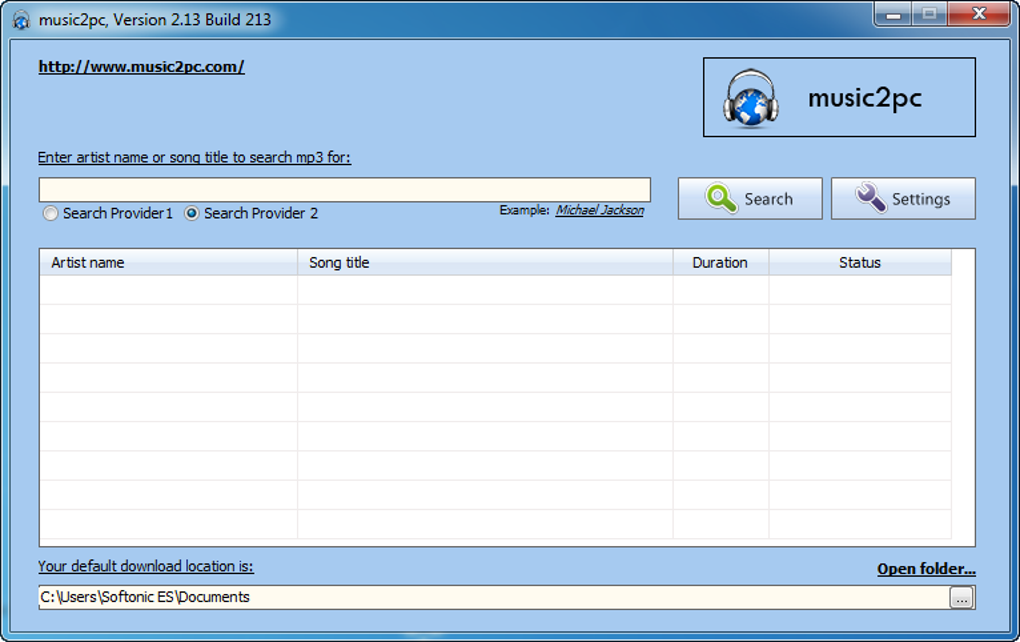
The user interface of music2pc is a testament to functional design. Upon launching the application, users are presented with a minimalist window, primarily featuring a search bar. The process begins here: simply input the name of the artist, the title of the song, or a combination of both, and initiate the search. This intuitive approach eliminates any learning curve, making the software immediately accessible even to novice computer users.
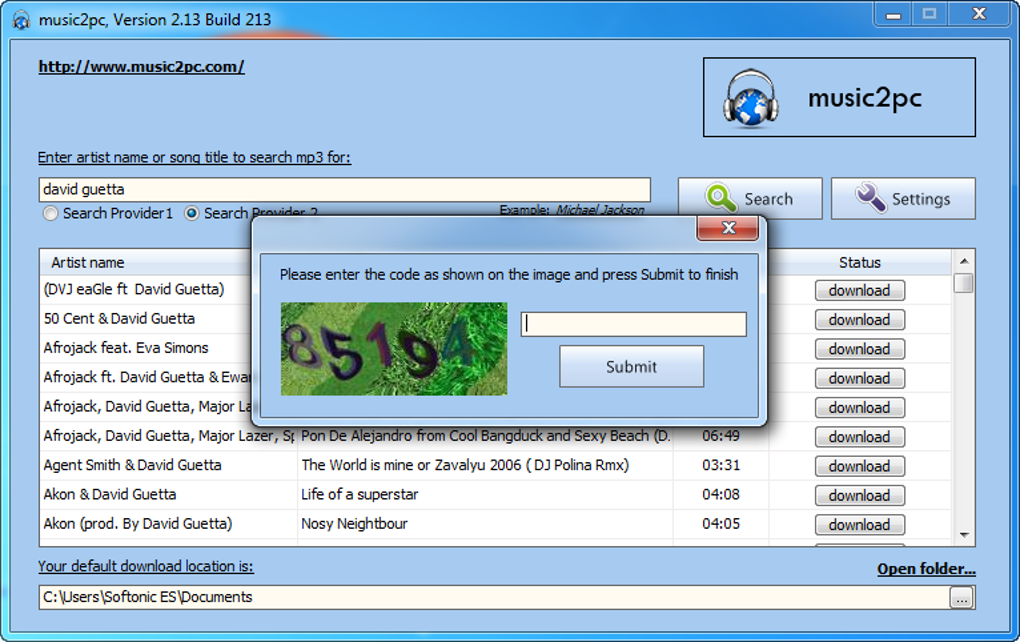
What follows is an almost instantaneous display of results. music2pc prides itself on its speed, quickly populating a list of potential matches. These results are thoughtfully organized, typically by the artist’s name or the song’s title, making it easy for users to navigate through the retrieved data. Beyond just names, the application provides crucial supplementary information for each track, most notably its duration. This detail is invaluable for discerning the correct version of a song, distinguishing between album edits, radio cuts, or live performances, without needing to initiate a download first. The ability to quickly scan through multiple results and ascertain their characteristics ensures that users can make informed choices, minimizing the chances of downloading an incorrect or unwanted file. This efficiency in both search and presentation underscores music2pc’s commitment to a user-friendly experience, making the act of finding music a pleasure rather than a chore.
The Download Mechanism: Fast, Efficient, and Capcha-Protected
Once the desired song or songs have been identified from the search results, music2pc offers the convenience of downloading one or multiple tracks simultaneously. This multi-download capability is a significant time-saver, particularly for users looking to curate playlists or build extensive music libraries quickly. Instead of laboriously downloading each track individually, users can queue up several selections, allowing the application to manage the process efficiently in the background.
However, the download process introduces a unique albeit minor hurdle: a numerical CAPTCHA. Before initiating each download, users are prompted to solve a simple numerical CAPTCHA challenge. This mechanism, common in many online services, serves as a basic security measure designed to prevent automated bots from excessively accessing and downloading files, ensuring fair usage and protecting the search providers from undue strain. While some users might find this an extra step, it is generally considered very easy to respond to, involving basic arithmetic or simple number recognition. For the vast majority, this brief interaction does not significantly detract from the overall smooth downloading experience. It’s a small concession for the convenience and breadth of music access that music2pc offers, serving as a gatekeeper to maintain the integrity of its underlying search and download infrastructure.
Understanding its Nature: Not a P2P Client
A crucial distinction that sets music2pc apart from many other historical music downloading tools is its operational model. music2pc is explicitly not a P2P (peer-to-peer) client. This means it does not rely on a decentralized network where users share files directly with one another, as seen with applications like uTorrent or eMule. Instead, music2pc operates through designated “Search Providers.” While the application itself might generically label these as “Search Provider 1” and “Search Provider 2,” it doesn’t disclose the specific sources or origins of the songs it finds. This opaque sourcing differentiates it from P2P platforms, where the provenance of a file (e.g., who is seeding it) is often visible or inferable.
This non-P2P characteristic has several implications. Firstly, it often leads to faster and more reliable downloads, as the software is presumably connecting to dedicated servers or optimized sources rather than relying on the varying upload speeds and availability of individual users. Secondly, it simplifies the user experience by abstracting away the complexities of P2P networking, such as port forwarding, peer counts, or seed-to-leech ratios. Users simply request a song, and music2pc handles the retrieval from its internal providers. While the lack of transparency regarding the exact origin of the files might raise questions for some about copyright or data integrity, for the typical user, the primary benefit is the sheer effectiveness and simplicity. If you’re struggling to find a particular song through conventional means or other downloaders, music2pc often manages to deliver, proving its mettle as a highly capable and distinct music acquisition tool.
Navigating the Digital Audio Landscape with music2pc
The digital audio landscape is vast and varied, characterized by a spectrum of tools that cater to different needs, from creation and editing to playback and acquisition. music2pc occupies a specific niche within this landscape, offering a direct route to downloading music. Its design principles emphasize user accessibility and efficiency, but like any software, it comes with its own set of advantages and limitations. Understanding these helps users make informed decisions about whether music2pc aligns with their personal music consumption habits and ethical considerations.
Pros: What Makes music2pc Stand Out
music2pc has garnered a loyal user base primarily due to several compelling advantages that significantly enhance the music downloading experience.
Unparalleled Song Discovery
One of the most frequently lauded features of music2pc is its remarkable ability to find a vast majority of songs and artists. Users consistently report that if a song exists online, music2pc is likely to locate it. This extensive reach extends beyond mainstream hits to include a wide array of musical genres and eras, making it a powerful tool for discovering both popular tracks and more obscure pieces. Its search providers seem to tap into a very broad index of MP3 files, ensuring that users rarely come up empty-handed in their quest for specific tunes. This broad indexing is a significant differentiator, as many other downloaders might be limited to certain repositories or public domains.
Quality and Variety: Beyond the Studio Album
Beyond mere availability, music2pc is praised for the good sound quality of the downloaded files. In the world of digital audio, quality can vary wildly, with low-bitrate or poorly encoded files often leading to a subpar listening experience. music2pc appears to prioritize sources that offer decent MP3 quality, ensuring that the downloaded tracks are enjoyable on various playback devices. Furthermore, the application is noted for including a rich variety of content, such as covers, live performances, and remixes. Crucially, these alternative versions are often clearly indicated in the search results, allowing users to differentiate them from original studio recordings. This feature is particularly valuable for collectors and fans who appreciate the nuances and variations of their favorite songs, providing access to a more diverse musical experience than simply the official album versions.
Efficiency in Acquisition: Multiple Downloads
The efficiency of music2pc is another major draw. The ability to download multiple songs simultaneously significantly streamlines the process of building or expanding a music library. Instead of initiating and monitoring each download individually, users can queue up a list of tracks and let the software handle the rest. This batch downloading capability is highly convenient, especially for users who are downloading entire albums, discographies, or extensive playlists. It transforms what could be a time-consuming and tedious process into a quick and seamless operation, allowing users to devote more time to enjoying their music rather than managing downloads.
Cons: The Trade-offs and Limitations
Despite its many advantages, music2pc is not without its limitations. These drawbacks, while not deal-breakers for all users, are important considerations for anyone contemplating its use.
Transparency and Provenance
A significant concern for some users is the lack of transparency regarding the provenance of the downloaded songs. music2pc does not explicitly indicate where the songs originate from. While it refers to “Search Provider 1” and “Search Provider 2,” these are generic labels that offer no insight into the actual host servers, websites, or legal status of the files. This opacity can be a concern for users mindful of copyright laws or those who wish to verify the legitimacy and safety of the source. In an era where digital rights and cybersecurity are paramount, this lack of information about the source can be a point of hesitation for some.
The Capcha Hurdle
As mentioned, each download requires solving a numerical CAPTCHA. While generally easy and quick to complete, this repetitive action can become tiresome, especially when downloading a large number of tracks. For users accustomed to completely automated download processes, the need for constant manual input, even for a simple CAPTCHA, can be an inconvenience. It breaks the flow of continuous downloading and requires the user to remain present and attentive during the process, which detracts slightly from the “set it and forget it” ideal that many users prefer for large batch operations.
Niche Content and Rarities
While music2pc excels at finding a vast array of popular and semi-popular music, users have reported that it sometimes struggles with extremely niche content, rare recordings, or tracks by local, unsigned artists. Its search providers, while extensive, may not index every single piece of audio ever uploaded to the internet, particularly those that reside on less common platforms or are distributed locally. For music connoisseurs seeking truly obscure tracks or regional music, music2pc might not be the definitive solution and they may still need to resort to more specialized P2P networks, independent artist platforms, or direct artist websites. This limitation underscores that while its reach is broad, it is not absolutely universal.
User Experience and Technical Specifications
Understanding how users perceive and interact with music2pc, alongside its underlying technical details, provides a comprehensive picture of its utility and place in the digital music landscape. User feedback is a crucial indicator of a software’s practical value, highlighting both its strengths and areas where it might fall short for certain individuals.
A Glimpse into User Sentiments: What People Say
User opinions on music2pc generally paint a positive picture, with recurring themes of ease of use, speed, and effectiveness. Many users praise its simplicity, describing it as “easy to understand” and “fast.” One anonymous user from February 2012 noted that it’s a “pretty good program for searching for music, it’s fast, and easy to use,” although they felt a competitor like Songr was “more complete.” This highlights a common sentiment: music2pc excels at its core function but might lack advanced features found in other applications.
The efficiency of music2pc for creating portable music libraries is a significant advantage. A user in August 2012 lauded it as “Perfect for USB,” describing it as “very reliable, lightweight, and very fast when downloading music.” They particularly emphasized its “100% effectiveness” in finding artists or bands and its ability to download “several tracks at once” with minimal speed loss. This feedback underscores its utility for users who want to quickly populate portable devices with music.
Another strong point frequently brought up is the program’s ability to directly download MP3s, circumventing the need for YouTube video conversions. A user in August 2012 called it “the best,” appreciating that it could “find music online without first downloading audio conversion from YouTube.” They highlighted its “multiple downloads” (e.g., “15 tracks at once, in a minute”), “complete MP3 tracks,” and “excellent audio quality,” all while being “completely free” and “portable.” This showcases its directness and convenience compared to more convoluted methods of acquiring music.
However, not all feedback is uniformly positive. Some users have expressed confusion, especially regarding its usage. A user in September 2015 commented, “I downloaded it but now I don’t know how to use it. I click search but it finds nothing.” Another in November 2015 reported, “it doesn’t work and it tells me it can’t find the song. it doesn’t download any songs and it also says it doesn’t find any songs, plus I don’t see how to change the language.” These negative experiences often point to potential issues with specific search queries, internet connectivity, or perhaps outdated search providers within certain versions of the software. The lack of an explicit language change option within the visible interface could also be a point of friction for non-Spanish speakers, although PhanMemFree usually offers applications in multiple languages.
Overall, the user opinions suggest that music2pc is highly effective for its intended purpose for a large segment of its users, offering a simple, fast, and reliable way to download music. The negative experiences, while present, seem to be fewer and often related to specific operational issues rather than a fundamental flaw in the application’s core design.
Addressing Common User Queries and Concerns
Many of the issues raised in user reviews can be addressed by understanding the software’s operational nuances. For users who struggle to find songs, it’s crucial to ensure correct spelling of artist and song names, as the search can be quite precise. Connectivity to the internet is also paramount, as music2pc relies entirely on online search providers. If “Search Provider 1” isn’t yielding results, trying “Search Provider 2” (as one user noted, “only on that search engine do they ask for a captcha, not on the other, but the program is very good”) might unlock different databases. As for language, while the application’s interface might be in Spanish by default, the underlying PhanMemFree platform generally offers various language options for downloading the software, which would dictate the interface language.
Under the Hood: Technical Details and Development
The practical performance and reliability of music2pc are underpinned by its technical specifications.
- License: music2pc is distributed as Freeware, meaning it can be downloaded and used without any cost. This free access is a significant factor in its widespread adoption.
- Version: The most recent version mentioned is 2.22. Software updates are crucial for maintaining compatibility, fixing bugs, and potentially expanding its search capabilities.
- Update Date: The last noted update was on May 23, 2023, indicating active maintenance and ensuring the software remains relatively current.
- Platform: It is designed specifically for Windows, with explicit compatibility for Windows 10. While it might function on older Windows versions, official support is confirmed for the dominant desktop OS.
- Language: The primary interface language mentioned is English, despite the initial product page being in Spanish. This suggests broad international usability. PhanMemFree.org typically hosts software in numerous languages, indicating that users can likely choose their preferred language during the download process or by accessing a specific regional version of the site.
- Downloads: The application boasts a substantial number of cumulative downloads, reaching 658.5K. In the last month alone, it recorded 747 downloads, signifying ongoing interest and usage.
- Size: The program itself is remarkably lightweight, with a file size of just 2.82 MB. This minimal footprint contributes to its “light and portable” reputation, making it easy to download, install, and even carry on a USB drive.
- Developer: The developer is listed as MP3 Download. This generic name suggests a focus purely on the functionality of MP3 downloading, aligning with the software’s straightforward purpose.
These technical details confirm music2pc’s status as a well-maintained, lightweight, and widely used utility tailored for Windows users, focused squarely on providing a simple and effective solution for music acquisition.
Beyond music2pc: The Broader World of Digital Music and Utilities
While music2pc excels in its specific function of direct music downloading, it exists within a much larger and rapidly evolving digital ecosystem. Understanding this broader context helps to position music2pc’s utility and highlights the diverse ways in which individuals engage with audio content. The landscape of digital music is characterized by constant innovation, legal challenges, and shifting user preferences, all of which influence the tools and platforms available.
The Evolving Ecosystem of Music Consumption
The journey of music consumption has been a dynamic one. From physical records and tapes to CDs, the advent of digital technology brought about a revolution. Initially, P2P networks like Napster, Kazaa, and later BitTorrent, popularized the concept of digital music sharing, albeit with significant legal controversies. These platforms, while groundbreaking, often presented challenges in terms of reliability, quality, and legal ambiguity.
The mainstream shift then moved towards legitimate digital music stores like iTunes, offering individual song and album purchases. This model provided convenience and legality but still required users to actively manage their music files. The most recent and arguably dominant paradigm is that of streaming services. Platforms like Spotify, Apple Music, and YouTube Music offer vast libraries accessible on-demand, often through subscription models. These services prioritize access over ownership, focusing on seamless playback across devices, curated playlists, and social features.
music2pc, in this context, harks back to an earlier desire for direct file ownership. It caters to users who prefer to have local copies of their music, free from subscription fees, internet connectivity requirements (after download), or the licensing restrictions of streaming platforms. It serves as a bridge for those who appreciate the convenience of digital access but still value the traditional model of owning their music collection, providing a simple alternative to complex P2P systems or paid downloads.
Exploring Alternatives: From Editing to Streaming
The “Apps alternativas” and “Top descargas Audio para Windows” sections on PhanMemFree.org reveal the rich diversity of audio-related software available. These alternatives offer different functionalities that complement or entirely diverge from music2pc’s core purpose.
- Audio Editing: Tools like Audacity and Adobe Audition are powerful audio editors. They allow users to record, mix, cut, and enhance audio files. While music2pc focuses on acquiring music, these tools empower users to manipulate it, whether for creating podcasts, editing song snippets, or restoring old recordings. This highlights a different facet of multimedia engagement: creative control over sound.
- Streaming Services: Spotify is the quintessential example of a modern music streaming service. It offers a vast catalog of music accessible through a subscription or ad-supported model, focusing on discovery, curated playlists, and social sharing. For users who prefer a lean-back listening experience without managing files, Spotify is a primary choice, contrasting sharply with music2pc’s download-centric approach.
- Volume Enhancement: Letasoft Sound Booster is a utility designed to amplify the volume beyond the system’s default limits. This type of software addresses a specific functional need, showing how utilities extend beyond core media playback to enhance the listening experience in various ways.
- General Downloaders and P2P Clients: While music2pc is not P2P, related tools like uTorrent (a P2P client) or more general Download Managers represent different approaches to file acquisition. These tools might handle a broader range of file types or offer advanced features for managing download queues, bandwidth, and file integrity, appealing to users with diverse downloading needs beyond just music.
- “Descargar Música Gratis” (Free Music Download App): This category, often found on platforms like PhanMemFree.org, includes various applications that promise free music downloads. music2pc falls directly into this category, but it’s important to note that the efficacy and legality of such apps can vary widely. Users often explore several options before settling on one that consistently meets their expectations.
The existence of these alternatives underscores that music2pc is one solution among many, each designed to address specific aspects of digital audio consumption. Its strength lies in its specialized, direct approach to finding and downloading MP3s.
Related Concepts: P2P, Download Managers, and Digital Rights
The “Temas relacionados con music2pc” (Related themes with music2pc) section lists several keywords that further contextualize the software:
- P2P (Peer-to-Peer): Although music2pc is not a P2P client itself, the concept of P2P is intimately linked with the history of free music downloading. P2P networks offered the promise of a vast, user-generated library but also came with legal risks and technical complexities. music2pc offers a simplified alternative, avoiding the P2P architecture while still delivering similar end results (downloaded music).
- Descarga De Musica Para Windows / Descargar Audio / Descarga De Música: These phrases broadly define music2pc’s primary function and target audience. It’s a tool specifically for downloading music and audio files onto Windows operating systems.
- Música Para Windows 10 / Música Gratis Para Windows 7 / Music Para Windows: These keywords highlight the platform specificity and the “free” aspect that users seek. Compatibility with popular Windows versions is crucial for any desktop application.
- Música De Calidad: This theme speaks to the user expectation for good sound quality in downloaded files. As noted, music2pc generally delivers on this, a critical factor for an enjoyable listening experience.
- U Torrent: This is a specific P2P client, often associated with downloading all types of files, including music. Its inclusion here reinforces the connection between music2pc’s function and the broader world of file-sharing technologies, even if their underlying mechanisms differ.
These related themes demonstrate that music2pc operates within a well-defined segment of the software market, catering to a consistent demand for easily accessible, downloadable music files on the Windows platform.
Conclusion: music2pc’s Enduring Appeal in a Changing World
In a digital landscape increasingly dominated by subscription-based streaming and cloud services, music2pc maintains a distinct and enduring appeal. It stands as a testament to the persistent user desire for direct ownership and local storage of music files. For many music enthusiasts, the ability to find virtually any song, download it in good quality, and save it directly to their PC without recurring costs or constant internet connectivity remains a highly valued proposition.
While it navigates the complexities of online music sources with a degree of opacity regarding provenance and requires a minor captcha interaction, these trade-offs are often seen as negligible compared to the benefits it offers. Its simplicity, speed, and effectiveness in delivering a vast catalog of MP3s make it a powerful utility, especially for those who prefer to curate their personal music collections on their desktop.
music2pc is not designed to replace sophisticated audio editing suites, comprehensive P2P clients, or the vast, interconnected ecosystems of streaming platforms. Instead, it serves a precise and crucial function: to be the direct, no-fuss conduit between the limitless ocean of online music and the user’s local hard drive. Its ongoing updates, modest file size, and consistent user base on platforms like PhanMemFree.org affirm its relevance. As long as there are individuals who prioritize owning their digital music library and seek a straightforward path to acquire it, music2pc will continue to be a valuable and trusted tool in the ever-evolving symphony of digital audio.


