
MyIPTV Player is a free media player designed for Windows users seeking a straightforward way to stream IPTV channels and Video on Demand (VOD) content. This review will delve into its functionality, strengths, weaknesses, and overall user experience. While not offering channels directly, it provides a robust platform for accessing and managing your preferred streaming sources.
Key Features and Functionality
MyIPTV Player’s core function is to play IPTV channels and VOD streams, requiring users to provide their own content sources. This means you’ll need to obtain playlists (typically in M3U format) from external providers, which will then be imported into the application. The player doesn’t include any built-in content; it acts solely as a playback interface.
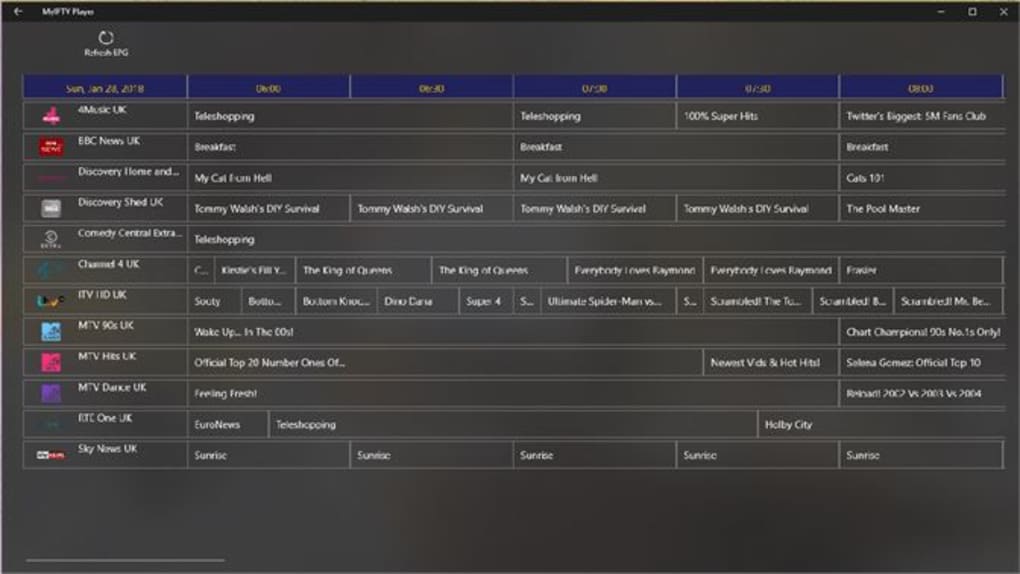
One of its notable features is the built-in Electronic Program Guide (EPG) support. Once a playlist containing EPG data is loaded, MyIPTV Player displays a comprehensive on-screen guide, making it easy to navigate and discover available programs. This eliminates the need to constantly search for specific channels and their scheduled content. The EPG provides a user-friendly interface, displaying program information, including titles, times, and descriptions, all within a familiar TV guide format.
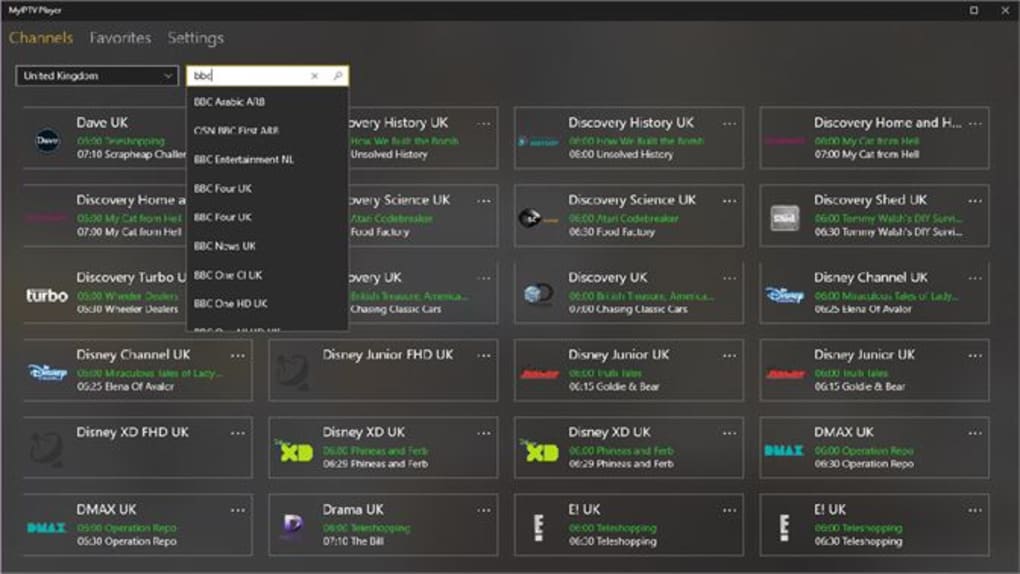
The application also offers convenient features for managing your content. Channels and VOD content are automatically grouped based on data from the playlist, providing efficient search and filtering capabilities. Users can utilize the built-in search function to quickly locate specific channels or programs based on keywords or descriptions. Furthermore, the advanced filtering allows for personalized viewing experiences by sorting content based on various criteria, such as genre, language, or time.
For those wanting to save their favourite shows, MyIPTV Player incorporates a recording function. Users can select their desired channels and recording times to capture programs for later viewing. The recorded content is stored locally, providing convenient access anytime, regardless of the program’s broadcast schedule. The application manages the recording process seamlessly, making it a valuable feature for users who often miss live broadcasts.

Beyond the live streaming and recording capabilities, MyIPTV Player also offers a dedicated download center. This feature enables users to download VOD content for offline viewing. The download history is maintained within the application, giving users a centralized location to access their downloaded videos. This is particularly beneficial for users who frequently travel or have unreliable internet connectivity. The download manager handles multiple downloads efficiently and effectively, ensuring users can easily manage their VOD library.
MyIPTV Player provides flexibility in media playback. Users can choose between using the built-in player or leveraging the VLC media library for playback. While using VLC offers broader compatibility with various media formats, there’s a noted drawback: when VLC is used for VODs, it might cause the color of regular channels to appear green. This is a crucial detail to consider when selecting a media player within the application.
The favorite management function significantly enhances user experience. Users can add frequently watched channels or programs to a favorites list for quick access, eliminating the need to continuously search for their go-to content. This personalization feature significantly streamlines the navigation process, creating a streamlined viewing experience.
Finally, the manual channel addition option allows users to add channels through URLs. This feature offers flexibility, allowing users to include channels not already part of an imported playlist. This adaptability proves useful for accessing content from niche providers or channels not widely available through standard playlists.
Pros and Cons
Pros:
- Comprehensive IPTV and VOD Support: MyIPTV Player flawlessly handles both live IPTV streams and VOD content, offering a unified platform for diverse viewing needs. Its ability to manage both types of content seamlessly is a major advantage.
- Built-in EPG Functionality: The integrated EPG greatly improves the user experience. Finding programs and navigating schedules becomes significantly easier, providing a familiar television-like experience.
- Robust Recording Capabilities: The recording function allows users to capture and save programs, providing flexibility and the ability to rewatch missed broadcasts.
- VOD Download Center: The download center simplifies the management of VOD content, providing a convenient way to watch videos offline.
- Flexible Media Playback: The option to utilize either the integrated player or the VLC media library caters to different user preferences and content compatibility requirements.
- User-Friendly Interface: Despite its numerous features, MyIPTV Player boasts a well-designed and intuitive interface, making navigation straightforward and simple, even for less technically inclined users.
- Favorites Management: The ability to create and manage a favorites list allows users to easily access their frequently watched content.
- Manual Channel Addition: The flexibility to manually add channels via URL expands the range of content accessible through the application.
Cons:
- External Content Source Required: The application itself doesn’t provide any channels. Users must obtain playlists from external sources, which may require some research and setup.
- Potential for Slow Loading Times: Initial loading of extensive playlists can take time, impacting the immediate usability of the app.
- VLC Compatibility Issue: The noted green-screen issue when using VLC for VOD playback is a significant limitation, especially for users who prefer VLC’s enhanced functionality.
- M3U Format Only: The application’s limitation to M3U formatted playlists might exclude users with content in other formats.
User Experience and Performance
MyIPTV Player’s user experience is largely positive. The interface is straightforward and well-organized, making it easy to navigate. The EPG enhances usability considerably, while the features like recording and favorites management add value for regular users. However, the initial loading of large playlists can be slow, and the VLC compatibility issue is a noticeable drawback.
Performance is generally smooth once the initial playlist is loaded. Streaming quality depends entirely on the source provider’s bandwidth and the user’s internet connection. The application itself handles streaming efficiently, with minimal buffering issues under ideal network conditions.
Alternatives and Comparisons
Several alternative IPTV players exist, each with its strengths and weaknesses. Some offer more advanced features or a wider range of supported formats, while others may boast a more polished user interface. However, MyIPTV Player stands out with its straightforward design and effective handling of both live streams and VOD content. The combination of a user-friendly interface and essential features, such as EPG and recording, makes it a competitive option in the market.
Conclusion
MyIPTV Player is a solid free IPTV and VOD player for Windows. While it doesn’t include channels, its feature set, including a built-in EPG, recording function, VOD download center, and flexible media playback options, makes it a viable choice for users comfortable sourcing their own content. The straightforward interface and ease of use are notable strengths. However, potential users should be aware of the limitations, such as the initial loading times and the VLC compatibility issue. Overall, if you’re looking for a free, functional, and easy-to-use IPTV player for Windows, MyIPTV Player is a strong contender worth considering.
File Information
- License: “Free”
- Version: “4.2.5.0”
- Latest update: “May 23, 2023”
- Platform: “Windows”
- OS: “Windows 11”
- Language: “English”
- Downloads: “47.9K”
- Size: “55.56 MB”


