
NeonDS was a free Nintendo DS emulator for Windows, offering users the ability to play DS games on their PCs. Released in 2011 and updated as recently as February 8, 2017, it enjoyed a period of popularity, achieving over 175,000 downloads. While no longer actively developed or supported, its legacy offers a valuable glimpse into the early days of DS emulation on the Windows platform. This article examines NeonDS, exploring its features, limitations, and its place within the broader history of Nintendo DS emulation software.
NeonDS: Functionality and Features
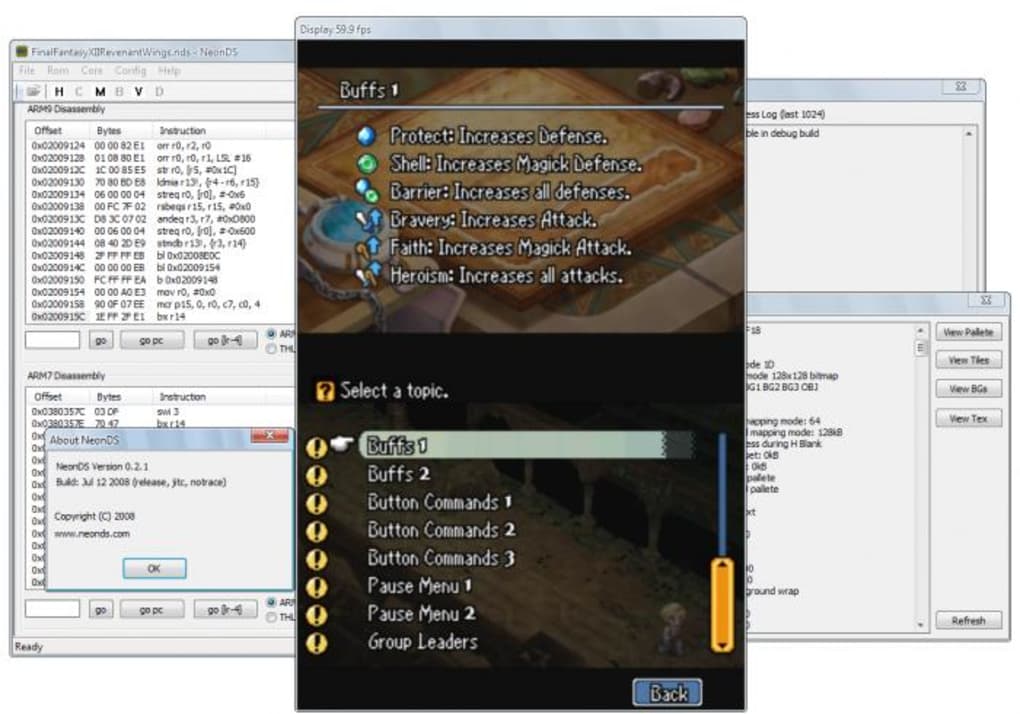
NeonDS, at its core, aimed to provide a functional, albeit rudimentary, means of playing Nintendo DS ROMs on Windows. Its primary function was to emulate the hardware of the Nintendo DS, allowing users to load and run game files. The emulator’s user interface was notably simple, reflecting its relatively early stage of development. While it lacked many of the advanced features found in more modern emulators, it offered a basic level of compatibility with a range of Nintendo DS titles.
The emulator’s core functionality centered around loading ROM files, configuring basic settings like screen resolution and sound output, and then launching the game. Users could typically adjust the emulation speed, allowing for fine-tuning to address performance issues or lag depending on their computer’s capabilities. While it supported saving and loading game states, the user experience was less refined compared to later emulators.
The absence of sophisticated features like advanced shader support, cheat codes integration, or multi-core CPU optimization, limited NeonDS’s performance and graphical fidelity. The graphics often appeared less polished than the native DS experience, and framerate issues were common, particularly with more demanding games. While it could run many games, the performance wasn’t consistently reliable across different titles and hardware setups.
Limitations and Alternatives
NeonDS’s limitations stemmed from its relatively simple architecture and limited development resources. Compared to contemporary and subsequent emulators, its capabilities were significantly restricted. Advanced features, such as enhanced graphical filters, precise controller mapping customization, and compatibility with a wider range of DS titles were largely absent. The emulator’s performance also lagged behind more sophisticated options, often resulting in slowdowns and graphical glitches even on fairly powerful PC systems.
Several alternative emulators offered a superior user experience and more robust functionality. DeSmuME, for instance, quickly emerged as a prominent competitor. DeSmuME showcased superior compatibility, enhanced speed, and a more polished user interface. Other emulators like iDeaS and WinDS Pro, also offered advantages in terms of features and performance. These alternatives provided stronger support for a wider range of games, smoother gameplay, and more refined control options. The competitive landscape quickly rendered NeonDS less attractive to users seeking a top-tier emulation experience.
The Significance of NeonDS in the History of DS Emulation
Despite its limitations, NeonDS played a significant role in the evolution of Nintendo DS emulation on Windows. Its existence in 2011 contributed to the growth of the emulator community, providing a free and accessible entry point for many users. The emulator’s relatively simple design may have attracted users unfamiliar with more complex emulators, effectively lowering the barrier to entry for those interested in playing DS games on PC. Its early presence helped to pave the way for more advanced emulators, demonstrating the potential and encouraging further development in this niche area of software development. The experience gained from developing and deploying NeonDS, no matter how limited the outcome, likely contributed to the advancements seen in subsequent emulators.
NeonDS also served as a free and accessible alternative in a time when more robust emulators might have required payment or had more complicated installation processes. The straightforward approach, while lacking in advanced features, offered convenience and easy accessibility, which was a significant appeal for many users. The fact that it was free of charge undoubtedly expanded its reach and cemented its position in the early landscape of DS emulation.
Technical Aspects and Legacy
NeonDS’s technical underpinnings were based on the common principles of emulation: interpreting instructions from the Nintendo DS’s CPU and GPU, managing memory allocation, and rendering the visual output. However, its architecture was comparatively less sophisticated than its competitors, using less optimized algorithms for tasks such as CPU instruction decoding and graphical rendering. This led to the performance limitations and compatibility issues that hampered the user experience.
The legacy of NeonDS is not one of lasting dominance or technical innovation within the field of emulation. Rather, its significance lies in its role as an early player in a quickly evolving technological landscape. It provided a valuable stepping stone for users and developers alike, demonstrating the potential for Nintendo DS emulation on the PC platform. It broadened awareness and contributed to the larger ecosystem of emulation software, ultimately leading to the more sophisticated and capable emulators we see today. NeonDS, though ultimately superseded, serves as a historical marker in the development of Nintendo DS emulation technology.
Conclusion: A Simple Emulator’s Impact
NeonDS, while a relatively simple and ultimately superseded emulator, holds a small but significant place in the history of Nintendo DS emulation. Its early release, free availability, and accessibility served as a gateway for many users to explore the possibilities of playing DS games on their PCs. Though it lacked the advanced features and performance of more sophisticated alternatives, its existence contributed to the overall growth and advancement of DS emulation technology. It’s a reminder that even relatively simple projects can leave a mark on the larger technological landscape, paving the way for future advancements and providing valuable learning experiences for developers. The relative ease of accessing and using NeonDS likely introduced numerous individuals to the exciting world of emulation, and from there to the more sophisticated emulators that followed. In that sense, its contribution extends beyond its own technical capabilities.
File Information
- License: “Free”
- Version: “0.2.1”
- Latest update: “February 8, 2017”
- Platform: “Windows”
- OS: “Windows XP”
- Language: “English”
- Downloads: “55.8K”
- Size: “331.53 KB”


